🛒 Best Price Today on Amazon
Prime members get fast, free shipping on everything above, plus member-only deals. New members get a 30-day free trial — cancel anytime.
A stand for the PS5 Slim or PS5 Pro is really a decision about fit and daily routine, not about chasing lower temperatures. Neither console ships with a vertical stand in the box, so the base you buy has to match your exact console revision, hold the machine steady, and charge the controllers and handhelds you own. This review looks at the FYOUNG All in One Cooling Stand and Charger Station, model PSP24, and sets it against two alternatives from G-STORY and Auarte.
The FYOUNG PSP24 fits owners who keep a PlayStation Portal next to the console, because its dock charges the Portal alongside DualSense and DualSense Edge controllers. The G-STORY station suits players who want one vertical base that also accepts the original 2020 console, while the Auarte lays the Slim or Pro flat with an automatic temperature-sensing fan. Every product here was chosen from the names and specifications on its Amazon product page, and the Specs lists below repeat only what those pages state.
Quick Picks
As an Amazon Associate we earn from qualifying purchases.
| Product | Best for | Key spec from title |
|---|---|---|
| FYOUNG All in One Cooling Stand & Charger Station (PSP24) | PS5 Slim and Pro owners who also charge a PlayStation Portal | Charges Portal, DualSense and DualSense Edge |
| G-STORY Stand & Cooling Station for PS5/Pro/Slim | Owners who may move from a launch PS5 to a Slim or Pro | Dual controller charger with RGB lighting |
| Auarte RGB Horizontal Cooling Station | Slim and Pro owners who keep the console horizontal | 14 RGB light modes with automatic fan |
How to Choose
Match the Stand to Your Exact Console Version
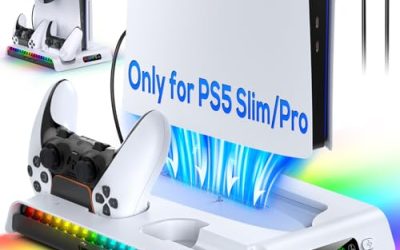
PS5 is three different machines now: the 2020 launch console, the 2023 Slim, and the 2024 Pro, each in Disc and Digital editions. A stand shaped for one revision may wobble under another, so start with the fit list on the product page and confirm your model group is named. Some stations narrow the fit on purpose: the Auarte below is built for the Slim and Pro only and does not accept the launch console at all. Others, like the FYOUNG PSP24, take all three revisions with the fixing screws included in the box.
Fan Layout, Speeds and Noise
Every station here moves air around the vents of the console, which is where the PS5 exhausts its heat. Makers describe that airflow in their own terms, and no stand replaces the cooling system inside the console itself. What you can compare on the page is control: the FYOUNG uses a dedicated button to step through three fan speeds, and the Auarte pairs three manual speeds with an automatic mode that adjusts airflow by temperature sensing. Higher speeds move more air and make more noise, so a low setting matters for quiet rooms and late sessions.
What the Dock Charges, and How Fast
Charging is where these stations genuinely differ. The FYOUNG PSP24 is the only pick here whose dock also takes the PlayStation Portal, and it charges DualSense and DualSense Edge controllers with LED status indicators and built-in over-current and over-voltage protection. The Auarte also accepts the DualSense Edge and refills two controllers in about 3.5 hours behind a protection chip, while the G-STORY dock covers the standard DualSense and takes over three hours for a full charge. Check the controller list on the page before assuming an Edge pad will fit.
Power Supply and Desk Footprint
A powered stand draws its current from the console or from a wall adapter, and that choice affects rest mode. If the station runs from a PS5 USB port, the console has to keep supplying power to USB ports while it rests, a setting you switch on in the power saving menu. Check the listing for how each station is powered before you plan cable runs. Footprint matters too: the FYOUNG and the G-STORY stand the console vertically, while the Auarte lays it flat, and a headset holder decides whether the station replaces clutter or adds to it.
The 3 Best Options
FYOUNG All in One Cooling Stand & Charger Station (PSP24)

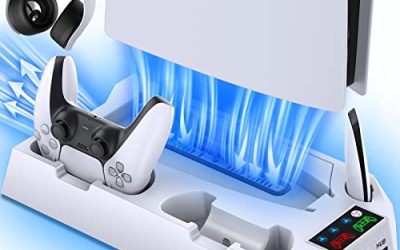
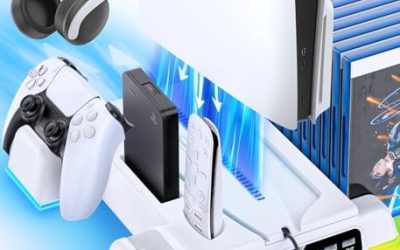
The FYOUNG PSP24 is the natural center of a Slim or Pro setup that includes a PlayStation Portal. One vertical base holds the console, charges two controllers, and docks the Portal, so three devices live in one footprint beside the TV. FYOUNG fits all three PS5 revisions, Disc and Digital, and secures the console with fixing screws from the box. The turbo fan runs at three speeds from a dedicated button, and the five monochrome LED modes let the base match the rest of a lit desk. A black finish is sold under a separate listing for darker setups. It is the most complete single station in this comparison.
Specs
- Brand: FYOUNG; model PSP24
- Fits: PS5, PS5 Slim and PS5 Pro, Disc and Digital editions, vertical
- Fan: turbo fan with 3 speed levels, dedicated control button
- Charging: DualSense and DualSense Edge controllers, plus a PlayStation Portal dock
- Protection: built-in over-current and over-voltage protection, LED status indicators
- Lighting: 5 monochrome LED modes (Blue, Red, Green, Purple, Gradient)
- Holders: headset holder and remote holder
- Material: ABS
- In the box: cooling stand, fixing screws, connection cable
- Color: White
Best for: Slim and Pro owners who also charge a Portal and two controllers on one base.
Watch out for: The Portal has to come out of its protective case before it will dock, per the listing, and this white finish will not match an all-black setup.
ASIN: B0DZWQV31F
G-STORY Stand & Cooling Station for PS5/Pro/Slim

The G-STORY station is the broad-fit vertical option in this comparison: its Amazon title names the original PS5, the Slim and the Pro, so one base can follow a household from a launch console to a newer machine. The dock charges two controllers at once, and RGB lighting runs around the station for players who light their desk. Charging is the slow lane here, with a full charge taking over three hours, and the fan offers fewer speed settings than the three-speed FYOUNG provides. It is the simpler, tidier choice for a mixed-generation PlayStation shelf.
Specs
- Brand: G-STORY
- Fits: PS5, PS5 Slim and PS5 Pro consoles, per the Amazon title
- Charging: dual controller charging dock
- Charge time: a full controller charge takes over 3 hours
- Fan: cooling fan with adjustable speed settings
- Lighting: RGB lighting
Best for: Players who want one vertical station that fits every PS5 revision, launch model included.
Watch out for: Charging is the slowest here at over three hours, and the listing never singles out the DualSense Edge, so Edge owners should confirm fit on the page before ordering.
ASIN: B0F3X97SRL
Auarte RGB Horizontal Cooling Station

The Auarte is the layout change in this comparison: instead of another tower base, it lays the PS5 Slim or Pro flat, which suits low media shelves and homes where a vertical console is easy to knock. Its fan pairs three manual speeds with an automatic mode that senses temperature and adjusts airflow on its own. The dock charges two controllers, DualSense or DualSense Edge, in about 3.5 hours, and 14 RGB light modes, a headset holder and an extra USB 3.0 port round out the station. It fits the Slim and Pro only, in Disc and Digital editions.
Specs
- Brand: Auarte; model: PS5 Slim Pro horizontal cooling station
- Fits: PS5 Slim and PS5 Pro, Disc and Digital editions, horizontal only; not the 2020 console
- Fan: automatic temperature-sensing mode plus 3 manual speeds (slow, middle, fast)
- Charging: two DualSense or DualSense Edge controllers in about 3.5 hours, overcharge protection chip
- Lighting: 14 RGB light modes (9 monochrome, 1 rainbow, 4 dynamic)
- Extras: headset holder, USB 3.0 port for data transfer and charging
Best for: Slim and Pro owners who keep the console horizontal in a media unit.
Watch out for: It does not fit the original 2020 PS5 at all, and the horizontal layout needs more shelf width than a tower base.
ASIN: B0CPJ7C7XL
Which One Fits Your Situation
You Own a PS5 Pro and a PlayStation Portal
Choose the FYOUNG PSP24. It is the only station here that docks the Portal next to the console, and it still charges two controllers, standard or Edge, on the same base. The fixing screws keep the Pro steady in its tower position, and the three fan speeds let you pick a quieter setting for evening play. Just remember the Portal charges without its protective case.
You Keep Your Console Horizontal in a Media Unit
Choose the Auarte. Its horizontal base slides into a low TV shelf where a tower stand would never fit, and the low profile is harder for pets or kids to tip than an upright console. The automatic fan mode means you never adjust speeds by hand, and the dock still charges two controllers, Edge included, while the console lies flat.
You Still Play on the Original 2020 PS5
Choose the G-STORY or the FYOUNG. The Auarte is Slim and Pro only, so it is off the table for a launch console. The G-STORY title names the original PS5 alongside the Slim and Pro, which makes it the alternative that follows you through an upgrade, while the FYOUNG PSP24 also lists the 2020 machine and adds Portal charging on top.
You Want the Simplest Station With Nothing to Configure
Choose the G-STORY. It keeps the station formula basic: a vertical base, a cooling fan, a dual controller dock and RGB lighting, with no panels to swap and no automatic modes to learn. The tradeoffs are charging speed, since a full charge takes over three hours, and a shorter feature list than the FYOUNG offers.
Common Mistakes
- Buying for the wrong console revision: Slim and Pro stands are not interchangeable with every launch-model base, so match the model group on the listing to the label on your console.
- Assuming every dock charges the DualSense Edge: the G-STORY listing never singles the Edge out, and the Edge has a different shape that not every cradle accepts.
- Leaving rest-mode USB power off: a console-powered station goes dark when the PS5 rests unless you set USB ports to stay powered in the power saving menu.
- Blocking the base vents: these fans draw air from the bottom of the console, so a stand pushed into a closed cabinet or deep carpet works against its own design.
- Docking a Portal in its case: the FYOUNG listing states the protective case must come off before the Portal will charge.
Frequently Asked Questions
Does the FYOUNG PSP24 fit every PS5 model?
The listing names the original PS5, the PS5 Slim and the PS5 Pro, in both Disc and Digital editions, and the console fixes to the base with the screws included in the box. It stands every model vertically. If your console is a Slim or Pro, it replaces the small support feet those models ship with for horizontal use.
Can these stands charge a DualSense Edge controller?
Two of the three do. The FYOUNG PSP24 lists the DualSense Edge among the controllers its dock charges, alongside the standard DualSense and the PlayStation Portal, and the Auarte listing also names DualSense Edge charging. The G-STORY title promises a dual controller charger without singling out the Edge, so Edge owners should confirm on its product page.
Will a cooling stand stop my PS5 from overheating?
No stand can promise that, and none of the listings here should be read that way. These bases add a fan under the console that moves air around the base vents, described by each maker in its own terms. The cooling system inside the PS5 does the real work, and clear space around the console still matters more than any accessory fan.
Do I need a wall adapter, or does the console power the stand?
It depends on the station and the listing. Console-powered stations draw from a PS5 USB port and generally need the PS5 setting that keeps USB ports powered during rest mode, while others ship with or accept an external supply. Check the power section of the product page, and budget for a spare adapter if your setup sits far from the console’s rear ports.