🛒 Best Price Today on Amazon
Prime members get fast, free shipping on everything above, plus member-only deals. New members get a 30-day free trial — cancel anytime.
A PS5 cooling station is really three purchases in one box: a vertical stand, a fan, and the charger your controllers will live on. The Kytok KT-P5329 is the station under review here, and the honest question is not whether its fan moves air, but whether its mix of fit, charging speed, RGB lighting and storage matches the console version on your shelf. Buy the wrong station and the dock will not seat your Slim, the fan will be louder than your TV, or the chargers will be slower than a cable.
This review is for PS5 owners who keep the console vertical and want one base to cool, charge and store the everyday gear. It compares the Kytok against three alternatives from Rysker, Tokluck and KIWIHOME, including one station built only for the original 2020 console. Every product below was chosen from the names and specifications on its Amazon product page, and the specs quoted are the makers’ own figures, not measurements.
Quick Picks
As an Amazon Associate we earn from qualifying purchases.
| Product | Best for | Key spec from title |
|---|---|---|
| Kytok PS5 Stand and Cooling Station with AC Adapter (KT-P5329) | One powered hub that fits any PS5 version | 3-level turbo fan with dual charging in about 2 hours |
| Rysker PS5/Slim/Pro Stand and Cooling Station (P5328X-PRO) | Slim and Pro owners who want an auto fan | 3-level AUTO adjustable fan with RGB ambient lighting |
| Tokluck PS5/Slim/Pro Cooling Station (TO-P5328X-PRO) | Set-and-forget temperature-driven cooling | Auto turbofan with 9 RGB light modes |
| KIWIHOME Cooling Station for PS5 (PB01) | Original 2020 PS5 owners who like magnetic dongles | 2 suction fans with 8 RGB modes |
How to Choose
Match the Stand to Your Console Version
The PS5 family now spans three shell designs, and a station molded for one does not automatically seat the others. The original 2020 console is the tallest and widest, the Slim is shorter with detachable covers, and the Pro is taller again. Kytok, Rysker and Tokluck all list fit for the original, Slim and Pro in disc and digital form, usually with adapter pieces or a locking screw in the box. The KIWIHOME station is the exception: it fits only the 2020 disc and digital consoles. Check the listing title against your exact model before anything else, because a stand that rocks or pinches the covers is worse than no stand.
Fan Speeds, Auto Modes and Noise
Every station here uses a three-level fan, but the way those levels are chosen differs. The Kytok pairs manual levels with an automatic mode, while the Tokluck reads a built-in temperature probe and steps its fan up or down as the console warms and cools. Rysker offers the same manual-plus-auto split. Higher speeds move more air and make more noise, so the useful question is how the middle setting sounds next to your TV speakers, not how strong the top setting feels. Touch controls on the base are easier to reach than a dial hidden at the back once the console is docked.
Charging Contacts and Charge Times
Charging hardware decides whether a station feels effortless or fiddly. Drop-in contacts, used by Kytok, Rysker and Tokluck, let you set the controller down and walk away; the Tokluck adds a movable USB port that adjusts for the DualSense Edge. KIWIHOME instead uses small Type-C magnetic dongles that stay in the controller and snap onto the dock. Maker-stated full-charge times run from about 2 hours for the Kytok, to 2.5 hours for the Tokluck, to about 3 hours for the KIWIHOME. Indicator lights matter too: a dock that shows red while charging and green when full saves you from picking up a half-charged pad.
Ports, Storage and Desk Footprint
The extras separate a plain stand from a hub. All four stations add three USB ports for a headset receiver, a wired pad or a phone cable, though the KIWIHOME ports are USB 2.0 speed. Game storage runs from 10 trays on the KIWIHOME to 14 card slots on the Kytok, which also adds a headset stand, a media remote slot and a hard drive slot. Measure the shelf before ordering: a fully loaded station is wider than the console alone, and adapter-powered models like the Kytok also need a free wall outlet within cable reach of the setup.
The 4 Best Options
Kytok PS5 Stand and Cooling Station with AC Adapter (KT-P5329)

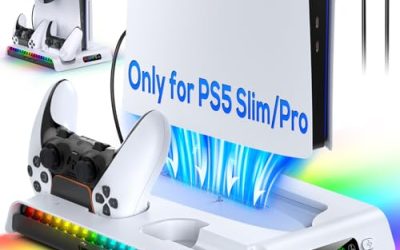
The Kytok is the most complete hub here and the main pick for a mixed household. One base fits the original PS5, the Slim and the Pro in disc and digital form, and the included 5V/3A AC adapter means the fan and chargers run from the wall instead of borrowing power from the console. Its turbo fan offers three levels plus an automatic mode, the dual dock is rated by the maker at about 2 hours for a full charge, and the RGB lighting doubles as a charge indicator. Storage is the deepest here: 14 game slots plus room for a headset, the media remote and an external drive.
Specs
- Compatibility: PS5, PS5 Slim and PS5 Pro, disc and digital editions
- Fan: turbo fan with 3 speed levels and an automatic mode, touch switch
- Charging: dual DualSense and DualSense Edge dock, about 2 hours per maker
- Lighting: RGB LED that also shows charging status, red charging and green full
- Ports: 3 USB charging ports
- Storage: 14 game card slots, headset stand, media remote slot, hard drive slot
- Power: 5V/3A AC adapter and Type-C cable included
- Model: KT-P5329
Best for: PS5 owners who want one powered station that cools, charges and stores everything, whichever console version they own.
Watch out for: it needs a free wall outlet near the setup for the adapter, and listings come in more than one color, so confirm the variant before ordering.
ASIN: B0C36DSRGK
Rysker PS5/Slim/Pro Stand and Cooling Station (P5328X-PRO)

The Rysker station is aimed squarely at the newer consoles, with the original, Slim and Pro all listed as supported in disc and digital form. Its fan runs at three speeds and adds an AUTO mode that adjusts on its own, controlled from a touch button on the base, and the RGB ambient lighting is a headline feature rather than a small indicator strip. A bolt locking system secures the console to the base, which suits setups that get bumped by kids or pets. Three USB ports handle extra accessories. It is the closest like-for-like rival to the Kytok for Slim and Pro owners who prefer an auto-first fan.
Specs
- Compatibility: PS5, PS5 Slim and PS5 Pro, disc and digital editions
- Fan: 3 speed levels plus AUTO adjustable mode, touch button control
- Charging: dual controller charging dock with LED indicators
- Lighting: RGB ambient lighting
- Ports: 3 USB ports
- Security: bolt locking system for the console
- Model: P5328X-PRO
Best for: Slim and Pro owners who want automatic fan behavior and stronger ambient RGB than the Kytok’s indicator lighting.
Watch out for: the model number appears as both P5328X-PRO and VG-P5328 across listings, so match the listing title to your console version before buying.
ASIN: B0CLV1YDYS
Tokluck PS5/Slim/Pro Cooling Station (TO-P5328X-PRO)

The Tokluck takes the most automated approach to cooling in this group. A built-in temperature probe reads the console and moves the fan between its three levels on its own, stepping up as the console passes maker-set temperature thresholds and easing back as it cools. The charging dock uses a movable USB port that shifts up or down, which is how it seats both the standard DualSense and the DualSense Edge, with a maker-stated 2.5-hour full charge and LED indicators on the base. Nine RGB lighting effects with a memory function round out a station designed to be set up once and then ignored.
Specs
- Compatibility: PS5, PS5 Slim and PS5 Pro, disc and digital editions
- Fan: auto turbofan with 3 levels, temperature probe adjusts speed automatically
- Charging: dual dock for DualSense and DualSense Edge, 2.5 hours per maker, movable USB port
- Lighting: 9 RGB lighting effects with memory function
- Indicators: LED charging and fan speed indicators
- Ports: 3 USB ports
- Model: TO-P5328X-PRO
Best for: players who want the fan to manage itself and who charge a DualSense Edge alongside a standard controller.
Watch out for: the automatic thresholds are fixed by the maker, and the 2.5-hour stated charge is slower than the Kytok’s, so impatient players should compare first.
ASIN: B0D4DHD5D7
KIWIHOME Cooling Station for PS5 (PB01)

The KIWIHOME is the specialist of the group: it is built only for the original 2020 PS5, and in return it offers a few touches the newer-console stations skip. Two suction fans with three speeds pull air through the console, and the controllers charge through magnetic Type-C dongles that stay plugged into the pads, so docking is a snap-on action with no hunting for contacts. Eight RGB modes, 10 retractable game trays and three USB 2.0 ports complete the package. The trade-off is absolute: this station does not fit the Slim or the Pro at all, so it only makes sense if the 2020 console is staying.
Specs
- Compatibility: original 2020 PS5 disc and digital editions only, not Slim or Pro
- Fans: 2 built-in suction fans with 3 adjustable speeds
- Charging: dual dock with 2 Type-C magnetic dongles, about 3 hours per maker
- Lighting: 8 RGB modes, 7 breathing colors plus a multicolor cycle
- Storage: 10 game trays
- Ports: 3 USB 2.0 ports
- Model: PB01
Best for: original 2020 PS5 owners who like the magnetic dongle system and keep a shelf of physical games.
Watch out for: it does not fit the PS5 Slim or PS5 Pro in any form, so do not buy it if an upgrade is planned.
ASIN: B09XTWFR92
Which One Fits Your Situation
You Own a PS5 Slim or PS5 Pro
Start with the Kytok, Rysker or Tokluck, since all three list the Slim and Pro by name, and cross the KIWIHOME off entirely. Between the three, the Kytok brings the most storage and its own wall adapter, the Tokluck brings the most automatic fan, and the Rysker brings the strongest ambient lighting. Pick based on which of those three things your setup lacks today.
You Still Play on the Original 2020 PS5
All four stations fit your console, so the choice opens up. The KIWIHOME becomes a real option here, with its magnetic dongles and 10 game trays aimed at exactly your machine. The Kytok still makes sense if there is any chance of a Slim or Pro arriving later, because it is the one station in this group you would not have to replace on upgrade day.
Two Controllers Need Charging Every Night
Look at the stated charge times and the dock design first. The Kytok’s maker-stated 2 hours is the fastest here, and its lights tell you at a glance which pad is ready. The Tokluck is the safer pick if one of those controllers is a DualSense Edge, thanks to its adjustable port. The KIWIHOME’s dongles are convenient but its stated 3 hours is the slowest of the group.
The Console Lives in a Shared Living Room
Noise and light discipline matter more than raw airflow here. The automatic modes on the Tokluck and Rysker keep the fan low while the console is cool, which suits films and quiet evening play. Check how each station handles its lighting at standby, and favor the Kytok if a headset stand and remote slot will clear clutter from the TV bench.
Common Mistakes
- Buying a station shaped for the wrong console generation, especially an original-only model for a Slim or Pro.
- Assuming every dock charges the DualSense Edge, when only some port designs adjust to fit it.
- Judging a fan by its top speed instead of the noise it makes at the middle setting you will actually use.
- Ignoring the power source: adapter-powered stations charge with the console asleep, while console-powered ones depend on USB rest-mode settings.
- Counting game slots and ports you will never use while forgetting to measure the shelf the loaded station has to fit.
Frequently Asked Questions
Does the Kytok KT-P5329 fit the PS5 Slim and PS5 Pro?
Yes, according to the maker. The KT-P5329 listing covers the original PS5, the PS5 Slim and the PS5 Pro in both disc and digital editions, using the adapter pieces and screw included in the box. Because the three shells differ in height and cover shape, follow the listing’s fit notes for your exact model and confirm the variant on the product page before ordering.
How long does the Kytok station take to charge two controllers?
Kytok states about 2 hours to fully charge DualSense controllers in the dual dock, and the same dock also accepts the DualSense Edge. The RGB indicator shows red while a controller is charging and green when it is full or on standby. Those figures are the maker’s own; a nearly empty battery and a top-up charge will naturally finish at different times.
Can the RGB lighting on these stations be turned off or changed?
It depends on the model. The Rysker uses a touch button to switch its ambient lighting effects, the Tokluck offers 9 RGB effects with a memory function, and the KIWIHOME cycles through 8 modes. On the Kytok the lighting also works as the charging indicator, so it carries information as well as decoration. Check the product page for your chosen model’s exact light controls.
Do these stations charge controllers while the PS5 is in rest mode?
Adapter-powered stations can, because they draw from the wall rather than the console. The Kytok includes a 5V/3A AC adapter for exactly this reason. Stations that draw power from a console USB port depend on the PS5’s rest-mode USB power setting, which you may need to switch on. The product page states how each model is powered, so check before assuming overnight charging will work.