🛒 Best Price Today on Amazon
Prime members get fast, free shipping on everything above, plus member-only deals. New members get a 30-day free trial — cancel anytime.
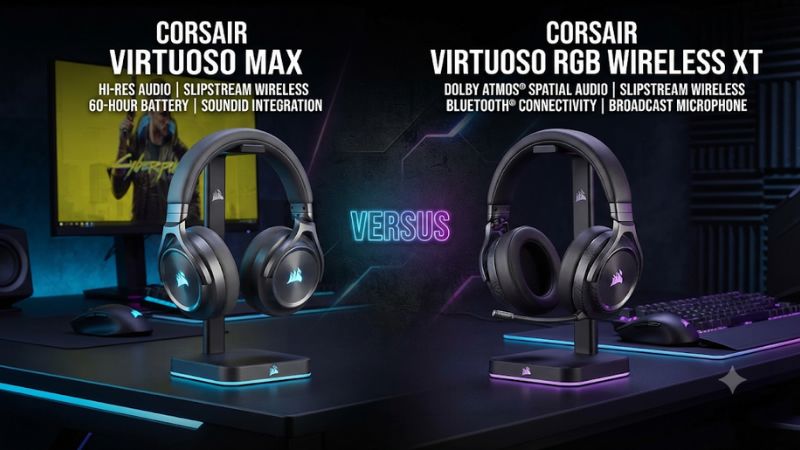
In Corsair Virtuoso Max vs Corsair Virtuoso RGB Wireless XT, pick the Max for active noise cancellation and longer wireless runtime. Choose the XT if you need 3.5 mm analog audio or USB audio on PC. Both can mix game audio from the receiver with Bluetooth, so your wired devices and charging routine should decide.
The differences that should decide your purchase
The Virtuoso Max suits a wireless setup where you value battery life, active noise cancellation, and separate controls for receiver and Bluetooth volume. The Virtuoso RGB Wireless XT suits a setup that crosses more device types. You can use its receiver for PC or PS5, run USB audio from a PC, or connect its analog cable to a compatible controller or source.
The comparison here uses the standard PC and PlayStation Virtuoso Max. The separately named Virtuoso Max for Xbox adds Xbox wireless support through its own receiver. If you play on Xbox as well as PS5, check which Max version is selected before making a decision.
| Feature | Corsair Virtuoso Max | Corsair Virtuoso RGB Wireless XT |
|---|---|---|
| Main wireless connection | 2.4 GHz USB receiver | 2.4 GHz Slipstream USB receiver |
| Simultaneous receiver and Bluetooth audio | Yes | Yes |
| 3.5 mm analog audio | No 3.5 mm audio input | Supported |
| USB cable audio | Use the receiver for dependable gaming playback | Supported on PC, up to 24-bit/96 kHz |
| Noise control | ANC and transparency mode | Passive isolation |
| Battery rating | Up to 60 hours with RGB off, or up to 30 with RGB on, per Corsair | Up to 15 hours, per Corsair |
| Microphone | Detachable omnidirectional boom | Detachable 9.5 mm omnidirectional boom |
| PS5 | USB receiver | USB receiver |
Choose by the connection you actually use
List the devices you use in a normal week and how the headset would connect to each one. A player who always uses a PC and phone can get the intended dual-wireless setup from either headset. Once that connection requirement is covered, the Max’s longer advertised runtime and ANC become the main differences.
A player who uses a gaming laptop, a DualSense, and an older handheld or other source with a 3.5 mm jack gets more out of the XT’s wired routes. The analog cable gives you a way to use the same headset without moving a receiver between devices. USB audio on a compatible PC gives you a second option if the wireless path is crowded or unavailable.
If the two models are close in price, the right choice can still be the XT. A single analog use case can outweigh the Max’s larger battery if it prevents you from buying or carrying a second headset. If you can account for every device with the Max’s receiver and Bluetooth, compare comfort and battery with fewer unknowns.
Treat wired listening and charging as separate capabilities
The XT has documented audio over USB on PC and through its analog connection. If you rely on a cable to carry sound, that is the stronger choice. For example, you can plug into a laptop over USB to listen to a compatible recording or use the analog cable with a controller that supports a headset jack.
Corsair’s Virtuoso Max storefront copy is inconsistent about USB audio. Its compatibility table and setup manual identify receiver and Bluetooth routes for playback, and independent reviewers found no working wired playback mode. Plan on using the Max’s USB-C cable for charging or supported firmware work and its USB receiver for game audio. A cable plugged into the earcup can supply power while the wireless connection continues to carry sound.
This distinction is worth settling before buying. Ask whether the product can play audio through the cable alone with the receiver disconnected. A statement that it can play while charging answers a different question. The XT is the documented choice when a wired fallback is part of your plan.
Dual wireless, consoles, and control layout
Both headsets can mix game audio and Bluetooth
The XT already supports simultaneous Slipstream and Bluetooth audio. Upgrading to the Max preserves that capability. This matters for owners who already listen to console or PC audio from the receiver while taking a phone call or playing media from a mobile device. Simultaneous playback alone gives them little reason to upgrade.
The Max has separate volume rings for receiver audio and Bluetooth in its default setup. That makes it easy to lower a phone stream or call without changing the level of the game. The XT provides separate Bluetooth controls alongside its main audio controls, using a different physical layout. The useful comparison is whether you can identify the right control by feel while wearing the headset.
A phone call also needs a separate test from media. Check where the phone routes the microphone and whether the party or game still hears you as expected during the call. Simultaneous playback describes two incoming sources. Which application or device receives your voice can depend on the headset’s call behavior and the software you use.
PS5 use is straightforward through either receiver
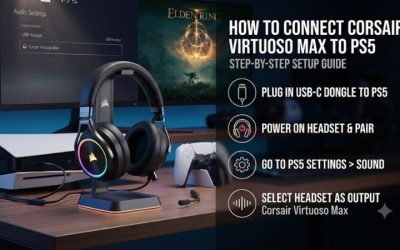
Connect each headset’s matching USB receiver to the PS5 and select that headset under Settings > Sound > Audio Output. Use All Audio if game and party sound should both be in the headphones. Select the headset separately as the microphone input and check its level before using voice chat.
For a standard Max or an XT on PS5, the receiver is the straightforward wireless route. If you buy the Max for Xbox version for a two-console household, Corsair documents a PC mode for PlayStation use. Its receiver should show solid white once connected in that mode. The XT can also work with compatible Xbox controllers through analog. Its Slipstream receiver is intended for the supported wireless platforms.
Dolby branding on the product page can be confusing for console owners. On PS5, compare the console’s 3D Audio for Headphones setting with ordinary headphone output. Under Windows, use the supported headphone spatial audio software you prefer. Choose the headset for its controls and connections on the devices you actually use, then tune spatial audio on each device.
The XT gives a PC owner more ways to recover audio
If the XT’s receiver is already connected to a console and you want to use a desktop without moving it, the documented USB audio mode gives you another route. This is useful for an editing or remote-work setup where you occasionally need to stay wired. The analog path also has a role with a source that accepts a conventional headset connection.
The Max concentrates its PC experience around the USB receiver and its associated iCUE options. For a stationary setup with an open USB port, that is usually simple. If the receiver is lost or left with another system, Bluetooth remains useful on a compatible device, while a replacement receiver or a different headset may be needed to restore the original PC or console experience.
Check a 3.5 mm source before relying on it for chat. Some ports are headphone-only, while a compatible headset jack can support microphone input as well. If you care about voice on a particular controller, dock, or laptop, test both game audio and its input meter. Hearing sound through an analog connection confirms only the output side.
Sound, noise control, and microphone
The Max adds ANC and transparency to a feature the XT lacks
The Max can switch among ANC, transparency, and off. ANC is useful when a fan, air conditioner, or steady environmental sound competes with the game. Transparency is useful when you want to answer someone without lifting a cup. The XT relies on its pads and closed cups for isolation, which may be sufficient in a quiet room.
Try the Max with the same scene before and after activating ANC. Listen during a pause in dialogue to see how much steady sound is reduced. Then check what happens when someone speaks near you or when you type. Those sounds have different patterns, and ANC can help more with one than the other. Expect the fit and seal to affect what you hear.
If your room is quiet, reduce the importance of ANC in the buying decision. You may prefer the XT’s physical connection options or its weight. If the room is shared and you use a fan throughout a session, the Max gives you a useful adjustment you can make without raising playback volume.
Driver materials only tell part of the sound story
The Max uses 50 mm graphene drivers. The XT also uses 50 mm drivers and offers documented 24-bit/96 kHz wired USB audio on a compatible PC. Neither specification establishes which tuning you will prefer. Cup seal, pad condition, EQ, spatial processing, and the game’s mix can matter more than a difference in the driver description or accepted audio format.
Published reviews have praised the Max’s game presentation, including the way it handles detailed scenes. Independent testing describes the XT as a reasonable all-rounder, with fit and tuning contributing to the result. A useful side-by-side comparison would use the same source, matched volume, and a familiar scene. Prefer comparisons against the same content and setup over trying to combine scores from unrelated reviews.
Start with a scene that includes dialogue and environmental sounds, then use a shooter map where you know the expected positions. Test at the volume you would keep for a long session. If spatial effects change your sense of direction, try them separately from EQ. This gives you a better explanation for a preference than attributing it to the driver material alone.
The microphone decision depends on your voice and room
Both headsets use detachable omnidirectional booms. The XT uses a 9.5 mm capsule and has a reputation for good headset-mic performance. Reviews of the Max’s microphone vary. Some praise how clearly it picks up speech, while others hear average tone for a premium gaming headset. The listening conditions and the way voice chat compresses or processes audio can explain part of the variation.
To compare them, record each using the same app and a moderate input level. Read one sentence in a normal speaking voice and make a quick callout. Then type or turn on a nearby fan. Check whether the words remain distinct and whether the microphone clips or lets noise dominate. Position each boom near the corner of your mouth before drawing conclusions.
If you already own an XT and like its microphone, the Max upgrade should earn its cost through battery life, ANC, or controls. A new buyer who wants one headset for narration should evaluate a raw sample and a normal chat recording separately. A mic that works in a party can sound different in a recorded stream.
Comfort and ownership costs
The Max feels substantial and can press on the crown
The Max uses a substantial frame and thick-looking cups. Tom’s Hardware weighed its sample at about 422 grams without the microphone and found it heavier than the XT sample it referenced. Other reviewers have also described pressure or rigidity, although some found the fit easier to live with. Head shape and how the suspension area or band sits across the crown are important to the result.
An XT is also a premium over-ear headset with a substantial build. It can be easier to wear if its pads and band suit your head, but a lower weight alone does not settle comfort. Check whether either cushion touches your ears, whether glasses create an uncomfortable pressure point, and whether you can find a headband position that stays comfortable for an hour.
If both are available to try, match the fit before judging sound. A cup seal can make bass and isolation feel different, especially with thick frames on glasses. Evaluate comfort with your normal eyewear and microphone attached if you spend most of your play time in chat.
The battery difference has clear practical value
Corsair gives the Max up to 60 hours with lighting off and up to 30 hours with RGB enabled in its product overview. It rates the XT for up to 15 hours. These are manufacturer figures under differing or incompletely described conditions. A simple ratio between them would give a false sense of what you will get at the same volume with two sources active.
Look at your charging routine. If the headset goes back to a USB cable every night, the XT’s shorter advertised runtime may barely affect you. If you use the headset for work, a late gaming session, and occasional phone audio, the Max’s larger allowance gives you more flexibility. ANC use, lighting, Bluetooth activity, and volume all influence how much of that allowance you keep.
For a used XT, ask how many hours it lasts after a complete charge in wireless use. For a used Max, check behavior with ANC and Bluetooth as well as through the receiver alone. A well-kept XT can be a better buy than a poorly functioning Max, especially if the XT’s documented wired modes cover the loss of wireless runtime.
Check the included accessories on a used or discounted listing
A complete XT has its wireless receiver, detachable mic, and the cable or cables you need for the intended connection. If the seller offers a headset with one cable, find out whether that is the USB cable or the analog headset cable. The missing item can change the appeal of the deal. Test both playback and the mic on the connection you intend to use.
A Max should have its matching receiver and detachable boom. If it comes with its case, confirm that the receiver and microphone are stored inside rather than assumed to be included. Check that each volume ring makes a predictable change and that the ANC and transparency control cycles through the expected modes.
For either product, test channel balance, comfort, and battery behavior. Try a spoken passage before assessing overall sound. Voices centered in the recording should appear centered in the headset after the pads are seated. If they consistently favor one side, retest with another known source before deciding whether the unit has a fault.
When an XT owner should upgrade
Keep a working XT if you still use its 3.5 mm connection or USB audio and charge it often enough. You already have simultaneous game and phone listening. The Max would add battery life and ANC at the cost of a wired playback route you may already rely on.
Upgrade if battery life regularly cuts sessions short and you spend most of your time on the receiver. Give the Max extra weight in the decision if room noise is also a recurring problem or you want easier independent volume control. Try its fit long enough to learn whether your comfort improves, stays acceptable, or becomes the new limitation.
If you rarely use either phone audio or advanced controls, compare how the headsets fit and what the complete package costs. Expensive features only affect purchase value when they solve something that happens in your setup.
Conclusion
Choose the Corsair Virtuoso Max for frequent wireless use, ANC, transparency mode, and a longer charging interval. Choose the Virtuoso RGB Wireless XT for a documented wired fallback, especially if you use USB audio on a PC, a controller’s analog jack, or several devices with different connection types. Both offer simultaneous receiver and Bluetooth playback. For an XT owner, the Max is most compelling when battery life or background noise is the specific problem you want to fix.