🛒 Best Price Today on Amazon
Prime members get fast, free shipping on everything above, plus member-only deals. New members get a 30-day free trial — cancel anytime.
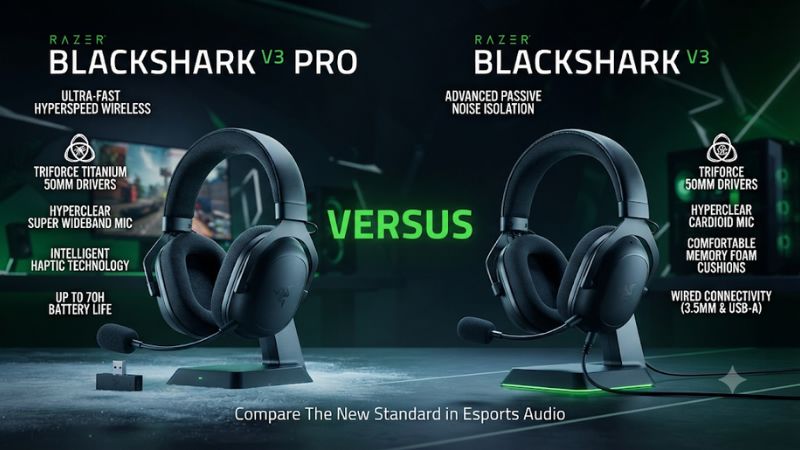
Buy the BlackShark V3 for a lighter headset with simultaneous 2.4 GHz and Bluetooth. Pay for the V3 Pro if you need active noise cancellation or a 3.5 mm option. In Razer BlackShark V3 Pro vs Razer BlackShark V3, those extras are stronger reasons to upgrade than expecting a faster headset or clearer chat in every setup.
Which BlackShark V3 should you buy?
Choose the standard V3 for a quiet room and a lighter fit
The standard V3 is the default for most people choosing between these two. It supports the 2.4 GHz receiver, Bluetooth, and USB audio, so it already covers most common PC and console workflows.
It also mixes receiver and Bluetooth audio in its simultaneous mode. The Pro is only necessary for a smaller set of needs.
Weight is an obvious difference on paper. Razer promotes the standard V3 at approximately 270 grams, while measurements and specifications for the V3 Pro put it around 367 grams. How the headband distributes the difference matters, but there is enough separation to justify trying the standard model if headsets usually feel heavy to you.
The V3 makes particular sense for someone who plays in a quiet room or mostly uses a separate USB microphone. The standard mic is detachable, and the 2.4 GHz connection already serves competitive play. Put the remaining money toward the feature you can identify as missing from that setup.
Choose the V3 Pro if you need ANC, ambient mode, or analog audio
The Pro’s hybrid active noise cancellation is the clearest hardware reason to spend more. Use it when a steady fan, ventilation noise, or ordinary shared-room distractions interfere with quieter games. The headset also offers ambient mode for moments when you want to hear someone nearby without taking it off.
A 3.5 mm connection is another concrete upgrade. It can matter if you have an older playback source or a compatible controller jack where the analog option is useful.
Verify what the specific input supports, including mic use if required. Keep the Pro if the cable solves a recurring problem that USB alone would leave unresolved.
The Pro adds a 12 mm Full Band microphone and a different 50 mm driver design. Those are genuine distinctions.
Give more weight to an audible improvement on your own voice or games than to a larger capsule number or a driver material name. Independent reviews describe different mic results depending on settings and evaluation.
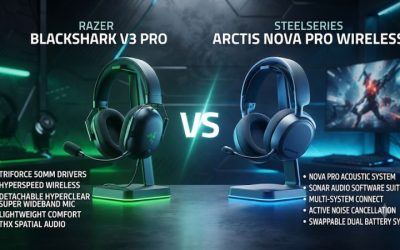
| Buying criterion | Razer BlackShark V3 Pro | Razer BlackShark V3 |
|---|---|---|
| Active noise cancellation | Hybrid ANC with ambient mode | Passive isolation only |
| Approximate headset weight | 367 g | 270 g |
| Wireless use | 2.4 GHz receiver and Bluetooth, with simultaneous mode | 2.4 GHz receiver and Bluetooth, with simultaneous mode |
| Wired connections | USB audio and 3.5 mm | USB audio |
| Boom microphone | Detachable 12 mm Full Band | Detachable 9.9 mm Super Wideband |
| Driver | 50 mm Gen-2 TriForce Bio-Cellulose | 50 mm Gen-2 TriForce Titanium |
| PC battery headline | Up to 70 hours under rated conditions | Up to 70 hours under rated conditions |
| THX on supported Windows PCs | Integrated THX Spatial Audio, including 7.1.4 on supported setups | Integrated THX Spatial Audio, including 7.1.4 on supported setups |
How do ANC, fit, and game audio differ?
ANC helps most when you can name the noise
Try the Pro with ANC off and on while the noise you actually want to reduce is present. A steady background source gives a clearer comparison than an unusually quiet room. Listen at the same comfortable volume and check whether dialogue and quieter cues are easier to follow without raising levels.
ANC cannot create a good pad seal by itself. Glasses, hair, and ear shape can leave gaps at the cushions. Move each cup a little and observe how noise and bass change.
Choose a comfortable position first. Then compare active cancellation with the passive seal the standard V3 gives you.
Ambient mode is a distinct benefit for a shared space. Try it after a game break to see whether it makes a nearby conversation easier.
If your room is consistently quiet, this feature and ANC may rarely matter. The lighter V3 can be a better daily choice even when the Pro has more control options.
Compare comfort over a session instead of at first touch
Put the headset on with the same glasses or accessories you normally use. Check pressure at the temples, top of the head, and behind the ears.
The Pro uses swiveling earcups to help fit and seal. The V3 uses its lighter construction as a day-to-day comfort advantage.
Play a normal session long enough to notice whether the top band develops a pressure point. Stand up, turn toward a second monitor, and check whether the cups move or the mic position changes. These movements matter if you regularly play, talk, and get up during the same session.
If you tolerate the Pro’s weight easily and ANC is useful, the extra mass may be a good trade. If weight belongs at the top of your shopping list, choose the V3 when its fit is comparably good. A deeper feature list will not remove pressure you feel after every match.
Separate tonal preferences from positional accuracy
The two driver designs do not establish which headset you will prefer. Check the actual sound, fit, and output mode with both.
Start in stereo with the same game, reasonable volume matching, and comparable EQ. Determine whether you can follow voice chat and game cues when ordinary effects occur together.
In competitive shooters, decide whether you can quickly locate a known source. Play the same path in a practice map and compare front, rear, and side cues.
If you turn THX on, test the headset with it separately from native game HRTF. One active renderer makes it easier to hear what changed.
Both support game-oriented profiles and integrated THX features on the supported Windows path. Razer specifies Windows 11 version 23H2 or newer for full 7.1.4 support. Game-specific profiles and EQ can be useful on either model, so do not assume the Pro is required to try them.
What changes for microphone and dual-source use?
Compare the two boom microphones using the same conditions
The Pro includes a removable 12 mm Full Band boom, and the V3 includes a removable 9.9 mm Super Wideband boom. The more expensive model is a reasonable option for someone who wants a higher-tier headset mic and can test it during the return period. Capsule size alone cannot account for processing or how close you position it.
Start with a local recording on the 2.4 GHz route. Put the mic near the corner of your mouth, speak at a normal level, and hold the same position for each recording.
If the Pro sounds quieter, match playback levels before comparing clarity. Then record again with the actual voice application you use.
Tom’s Hardware found the V3 Pro mic quality less impressive in its evaluation than the feature list would suggest, while RTINGS reported strong microphone performance. Those conclusions can coexist because settings, room noise, and capture paths differ. Make your own one-sentence check if teammates’ voice clarity is central to the purchase.
Check phone and receiver audio together if you will use both
Both models offer simultaneous 2.4 GHz and Bluetooth audio rather than only letting you alternate between sources. That matters when you play through the receiver and keep a phone connected for another app. Put the headset in the correct mode and establish each source separately before playing both.
Test an incoming call as well as ordinary media. Razer documents that the Pro can give a Bluetooth call microphone priority while in simultaneous mode.
If you need your squad to keep hearing the headset mic while you take a call, verify the actual behavior before relying on it. The ability to hear two sources does not promise the mic is sent to both.
Keep a receiver-only baseline for competitive play. If something changes when Bluetooth connects, repeat the same game sound and mic recording with the phone disconnected. That comparison tells you whether the second connection or its call profile contributes to the issue.
Choose the connection by platform, including the exact edition
Both families have platform-specific listings. Buy the edition that officially supports the console you own, especially for Xbox, and check the receiver instructions. Do not compare a PC listing price against an Xbox listing unless their actual features and platform support meet the same needs.
On a PC, make the headset’s intended endpoint the default output and choose the physically connected microphone for the first test. Then set up the game and communication app independently.
On a console, verify separate playback and voice capture. Hearing the game is not proof that your party will hear the boom.
With the Pro’s analog path, check the exact source’s jack and whether you want playback alone or a complete headset connection. On the V3, USB audio can be the wired fallback when the source supports it. A connection that works at your desk can be unavailable on a different console.
Should you pay extra for battery or latency?
Read the battery rating as an upper limit under stated conditions
Razer promotes up to 70 hours for both models on the PC-oriented product pages. That is useful context for the size of the battery story. The numbers depend on the connection, feature settings, and test conditions, so the Pro is not an automatic upgrade in time between charges.
The Pro’s ANC and Ultra Low Latency mode can affect battery life in daily use. If runtime matters, test a normal week with those features set the way you want.
Record when you start fully charged and when you first see a low battery indication. That will tell you more about your own routine than an isolated manufacturer headline.
Both product pages also advertise a quick charge of about six hours of play from 15 minutes under their published conditions. This is a useful convenience for a desk setup that rarely goes many days without a cable. If you mainly play on console, verify that edition’s runtime rather than applying a PC rating directly.
Compare the same wireless modes before drawing conclusions
Razer’s current US pages say the standard V3 and V3 Pro can reach about 10 ms under advertised low-latency conditions. This is a manufacturer audio figure and belongs to the specified mode. It does not state the full delay from an in-game event to the sound reaching you on every console or PC.
While using the receiver, test a familiar timing cue or menu response at your normal distance. If you enable Ultra Low Latency, confirm that the link stays reliable from the seat where you play.
The Pro manual explains that the mode can reduce both range and battery life. Consistent reception matters more than squeezing down the stated interval in a setup that drops out.
USB is worth testing if you prefer a wired baseline or want to isolate a wireless problem. Confirm the cable carries data and that you chose the headset as the active output. If USB works and only the receiver struggles, improve port placement or test a direct USB connection before changing your audio profiles.
Which everyday setups change the recommendation?
A shared desk gives ANC a clearer job
If you work or play near a steady fan, put the Pro on and find a comfortable seal before enabling ANC. Listen to a quiet scene at your normal level and note how often you reach for the volume.
Then compare with ANC off and with the ordinary V3 if you can. A reduction that helps you avoid daily level changes is worth more than a feature you rarely notice.
Conversation is another kind of test. If another person needs to get your attention, use the Pro’s ambient setting and see whether it makes the interruption easier to handle.
Someone who takes the headset off during every break may need that feature less. The right comparison is against the habits you already have.
In a quiet room, use the same time to check weight and comfort. Both models provide passive isolation from their pads. The one that sits more securely without causing heat or pressure can improve every session, while an ANC feature only helps where its effect is audible.
A console plus phone setup mostly rewards shared features
For console play, both families can support receiver audio while paired with a phone on compatible editions. Check whether you mainly want to hear alerts or an active call.
Before spending extra, confirm which app should carry your voice when phone audio is also active. Test that specific combination rather than assuming both input paths stay active.
Try to buy the version that covers your main console explicitly. Compare the documentation for the receiver and any cable fallback, including which ports and modes carry audio. If you already have a supported receiver workflow and a 3.5 mm jack is irrelevant, the Pro has less to add unless ANC changes the experience.
Test again when the phone disconnects or the console wakes. A device that resumes the correct mix quickly can be more convenient than a small extra tuning feature. Once the standard model passes that test, the choice usually turns on fit and the actual price difference.
A streaming desk can separate the listening and recording decisions
If you talk on stream with a separate mic, you can remove the boom from either headset. That leaves comfort, sound, ANC, and connection options as the main differences. Pick the cheaper standard V3 if the desktop already provides a suitable playback and microphone setup and the room is quiet.
A shared stream room can favor the Pro if ANC helps you follow cues while people or equipment make noise. Check the difference in a real session rather than only running an ANC demo. The microphone still needs its own handling because canceling sound for your ears does not remove that same noise from the broadcast.
For casual voice chat, test the onboard mic with your normal application. A clearer sample at the same level and position can justify some of the price if you rarely use a desktop mic. If both sound equally understandable to your friends, let the other practical differences make the decision.
How can you confirm that a particular model fits your setup?
Use a short side-by-side test for the features you need
- Run the same game scene. Use similar volume and the same camera position. Compare ordinary stereo first so EQ and spatial processing do not obscure the fit difference.
- Record the same voice sample. Keep the boom position and volume close. Listen for speech clarity with the room quiet and while typing or speaking over brief game audio.
- Try ANC in the room where you will use it. Compare on and off during a normal source of background noise. If you would rarely switch it on, give that feature less weight in the price decision.
- Verify your required connection. Test receiver and USB as needed, plus 3.5 mm if that is a reason you want the Pro. Confirm both microphone and playback where you expect them.
- Check comfort after moving. Adjust the band, turn your head, and wear it for a match-length session. Listen for seal changes with glasses or a small shift in cup position.
Pause before making several changes together. Switching ANC, EQ, source, and volume in one comparison makes either headset easy to favor for the wrong reason. Return to your known stereo setting, then introduce the feature you are assessing.
Set up a profile you can reproduce on your own PC. If the first action after every start is to reload an audio device or adjust the blend, consider that in the purchase. A convenient wireless headset should fit a normal start-up routine as well as your listening preferences.
Make the final choice by what you gain this week
Choose the standard V3 if your room is quiet, you prefer low weight, and the receiver plus Bluetooth already cover your inputs. Competitive shooters, voice chat, and a PC spatial option are all available on the cheaper model. A small savings matters when the omitted controls would spend most nights off.
Choose the Pro when you regularly need the isolation controls or want the analog input for a specific device. If the mic is your main reason, hear it under your conditions and compare the costs of a different mic path. That check is particularly useful if you already use a desktop mic for calls or recordings.
For a gift or used purchase, confirm the receiver and detachable boom are included. Verify the platform edition and applicable return terms before assuming a deal on a similar-looking model is equivalent. Buy the configuration that can produce the audio and microphone path you expect from day one.
Check the real price gap after selecting the platform
Compare the V3 and V3 Pro in the same platform edition and with the accessories you will use. A discounted PC model does not help if you need an Xbox receiver. With both compatible, ask whether the price difference buys noise control or wired connectivity you would use in a normal week.
A close sale price can make the Pro worthwhile if you tolerate its weight.
Conclusion
The BlackShark V3 is the better buy for a quiet setup that values low weight and still wants simultaneous 2.4 GHz and Bluetooth, USB audio, and THX on a supported PC. Choose the V3 Pro if hybrid ANC, ambient mode, or 3.5 mm connectivity addresses a regular need. Test fit and microphone sound in your own setup before treating the hardware premium as a general upgrade.