🛒 Best Price Today on Amazon
Prime members get fast, free shipping on everything above, plus member-only deals. New members get a 30-day free trial — cancel anytime.
- Which premium wireless headset should you buy?
- How do the receiver and base station affect everyday use?
- Is hot-swapping better than one long-lasting battery?
- Which headset is better for sound, mic, and noise control?
- What works best for a PC-only desk, a PC and console, or travel?
- What should you verify before paying for either headset?
- Conclusion
Choose the BlackShark V3 Pro for a receiver-based setup that travels easily between compatible devices. Choose the Nova Pro Wireless if two systems stay connected to one desk or you want swappable batteries. In Razer BlackShark V3 Pro vs SteelSeries Arctis Nova Pro Wireless, connection and charging habits settle the purchase first.
Which premium wireless headset should you buy?
Choose the BlackShark for a simpler receiver-based setup
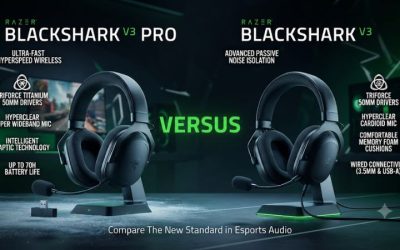
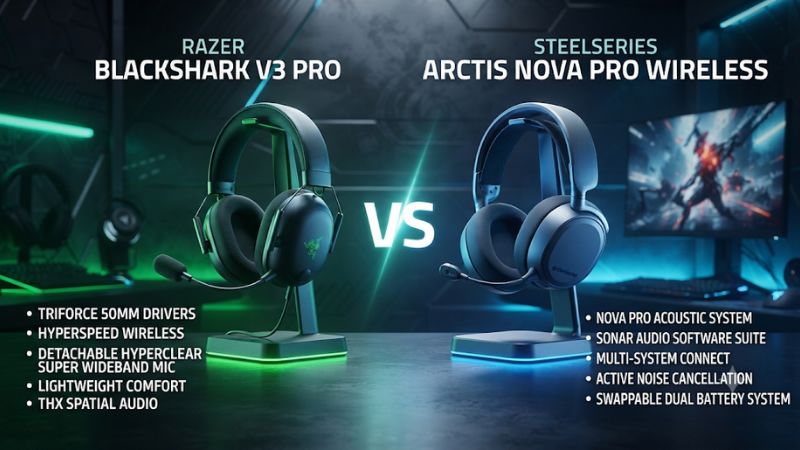
The Razer BlackShark V3 Pro suits a player who wants a USB receiver, a removable mic, and onboard controls for a primary gaming device. Its 2.4 GHz receiver is easier to move than a powered desk station with several cables. It still offers simultaneous Bluetooth, hybrid ANC, and wired options when the source supports them.
This is the more natural setup if you split your time between a main computer and occasional sessions elsewhere. Choose the right platform edition, keep the matching receiver with it, and test the audio and mic separately wherever you plan to play. A small receiver also makes sense at a desk where ports or surface space are already crowded.
The Razer can take a long charge interval under the manufacturer’s rated conditions. It does not use the SteelSeries two-pack routine. If you are happy to charge over USB between sessions and rarely need to move a battery, the simpler arrangement may be the better daily fit.
Choose the Nova for two permanent USB hosts and spare batteries
The original SteelSeries Arctis Nova Pro Wireless includes a base station with two USB host connections. Plug supported systems into those ports and select the active host from the station or supported menu controls. That helps when the same chair or gaming area serves a PC and a console and both can stay wired to the base.
The station also charges a removable battery while the headset can use the other. You can exchange the packs when the installed one runs low. The key advantage is an available spare at the desk, which can be more useful than a long rating if several people share the headset or you play across multiple sessions without remembering to plug it in.
Buy the Xbox edition if Xbox is one of your USB hosts. SteelSeries says that edition’s dedicated Xbox port is the one that supports that console, while the other USB port can serve an additional compatible system. The standard PC or PlayStation version is appropriate when Xbox isn’t needed.
| Buying priority | Razer BlackShark V3 Pro | SteelSeries Arctis Nova Pro Wireless |
|---|---|---|
| Main 2.4 GHz hardware | Portable USB receiver | Desk base station |
| Two USB hosts left connected | Move the receiver or use another supported audio path | Two host connections, with one active at a time |
| Phone audio during receiver playback | Simultaneous Bluetooth supported | Simultaneous Bluetooth supported |
| Battery routine | Built-in rechargeable battery; up to 70 hours on the PC-oriented rating | Two swappable packs; up to 22 hours each per published specifications |
| Microphone | Detachable boom | Retractable boom |
| Listening modes | Hybrid ANC, ambient mode, and off | ANC, transparency mode, and off |
| PC software emphasis | Synapse, THX, and headset tuning | SteelSeries GG and optional Sonar processing |
| Xbox wireless | Buy the supported Xbox variant for Xbox | Buy the Xbox base station variant and use its dedicated port |
How do the receiver and base station affect everyday use?
Pick the model that matches the number of permanent systems
Imagine that a PC and a PS5 are always on the same desk. With the Nova, you can leave both connected to the base and switch the selected USB source on its display.
With the Razer, you can move the receiver where appropriate, use another supported input path, or leave it on the machine you use most. The desk layout determines how much that difference matters.
The Nova’s two host connections provide convenient selection. They do not create a two-USB-host mix.
If you want to hear a second stream at the same time, use the documented Bluetooth route or look at other supported options for your devices. Confirm which source should provide the microphone before expecting simultaneous capture.
The Razer makes the better travel case when your headset must occasionally work on a laptop away from the main setup. The receiver and headset are the relevant pieces in that configuration.
The Nova can also use Bluetooth separately, but its primary 2.4 GHz workflow depends on the base. Buy for the connection you expect to use in each room.
Plan for the cables and ports at a mixed PC and console desk
Look at where the main console and computer sit before choosing the Nova’s fixed setup. Each host needs a suitable cable to the station. If the devices are on different sides of a room, the effort to run those cables can outweigh the convenience of software or menu switching.
For a Windows computer attached to an Xbox edition Nova base, SteelSeries instructs owners to use the ordinary USB port for Sonar and Engine recognition instead of the port marked Xbox. Label the cables once both sources work. This makes the common problem of selecting the wrong host or port easier to diagnose.
If you choose the Razer for an Xbox or PlayStation, verify the platform edition and receiver mode against Razer’s documentation. A storefront may group several color and platform variants in one listing. Check the selected variant after choosing the color, and verify whether the receiver, boom, and cables you need come in that package.
Treat simultaneous Bluetooth as a separate test
Both headsets can play phone audio while using their 2.4 GHz gaming link. Test the receiver first, pair the phone, then play a short piece of media during a menu or game sound. Set a reasonable independent volume for each source before deciding whether the mix is usable.
An incoming phone call is a different condition. Razer documents that Bluetooth calls can take microphone priority in simultaneous mode.
Whatever model you choose, test your actual call and voice app pairing if you need to hear both and remain audible in the game. Dual playback and dual microphone routing are different requirements.
If you start hearing a sudden tonal change or a missing voice connection during a call, disconnect Bluetooth and repeat a local mic test over the receiver. Then reconnect the phone and verify the effect intentionally. This is particularly useful for a game setup that uses mobile voice chat while the computer plays the game.
Is hot-swapping better than one long-lasting battery?
The Razer suits a charge-between-sessions routine
The BlackShark V3 Pro’s published PC-oriented figure is up to 70 hours. Treat it as a rating for a particular setup, with volume, ANC, wireless mode, and other factors influencing what you see. Razer also advertises a quick charging benefit of approximately six hours from 15 minutes under its conditions.
That makes sense if your headset lives near a charging cable and you usually start long sessions with enough power left. If you find yourself charging by habit after your last match of the week, the built-in battery and cable may be all you need. Try the same routine with ANC and latency set as you actually use them.
For a used headset, check battery behavior before paying a premium. A single brief power-on does not show the number of hours it can sustain. The built-in design makes the battery’s present condition an important buying variable.
The Nova turns battery changes into a quick desk task
SteelSeries advertises up to 22 hours per pack under the stated conditions. Using both packs depends on keeping one charged in the station. Judge the convenience of having the spare ready rather than treating the sum of two headline ratings as a continuous runtime for one pack.
A swap is most useful when you can reach the station between matches. Insert the spare promptly and check the connection afterward.
Familiarize yourself with the battery cover and the orientation so you do not need to solve that for the first time during a call. If you buy used, confirm that both packs and the charging base are present.
The removable design can be useful if a pack no longer holds a useful charge. Check the price and availability of a compatible replacement. For a player who cannot keep the base accessible, the requirement to carry or reach the spare can make the larger built-in battery easier to manage.
Which headset is better for sound, mic, and noise control?
Compare ANC in the noise you actually want to reduce
Both products have ANC and a mode for hearing your surroundings. Start with a steady fan or ventilation noise at the normal desk position.
Turn ANC on and off at the same listening level, then let someone speak from a nearby position. Separate how much low steady noise is reduced from how well you can follow quiet dialogue with your setup.
The ear pads and fit affect both passive isolation and the perceived benefit of ANC. Try the headsets with the glasses or hair arrangement you normally have. If the sound shifts considerably when you hold a cup closer to your head, adjust the fit before deciding which noise control works better.
Review measurements help set expectations but cannot recreate your own seal. RTINGS evaluates both models and identifies differences in isolation and audio behavior.
Give the greater weight to the noise that bothers you during a typical session. A headset that is better for one kind of sound may not matter if your actual issue is nearby conversation or a mechanical keyboard.
Choose a detachable or retractable mic for the way you use it
The BlackShark’s boom detaches. If you use a desktop mic at home, you can remove the headset boom entirely.
The Nova boom retracts into the cup and stays available when you move to a console. Extend it for normal chat, then position it by your mouth as SteelSeries documents.
Published BlackShark listening results vary. RTINGS rated the BlackShark V3 Pro boom highly, while Tom’s Hardware reported reservations about how voice sounded. Compare a direct local recording and the processed voice app you actually use, since one can hide or exaggerate what you heard in the other.
If you are streaming, compare the two headsets’ playback convenience and price while leaving microphone choice independent. Either can be paired with a desktop mic on PC. For someone who regularly swaps between consoles, the onboard boom is more important, so test how easy it is to unmute and get a clear signal after switching sources.
Compare software by the tasks you will actually use
Razer offers device tuning in Synapse on supported PCs. THX, EQ, mic monitoring, and other options depend on the headset edition and platform. It is a sensible choice if you want an integrated headset profile and already know which settings you will change.
SteelSeries GG and Sonar can provide per-application routing, game and chat paths, EQ, and processing on supported Windows setups. The physical base also gives you access to some controls without opening a PC app. Treat Sonar as a Windows software layer and verify what remains available on your console.
Start with stereo and a standard EQ on either headset. Then try the spatial mode or voice processing you actually want.
If you use game-native headphone processing, test that as a separate path. Choose the package that makes your setup easier to reproduce, rather than the one with the longer list of menus.
What works best for a PC-only desk, a PC and console, or travel?
A single gaming PC often favors the smaller setup
With one PC and a phone, either headset can provide a game feed and Bluetooth audio. If the Nova’s other USB connection would sit empty and you normally charge at the end of the day, its most distinctive hardware may get little use. The Razer can still give you the same general combination of receiver and phone audio with less equipment on the desk.
You may still prefer the Nova on a single PC if you use the station as an accessible physical control or swap batteries several times in a week. Ask what would happen without the station at your preferred seat. If you reach it easily and would actually use it, the extra hardware earns some of the desk space.
A close price makes comfort more important in this scenario. Check the cups, suspension, and reach of the primary controls. If a model is awkward with glasses or an extended mic, no additional host connection will fix that.
A PC and console desk makes source switching easier to value
A desk used for both PC games and console parties gives the Nova a specific advantage. Leave the two supported USB hosts attached, switch to each device, and play a known sound.
Then record a short voice sample or use a console input test after every switch. The base only helps if the complete game and chat route arrives with it.
If one device is an Xbox, match the station version and port to that device before connecting the Windows PC. If the PC app only sees the headset on the ordinary USB port, correct the wiring and test the station again. A physical label on each cable can prevent accidental swaps later.
With the BlackShark, try the same scenario by moving the compatible receiver or using another supported route. If you switch once a month, that can be easy enough. If you switch several times per evening and both hosts sit together, using the station becomes more valuable because it removes a recurring cable move.
A shared headset needs a reliable charging routine
If several people use the same headset, a charged Nova pack can be easy to hand off at a fixed station. Establish who places the depleted pack back on the charger and verify that the base shows it charging. A second battery that spends the week sitting outside its charging slot removes most of the benefit.
If you move between rooms or take your headset away from the desk, the BlackShark’s single rechargeable battery can be simpler. Check how long you use it between visits to a USB power source under the ANC and wireless modes you actually prefer. A spare pack and a cable solve different problems depending on where you play.
When buying secondhand, check whether an original battery still lasts through your longest uninterrupted session. Also confirm that the matching base and its controls work on both hosts. If the Razer package is cheaper because it omits the compatible receiver, factor the replacement path and availability into the comparison before paying.
What should you verify before paying for either headset?
Run the same first-session checklist
- Confirm the exact model and platform. Check that the Razer edition or Nova base station matches the intended console. Distinguish the original Nova Pro Wireless from other Arctis models and the V3 Pro from the standard V3.
- Test the main wireless connection. Use the receiver or base in its normal place. Verify steady game audio and a microphone recording from your usual seat.
- Test the auxiliary device. Mix phone media with a known game sound if it matters. For the Nova, switch the active USB host and verify input and output on each.
- Check the battery routine. Charge the Razer with its expected cable or check that both Nova packs charge and the headset recognizes them.
- Compare the fit over time. Keep the headset on for a match-length session and check whether pads, weight, or boom reach become annoying.
If a headset sounds weak immediately after setup, confirm the right device is active. On PC a game can use an old endpoint after you change audio software.
On console, an available chat path can work even when the game is still playing on a television. Start by verifying whether the problem is the output rather than the headset.
When comparing prices, count everything you need in the box. The Nova’s base station and battery packs are central to the buying case.
The Razer’s compatible receiver and removable boom matter just as much for its portable configuration. A low used price carries less value if the key piece is missing.
Identify which feature changes your week
Choose the Nova if you would switch between permanent USB hosts several times a week or regularly depend on a charged spare. A two-system desk gives it an obvious role. If you mostly use one PC and move the headset and receiver between rooms, the simpler package can be easier to use.
Choose the Razer if your main benefit is a dongle, a detachable mic, and active isolation at a single gaming setup. Try the fit and the microphone before counting on a quality improvement. A headset you rarely have to adjust is a better upgrade than one whose strongest feature you leave off.
If either model is replacing a working headset, identify the specific problem you want to solve first. A second Bluetooth source, a spare battery, a more accessible physical control, or support for another console are real differences. Without one of those needs, the exact price and how the ear cups fit can decide between two capable headsets.
Conclusion
Buy the Razer BlackShark V3 Pro for a compact setup around one primary gaming system, with a portable receiver, detachable mic, and simultaneous Bluetooth. Buy the SteelSeries Arctis Nova Pro Wireless for two connected USB hosts and the convenience of swapping charged packs. Verify the correct Xbox edition when needed, and judge ANC, comfort, and chat quality with the connection and room you actually use.