🛒 Best Price Today on Amazon
Prime members get fast, free shipping on everything above, plus member-only deals. New members get a 30-day free trial — cancel anytime.
Buy the FiiO K11 for an affordable desktop setup, the Topping DX3 Pro+ for a demanding single-ended pair, or the Schiit Gunnr if you need a wired mic input. The best USB DAC amps for high-impedance gaming headphones deliver enough voltage at your headphone’s impedance through the jack you will use. Start there before paying for extra features.
Which USB DAC amps are worth shortlisting?
Start with the jack on the headphones you already own. A 250-ohm pair with a conventional three-conductor plug and a 600-ohm pair with a correctly wired balanced cable can lead to different purchases, even when both sit on the same desk. The best choice also changes when the microphone needs its own analog input.
The figures below are manufacturer specifications. An output power number belongs to its specified load and jack.
Test thresholds vary, so the table is a way to identify usable headroom and connections. Listening comparisons, driver stability, and the behavior of any particular game need to be assessed on the actual setup.
| Model | High-impedance output evidence | Best fit | Analog mic input |
|---|---|---|---|
| FiiO K11 | 60 mW single-ended or 250 mW balanced per channel at 300 Ω | Value desktop setup with a choice of jacks | No |
| Topping DX3 Pro+ | 250 mW per channel at 300 Ω from the 3.5 mm output | More voltage with an existing single-ended cable | No |
| Schiit Gunnr | 200 mW maximum at 300 Ω | Headphone and wired mic on one box | Yes |
| FiiO K7 | 140 mW single-ended or 560 mW balanced per channel at 300 Ω | Desktop setup with substantial balanced headroom | No |
| iFi ZEN DAC 3 | Over 18 mW single-ended or 70 mW balanced at 600 Ω | USB-C desktop with useful 600-ohm ratings | No |
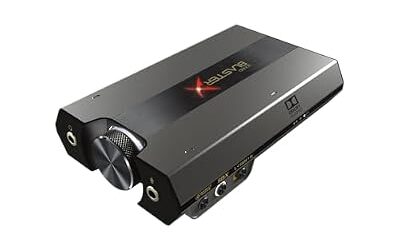
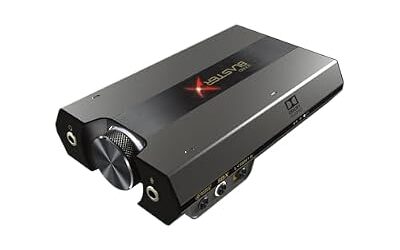
| Creative Sound BlasterX G6 | Creative specifies high gain for 150–600 Ω | Compact gaming audio and headset mic | Yes |
| JDS Labs Element IV | 174 mW continuous at 600 Ω (10.22 Vrms) | Premium desk setup with a large knob and automatic gain | No |
FiiO K11 is the value pick for a simple desktop
The standard K11 has a front 6.35 mm single-ended headphone jack and a 4.4 mm balanced headphone jack. FiiO specifies 60 and 250 mW per channel respectively into 300 ohms. The single-ended figure corresponds to roughly 4.2 Vrms at that load, already a useful starting point for a conventional high-impedance headphone if its sensitivity is reasonable.
Choose it when you want a volume knob and can leave a power adapter on the desk. The rear digital inputs offer room to connect more than a PC, and the front outputs let you reuse a typical headphone cable today. The stronger balanced output is available if your headphones can take a properly wired balanced cable and you have a reason to buy one.
The easiest mistake is shopping from a box photo or an abbreviated model name. The K11 R2R is a distinct version. Use the standard K11 listing and its specifications for the numbers here.
Budget a simple 3.5-to-6.35 mm single-ended adapter if your cable has the smaller plug. If you use a USB mic, leave Discord pointed at that mic after installing the K11.

Topping DX3 Pro+ is the stronger single-ended choice
Topping specifies 250 mW per channel into 300 ohms at less than 0.1 percent THD+N in the DX3 Pro+ manual. That converts to roughly 8.7 Vrms at the rated load. The front headphone output is a standard 3.5 mm single-ended jack, so its useful voltage is available with an ordinary cable.
Pick this unit if a 300-ohm headphone already has the cable you like and you want more reserve through that cable. It also makes sense if the desk doubles as a listening station and the display, remote, and additional digital inputs are useful to you. For PC gaming, use USB and treat the Bluetooth receiver as an optional convenience for other devices.
The smaller jack affects how your cable sits on the desk. A long, rigid adapter hanging off a heavy 6.35 mm plug can put leverage on the device. A short flexible adapter is easier to route.
The unit has no headset mic input, so a single four-pole headset plug needs a separate path for its microphone. Consider that before choosing the DX3 Pro+ over a gaming-oriented option.
Schiit Gunnr puts voice chat and game audio on one desk unit
Gunnr is the first pick here if you want an analog microphone input alongside a demanding headphone. Schiit lists 200 mW maximum at 300 ohms, equivalent to about 7.7 Vrms at that load. Its selectable negative, low, and high gain settings also make sense on a desk that sees both insensitive headphones and efficient pairs.
This is a practical match for headphones fitted with a compatible analog boom mic. Check whether the mic terminates separately or comes through a combined headset plug.
If you have a combined plug, confirm the required splitter and pinout. A USB mic or an XLR mic with an interface can still run independently if that is the recording path you prefer.
Gunnr offers adjustable width and presence controls. Start with neutral settings when checking how a game places footsteps or voices.
Try those controls after the baseline is working so you can tell which change affected the mix. Read Schiit’s power and connection instructions for the configuration you buy before assuming the maximum output applies under every possible power arrangement.
FiiO K7 suits a wired balanced setup with room on the desk
At 300 ohms, FiiO specifies at least 140 mW per channel through the K7’s single-ended headphone output and 560 mW through its balanced output under the listed test conditions. That is about 6.5 and 13 Vrms respectively. High output is a reason to consider it when a quiet recording or demanding pair runs out of headroom on your current source.
Look at the K7 if headphones and powered speakers share one desk. The input and output controls, multiple rear inputs, and two front headphone connections suit a permanent setup. The power adapter and deeper footprint are worth planning for if the desk has a monitor shelf, a keyboard tray, or limited cable clearance.
The K7’s biggest published advantage in this list is through the balanced connection. With a conventional single-ended cable, compare its 140 mW figure to the 250 mW listed for the DX3 Pro+ at the same load.
Different distortion thresholds matter near a limit. For a headphone that is already easily driven, changing amplifiers for the larger number alone is unlikely to solve a practical problem.
iFi ZEN DAC 3 gives you a published 600-ohm comparison
The ZEN DAC 3 is a good option if you want USB-C and need a manufacturer rating at 600 ohms. iFi specifies over 18 mW from the 6.35 mm single-ended jack and over 70 mW from the 4.4 mm balanced jack at that load. Those figures correspond to about 3.3 and 6.5 Vrms respectively at the minimum stated power.
This is one of the clearer examples of why a single headline wattage is insufficient. iFi’s 390 mW figure is for a balanced 64-ohm load. If you have a fixed cable on a 600-ohm pair, the 18 mW rating is the relevant starting point. Check headphone sensitivity and usable output before counting on more reserve.
PowerMatch gives you a gain option, and the front bass control can stay off while you establish your gaming baseline. The unit can take power over USB-C or from a compatible external 5 V supply.
If you want a minimal install with a separate mic, that wiring is straightforward. If you need analog voice input on the same box, choose Gunnr or the G6 instead.
Creative Sound BlasterX G6 fits a compact PC and headset mic
The G6 is the compact USB-powered pick when you value both headphone playback and a wired mic input. Creative documents a high-gain range of 150 to 600 ohms and a low-gain range for less demanding headphones.
Treat that as the manufacturer’s supported use case. It is a different kind of evidence from a maximum power measurement at exactly 300 ohms.
This is an especially practical option if you use a small desk, switch between solo gaming and voice chat, or want headphone and mic controls within reach. Its older Micro-USB connection is worth factoring in if the rest of your setup is USB-C. Use a cable that carries data and verify that Windows sees the playback and recording devices you expect.
Start with a plain stereo configuration while checking output and mic levels. Bring in a Creative surround or emphasis mode only after the game sounds correct in stereo, and test the result with known cues. If you intend to use a direct or processing-bypass mode, check microphone behavior in that exact mode before depending on it in a call or on stream.
JDS Labs Element IV is a premium alternative for daily desk use
Element IV is for someone who values a large physical volume control, a display, USB-C, and an automatic gain mode. JDS Labs specifies a maximum continuous 174 mW at 600 ohms, or 10.22 Vrms, through its headphone output. That makes it an option for a demanding 600-ohm pair with a conventional cable, including cases where the iFi’s single-ended rating leaves less room than you need.
One reason to choose this desktop design is repeatable operation. If you switch between an efficient headphone and a more demanding model, check the volume indication before switching back. If you also use speakers, verify output selection with both connected and see whether the workflow fits where the unit will sit.
The trade-off is cost and footprint. If you need exactly one headphone output and already have enough level from a cheaper amp, price the upgrade around controls and convenience. Element IV is also a playback device in this setup.
Plan an independent USB input or audio interface for voice. People who want one cable and one analog mic port have more suitable options above.
How much output does your headphone actually need?
Combine impedance with sensitivity
Impedance describes the electrical load. Sensitivity describes how much sound a headphone makes from a defined voltage or power. Two 300-ohm pairs can have different sensitivities, so one can reach a comfortable level with considerable room left while the other needs more voltage for brief peaks.
Some makers specify dB SPL per milliwatt and others specify dB SPL per volt. Read the units before comparing them.
A useful mathematical example is a 300-ohm load supplied with 3 Vrms. Voltage squared divided by resistance gives 30 mW. At 6 Vrms, the same load takes 120 mW.
At 600 ohms those same voltages produce 15 and 60 mW. These are electrical examples for evaluating equipment ratings. Actual listening loudness depends on the headphone and the signal.
Sensitivity figures are usually measured under a specified condition such as a particular frequency or fixture. They can give an estimate, and a small estimated difference may disappear in day-to-day use. For buying, compare the exact headphone’s sensitivity, the headroom you lack now, and the available rating on the output jack you intend to use.
Compare the output you can connect safely
A standard headphone plug carries left and right audio with a shared return. A balanced headphone output typically expects separate returns, so a cable compatible with the headphone must preserve those separate connections. An adapter that ties a 4.4 mm balanced output to a common-ground 3.5 mm plug can short amplifier outputs.
- Check the headphone cable. Look up the wiring or the manufacturer’s compatible accessories, especially when there is only one cup-side connector or the cable is fixed. A balanced plug on the amp end alone tells you little about the cable internally.
- Compare jack-specific ratings. Use the single-ended figure for a standard cable. Use the balanced figure after you have verified compatible wiring. Read both numbers at the headphone’s load where possible.
- Allow for EQ headroom. If your EQ uses a negative preamp to accommodate boosts, it reduces the delivered digital level. Check whether your normal listening volume still leaves room with the EQ engaged.
A 600-ohm impedance rating and good sensitivity might make a compact amp perfectly suitable. A less sensitive headphone can make the stronger desktop output worth paying for. A known 300-ohm value should remain a 300-ohm value in your comparison, unless the maker also supplies a voltage or a rating at your load that supports the inference.
Budget for features that change your setup
A straightforward USB DAC amp can carry Windows game audio while a dedicated USB mic handles Discord. This arrangement already meets the needs of most desktop users with separate microphones. A compatible analog mic input becomes important when you want a headset with a split cable or a dedicated analog boom mic to run through the same device.
Think through the console or handheld path separately. A PC connection over USB does not establish compatibility with Xbox, PlayStation, or a docked handheld.
Confirm the exact model, platform, and audio directions you need, including playback and microphone capture. If the product uses an external adapter, check that you can still power it normally at that location.
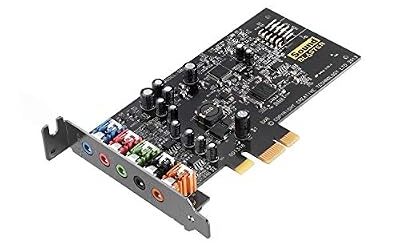
Keep software and desktop costs in the comparison. A headphone cable, a flexible adapter, a mic splitter, and a power adapter can change the overall cost. A sound card with an older USB connector may still be a convenient purchase if the kit includes the data cable and its mic controls solve a real problem for you.
How do you verify the upgrade in the first session?
Set the output and mic explicitly
- Start with low gain and low volume. Connect the headphones to their matching output, select USB if necessary, and lower the physical volume before playing audio. Raise it gradually with a familiar game or recording.
- Select the playback device in Windows. Confirm the game is playing through the USB DAC. Some games keep the old output until they restart, and a voice app can remember a different device from the system default.
- Select the input in Discord. Choose the mic connected to Gunnr or the G6, or choose your separate mic by name. Run Discord’s mic test or make a short recording to confirm the correct source carries your voice.
- Try higher gain only when necessary. Lower the volume before switching. Check whether ordinary material now reaches a comfortable level with useful adjustment remaining. Keep gain at the setting that gives you a sensible volume range.
If the headphone has an analog cable with inline volume, check it separately. A muted headset control, weak game mix, or negative software preamp can mimic an amp with too little output. Testing a familiar track and a single game before opening voice apps gives you a stable reference.
Check headroom with a real game and a quiet source
Pick a scene you know with speech, footsteps, and occasional loud effects. Use a moderate loudness that lets you follow it comfortably. Then play a quiet source you actually use.
If you need to put every volume control at its limit on routine material, first check the Windows mixer, game volume, EQ preamp, gain, and source selection. With those verified, extra voltage can be a meaningful improvement.
If you hear distortion, change one variable at a time. Reduce a boost or the digital level, verify the plug is fully seated, and try the other game or recording again.
A problem that follows one application or only appears when switching audio modes may come from the signal or configuration. A swap between two working headphone sources at matched listening volume can help narrow it down.
Diagnose low volume before buying more voltage
Look for a level mismatch between two known sources before drawing a conclusion from the Windows volume percentage. A game with a quiet mix can sound much lower than music on the same device, and a chat balance control can reduce the game alone. If you can reach a comfortable level in one application, check the quieter application’s own output and levels first.
If you are moving from a motherboard jack to a USB DAC amp, start by keeping the game and headphone cable unchanged. Verify that the new device gives you extra usable range without a noisy connection, unexpected gain changes, or awkwardly large volume steps. That check is especially useful if your most demanding material is a small part of what you play.
Decide whether the old source already does the job
If your current output gets comfortably loud, preserves quiet details, and leaves range for quieter sources through the cable you prefer, spend based on the features you want to add. Those might be a volume knob under your hand, a wired mic input, reliable output switching, or a tidier desk. Bench specifications can help select a device after that need is clear.
Use the same volume for any comparison involving footsteps. A slightly louder setup often makes more things noticeable. Volume-match as closely as possible and keep in-game sound settings constant so you can judge whether the new source changed your experience for the better.
Conclusion
Choose the FiiO K11 for value, the Topping DX3 Pro+ for higher output through a conventional cable, or Schiit Gunnr for an analog mic and substantial 300-ohm power in one box. The FiiO K7 is the balanced desktop upgrade, the iFi ZEN DAC 3 offers useful 600-ohm ratings, the G6 covers compact headset duty, and Element IV suits a desk that benefits from finer daily controls. Match your exact headphone and cable to the output rating, then check its usable range with the software and games you actually play.