🛒 Best Price Today on Amazon
Prime members get fast, free shipping on everything above, plus member-only deals. New members get a 30-day free trial — cancel anytime.
- Refurbished gaming laptops at a glance
- Is a refurbished gaming laptop worth buying?
- Which GPU generation to look for: RTX 30 vs RTX 40
- Best used gaming laptops by budget tier
- Models worth buying refurbished
- Refurbished gaming laptop inspection checklist
- Warranty, returns and seller types
- Which refurbished gaming laptop should you buy: decision guide
- Questions to ask the seller before you buy
- First days after delivery
- Used laptop searches that are not about gaming
- Best used laptops that are not gaming laptops
- Refurbished gaming laptop red flags
- Alternatives to buying refurbished
- Frequently Asked Questions
Updated November 2026 – The best refurbished gaming laptops are previous-generation RTX 30 and RTX 40-series models from lines such as Lenovo Legion 5 and Legion 5 Pro, ASUS ROG Zephyrus G14 and TUF Gaming, Alienware m-series, Razer Blade and MSI Katana, but the seller’s warranty and a proper inspection matter more than the model.
If you are shopping for the best refurbished gaming laptops, the safest approach is to pick a model first, then pick the seller. A manufacturer-certified refurbished unit with a clear warranty is usually a better bet than a private sale, even when the hardware is identical. This guide covers the models worth looking for, a step-by-step inspection checklist, warranty and return advice, and answers to related searches like best used laptops, best renewed laptops and best pre owned laptops. It makes no claims about listings or prices, which change daily.
Refurbished gaming laptops at a glance
| Model family | Best for | Typical GPU generation | Watch for |
|---|---|---|---|
| Lenovo Legion 5 / 5 Pro | Balanced all-rounder | RTX 30 and RTX 40-series | Fan wear, battery health |
| ASUS ROG Zephyrus G14 | Portable gaming | RTX 30 and RTX 40-series | Battery wear, thermal paste, soldered RAM |
| ASUS ROG Zephyrus G15 | Slim 15-inch value | RTX 30-series | Older model; battery and thermals |
| ASUS TUF Gaming | Budget durability | RTX 30 and RTX 40-series | Hinge and plastic wear |
| Alienware m-series | Higher-end power | RTX 30 and RTX 40-series | Weight, heat, cosmetic wear |
| Razer Blade | Premium build | RTX 30 and RTX 40-series | Battery swelling, thermals |
| MSI Katana | Budget value | RTX 30 and RTX 40-series | Display quality, build |
| MSI Stealth | Slim performance | RTX 30 and RTX 40-series | Thermals and battery |
The table lists families, not specific units. A single family can span several generations, so the exact model number and GPU matter.
Is a refurbished gaming laptop worth buying?
It can be, when the laptop comes from a seller that offers a clear warranty and return window. Gaming laptops are more complicated than ordinary laptops because heat, battery wear and fan condition all affect performance. Guides from several sources agree that OEM-certified refurbishment, where the manufacturer inspects and repairs the machine, is usually the most consistent route, and that private sales rarely include coverage. A used laptop is worth considering if you can inspect it or the seller gives a return window long enough to test it.
Terms are used differently across stores. ‘Refurbished’ normally means the unit was inspected and repaired; ‘renewed’ and ‘certified’ labels vary by seller; ‘used’ or ‘pre-owned’ may mean no repair at all. Read the grading and the warranty terms rather than relying on the label.
Which GPU generation to look for: RTX 30 vs RTX 40
Because laptop GPUs are soldered and cannot normally be upgraded, the GPU generation fixes the machine’s lifespan. Used-laptop guides describe RTX 40-series models as the mainstream used tier, capable at 1440p and with DLSS 3 support, and RTX 30-series as solid for 1080p and entry-level 1440p. Exact model matters: an RTX 3050 Ti is faster than a base 3050, and an RTX 4050 laptop GPU is described as faster than an RTX 3060 in at least one guide. If you need DLSS 3 frame generation or AV1 encoding, an RTX 40-series is the sensible minimum; the newer RTX 50-series is not common on the refurbished market yet.
Best used gaming laptops by budget tier
Budget tier: older RTX 30-series machines
Look at TUF Gaming, Legion 5 and MSI Katana models with RTX 3050 to RTX 3060. They handle 1080p gaming but have older features and may show cosmetic wear. Battery health and thermals are the main risks.
Mid-range tier: RTX 3070 to RTX 4060
This is the sweet spot for most buyers. Legion 5 Pro, Zephyrus G14 and G15, and Alienware m16 offer solid 1080p and 1440p performance. Pick the model with the best display and cooling you can find.
Premium tier: RTX 4070 and above
Razer Blade, Alienware and high-end Zephyrus models appear in this tier. They offer the best performance but cost more even used, so warranty and return terms matter even more.
Models worth buying refurbished
Lenovo Legion 5 and Legion 5 Pro – Best for balanced value
Spec line: 15 or 16-inch display · RTX 30 or RTX 40-series options · AMD Ryzen or Intel H-series · upgradeable RAM and SSD on many models as the maker lists.
Legion 5 models are a common used-market recommendation because they balance performance, cooling and a plain design. The Legion 5 Pro adds a larger 16-inch display with a taller aspect ratio. Check the fan sound and thermals, as these are the usual wear items.
ASUS ROG Zephyrus G14 – Best for a portable used gaming laptop
Spec line: 14-inch display · RTX 30 or RTX 40-series options · AMD Ryzen processors · compact chassis.
The G14 is popular for its size. On the used market, battery wear and thermal paste age are important, and RAM may be soldered in some versions, so confirm how much memory the exact unit has.

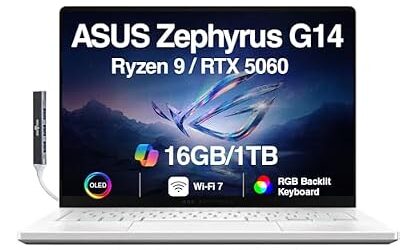
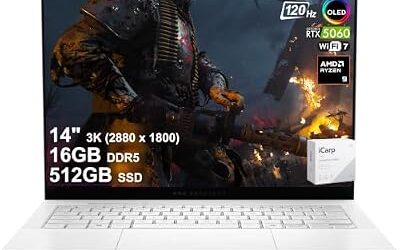
ASUS ROG Zephyrus G14 AI Gaming Laptop 14" 3K 120Hz OLED (500nits, 100% DCI-P3) AMD 8-core Ryzen 9 270 16GB DDR5 512GB SSD GeForce RTX 5060 (572 AI Tops) RGB Backlit WiFi 7 Win11 ICP Accessory
Included for 'Best Refurbished and Used Gaming Laptops in 2026 (What to Check Before You Buy)' as a representative home product in this roundup; selection reflects the product set returned for this topic.
View on AmazonASUS ROG Zephyrus G15 – Best for slim 15-inch value
Spec line: 15-inch display · RTX 30-series options · AMD Ryzen H-series · slim chassis · previous generation.
The G15 is the older sibling of the G14 and can be good value if the battery is healthy. Check the keyboard and hinge condition.
ASUS TUF Gaming – Best for budget durability
Spec line: 15 or 16-inch display · RTX 30 or RTX 40-series options · AMD or Intel · durable chassis as the maker describes.
TUF laptops are designed to take knocks, which helps for used buyers. Still inspect the hinges and the plastic around the screen.
Alienware m-series – Best for higher-end power
Spec line: 16 or 18-inch display · RTX 30 or RTX 40-series options · large cooling system · heavy chassis.
Alienware machines can offer strong GPU options but are heavy, and cosmetics matter. Certified refurbished units from the maker usually carry clearer warranty terms than private sales.
Razer Blade – Best for a premium build
Spec line: 14, 15 or 16-inch display · RTX 30 or RTX 40-series options · aluminium chassis.
The Blade has a premium look but older units can have swollen batteries and thermal wear. Inspect the base for bulging and check performance under load.
MSI Katana – Best for budget gaming
Spec line: 15 or 17-inch display · RTX 30 or RTX 40-series entry GPUs · Intel processors · plastic chassis.
Katana is a low-cost range. Screen quality varies, so check for brightness and colour before buying.
MSI Stealth – Best for slim performance
Spec line: 15 or 16-inch display · RTX 30 or RTX 40-series options · thin chassis.
Stealth models trade cooling for thinness, so thermal checks are especially important on used units.
Refurbished gaming laptop inspection checklist
Use this checklist when the laptop arrives or when you can inspect it in person. Gaming-laptop guides from used-electronics sellers and refurbishers consistently list the same items.
Battery health
On Windows, the powercfg /batteryreport command generates a report that shows design capacity, full-charge capacity and cycle count. Guides describe above 80 percent of design capacity as healthy, 60 to 80 percent as ageing and below 60 percent as a reason to budget for a replacement. A raised trackpad, a bulging base or a case that will not sit flat can indicate a swollen battery; stop using the laptop and contact the seller if you see this.
Hinges and build
Open and close the lid several times. A healthy hinge holds any angle without wobble and does not grind. Loose hinges can point to a previous drop. Inspect the chassis for cracks, particularly around the hinges and ports.
Screen and keyboard
Display a solid white, black and red screen to look for dead pixels and backlight bleed. Press every key and test the trackpad. Shiny, worn WASD keys suggest heavy use.
Thermals and GPU stability
Run a stress test for at least half an hour with a tool such as FurMark or AIDA64, and watch temperatures and clock speeds. Heavy throttling can mean dried thermal paste or clogged fans. Ask whether the refurbisher repasted the laptop and whether stress-test logs are available.
Ports, wireless and storage
Test every USB, HDMI and audio port, the Wi-Fi and Bluetooth, the webcam and the SSD health. Check the charger is the correct wattage; guides suggest a charger of 135W or higher for many gaming models, but follow the maker’s rating for the exact model.
Software and lock status
Confirm the laptop is not locked to a previous owner or company account, that the operating system is genuine and that the BIOS is not password-protected.
Warranty, returns and seller types
| Seller type | Typical warranty | Pros | Cons |
|---|---|---|---|
| Manufacturer-certified refurbished | Often one to two years | Most consistent, original parts | Limited stock |
| Specialist refurbisher | Varies, check in writing | Tested and graded | Quality varies by seller |
| Marketplace renewed programme | Varies by programme | Return window | Grading differs between sellers |
| Private sale | Usually none | Possible bargains | No recourse if it fails |
Guides disagree about the minimum warranty. Some say at least 12 months covering the GPU, CPU and display, while others say 90 days is the minimum and six months is the sweet spot. Avoid sellers who offer only a short dead-on-arrival window. Get the terms in writing and confirm whether battery degradation and GPU failure are covered.
Which refurbished gaming laptop should you buy: decision guide
Pick a Legion 5 or Legion 5 Pro if you want a safe all-rounder
Plain design, upgradeable components on many models and a wide choice of used units make it the least risky family. Choose the unit with the best battery report and fan condition.
Pick a Zephyrus G14 if you want portability
It is a good used choice if the battery health is strong and you accept possible soldered RAM.
Pick a TUF Gaming or MSI Katana if cost is the priority
Both are lower-cost families. Inspect the hinges, display and keyboard because budget builds show wear faster.
Pick an Alienware or Razer Blade if you want premium hardware
Buy these from a seller with a clear warranty, because a failure on a premium machine is costly to repair.
Pick a new previous-generation laptop if you cannot inspect the unit
If the seller does not offer clear returns and a warranty, a new unit is the lower-risk choice even when the specification is similar.
Questions to ask the seller before you buy
- What is the exact model number, GPU name, RAM size and SSD size?
- What is the battery’s full-charge capacity compared with its design capacity, and how was it measured?
- Has the laptop been opened, repasted or repaired, and were original parts used?
- What grading scale does the seller use, and what does each grade mean?
- What does the warranty cover, for how long and who pays for shipping on a repair?
- How many days do you have to return it, and are there restocking fees?
- Does it come with the original charger of the correct wattage?
First days after delivery
Run the inspection checklist straight away, while the return window is open. Install the maker’s driver updates, run a full stress test, check temperatures and fan noise, and play your most demanding game for an extended session. If anything fails, contact the seller in writing before the return window closes and keep the packaging until you are sure you will keep the laptop. A short session is not enough: thermal and battery problems often show up only after an hour or more of load.
Used laptop searches that are not about gaming
Searches such as best second laptops, best laptops used or best used it laptops mix gaming and non-gaming intent. The rest of this guide is about gaming machines, but the same warranty and battery rules apply to any used laptop.
Best used laptops that are not gaming laptops
Best used Mac laptops
MacBooks are not designed for the same game library as Windows gaming laptops, so they are a different decision. If you want a used Mac for work, look for models still receiving macOS updates and check battery cycle count in System Settings. For PC gaming, stay with Windows machines.
Best used business laptops
Searches such as best used it laptops lead to ThinkPad, Latitude and EliteBook ranges. They have strong keyboards and are cheap used, but most lack a gaming GPU. Choose these only if gaming is not a priority.
Refurbished gaming laptop red flags
- A listing that does not state the GPU model or battery health.
- No warranty or a warranty that excludes the battery and GPU.
- Photos that do not show the actual unit.
- A charger of unknown wattage or a non-original adapter.
- A seller who refuses returns or will not share stress-test logs.
- Signs of liquid damage or a swollen battery.
Alternatives to buying refurbished
Buy a previous-generation new laptop
New old stock of an earlier generation carries a full warranty and may cost little more than a refurbished unit.
Buy an entry current-generation laptop
An RTX 50-series entry model offers a full warranty and newer features, such as DLSS 4.
Buy a gaming desktop
If you do not need portability, a used or new desktop gives more performance for the money and can be upgraded.
Frequently Asked Questions
Is it safe to buy a refurbished gaming laptop?
It can be safe when you buy from a manufacturer or reputable refurbisher with a written warranty and return window. Private sales carry the most risk because they rarely include coverage.
What is the difference between refurbished, renewed and used?
Refurbished usually means inspected and repaired, while renewed and certified are seller-defined labels and used or pre-owned may mean no repair. Read the grading and warranty terms to see what the label actually promises.
Which GPU should I look for in a used gaming laptop?
RTX 40-series models are the mainstream used tier and handle 1440p well, while RTX 30-series models are fine for 1080p. Check the exact GPU name, since variants within a generation differ.
How do I check a laptop battery?
On Windows, run powercfg /batteryreport in Command Prompt and compare design and full-charge capacity. Guides treat above 80 percent as healthy and suggest budgeting for a replacement below 60 percent.
How long should the warranty be?
Guides suggest at least six to twelve months, with manufacturer-certified units often offering one to two years. A warranty that excludes the battery or GPU is of limited value.
Can I upgrade a refurbished gaming laptop?
RAM and SSD are often upgradeable, but laptop GPUs are normally soldered and cannot be changed. Check the maker’s service page for the exact model, and note that opening the laptop may affect remaining warranty.