🛒 Best Price Today on Amazon
Prime members get fast, free shipping on everything above, plus member-only deals. New members get a 30-day free trial — cancel anytime.
- Best Thin and Light Gaming Laptops at a Glance
- What “Thin and Light” Means for a Gaming Laptop
- Premium Compact Picks (14-Inch)
- Slim 16-Inch Picks
- Budget, Mid-Range and Premium Tiers in Words
- Thermal Trade-Offs in Slim Gaming Laptops
- Screen, Ports and Upgrade Notes
- Pick X If… Decision Table
- Alternatives to Consider
- How to Choose Between Slim Gaming Laptops
- Frequently Asked Questions
Updated November 2026 – The best thin and light gaming laptops for most buyers are the ASUS ROG Zephyrus G14 (most portable all-rounder), the Razer Blade 14 (premium build in a compact shell), the Lenovo Legion Slim 5 (slim 16-inch value pick) and the ASUS ROG Zephyrus G16 (larger screen, still slim).
The best thin and light gaming laptops in 2026 share one idea: they trade a little sustained graphics power for a body you can carry to class, the office or a flight. If you want the most frames per pound, a chunkier machine will always win. If you want one laptop that games well and does not feel like a brick in your bag, the slim class is the right place to shop. This guide explains what “thin and light” means in practice, which models fit, how they differ, and where the thermal trade-offs show up.
A note on sourcing: weights, ports and GPU options below are attributed to the maker or to outlets such as GamesRadar, TechSpot and TechRadar. Reviewers do not always agree on weights because the figure shifts with screen size, battery and model year. Configurations vary; check the exact GPU, RAM and display before buying.
Best Thin and Light Gaming Laptops at a Glance
| Laptop | Best for | Key stated specs | Limits |
|---|---|---|---|
| ASUS ROG Zephyrus G14 | Most portable all-rounder | 14-inch display, RTX 50-series laptop GPU options, reviewers cite roughly 1.5 to 1.6 kg | Fans can get loud under load, per TechRadar |
| Razer Blade 14 | Premium build and design | 14-inch display, RTX 50-series laptop GPU options, reviewers cite about 1.6 kg | Narrower spec ceiling than the G14, per GamesRadar |
| ASUS ROG Zephyrus G16 | Bigger screen, still slim | 16-inch display, RTX 50-series laptop GPU options | Heavier than 14-inch rivals |
| Razer Blade 16 | Slim performance flagship | 16-inch display, high-end laptop GPU options | Premium tier, warm chassis under load |
| Lenovo Legion Slim 5 | Value in a slim 16-inch body | 16-inch display, high refresh options, one source lists about 1.88 kg | Slightly heavier than 14-inch picks |
| MSI Stealth 14 and 16 | Creator-leaning slim gaming | 14 and 16-inch options, laptop RTX GPUs | Fewer configurations in some regions |
| HP Omen Transcend 14 | Compact option with a design focus | 14-inch display, laptop RTX GPU options | Cooling headroom is limited in a small shell |
| Acer Predator Triton 14 and 16 | Slim Predator with a metal body | 14 and 16-inch options, laptop RTX GPUs | Fewer reviews than the big rivals |
What “Thin and Light” Means for a Gaming Laptop
There is no official cut-off, but buyers searching for slim gaming laptops usually mean a chassis around the 15 to 20 mm range and a weight near or under 2 kg. Many guides use 2 kg as the practical line because it is where a laptop stops feeling like a desk machine. Under that line you see 14-inch and slim 16-inch models. Above it you move into mainstream and desktop-replacement territory.
The key point is that weight and thickness are decided by cooling. A heat pipe, vapour chamber and fan set that fits in a thin lid can only move so much heat. That is why the same GPU name can behave differently across laptops. Makers set a power limit for each design, and slim designs often use a lower limit than thick ones. Where the maker states a GPU power figure, read it; where it does not, treat the GPU name as a ceiling rather than a promise.
Premium Compact Picks (14-Inch)
The 14-inch class is where thin and light matters most. These laptops are the easiest to carry and the most expensive per unit of graphics power, so they suit buyers who value portability first.
ASUS ROG Zephyrus G14 – Best for Portable All-Round Use
14-inch display · OLED options in several configurations · RTX 50-series laptop GPU options · Ryzen AI-series processor options · around 1.5 to 1.6 kg per reviewers
The Zephyrus G14 is the model most roundups put first. GamesRadar calls it the best 14-inch gaming laptop and notes configurations can reach up to an RTX 5080 laptop GPU. Reviewers cite a weight of roughly 1.5 kg for the 2025 model and slightly more for newer ones, depending on the source. TechRadar reports that the G14 can run hot while gaming and that the fans can get noisy, which is the standard price of this size. It also works as a daily laptop: the display options are strong, and it is small enough for a backpack side pocket. Pick it if you want one machine for games, study and travel.

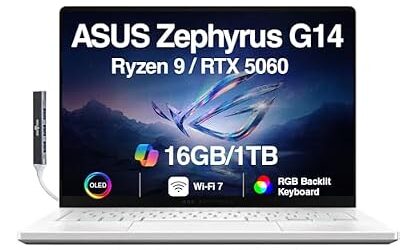
ASUS ROG Zephyrus G14 AI Gaming Laptop 14" 3K 120Hz OLED (500nits, 100% DCI-P3) AMD 8-core Ryzen 9 270 16GB DDR5 512GB SSD GeForce RTX 5060 (572 AI Tops) RGB Backlit WiFi 7 Win11 ICP Accessory
Included for 'Best Thin and Light Gaming Laptops in 2026 (Slim, Portable and Under 2 kg Options)' as a representative home product in this roundup; selection reflects the product set returned for this topic.
View on AmazonRazer Blade 14 – Best for Premium Build Quality
14-inch display · CNC aluminium chassis per the maker · RTX 50-series laptop GPU options · roughly 1.6 kg per reviewers · Thunderbolt/USB4 ports
TechSpot calls the G14 and Blade 14 the two rivals in this class and gives Razer a narrow edge on overall feel, noting a thickness of about 15.7 mm for the 2025 model. GamesRadar says the Blade 14 is held back by a more constrained spec sheet than the G14. In practice that means a lower GPU ceiling in exchange for a very solid shell, a clean design and a trackpad that reviewers regularly praise. Choose it if the look and feel of the laptop matter as much as raw frame rate.

Razer Blade 14 (2025) Gaming Laptop, RTX 5070, 32GB DDR5 RAM, 1TB, Black | AMD Ryzen AI 9 365, 3K 120Hz OLED Display, Thin & Lightweight, Chroma RGB, Windows
Included for 'Best Thin and Light Gaming Laptops in 2026 (Slim, Portable and Under 2 kg Options)' as a representative home product in this roundup; selection reflects the product set returned for this topic.
View on AmazonHP Omen Transcend 14 – Best for a Design-Led Compact Machine
14-inch display · laptop RTX GPU options · slim aluminium-style body as the maker describes it · lightweight class
The Omen Transcend 14 is HP’s slim answer to the G14 and Blade 14. Configurations differ by region, and cooling headroom in a chassis this small is limited, so check the GPU and memory in the exact variant on sale near you. It suits buyers who already prefer HP’s keyboard and software and want a compact, understated gaming laptop that does not look like one.

HP Omen Transcend 14 Gaming AI Laptop 14" 3k OLED 120Hz (100% DCI-P3, HDR 500nits) Intel 16-core Ultra 9 285H 32GB RAM 1TB SSD GeForce RTX 5070 (798 AI Tops) RGB Backlit Thunderbolt Win11 ICP Acc
Included for 'Best Thin and Light Gaming Laptops in 2026 (Slim, Portable and Under 2 kg Options)' as a representative home product in this roundup; selection reflects the product set returned for this topic.
View on AmazonMSI Stealth 14 – Best for Creators Who Also Game
14-inch display · laptop RTX GPU options · slim body in a plain colour scheme · Thunderbolt-class port options on some configurations
MSI’s Stealth line aims at people who edit video or photos and also play. The 14-inch model is the compact member of the family. Specifications change between model years, so read the maker listing for the exact processor, GPU and port set. It is a sensible alternative if the G14 and Blade 14 are out of stock or out of budget.
Acer Predator Triton 14 – Best for a Slim Predator
14-inch display · laptop RTX GPU options · metal body per the maker · compact travel size
The Triton 14 gives Acer’s gaming line a thin option. It has fewer independent reviews than the big names, so shoppers should look for recent outlet write-ups on their exact configuration, particularly for fan noise and battery behaviour, before committing.
Slim 16-Inch Picks
If you want a bigger screen without a bulky laptop, the slim 16-inch class gives more room for cooling and usually better sustained performance than 14-inch models. The trade-off is weight, which tends to land closer to 2 kg than 1.5 kg.
ASUS ROG Zephyrus G16 – Best for a Large Screen in a Slim Body
16-inch display · OLED options per the maker · RTX 50-series laptop GPU options · premium slim chassis
The Zephyrus G16 is the larger sibling of the G14. It offers more screen and more cooling room, and it is the better choice if you game at a desk most of the time and travel only occasionally. Expect more weight than the 14-inch model; check the maker page for the figure that matches your configuration.

ASUS ROG Zephyrus G16 All-Around Gaming Laptop, Ultra 9 285H, TGP RTX 5070 | 16" 2.5K OLED 240Hz Display, 16GB LPDDR5X RAM, 1TB PCIe 4.0 SSD, Wi-Fi 7, Bag-ready Notebook PC for Study Gaming Bussiness
Included for 'Best Thin and Light Gaming Laptops in 2026 (Slim, Portable and Under 2 kg Options)' as a representative home product in this roundup; selection reflects the product set returned for this topic.
View on AmazonRazer Blade 16 – Best for Slim High-End Power
16-inch display · high-end laptop GPU options · aluminium chassis per the maker · premium tier
The Gentleman’s Journal ranks the Blade 16 as the all-rounder to beat among gaming laptops overall. It carries the Razer design language into a larger body and supports higher-end graphics options than the 14-inch version. Reviewers note that thin high-power laptops run warm, so use a hard surface for long sessions.

Razer Blade 16 (2026) Thin Gaming Laptop, RTX 5070 Ti, 32GB DDR5, 1TB | Intel Ultra 9 386H, 16" QHD+ 240Hz 0.2ms OLED Display, 32GB DDR5, 1TB SSD, Wi-Fi 7, TB5, Windows 11, PC for Gaming & Creating
Included for 'Best Thin and Light Gaming Laptops in 2026 (Slim, Portable and Under 2 kg Options)' as a representative home product in this roundup; selection reflects the product set returned for this topic.
View on AmazonLenovo Legion Slim 5 – Best for Value in a Slim Shell
16-inch display · high refresh rate options · RTX laptop GPU options · one source lists about 1.88 kg
GamesRadar and others treat the Legion Slim 5 as the value pick among slim gaming laptops. It is a little heavier than the 14-inch rivals, but still under the 2 kg line by one listing, and it usually costs less than the Zephyrus or Blade families. Lenovo also sells a Legion Slim 7 for buyers who want more premium materials and screen options. Choose the Slim 5 if you want a lighter-than-average 16-inch machine without paying for a flagship.
MSI Stealth 16 – Best for Creator Features
16-inch display · laptop RTX GPU options · slim body · creator-focused panel options in some configurations
The larger Stealth suits buyers who need colour-accurate screens and a slim form. As with the 14-inch model, read the maker listing for the exact specification.
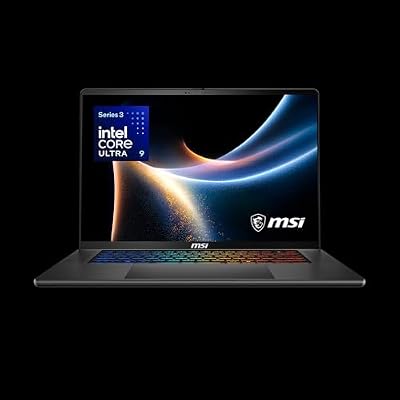
msi Stealth 16 AI+ 16” 240Hz QHD+ OLED Gaming Laptop: Intel Core Ultra 9 386H, NVIDIA Geforce RTX 5070Ti, 32GB DDR5, 1TB NVMe SSD, Wi-Fi 7, Win 11 Home: Charcoal Black B3WH-036US
Included for 'Best Thin and Light Gaming Laptops in 2026 (Slim, Portable and Under 2 kg Options)' as a representative home product in this roundup; selection reflects the product set returned for this topic.
View on AmazonAcer Predator Triton 16 – Best for Metal Build at 16 Inches
16-inch display · laptop RTX GPU options · slim metal body per the maker
Acer’s larger Triton competes with the Zephyrus G16 and Blade 16. Look for reviewer coverage of your exact configuration, particularly of fan noise.
Budget, Mid-Range and Premium Tiers in Words
- Budget slim: few true slim gaming laptops sit here. The Lenovo Legion Slim 5 with an RTX 4060 class GPU, which one source calls the value pick, is the nearest fit.
- Mid-range slim: Legion Slim 5 and 7, MSI Stealth, and lower configurations of the Zephyrus G14 and G16.
- Premium slim: Razer Blade 14 and 16, higher Zephyrus G14 and G16 configurations with OLED panels and top-tier GPUs.
Thermal Trade-Offs in Slim Gaming Laptops
Every slim laptop makes the same bargain. A thinner body leaves less room for heat pipes and fans, so the maker sets a lower power limit, and the fans spin faster to compensate. Reviewers report three common effects: louder fans under load, a warm keyboard deck, and performance that is lower than the same GPU name in a thicker laptop. This does not mean slim laptops are bad; it means you should match the machine to how you play.
Practical steps help. Use a hard flat surface or a stand that lets air reach the intake vents. Use the maker’s performance profiles rather than manual overclocking, which can void warranties and cause instability. Keep the vents clean, and if the laptop shuts down or throttles heavily, contact the maker rather than opening the case yourself.
Screen, Ports and Upgrade Notes
- Display: 14-inch OLED panels look excellent for single-player games but can show different brightness behaviour from IPS panels. A high refresh rate matters for fast shooters. Check the resolution and refresh rate listed for your exact configuration.
- Ports: thin laptops often drop full-size ports. Look for Thunderbolt or USB4, HDMI and a card reader if you need one. If you game with a wired headset, check for a 3.5 mm jack.
- Memory and storage: some slim models use soldered memory. If the maker lists soldered RAM, buy the capacity you need at purchase. SSD slots are more often upgradeable, but confirm in the maker’s specification.
- Battery and charger: the maker lists battery capacity and charging options. Many slim models charge over USB-C at lower power, which is useful for travel but is not a substitute for the main charger when gaming.
- Warranty: read the stated warranty term and whether accidental damage cover exists.
Pick X If… Decision Table
| Pick this | If you… |
|---|---|
| ASUS ROG Zephyrus G14 | want the best all-round compact laptop and accept fan noise under load |
| Razer Blade 14 | care about build quality and design more than the highest GPU ceiling |
| ASUS ROG Zephyrus G16 | want a larger screen but still need a slim laptop |
| Razer Blade 16 | want slim high-end power and a premium feel |
| Lenovo Legion Slim 5 | want a slim 16-inch laptop at a mid-range tier |
| MSI Stealth 14 or 16 | edit photos or video and game on the same machine |
| HP Omen Transcend 14 | like HP’s design and want a compact machine that looks understated |
| Acer Predator Triton 14 or 16 | want a slim metal-bodied option from Acer’s gaming line |
Alternatives to Consider
- ASUS TUF Gaming A16: GamesRadar-style roundups and The Gentleman’s Journal list it as a value-focused RTX option. It is heavier than the slim class but usually costs less.
- Lenovo Legion 5: described by the same roundup as offering the best overall value, with an OLED display option. Heavier than the Slim 5, so it suits those who prioritise price and cooling over carry weight.
- An ultraportable with strong integrated graphics: if you mostly play lighter games and want the lowest weight, a laptop with an AMD Radeon or Intel Arc iGPU can be a better fit than any gaming laptop.
How to Choose Between Slim Gaming Laptops
- Set a carry weight. Decide whether 1.5 kg or 2 kg is your limit; it separates the 14-inch from the 16-inch picks.
- Check the exact GPU and its power limit. The name alone does not tell you how the laptop will behave.
- Look at the display. Resolution, refresh rate and panel type shape how every game looks.
- Check RAM and SSD. Soldered memory means you must choose capacity at purchase.
- Read recent reviews on fan noise. It is the most common complaint in this class.
- Confirm warranty and service. A premium laptop needs support behind it.
Frequently Asked Questions
What is the best thin and light gaming laptop overall?
Most 2026 roundups name the ASUS ROG Zephyrus G14 as the best overall, with the Razer Blade 14 as the closest rival. The G14 offers a higher stated spec ceiling, while the Blade 14 is praised for build and feel. Configurations vary, so compare the exact versions on sale.
How light is a thin gaming laptop?
14-inch models are typically cited by reviewers at about 1.5 to 1.8 kg, and slim 16-inch models sit nearer 1.9 to 2.2 kg. Exact weight depends on screen size, battery and model year, so read the maker’s specification page for the version you choose.
Do thin gaming laptops run hotter than thicker ones?
Reviewers generally report that slim laptops run warmer and louder under sustained load because there is less room for cooling. TechRadar, for example, notes the G14 can get hot while gaming. Using a hard surface and the maker’s performance profile helps keep temperatures reasonable.
Is a 14-inch or 16-inch slim laptop better for gaming?
A 14-inch laptop is easier to carry, while a slim 16-inch laptop offers a bigger screen and more cooling room. If you travel often, choose 14 inches; if you play mostly at a desk, 16 inches is usually the better fit.
Can a slim gaming laptop replace a desktop?
It can for many players, but a thicker laptop or a desktop will usually deliver more sustained performance at the same graphics tier. Slim laptops suit people who want one portable machine and accept a trade-off in power and fan noise.
Can I upgrade RAM and storage in a thin gaming laptop?
It depends on the model. Some use soldered memory that cannot be changed, while SSD slots are more often accessible. Check the maker’s specification page before buying, and follow the manual and warranty terms if you plan to open the laptop.