🛒 Best Price Today on Amazon
Prime members get fast, free shipping on everything above, plus member-only deals. New members get a 30-day free trial — cancel anytime.
- Quick Answer: Which WiFi 7 Router Suits Which Buyer
- Best WiFi 7 Router Black Friday Deals 2026: What to Target
- Do You Need WiFi 7 for Gaming?
- Ports, Bands and Mesh: Reading the Spec Sheet
- Premium Tier: Flagship Gaming Routers
- Mid-Range Tier: Value Picks
- Budget Tier: Entry WiFi 7
- Pick X If… Decision Table
- When to Buy: Early vs Black Friday vs Cyber Monday
- Deal Red Flags
- How Latency, Not Speed, Decides Gaming Quality
- Setup Tips for Gaming
- Frequently Asked Questions
Updated November 2026 – For best wifi 7 router black friday deals, the ASUS RT-BE96U and TP-Link Archer BE800 are the best all-round picks, the ASUS ROG Rapture GT-BE98 Pro suits gamers who want a flagship with strong QoS, the eero Max 7 suits big homes that want easy mesh, and the Netgear Nighthawk RS300 is an entry option with limited ports and no advanced gaming controls.
As an Amazon Associate we earn from qualifying purchases at no extra cost to you.
WiFi 7 (802.11be) adds wider 320MHz channels on 6GHz, Multi-Link Operation (MLO) and higher-order modulation. Gaming benefits mostly come from steadier latency on the 6GHz band and from multi-gig ports, not from raw headline speeds. This guide explains whether you need WiFi 7, which port setup to target, how to read tri-band and quad-band claims, which models reviewers rate in 2026, and how to judge a Black Friday markdown (Friday 27 November 2026) without naming any retailer.
Quick Answer: Which WiFi 7 Router Suits Which Buyer
| Model | Type | Best for | Reported strengths | Limit |
|---|---|---|---|---|
| ASUS RT-BE96U | Tri-band router | All-round pick, no subscription features | HighSpeedInternet.com top pick; three-year warranty; Smart-Wired recorded 2.4Gbps on 6GHz at close range | Premium tier for a single router |
| TP-Link Archer BE800 | Tri-band router | Best balance of features and cost | Named best balance by Smart-Wired and best overall by Cablepapa; Technerdo calls it the value pick | Pricing varies widely between sources |
| ASUS ROG Rapture GT-BE98 Pro | Quad-band gaming router | Flagship gaming | Technerdo: most stable 6GHz radio; Cablepapa: best for gaming; SmarterRanking scores it highly for latency and QoS | Top tier cost and size |
| TP-Link Archer GE800 | Tri-band gaming router | Gaming-first features | SmarterRanking places it first in its gaming list with a score of 90 | Fewer independent reviews |
| Netgear Nighthawk RS700S | Tri-band router | Raw speed on 6GHz | Smart-Wired calls it best for raw speed | Premium tier |
| eero Max 7 | Mesh | Large homes, non-technical households | Hassle-free mesh; Tom’s Guide measured 1.781Gbps at 15 feet | Tom’s Guide measured only 16.8Mbps at 90 feet |
| Netgear Nighthawk RS300 | Dual-band entry router | Entry WiFi 7 | Has a 2.5GbE port | Limited ports, no advanced gaming QoS |
Best WiFi 7 Router Black Friday Deals 2026: What to Target
Scan listings for these items, in order of how much they affect gaming:
- Wired ports. A 2.5G or 10G WAN and LAN port lets your internet plan and your gaming PC use their full speed. For fast fibre plans, look for a 10G port; for most cable plans 2.5G is enough.
- Tri-band or better. A dedicated 6GHz band keeps gaming traffic off crowded channels.
- QoS and gaming prioritisation. Gaming-focused routers like the ASUS ROG line and TP-Link’s gaming line list game acceleration. The Netgear RS300 reportedly lacks advanced QoS.
- Software and subscription features. HighSpeedInternet.com notes that the RT-BE96U needs no subscription for its features. Check whether security or parental controls are paywalled.
- Warranty and firmware support. A longer warranty and regular firmware updates matter for a device that sits on your network for years.
Deals change daily, so compare the current listing against that list rather than a discount badge.
Do You Need WiFi 7 for Gaming?
When WiFi 7 helps
WiFi 7 helps when you have several heavy users sharing the network, use the 6GHz band close to the router, or own WiFi 7 client devices such as new laptops and phones. MLO allows a device to use multiple bands at once, which can steady latency, but it requires support on both router and device.
When WiFi 6 or 6E is enough
If your gaming PC and console use Ethernet, a WiFi 7 router adds little for those devices. A fast wired connection is still the best choice for lowest latency. A well-priced WiFi 6E router can serve phones, tablets and handhelds, so WiFi 7 is mainly a future-proofing choice, and sales on previous-generation routers can be good value.
Wired versus wireless for consoles and PCs
The PS5 and Xbox Series X have Ethernet ports. If your router is near the TV, a cable will outperform any WiFi band. If not, a mesh node with a wired backhaul port is the next best option.
Ports, Bands and Mesh: Reading the Spec Sheet
2.5G and 10G ports
Many gaming PCs and motherboards now include 2.5G Ethernet, and some include 10G. A router with a 2.5G or 10G LAN port lets you use that speed for a local NAS or fast transfers. The WAN port matters when your internet plan exceeds 1Gbps. Makers list the port set on the specification page; confirm both the WAN and LAN counts for your exact model.
Tri-band and quad-band
A tri-band WiFi 7 router typically offers one 2.4GHz and one 5GHz band plus a 6GHz band, while a quad-band design adds another 6GHz or 5GHz band. The extra band helps in crowded homes and for wireless backhaul in mesh. The ASUS ROG Rapture GT-BE98 Pro is the quad-band option in this list.
MLO (Multi-Link Operation)
MLO lets compatible devices combine bands for speed or reliability. Not every device supports it, and benefits vary. Treat MLO as a bonus, not a reason to pay a premium on its own.
Single router or mesh
A single powerful router works well in an apartment or a small to medium house. Large or multi-floor homes benefit from mesh. Tom’s Guide measured the eero Max 7 at 1.781Gbps at 15 feet and only 16.8Mbps at 90 feet, which shows that distance and walls still matter. Plan mesh nodes by layout, and use wired backhaul where you can.
Premium Tier: Flagship Gaming Routers
Spec lines below summarise what reviewers and makers report. Confirm port counts and band layout on the maker page for your exact model, since regional variants exist.
ASUS RT-BE96U – Best for All-Round Performance
WiFi 7 tri-band · multi-gig ports · no subscription needed for its features · three-year warranty · 2.4Gbps recorded on 6GHz at close range by Smart-Wired
HighSpeedInternet.com names the RT-BE96U its top pick, and Tom’s Guide has said it held the top spot as best WiFi 7 router for over a year. Pick it if you want strong performance and ASUS’s detailed settings without paying for add-on services. It is a larger, premium-tier router, so plan placement and cooling.
ASUS ROG Rapture GT-BE98 Pro – Best for Flagship Gaming
WiFi 7 quad-band · gaming QoS and game acceleration · reported most stable 6GHz radio by Technerdo · scored highly by SmarterRanking for gaming latency and QoS
Cablepapa names the GT-BE98 Pro best for gaming. Technerdo calls it the single-unit performance pick. It is aimed at buyers who want gaming features and a large coverage area from one unit. Another outlet’s gaming ranking places it lower than some rivals, so reviewers do not agree on a single winner; read a current review before you buy.
Netgear Nighthawk RS700S – Best for Raw 6GHz Speed
WiFi 7 tri-band · multi-gig ports · named best for raw speed on 6GHz by Smart-Wired
SmarterRanking places it second on its gaming list. It suits buyers with fast fibre plans and WiFi 7 clients in the same room as the router. Remember that real speed falls with distance and walls.
Mid-Range Tier: Value Picks
TP-Link Archer BE800 – Best for Balance of Price and Performance
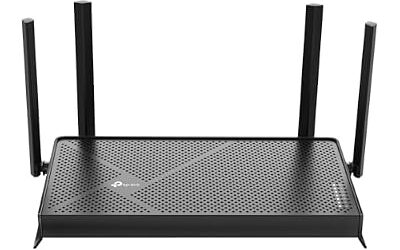
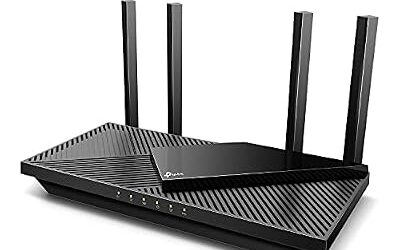
WiFi 7 tri-band · multi-gig ports · status display on the unit · named best balance by Smart-Wired and best overall by Cablepapa
Technerdo describes it as the value pick with most of the GT-BE98 Pro’s performance at a lower cost. Sources list quite different prices for the BE800, from full retail down to deep sale tiers, which makes price history important. A Black Friday 2025 roundup shows how far this model has fallen during previous sales.
TP-Link Archer GE800 – Best for Gaming Features Without the Flagship
WiFi 7 tri-band · gaming-focused features and QoS · first place in a SmarterRanking gaming list with a score of 90
It targets gamers who want prioritisation and gaming modes. Fewer outlets review it, so cross-check with a second source and confirm the port set and band layout on TP-Link’s page.
eero Max 7 – Best for Large Homes With Easy Setup
WiFi 7 mesh · app-based setup · multi-gig ports · 1.781Gbps at 15 feet and 16.8Mbps at 90 feet in Tom’s Guide measurements
Technerdo says the eero Max 7 suits a non-technical household with a large home. Gagadget notes the mesh handles networking decisions automatically. The trade-off is fewer advanced gaming controls than ASUS, and some eero features may require a subscription, so read what is included before buying.
Budget Tier: Entry WiFi 7
Netgear Nighthawk RS300 – Best for Entry-Level WiFi 7
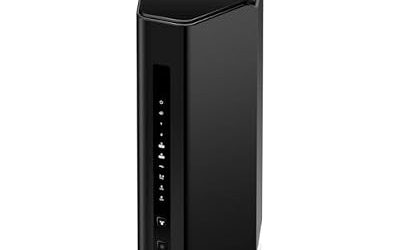
WiFi 7 · 2.5GbE port · limited ports · no advanced gaming QoS reported
The RS300 is Netgear’s entry WiFi 7 router and the weakest gaming option in this group, according to reviewers. It suits a small home with a handful of devices and a modest internet plan. If you game on wired Ethernet, check that the router has enough LAN ports for your devices.
Pick X If… Decision Table
| If you… | Pick | Why |
|---|---|---|
| Want the best all-round router | ASUS RT-BE96U | Top pick in several roundups, no subscription |
| Want strong value | TP-Link Archer BE800 | Balance of price and features |
| Game competitively with many devices | ASUS ROG Rapture GT-BE98 Pro | Gaming QoS and a stable 6GHz radio |
| Live in a large home | eero Max 7 | Easy mesh |
| Have a small home and a tight budget | Netgear Nighthawk RS300 | Entry WiFi 7 with 2.5GbE |
| Want a gaming-first interface | TP-Link Archer GE800 | Gaming features on a tri-band router |
When to Buy: Early vs Black Friday vs Cyber Monday
Router deals typically begin in early November and continue through Cyber Monday on 30 November. Previous-generation WiFi 6E and WiFi 7 models often reach their lowest tiers near the main sale weekend, while new launches see smaller markdowns. Networking stock is limited, so a mid-November offer can beat waiting for a doorbuster. Confirm return terms, since many people keep a router on the network for a week before they notice problems.
Deal Red Flags
- Look-alike model codes. Check that the listing is the WiFi 7 model and not a WiFi 6 or 6E sibling with a similar name.
- Combined speed claims. Numbers like “19Gbps” add up all bands; no single device reaches that.
- Missing port detail. If the listing does not state 2.5G or 10G ports, check the maker page.
- Subscription lock-in. Security, parental or QoS features may need a paid plan on some brands.
- Inflated “was” pricing. Use price-history habits and compare with the lowest tier you have seen recently.
- Bundles with extenders. A bundled extender may not support wired backhaul or WiFi 7.
- Old data. Many reviews are months old; firmware changes can improve or worsen performance.
How Latency, Not Speed, Decides Gaming Quality
Online games send small packets, so ping and jitter matter far more than peak throughput. A router that holds a stable connection under load beats one with a bigger headline number. Reviewers who measure gaming performance look at latency under load, 6GHz stability and how well QoS separates a game from a large download. Bufferbloat, the delay that builds when a link is saturated, is a common cause of lag spikes, and QoS or smart queue features can reduce it when configured. Feature and menu names vary by maker, so follow the router manual.
Distance and interference still apply. The 6GHz band offers wide channels and little congestion but has shorter range and weaker wall penetration than 5GHz or 2.4GHz. In a house with several floors, a console on another level may do better on 5GHz or on a wired link. If you are not sure, put the console on Ethernet and keep WiFi for phones and laptops.
Consider your internet plan too. WiFi 7 routers and 10G ports do nothing for a plan that tops out at a few hundred megabits, so match the router to what you pay for and to the devices you own. If your modem is separate, confirm it supports your plan speed and that the router WAN port can handle it, since many buyers upgrade the router and discover the modem is the bottleneck.
Security matters on a device that guards your home network. Choose a brand with a record of firmware updates, turn on automatic updates if offered, and disable remote administration unless you need it. A router that stops receiving updates after two or three years is poor value at any sale tier.
Setup Tips for Gaming
- Place the router in a central, open location, away from metal and microwaves.
- Use Ethernet for consoles and desktop PCs whenever possible.
- Use the 6GHz band for devices that support it and are within a room or two of the router.
- Enable QoS or game prioritisation if your plan is shared and you notice lag spikes. Menu names vary by brand, so follow the manual.
- Update firmware after setup and change the default admin password.
- If you use mesh, wire the nodes with Ethernet backhaul where possible.
Frequently Asked Questions
What is the best WiFi 7 router for gaming in 2026?
Reviewers split between the ASUS RT-BE96U, the TP-Link Archer BE800 and the ASUS ROG Rapture GT-BE98 Pro. Choose by budget, home size and the ports you need.
Do I need WiFi 7 for gaming?
No, not for wired consoles and PCs. WiFi 7 helps if many devices share the network and your devices support it. A wired connection gives the lowest latency.
Are 2.5G and 10G ports worth it?
Yes if your internet plan or your local network exceeds 1Gbps. For most gaming, a 2.5G port is enough, and 10G suits fast fibre plans and NAS transfers.
Is mesh better than a single router?
Mesh helps in large or multi-floor homes where one router cannot cover everything. In smaller homes, a single strong router is simpler and often faster. Wired backhaul makes mesh far more reliable.
What does MLO do?
Multi-Link Operation lets a compatible device use two bands at once for speed or stability. Benefits depend on client support, so treat it as a bonus.
Is a Black Friday WiFi 7 router deal worth it?
Yes if it is the exact model you want at a clearly lower price than its recent history. Confirm the port set, warranty and return window before buying.