🛒 Best Price Today on Amazon
Prime members get fast, free shipping on everything above, plus member-only deals. New members get a 30-day free trial — cancel anytime.
- Quick Answer: Which Ultrawide Should You Target?
- Ultrawide Monitor Comparison Table
- Best Ultrawide Monitor Black Friday Deals 2026: What to Target
- 34-Inch 3440×1440 vs 49-Inch 5120×1440
- OLED vs VA on an Ultrawide
- Game Support and GPU Load
- Curved vs Flat
- Budget Tier: Previous-Generation OLED Bargains
- Mid-Range Tier: Under-the-Flagship 34-Inch OLED
- Premium Tier: 360Hz 34-Inch and 49-Inch OLED
- Pick X If… Decision Table
- When to Buy: Early vs Black Friday vs Cyber Monday
- Deal Red Flags
- Desk Space and Setup
- Alternatives Worth Knowing
- Frequently Asked Questions
Updated November 2026 – For the best ultrawide monitor Black Friday deals, target a 34-inch 3440×1440 OLED such as the ASUS ROG Swift OLED PG34WCDN or MSI MPG 341CQR X36 for most gamers, and the Samsung Odyssey OLED G9 or MSI MPG 491CQP only if you want the 49-inch super ultrawide experience and have a strong graphics card.
An ultrawide monitor changes how a game feels more than almost any other upgrade, but it also changes what your graphics card has to do, how much desk you need and which games behave properly. This guide covers the two formats that matter, 34-inch 21:9 at 3440×1440 and 49-inch 32:9 at 5120×1440, compares OLED and VA panels, explains game support and GPU load, and sets out what to look for in a sale. Deals change daily, so compare any live listing against the spec lines below rather than trusting a headline discount.
Quick Answer: Which Ultrawide Should You Target?
- Best 34-inch overall: the ASUS ROG Swift OLED PG34WCDN, which RTINGS names as its best 34-inch monitor and best ultrawide gaming monitor.
- Newest 34-inch QD-OLED: the MSI MPG 341CQR X36, TFTCentral’s pick, with an early-2026 “Gen 5” QD-OLED panel.
- Best overall per TechRadar: the Alienware AW3426DW, a tandem OLED model.
- Best value OLED: the Alienware AW3425DW, and from the previous generation the Alienware AW3423DWF, which PC Gamer calls the best budget OLED ultrawide.
- Best 49-inch: the Samsung Odyssey OLED G9, with the MSI MPG 491CQP and Philips Evnia 49M2C8900 as alternatives.
Ultrawide Monitor Comparison Table
| Model | Size / resolution | Panel | Best for | Limits |
|---|---|---|---|---|
| ASUS ROG Swift OLED PG34WCDN | 34-inch / 3440×1440 | QD-OLED, 360Hz | Top 34-inch performance | Premium tier |
| MSI MPG 341CQR X36 | 34-inch / 3440×1440 | Gen 5 QD-OLED, 360Hz | Latest panel, brightness | Premium tier |
| Alienware AW3426DW | 34-inch / 3440×1440 | Tandem OLED | Bright, high-contrast image | Upper price tier |
| MSI MPG 341CQPX | 34-inch / 3440×1440 | QD-OLED | Value under the top tier | Fewer extras |
| Alienware AW3425DW | 34-inch / 3440×1440 | QD-OLED, 240Hz | Value OLED | Lower refresh than newest |
| Alienware AW3423DWF | 34-inch / 3440×1440 | QD-OLED (previous generation) | Budget OLED | Older panel |
| Samsung Odyssey OLED G9 | 49-inch / 5120×1440 | OLED, curved | Super ultrawide immersion | Heavy GPU load |
| MSI MPG 491CQP | 49-inch / 5120×1440 | QD-OLED, 240Hz | Large-format alternative | Desk space |
| Philips Evnia 49M2C8900 | 49-inch / 5120×1440 | QD-OLED, 240Hz | Alternative 32:9 | Desk space |
Best Ultrawide Monitor Black Friday Deals 2026: What to Target
Pick the format first. A 34-inch 3440×1440 screen is the mainstream ultrawide: it has about 4.95 million pixels, roughly 34 percent more than a standard 1440p monitor, and most mid-range and high-end graphics cards can drive it at high frame rates. A 49-inch 5120×1440 screen is the super ultrawide: it has the resolution of two 27-inch 1440p monitors side by side, which TFTCentral uses as a comparison, and it needs a much stronger GPU and a deeper desk.
Within each format, the panel type decides the price tier. Reviewers at RTINGS, TFTCentral and TechSpot all treat OLED as the best choice for contrast and response time, and the discussion has moved to which OLED generation to buy. Early-2026 “Gen 5” QD-OLED models are brighter and reach higher refresh rates than earlier ones, which makes the previous generation a candidate for clearance discounts.
34-Inch 3440×1440 vs 49-Inch 5120×1440
| Factor | 34-inch 21:9 | 49-inch 32:9 |
|---|---|---|
| Resolution | 3440×1440 | 5120×1440 |
| Pixels per frame | about 4.95 million | about 7.37 million |
| GPU demand | Moderate to high | High, close to a 4K load |
| Desk width | Fits most desks | Needs a very wide desk |
| Game support | Widely supported | Fewer games handle 32:9 properly |
| Best for | All-round gaming and work | Racing, flight and sim titles |
The pixel counts follow directly from the resolutions: 3440 by 1440 is about 4.95 million pixels, and 5120 by 1440 is about 7.37 million, which is within reach of the roughly 8.3 million pixels in a 4K frame. That is why a 49-inch super ultrawide behaves like a 4K monitor for GPU planning purposes.
OLED vs VA on an Ultrawide
OLED ultrawides, both QD-OLED and tandem or WOLED designs, give per-pixel dimming, near-instant response and wide color. VA ultrawides cost less and give strong native contrast, but they are slower in dark scenes and often rely on a stronger curve. TFTCentral cautions that QD-OLED panels have reduced contrast in bright rooms because ambient light lifts black levels, so a dim room suits OLED best. Burn-in considerations apply to every OLED; read the maker’s care guidance and warranty terms before buying.
VA remains a reasonable choice for single-player games and mixed work in a budget tier, but the best ultrawide gaming panels reviewers currently discuss are OLED.
Game Support and GPU Load
Not every game supports ultrawide properly. Many modern PC titles handle 21:9 natively, but some cutscenes, user interfaces or competitive modes still show black bars or stretch the image. Super ultrawide 32:9 support is less common, and some games lock the field of view or leave interface elements at the far edges where they are hard to see. Before buying, check the games you play most on a community resource that tracks widescreen support, and read the maker’s documentation for how the monitor scales picture modes.
GPU load scales with pixels. A 34-inch 3440×1440 monitor is a good match for a mid-range to high-end card, and upscaling from the GPU makers can help close the gap. A 49-inch 5120×1440 monitor is closer to a 4K load, so high refresh rates in demanding games call for a high-end GPU. A 360Hz 34-inch panel will only show its full benefit in lighter or esports-style games.
Connections matter as well. High refresh at these resolutions typically relies on DisplayPort, and some models use compression to reach their top refresh rate, so check the manual for caveats with your graphics card. Console support for ultrawide is limited, so these monitors are mainly PC products.
Curved vs Flat
Almost all ultrawides are curved, and the curve matters most on the 49-inch size, where the edges would otherwise sit too far away from your eyes. On a 34-inch, a gentle curve reduces edge distortion without bending straight lines too much for productivity. Choose flat only if you do a lot of design work, and be aware that flat ultrawides are rarer.
Budget Tier: Previous-Generation OLED Bargains
Sales are the best time to buy last year’s OLED. The previous generation gives most of the OLED experience at a lower price, with older panel brightness and a lower refresh rate as the compromise.
Alienware AW3423DWF – Best for budget OLED ultrawide
34-inch · 3440×1440 · QD-OLED · previous generation · mid-range tier on sale
PC Gamer calls the AW3423DWF the best budget OLED ultrawide because it is often discounted and has great image quality. It is an older panel, so reviewers note it is less bright than the 2026 models, but for a dim room it remains a strong choice.

Alienware AW3423DWF Curved QD-OLED Gaming Monitor - 34-inch Quantum Dot, 0.1Ms 165Hz 21:9, 99.3% DCI-P3 Color Gamut, VESA DisplayHDR, 400, AMD FreeSync Premium Pro - Black
Included for 'Best Ultrawide Monitor Black Friday Deals 2026' as a representative home product in this roundup; selection reflects the product set returned for this topic.
View on AmazonAlienware AW3425DW – Best for value 240Hz QD-OLED
34-inch · 3440×1440 · QD-OLED · 240Hz · mid-range to premium tier
TechSpot highlights the AW3425DW as a budget 34-inch OLED, with a QD-OLED panel at 240Hz. It is a common sale target because newer models have taken its place at the top of the range.
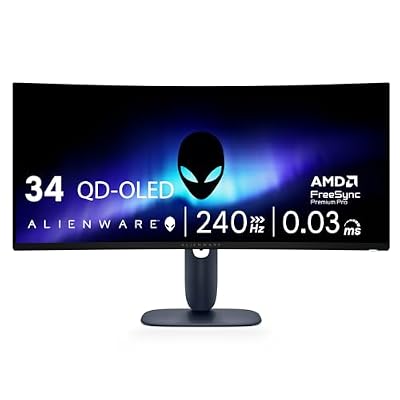
Alienware 34 240Hz QD-OLED Curved Gaming Monitor - AW3425DW - 34.2-inch WQHD (3440 x 1440) 0.03ms Display, 1800R Curve, AMD FreeSync Premium Pro, VESA AdaptiveSync, DisplayHDR TrueBlack 400
Included for 'Best Ultrawide Monitor Black Friday Deals 2026' as a representative home product in this roundup; selection reflects the product set returned for this topic.
View on AmazonMid-Range Tier: Under-the-Flagship 34-Inch OLED
The mid-range tier is where 34-inch OLED meets reasonable pricing. These monitors have the panel quality of the premium range with fewer extras.
MSI MPG 341CQPX – Best for OLED value under the flagship tier
34-inch · 3440×1440 · QD-OLED · high refresh · mid-range to premium tier
PCWorld chooses the MPG 341CQPX as its ultrawide pick, saying it sells for under the top of the range and has very good contrast and vibrancy. It is a good candidate when the premium models are out of budget.
Alienware AW3426DW – Best for bright, high-contrast tandem OLED
34-inch · 3440×1440 · tandem OLED · high refresh · premium tier
TechRadar calls the AW3426DW its best overall ultrawide, citing a five-layer tandem OLED stack and high brightness. A brighter panel helps in rooms with more ambient light, where other OLEDs can look washed out.

Alienware 34 Gaming Monitor AW3426DW, UWQHD QD-OLED, 280Hz, 0.03ms, G-SYNC | DisplayHDR True Black 500, 1,500,000:1 Contrast, 99% DCI-P3, USB-C 15W, 2 HDMI 2.1, 1 DP 1.4, VESA 100x100
Included for 'Best Ultrawide Monitor Black Friday Deals 2026' as a representative home product in this roundup; selection reflects the product set returned for this topic.
View on AmazonPremium Tier: 360Hz 34-Inch and 49-Inch OLED
ASUS ROG Swift OLED PG34WCDN – Best for top 34-inch performance
34-inch · 3440×1440 · QD-OLED · 360Hz · premium tier
RTINGS names the PG34WCDN the best 34-inch monitor it has tested and its best ultrawide gaming monitor. TechSpot recommends it alongside the MSI MPG 341CQR X36 and describes both as the latest 360Hz QD-OLEDs. It is a strong choice for fast shooters and racing games.

ASUS ROG PG34WCDN 34 Inch 1440p 360Hz Ultrawide RGB OLED Gaming Monitor | Tandem RGB QD-OLED, RGB Stripe Pixel, OLED Care Pro, DisplayHDR 500 True Black, USB-C 90W, 0.03ms
Included for 'Best Ultrawide Monitor Black Friday Deals 2026' because the listing lists an explicit depth/thickness, which is the attribute this article compares.
View on AmazonMSI MPG 341CQR X36 – Best for the latest QD-OLED panel
34-inch · 3440×1440 · Gen 5 QD-OLED · 360Hz · premium tier
TFTCentral picks the MPG 341CQR X36 and says early-2026 Gen 5 QD-OLED panels improved the 34-inch category significantly, with a higher refresh rate and better brightness than older generations. TechSpot also recommends it.

MSI MPG 341CQR X36-34 UWQHD Gaming Monitor (3440x1440, 1800R), 5ª gen QD-OLED, 360Hz, 0.03ms, HDR Customization, Adaptive-Sync, KVM, HDMI 2.1, DP 2.1, USB-C (98W PD), AI Vision, Black
Included for 'Best Ultrawide Monitor Black Friday Deals 2026' as a representative home product in this roundup; selection reflects the product set returned for this topic.
View on AmazonSamsung Odyssey OLED G9 – Best for a 49-inch super ultrawide
49-inch · 5120×1440 · OLED · curved · 32:9 · premium tier
PC Gamer calls the Odyssey OLED G9 (G93SC and G95SC variants) the best 32:9 ultrawide for gaming, and TechSpot lists the G95SC as its best super ultrawide. It is a large screen that needs a strong GPU and a deep, wide desk, and it suits racing, flight and sim games more than competitive shooters.

Samsung 49" Odyssey OLED G9 (G91SD) Dual QHD QD-OLED Curved Gaming Monitor | 144Hz, 0.03ms, G-Sync Compatible, AMD FreeSync Premium Pro, Ergonomic Stand, 3 Year Warranty (LS49DG910SNXZA)
Included for 'Best Ultrawide Monitor Black Friday Deals 2026' as a representative home product in this roundup; selection reflects the product set returned for this topic.
View on AmazonMSI MPG 491CQP – Best for a large-format OLED alternative
49-inch · 5120×1440 · QD-OLED · 240Hz · premium tier
TFTCentral calls the MPG 491CQP (also sold as the 491CQPX) a very good large-format OLED with a 240Hz refresh rate. At 5120×1440 it is roughly equivalent to two 27-inch 1440p monitors.
Philips Evnia 49M2C8900 – Best for another 32:9 QD-OLED option
49-inch · 5120×1440 · QD-OLED · 240Hz · premium tier
TechRadar recommends the Evnia 49M2C8900 as a 32:9 QD-OLED with a 240Hz refresh rate. It gives a third 49-inch option to compare during a sale.
Pick X If… Decision Table
| Pick this | If you… |
|---|---|
| ASUS ROG Swift OLED PG34WCDN | want the top-ranked 34-inch ultrawide for fast games |
| MSI MPG 341CQR X36 | want the newest brighter Gen 5 QD-OLED |
| Alienware AW3426DW | play in a brighter room |
| MSI MPG 341CQPX | want OLED under the flagship tier |
| Alienware AW3425DW or AW3423DWF | want the cheapest way into OLED ultrawide |
| Samsung Odyssey OLED G9 | have a strong GPU and a wide desk, and play sims |
| MSI MPG 491CQP or Philips Evnia 49M2C8900 | want a 49-inch alternative to Samsung |
When to Buy: Early vs Black Friday vs Cyber Monday
Black Friday 2026 is Friday 27 November, with Thanksgiving on 26 November and Cyber Monday on 30 November. Ultrawide monitors often see early promotions in the first half of November, particularly for previous-generation models being cleared before newer panels arrive. Black Friday gives the broadest range of discounts, while Cyber Monday sometimes brings stock that sold out earlier. Track the model you want for a few weeks first so you know its normal range, and buy early if the listing already matches your target spec and the return window covers the holidays.
Deal Red Flags
- Inflated “was” prices: a discount from an unrealistic list price is not a real saving. Use price-history habits and note the lowest recent price.
- Similar model names: the AW3423DWF, AW3425DW and AW3426DW are different monitors. Match the full model number.
- Refresh rate and port differences: a cheaper variant may have a lower refresh rate or fewer ports.
- Bundle traps: judge the monitor on its own, not the bundled accessories.
- Last-generation clearance: acceptable if the older panel meets your needs, but compare brightness and warranty.
- Return windows and warranty: check dates and burn-in coverage terms, and inspect for dead pixels promptly.
Desk Space and Setup
A 34-inch ultrawide is about 32 inches wide and fits most desks. A 49-inch super ultrawide is about 47 inches wide and needs a desk of at least that width, plus deep enough space to keep the screen at a comfortable distance. A monitor arm can free space, but check the weight and VESA pattern in the manual. Cable routing matters too, because DisplayPort cables rated for the required bandwidth are needed for the highest refresh rates.
Alternatives Worth Knowing
- 32-inch 4K OLED: better pixel density and wide game support, but a narrower field of view.
- 27-inch 1440p OLED: lower GPU demand and good for esports.
- Dual monitors: cheaper and flexible for productivity, though a bezel runs down the middle.
Frequently Asked Questions
Is a 34-inch or 49-inch ultrawide better for gaming?
A 34-inch 3440×1440 monitor suits most players because games support it widely and mid-range to high-end GPUs can drive it. A 49-inch 5120×1440 monitor is more immersive but demands a strong GPU and a very wide desk.
Will my graphics card handle an ultrawide monitor?
A 34-inch 3440×1440 panel has about 34 percent more pixels than a standard 1440p screen, so a mid-range card can manage it with sensible settings. A 49-inch 32:9 panel is closer to a 4K load.
Do all games support ultrawide?
No. Many modern PC games support 21:9, but 32:9 support is less common, and some cutscenes or menus show black bars. Check support for your main games first.
Is OLED worth it on an ultrawide?
Reviewers at RTINGS, TFTCentral and TechSpot rate OLED as the best option for contrast and response. The trade-offs are burn-in care and reduced contrast in bright rooms on QD-OLED models.
Should I buy a previous-generation OLED ultrawide on sale?
It can be good value. PC Gamer calls the Alienware AW3423DWF a strong budget OLED because it is often discounted. The newer 2026 panels are brighter and faster, so decide whether that matters for your room and games.
Do ultrawide monitors work with consoles?
Support is limited, because consoles output standard 16:9 resolutions. Most ultrawides will show black bars or stretch the image, so these monitors are mainly for PC gaming.