🛒 Best Price Today on Amazon
Prime members get fast, free shipping on everything above, plus member-only deals. New members get a 30-day free trial — cancel anytime.
Psu Power Cables can improve cable management, appearance, and GPU connectivity, but compatibility matters far more than color or sleeving. Some products replace modular PSU cables, while others are universal extensions. The best choice depends on your exact power supply, GPU connector, cable length, wire construction, and PC case layout.
Quick Comparison
| Product | Best For | Key Advantage | Limitation |
|---|---|---|---|
| Corsair Premium Type-5 Pro Kit | Best Overall | Complete direct-replacement set | Only compatible with Corsair Type-5 PSUs |
| CableMod C-Series Pro ModMesh | Best Corsair Alternative | Stiff premium sleeving and clean cable combs | Must match exact Corsair PSU family |
| CableMod E-Series Pro ModFlex | Best EVGA-Compatible Kit | Flexible individually sleeved replacements | Compatibility varies by EVGA PSU model |
| AsiaHorse 16AWG Extension Kit | Best Value Extensions | Works without changing PSU-side cables | Adds extra cable length behind motherboard |
| EZDIY-FAB Sleeved Extension Kit | Best Budget Aesthetic Upgrade | Easy color customization | Extensions do not replace stock PSU cables |
| Lian Li Strimer Wireless Cables | Best RGB Build | Addressable lighting integrated with extensions | Expensive and adds cable bulk |
Best PSU Power Cable Kits
Corsair Premium Individually Sleeved Type-5 Pro Kit
Best For: Modern Corsair power supplies that use Type-5 modular cables.
Key Features:
- Direct modular replacement cables
- 24-pin ATX cable
- EPS CPU cables
- PCIe 6+2-pin cables
- Modern 16-pin GPU cable in supported kits
- Individually sleeved construction
- Pre-installed cable combs
- Multiple color choices
Corsair’s Type-5 Pro Kit is the safest premium choice when your power supply explicitly uses Corsair Type-5 cabling. Unlike an extension set, these cables connect directly from the PSU to the motherboard, CPU, graphics card, and drives, reducing unnecessary cable length behind the motherboard tray.
The individually sleeved design makes each wire easier to shape into controlled curves, while cable combs keep visible sections parallel. The major limitation is compatibility: modular PSU pinouts are not universal, so a Type-5 set must never be installed on an unsupported Corsair model simply because the connectors appear to fit.
What Makes It Different: This is a full replacement solution rather than a decorative extension kit. That allows cleaner cable routing in cases where the stock PSU cables are bulky or difficult to bend.
Pros:
- Direct PSU replacement design
- Complete motherboard and GPU cable coverage
- Clean individually sleeved appearance
Cons:
- Corsair Type-5 compatibility only
- More expensive than universal extensions
Who Should Buy It: Choose this kit if you own a confirmed Type-5 Corsair PSU and want cleaner routing without adding another layer of extension cables.
CableMod C-Series Pro ModMesh Kit
Best For: Compatible Corsair RM, RMx, RMi, and related PSU families.
Key Features:
- Direct PSU replacement design
- Individually sleeved ModMesh cables
- 24-pin motherboard cable
- EPS CPU power cables
- PCIe GPU cables
- Cable combs
- Multiple color combinations
- PSU-series-specific pinout
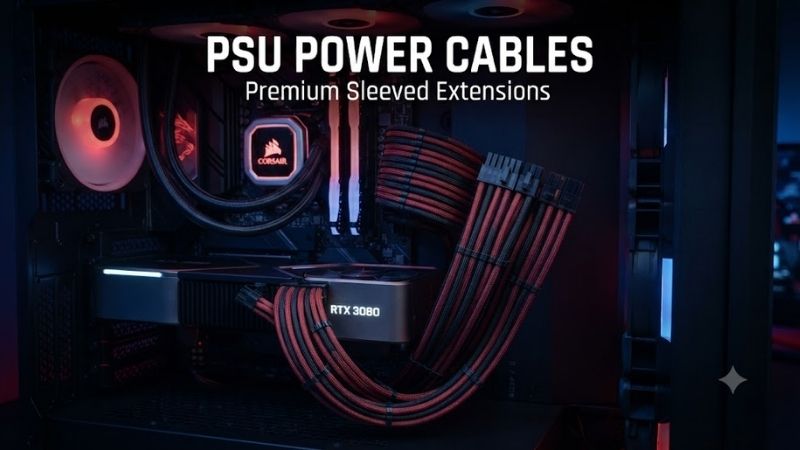
CableMod’s C-Series kits are popular with custom PC builders because they replace compatible Corsair modular cables entirely instead of attaching to the original leads. ModMesh sleeving has a relatively firm feel, helping visible cable runs hold smooth curves between the motherboard tray, GPU, and power connectors.
That stiffness can also become a limitation in compact cases. Tight bends behind the motherboard or near a side panel may be easier with softer cables. More importantly, C-Series naming covers specific compatibility groups, so builders must verify the exact Corsair PSU model and cable generation before installation.
What Makes It Different: ModMesh focuses heavily on visual structure. The cables hold organized parallel runs particularly well when combined with combs, making them attractive in glass-sided gaming PCs.
Pros:
- Premium structured sleeving
- Direct replacement cables
- Wide range of aesthetic options
Cons:
- Firmer than highly flexible sleeving
- Exact PSU compatibility must be verified
Who Should Buy It: Choose this kit for a supported Corsair power supply when aesthetics and clean cable shaping matter as much as functionality.
CableMod E-Series Pro ModFlex Kit
Best For: Compatible EVGA modular power supplies.
Key Features:
- Direct modular PSU cables
- Flexible ModFlex sleeving
- Motherboard, CPU, and GPU cables
- Cable comb support
- Multiple color options
- PSU-specific connector pinout
- Softer routing than ModMesh
CableMod E-Series Pro ModFlex kits target compatible EVGA modular power supplies and use softer sleeving than the company’s ModMesh line. The increased flexibility is helpful when routing CPU EPS cables through narrow top cutouts or bending GPU power leads around tight case openings without placing unnecessary stress on connectors.
As with every direct modular replacement kit, the PSU model matters more than the connector shape. EVGA has sold multiple PSU families made on different internal platforms, so a cable labeled for one E-Series compatibility group should not be assumed safe for every EVGA-branded power supply.
What Makes It Different: ModFlex is better suited to builders who want individually sleeved replacement cables but prioritize easy routing over the firmer, highly structured appearance of ModMesh.
Pros:
- Flexible sleeving
- Direct replacement design
- Cleaner routing in tight cases
Cons:
- Requires exact EVGA compatibility
- Softer cables may not hold rigid curves as well
Who Should Buy It: Pick this kit if you have a supported EVGA PSU and need premium sleeved cables that are easier to bend through compact cable-management spaces.
AsiaHorse 16AWG PSU Extension Cable Kit
Best For: Budget gaming builds that need better-looking visible cables without changing PSU-side wiring.
Key Features:
- Extension-style installation
- Common 24-pin ATX extension
- CPU EPS extension
- PCIe GPU extensions
- Individually sleeved appearance
- Cable combs
- Multiple color combinations
- Compatible with many standard PSU cables
AsiaHorse extension kits are attractive because they avoid the biggest compatibility risk associated with modular PSU replacements. The extensions connect to the component end of your existing motherboard, CPU, or GPU cables, so the original PSU-side pinout remains untouched. That makes installation easier across many power-supply brands.
The disadvantage is additional cable length. The original PSU cables still remain inside the system, and the extensions connect to them behind the visible area. Cases with shallow rear cable channels can become crowded, particularly around the 24-pin motherboard extension where two relatively large connectors must be hidden.
What Makes It Different: You can dramatically change the visible cable color and routing without replacing proprietary modular PSU cables.
Pros:
- Broad compatibility as extensions
- Lower cost than premium replacement kits
- Multiple colors and cable combs
Cons:
- Adds cable bulk
- Stock PSU cables must remain installed
Who Should Buy It: Choose AsiaHorse if appearance is the main goal and you want a lower-risk upgrade that does not require matching the PSU-side modular pinout.
EZDIY-FAB Sleeved PSU Extension Kit
Best For: Affordable aesthetic upgrades in mainstream gaming PCs.
Key Features:
- Universal extension approach
- 24-pin motherboard extension
- EPS CPU extension
- PCIe GPU extensions
- Sleeved cable construction
- Cable combs
- Multiple color options
- Works with existing PSU leads
EZDIY-FAB extension kits follow the same fundamental approach as AsiaHorse: they extend the existing power cables instead of plugging directly into the modular power supply. That makes them useful for builders who own non-modular PSUs or who cannot find a trusted direct replacement set for their exact power-supply model.
The kit is most valuable in glass-sided PCs where only the final cable sections are visible. You can hide the original black PSU wiring behind the motherboard tray and expose the sleeved extensions near the motherboard and graphics card. The trade-off is additional connectors and more wiring to manage inside the case.
What Makes It Different: EZDIY-FAB offers a straightforward path to coordinated cable colors without requiring a premium custom replacement set.
Pros:
- Easy compatibility
- Good visual upgrade for the cost
- Suitable for non-modular PSUs
Cons:
- Adds more connectors and cable length
- Does not simplify hidden PSU wiring
Who Should Buy It: Pick this kit for a budget gaming build where visual improvement matters but replacing the original power cables is unnecessary or impractical.
Lian Li Strimer Wireless Power Extensions
Best For: RGB showcase PCs and highly visible gaming builds.
Key Features:
- Illuminated power cable extensions
- 24-pin motherboard options
- Modern GPU power options
- Addressable lighting effects
- Wireless lighting-control ecosystem
- Flexible light guides
- Designed for glass-sided cases
- Multiple Strimer configurations
Lian Li Strimer products turn normally passive power leads into part of the lighting system. Versions are available for major motherboard and graphics-card power connections, placing illuminated light guides directly over the extension cable. This creates a much brighter visual element than ordinary colored sleeving or static cable combs.
The lighting hardware adds thickness and cost, so Strimer cables are not ideal when the goal is simply efficient cable management. They also remain extensions rather than universal replacement PSU cables, meaning the original power leads still need to be routed behind the visible section of the build.
What Makes It Different: Strimer prioritizes addressable lighting over traditional sleeving, making the power cables themselves a major RGB component.
Pros:
- Highly visible RGB effects
- Motherboard and GPU options
- Distinctive showcase appearance
Cons:
- More expensive than standard extensions
- Adds substantial cable bulk
Who Should Buy It: Choose Strimer cables for a tempered-glass gaming PC where lighting design is a major part of the build and extra cable thickness is acceptable.
How to Choose PSU Power Cables
Replacement Cables vs Extension Cables
Replacement cables connect directly to a modular PSU and therefore must use the exact electrical pinout required by that power supply. Two modular cables can use identical-looking connectors while wiring the pins differently, making an incompatible replacement capable of damaging expensive PC components.
Extensions connect to the component side of existing PSU cables. The motherboard, EPS, and PCIe ends follow standardized component-side layouts, which makes extensions broadly usable. They are safer for aesthetic upgrades, but they increase total cable length and do not remove the original wiring from the case.
Verify Modular PSU Compatibility
Never identify a modular cable only by brand. One manufacturer may use several pinout generations across different PSU families, and even supplies with similar names can require different cable types. Check the exact model number and the cable manufacturer’s compatibility information before connecting replacement leads.
Do not perform a trial installation just because a cable physically plugs into the PSU. The connector housing does not guarantee electrical compatibility. Using an incorrect modular cable can place 12V on a pin intended for another voltage or ground, potentially damaging drives, graphics cards, or motherboard hardware.
Understand 24-Pin, EPS, and PCIe Connectors
The 24-pin ATX cable powers the motherboard, while EPS 4+4-pin or 8-pin connectors supply the CPU power circuitry near the processor socket. PCIe 6+2-pin cables traditionally power graphics cards. These connectors serve different electrical roles and should never be interchanged based on similar eight-pin shapes.
Modern GPUs may instead use a 16-pin 12VHPWR or revised 12V-2×6 connection. If your PSU supports a native cable for the GPU, that is generally cleaner than using several 8-pin adapters. Always verify the PSU’s supported cable type and the graphics card manufacturer’s power requirements before installation.
Check Wire Gauge and Cable Quality
Wire gauge influences current capacity, resistance, flexibility, and thickness. Lower AWG numbers indicate thicker conductors. High-power GPU cables deserve particular attention because multiple amps may pass through individual conductors when a graphics card is heavily loaded.
Do not judge quality purely by the thickness of the outer sleeving. Decorative material can make a cable appear substantial without revealing the conductor size, terminal quality, or internal construction. For direct replacements, established PSU-specific compatibility is more important than color, braid pattern, or cable-comb design.
Measure Cable Length Before Ordering
Large full-tower cases can require long CPU EPS cables because the connection must travel from the PSU chamber to the top edge of the motherboard. Compact cases have the opposite problem: overly long replacement cables create large bundles that are difficult to hide behind the motherboard tray.
Extensions need even more planning because their entire length is added to the original PSU cable. Measure the visible run you want, then check whether there is enough hidden space for the original cable and extension connector. This is especially important with stiff 24-pin bundles and illuminated RGB extensions.
Pay Extra Attention to GPU Power Cables
High-power graphics cards place significant electrical demand on GPU cables and connectors. Use the PSU manufacturer’s recommended native cables whenever practical, avoid questionable splitters, and fully seat every connector. A partially inserted high-current connector can create resistance and excessive heat.
For 12V-2×6 or similar 16-pin connectors, allow enough clearance between the GPU and side panel so the cable can route naturally. Avoid forcing a severe bend immediately at the connector body. A clean-looking cable is not worth creating mechanical stress at the most power-sensitive connection in the system.
FAQ
Can I Use PSU Cables From Another Power Supply?
Do not reuse modular PSU cables unless the manufacturers explicitly confirm compatibility. The component-side connectors may be standardized, but the modular PSU-side pinout is not. A cable that fits physically can still send voltage to the wrong pins and damage the motherboard, graphics card, SSDs, or other components.
Are PSU Extension Cables Universal?
Motherboard, EPS, and conventional PCIe extensions are more universal than modular replacement cables because they connect to the standardized component ends of existing PSU leads. You still need to verify the connector type, current requirements, build quality, and GPU configuration before using any extension in a high-power PC.
Do PSU Cable Extensions Reduce Performance?
Properly made extensions of suitable conductor size should not cause a noticeable performance reduction in a normal PC. However, every added connection introduces another electrical interface, so poorly built, damaged, undersized, or loosely connected extensions can increase resistance and become a reliability or heating concern.
What Is the Difference Between EPS and PCIe Cables?
EPS cables deliver power to the CPU section of the motherboard, while PCIe cables power graphics cards and certain expansion hardware. Although both may use eight-position connectors, their keying and electrical arrangements differ. Never force a CPU cable into a GPU connector or substitute one for the other.
Do I Need a 12V-2×6 Cable for a New GPU?
Only if your graphics card uses that connector and your PSU provides a compatible native cable or approved solution. Many older and lower-power GPUs still use conventional 8-pin PCIe connectors. Check the exact graphics card and PSU documentation instead of assuming every new GPU requires the latest 16-pin connection.
Conclusion
The best Psu Power Cables depend first on electrical compatibility and only then on appearance. Corsair Type-5 and CableMod kits are strong direct replacements for supported PSUs, AsiaHorse and EZDIY-FAB simplify cosmetic upgrades with extensions, while Lian Li Strimer cables are the standout choice for RGB-focused gaming builds.