🛒 Best Price Today on Amazon
Prime members get fast, free shipping on everything above, plus member-only deals. New members get a 30-day free trial — cancel anytime.
- Best USB Cords for External Hard Drives Compared
- StarTech USB3AUB50CMB – Best Overall External Hard Drive Cable
- Cable Matters Micro USB 3.0 Cable – Best Value
- UGREEN USB 3.0 Micro-B Cable – Best Longer Cable
- StarTech USB31CUB1M – Best USB-C to Micro-B Cable
- StarTech USB3AUB50CMS – Best Short and Flexible Cable
- How to Choose a USB Cord for an External Hard Drive
- Why an External Hard Drive Keeps Disconnecting
- Can You Use a Phone Micro-USB Cable?
- FAQ
- Conclusion
The best USB cord for external hard drive depends on the connector fitted to your drive. Older WD, Seagate, and Toshiba portable HDDs commonly use USB 3.0 Micro-B, while newer external SSDs increasingly use USB-C. For reliable transfers, choose the correct connector first, then match the cable’s USB speed to the drive and computer.
Quick answer: For most people in 2026, the best usb cord for external hard drive is the Cable — our #1 rated choice. See the full ranked comparison, alternatives and buying advice below.
Best USB Cords for External Hard Drives Compared
| Cable | Best For | Connector | Maximum Rated Speed | Length |
|---|---|---|---|---|
| StarTech USB3AUB50CMB | Best Overall | USB-A to Micro-B | 5Gbps | 1.5 ft |
| Cable Matters Micro USB 3.0 | Best Value | USB-A to Micro-B | 5Gbps | Multiple |
| UGREEN USB 3.0 Micro-B | Best Longer Cable | USB-A to Micro-B | 5Gbps | Up to 2m |
| StarTech USB31CUB1M | Best USB-C Upgrade | USB-C to Micro-B | 10Gbps | 3 ft |
| StarTech USB3AUB50CMS | Best Short Cable | USB-A to Micro-B | 5Gbps | 1.6 ft |
USB cables for external hard drives can look confusing because the connector commonly called “Micro USB 3.0” is actually USB 3.x Micro-B. It is wider than the Micro-USB connector historically used on phones because additional contacts provide SuperSpeed data connectivity.
This connector is still common on portable mechanical hard drives because a single cable can carry data and enough power for many 2.5-inch HDDs. Buying the wrong cable can result in either no physical connection or dramatically reduced transfer performance, so identifying the drive port is more important than choosing a brand.
StarTech USB3AUB50CMB – Best Overall External Hard Drive Cable
Best For: WD, Seagate, Toshiba, and other portable HDDs using USB 3.0 Micro-B
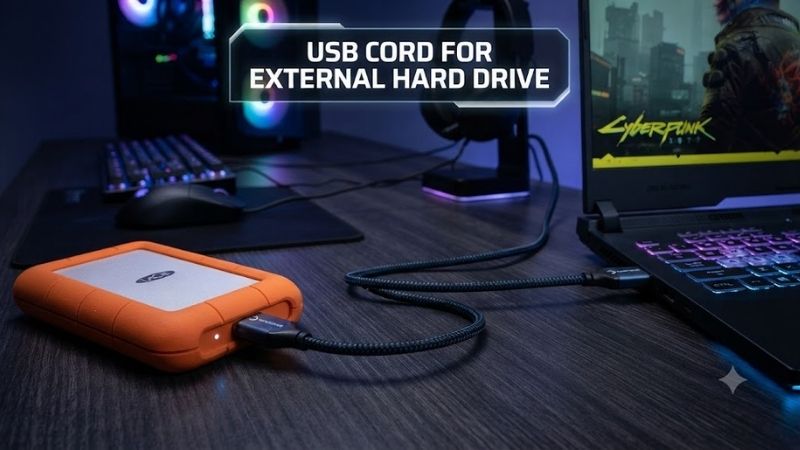
StarTech’s USB3AUB50CMB connects a standard USB Type-A computer port to a USB 3.0 Micro-B device. It is specifically marketed for USB 3.2 Gen 1 external hard drives and supports transfer speeds up to 5Gbps.
The cable is approximately 0.5 meters, or 1.5 feet, long. That relatively short length is particularly useful for portable drives sitting directly beside a laptop because it reduces unnecessary cable clutter while still providing enough flexibility for normal placement.
Key Features
- USB-A male connector
- USB 3.0 Micro-B male connector
- USB 3.2 Gen 1 compatibility
- Up to 5Gbps transfer speed
- Approximately 0.5m length
- Aluminum-Mylar foil shielding
- Braided shielding
- Molded strain relief
- Designed for external hard drives
What Makes It Different
Construction quality is the primary advantage. StarTech uses both foil and braided shielding to reduce interference, while molded connector strain relief helps protect the areas where cables frequently fail after repeated bending.
The 5Gbps specification is also more than enough for a conventional portable HDD. Mechanical 2.5-inch drives normally operate far below the theoretical limit of USB 3.0, so increasing cable bandwidth beyond 5Gbps would not make the hard disk itself spin or read data faster.
Pros
- Correct connector for many portable HDDs
- 5Gbps SuperSpeed support
- Short, clean cable length
- Shielded construction
- Strain-relieved connectors
- Established connectivity brand
Cons
- USB-A host connector only
- Too short for some desktop installations
- More expensive than generic cables
- Not compatible with USB-C-only drives
Use Case
This is an excellent replacement cable when a WD My Passport, Seagate portable drive, Toshiba Canvio, or similar external HDD has a damaged or missing original cable. The short length is especially practical when the drive sits next to a laptop.
Who It’s For
Choose this StarTech cable if your computer has a normal rectangular USB-A port and your hard drive uses the wide USB 3.0 Micro-B connector.
Cable Matters Micro USB 3.0 Cable – Best Value
Best For: Affordable replacement cables for popular external HDDs
Cable Matters offers a USB-A to USB 3.0 Micro-B cable specifically designed for external drives, USB hubs, tablets, and other SuperSpeed peripherals. The manufacturer rates the cable for transfer speeds up to 5Gbps.
Cable Matters specifically lists compatibility with popular storage devices including Toshiba Canvio, Seagate FreeAgent, WD My Passport, and WD Elements. This makes the product particularly easy to identify for users replacing the original cable from one of these common portable-drive families.
Key Features
- USB-A to Micro-B
- Up to 5Gbps
- Designed for external hard drives
- Gold-plated connectors
- Molded strain relief
- Bare copper conductors
- Foil and braid shielding
- Plug-and-play operation
What Makes It Different
Cable Matters focuses on practical compatibility. Instead of presenting the cable mainly as a generic USB accessory, the product documentation explicitly mentions multiple external-hard-drive families.
Gold-plated connectors are included as part of the design. Connector plating alone does not make data transfers faster, but quality contacts, shielding, and strain relief can improve long-term reliability when a cable is frequently inserted, removed, and packed into a laptop bag.
The cable also requires no special driver or software. A supported drive should appear normally in Windows, macOS, or Linux once connected, assuming the disk itself and its file system are functioning correctly.
Pros
- Affordable
- 5Gbps specification
- Broad external HDD compatibility
- Durable connector construction
- Shielded cable
- Multiple lengths typically available
- Plug-and-play
Cons
- USB-A only on the computer side
- Not designed for USB-C SSDs
- Long versions create more cable clutter
- Generic-looking black design
Use Case
This cable works well as a spare that remains in a laptop bag, office drawer, or travel case. It is also useful if you own several older portable drives that share the same Micro-B connector.
Who It’s For
Choose Cable Matters if you want an affordable replacement from an established cable manufacturer and do not need USB-C connectivity.
UGREEN USB 3.0 Micro-B Cable – Best Longer Cable
Best For: Desktop PCs where the external hard drive sits farther from the USB port
UGREEN USB 3.0 to Micro-B cables are widely available in longer lengths such as two meters. Current shopping results show versions marketed for 2.5-inch external hard drives with data-transfer specifications up to 5Gbps.
A two-meter cable is useful when the computer tower sits underneath a desk while the external drive remains on the desktop. A short portable-drive cable may not reach comfortably in this configuration.
Key Features
- USB-A to USB 3.0 Micro-B
- Up to 5Gbps
- Longer cable options
- Suitable for 2.5-inch external HDDs
- Molded connectors
- Widely available
- Designed for data and power
What Makes It Different
Length is the primary advantage. Portable HDD manufacturers often include cables around 30–50cm because those dimensions work well with notebooks, but desktop towers can sit much farther away.
UGREEN’s longer cable options allow the drive to remain somewhere easy to reach without forcing users to place it on the floor or hang it beside the computer case.
Current marketplace listings show 2m UGREEN Micro-B cables around the low-cost accessory price range, making them inexpensive compared with replacing an external drive because its original cable is damaged.
Pros
- Useful long lengths
- 5Gbps support
- Low cost
- Compatible with common external HDDs
- Widely available
- Good desktop-PC option
Cons
- Longer cable is harder to manage
- Generic marketplace versions can be confused with genuine products
- USB-A host connection
- Longer passive cables are unnecessary for laptop use
Use Case
Use a longer UGREEN cable when your desktop’s SuperSpeed USB port is located at the rear of the tower or the external drive needs to sit on another part of the desk.
Who It’s For
Choose it if cable reach matters more than minimizing clutter. A 0.5m cable remains preferable for laptop users who place the drive directly beside the computer.
StarTech USB31CUB1M – Best USB-C to Micro-B Cable
Best For: Connecting an older external hard drive directly to a newer USB-C laptop
Many modern laptops have eliminated USB-A ports entirely. StarTech’s USB31CUB1M solves this problem by placing USB-C on the computer side while retaining USB Micro-B for compatible hard drives and drive enclosures.
StarTech rates the cable for up to 10Gbps when both the host and Micro-B device support USB 3.2 Gen 2. It remains backward compatible with older USB 3.2 Gen 1 peripherals, which operate at up to 5Gbps.
Key Features
- USB-C male
- USB 3.x Micro-B male
- Up to 10Gbps
- USB 3.2 Gen 2 capable
- Backward compatible with 5Gbps devices
- Approximately 1m length
- Thunderbolt 3 port compatibility
- Up to 3A specified cable capability
What Makes It Different
This cable eliminates the need for a separate USB-C adapter. Every extra adapter adds another physical connection point that can become loose, disconnect during a transfer, or simply get lost.
The 10Gbps bandwidth is most useful with external SSD enclosures using the SuperSpeed Micro-B connector. A traditional mechanical HDD cannot exploit the full bandwidth, but direct USB-C connectivity still provides convenience.
Pros
- Direct connection to USB-C laptops
- Up to 10Gbps
- Backward compatible
- No adapter required
- Good for HDDs and SSD enclosures
- Reversible USB-C computer connector
Cons
- More expensive than USB-A cables
- 10Gbps provides little benefit to mechanical HDDs
- Does not fit USB-C ports on the drive itself
- Connector type can confuse inexperienced buyers
Use Case
This is particularly useful for MacBook, ultrabook, and newer Windows laptop users who still own older WD, Seagate, or Toshiba USB 3.0 Micro-B hard drives.
Who It’s For
Choose it when the hard drive uses Micro-B but the computer has USB-C. It provides a cleaner solution than attaching a USB-A cable through a dongle.
StarTech USB3AUB50CMS – Best Short and Flexible Cable
Best For: Portable laptop setups where excess cable length is undesirable
StarTech’s USB3AUB50CMS is a slim 50cm USB-A to Micro-B cable built specifically for USB 3.0 portable hard drives and related SuperSpeed devices. It supports transfer speeds up to 5Gbps.
The cable uses a thinner construction than many standard SuperSpeed cables, with StarTech documenting an outer diameter around 4.8mm. This can make it easier to route through compact laptop bags and crowded desks.
Key Features
- 50cm length
- USB-A to Micro-B
- USB 3.0 / USB 3.2 Gen 1
- Up to 5Gbps
- Thin 4.8mm cable
- Foil and braid shielding
- Molded strain relief
- Suitable for portable hard drives
What Makes It Different
Standard SuperSpeed cables can be relatively thick because of the extra data conductors and shielding. A slimmer cable bends more naturally when the hard drive sits only a few inches from the laptop.
Short cables also reduce desk clutter. There is little reason to carry a two-meter cord when the external HDD spends almost all of its time beside a notebook.
Pros
- Compact
- Flexible
- Easy to carry
- 5Gbps bandwidth
- Shielded construction
- Ideal for laptop users
Cons
- Limited reach
- USB-A host only
- Unsuitable when the drive sits far from the PC
- No benefit for USB-C-only laptops without an adapter
Use Case
Use this cable in a portable backup kit. A short cable, external HDD, and laptop can fit neatly on a small desk, airplane tray, or hotel workspace without a large coil of unused cable.
Who It’s For
Choose it when portability is the priority and the computer still has a SuperSpeed USB-A port.
How to Choose a USB Cord for an External Hard Drive
Identify the Drive Connector
Look at the port on the external drive first. USB 3.0 Micro-B is wide and appears almost like two connectors joined together. It is common on WD My Passport, WD Elements, Seagate portable HDDs, Toshiba Canvio drives, and many older enclosures.
USB-C is smaller, symmetrical, and reversible. Newer portable SSDs increasingly use this connector.
Full-size USB-B is larger and square. It appears more commonly on desktop enclosures, printers, and docking hardware than on pocket-sized portable drives.
Match the USB Speed
A USB 3.0 Micro-B HDD cable should ideally support at least 5Gbps. StarTech and Cable Matters both document 5Gbps operation for their SuperSpeed Micro-B cables.
Using a slower USB 2.0 connection can dramatically limit transfer performance. USB 2.0 tops out at 480Mbps theoretically, while USB 3.x Gen 1 provides 5Gbps.
Mechanical HDD vs External SSD
Portable mechanical hard drives generally cannot approach 5Gbps of actual disk throughput, so a certified 5Gbps cable is normally sufficient.
External SSDs can be much faster. A 10Gbps cable can matter when using a compatible SATA or NVMe SSD enclosure, while faster 20Gbps and USB4 storage requires corresponding cables and host ports.
Do Not Assume USB-C Means Fast
USB-C describes the physical connector rather than one fixed data speed. A Type-C cable might support only USB 2.0, 5Gbps, 10Gbps, 20Gbps, USB4, or another specification.
For external storage, check the stated data rate. A charging cable capable of delivering substantial power may still provide slow data transfer.
Cable Length Matters
Short cables are preferable for portable HDDs because they are easier to carry and manage. Around 0.5–1m is sufficient for most laptop setups.
Desktop users may prefer 1–2m. For unusually long SuperSpeed runs, active cables can be necessary. StarTech notes that active technology can extend USB 3.x connections beyond the roughly three-meter practical range of standard passive SuperSpeed cables.
Look for Proper Shielding
External drives transfer large amounts of data continuously, so signal integrity is important. StarTech and Cable Matters use combinations of foil and braid shielding in their higher-quality Micro-B cables.
Shielding does not increase the drive’s maximum speed beyond the USB specification, but it can help maintain a reliable connection in electrically noisy environments.
Why an External Hard Drive Keeps Disconnecting
The cable is often one of the first components worth testing when an external drive repeatedly disappears from Windows or macOS. Worn connectors, internal cable damage, or loose plugs can interrupt both data and power.
Try another known-good SuperSpeed cable and a different USB port before assuming the hard drive itself has failed. Avoid moving the drive while it is operating because portable HDDs contain mechanical components that are more vulnerable to shocks than SSDs.
Insufficient USB power can also cause problems. Connect the drive directly to the computer instead of an unpowered hub when diagnosing unexplained disconnects.
Can You Use a Phone Micro-USB Cable?
A standard Micro-USB 2.0 phone cable is physically different from the full USB 3.0 Micro-B connector used by many portable hard drives.
Some SuperSpeed Micro-B devices have backward-compatible portions that can accept certain older connectors, but performance and power behavior may be reduced. For normal use, buy the proper USB 3.0 Micro-B cable instead of relying on a phone charging cable.
FAQ
What USB Cable Does an External Hard Drive Use?
Many older portable WD, Seagate, and Toshiba HDDs use USB 3.0 Micro-B. Newer external SSDs commonly use USB-C, while larger desktop enclosures may use full-size USB-B or USB-C.
Can Any USB Cable Work With an External Hard Drive?
No. The physical connectors must match, and the cable should support the required data rate. Some USB-C cables are designed mainly for charging and provide slower data speeds.
Is USB 3.0 Fast Enough for an External HDD?
Yes. USB 3.0 provides up to 5Gbps of theoretical bandwidth, far more than most portable mechanical hard drives can use. A good 5Gbps cable is therefore sufficient for typical HDDs.
Can I Connect a Micro-B Hard Drive to USB-C?
Yes. Use a USB-C-to-Micro-B cable such as the StarTech USB31CUB1M. It supports Micro-B storage devices directly from a Type-C host without requiring a separate USB-A adapter.
Does Cable Length Affect Hard Drive Speed?
Very long or poorly manufactured cables can reduce signal reliability. For ordinary portable-drive use, 0.5–1m is ideal. Longer SuperSpeed connections should use properly designed cables, and extreme distances may require active USB technology.
Why Is My External Drive Slow With a New Cable?
Check the cable speed, USB port, source drive, destination drive, and file types. Plugging a 5Gbps external drive into USB 2.0 restricts transfer bandwidth even when the cable itself supports SuperSpeed operation.
Conclusion
The best USB cord for external hard drive starts with the correct connector. StarTech USB3AUB50CMB is the strongest general USB-A-to-Micro-B choice, Cable Matters provides excellent value, UGREEN offers convenient longer cables, while StarTech USB31CUB1M is ideal for connecting older Micro-B drives directly to modern USB-C laptops.
Ready to decide? Our #1 pick for 2026 is the Cable.
Live price & availability on Amazon.