🛒 Best Price Today on Amazon
Prime members get fast, free shipping on everything above, plus member-only deals. New members get a 30-day free trial — cancel anytime.
- Best Cable Management Accessories at a Glance
- 1. VIVO Under-Desk Cable Management Tray
- 2. VELCRO ONE-WRAP Cable Ties
- 3. JOTO Cable Management Sleeve
- 4. D-Line Cable Raceway
- 5. OHill Adhesive Cable Clips
- 6. D-Line Cable Tidy Box
- How to Choose the Best Cable Management Accessories
- Cable Tray vs Cable Raceway vs Cable Sleeve
- FAQ
- Conclusion
The best cable management accessories do more than hide wires. A good setup keeps power strips off the floor, separates data and power runs, secures charging cables, and leaves enough slack for monitor arms or standing desks. The right combination of trays, ties, sleeves, clips, boxes, and raceways creates the cleanest result.
Quick answer: For most people in 2026, the best cable management accessories for clean gaming desks is the Accessory — our #1 rated choice. See the full ranked comparison, alternatives and buying advice below.
Best Cable Management Accessories at a Glance
| Accessory | Best For | Type | Main Strength |
|---|---|---|---|
| VIVO Under-Desk Cable Tray | Overall desk organization | Under-desk tray | Holds power strips and cable slack |
| VELCRO ONE-WRAP Ties | Reusable cable bundling | Hook-and-loop ties | Easy to reopen and reorganize |
| JOTO Cable Management Sleeve | Large cable bundles | Cable sleeve | Hides multiple wires in one run |
| D-Line Cable Raceway | Wall and desk-edge routing | Raceway | Conceals fixed cable routes |
| OHill Cable Clips | Charging and peripheral cables | Adhesive clips | Keeps loose cables within reach |
| D-Line Cable Tidy Box | Power strips and adapters | Cable box | Hides plugs and bulky adapters |
1. VIVO Under-Desk Cable Management Tray
Best For: Organizing power strips and bulky cables
An under-desk tray is usually the most important accessory in a complete cable-management system because it removes the largest source of clutter: the power strip, adapters, and excess cable length beneath the desk. The VIVO tray gives those components a dedicated location instead of leaving everything on the floor.
Mounting the power strip beneath the desktop also simplifies routing. Monitor, speaker, PC accessory, charger, and lighting cables can travel toward one central area before connecting to power. Only the main power-strip cable then needs to reach the wall, producing a much cleaner path than several individual power cables.
This approach becomes even more useful on standing desks. When the tray and power strip move together with the desktop, most cables rise and fall as one system. Users only need sufficient slack in the main power lead and any fixed connections rather than giving every device its own long moving cable from desk to floor.
The open tray design also makes future changes easier than permanently attaching every cable directly beneath the desk. New chargers or accessories can simply be placed into the tray, while excess cable can be loosely bundled. This is useful for gaming setups that gradually gain microphones, lights, USB hubs, speakers, and extra monitors.
Key Features
- Under-desk mounting
- Steel tray construction
- Open design for cable access
- Holds power strips and adapters
- Space for excess cable length
- Suitable for fixed and standing desks
- Works with reusable ties and sleeves
- Keeps components away from the floor
What Makes It Different
A tray solves the structural part of cable management rather than only improving appearance. Instead of trying to hide ten separate cables individually, it creates one central service area beneath the desk. Other accessories such as sleeves and clips can then handle the smaller cable runs leaving that main hub.
Pros
- Removes major cable clutter
- Holds bulky power adapters
- Useful with standing desks
- Makes future changes easier
- Keeps the floor clear
- Works with other cable accessories
Cons
- Installation may require screws
- Desk thickness must be checked
- Large power bricks can consume tray capacity
Use Case: Gaming desks, standing desks, dual-monitor setups, streaming stations, workstations, and desks with several powered accessories.
Who It’s For: Anyone building cable management from scratch should consider an under-desk tray before spending heavily on smaller clips and decorative accessories.
2. VELCRO ONE-WRAP Cable Ties
Best For: Reusable cable bundling
Reusable hook-and-loop ties are one of the simplest but most useful cable-management accessories. VELCRO ONE-WRAP ties let users group display cables, USB wires, power leads, and peripheral connections without permanently locking them together, making them much easier to reorganize than conventional plastic zip ties.
That reusability matters on gaming desks because hardware rarely stays unchanged. A new monitor, keyboard, USB hub, microphone, capture card, or console can alter cable routing. Hook-and-loop ties can be opened and reused repeatedly, while traditional zip ties normally need to be cut every time one cable changes.
Ties are particularly useful around monitor arms. HDMI, DisplayPort, power, and USB cables can be grouped loosely along the arm while retaining enough slack at each joint for movement. The bundle should never be tightened so aggressively that it restricts the arm or places stress on the connectors during adjustment.
They also work well inside under-desk trays. Long cables can be folded into loose loops and secured individually rather than becoming tangled together. Keeping each cable identifiable makes later troubleshooting much easier, especially when several similar black power and display cables disappear into the same tray.
Key Features
- Reusable hook-and-loop construction
- Adjustable bundle diameter
- No cutting required for removal
- Suitable for power and data cables
- Useful with monitor arms
- Easy to reposition
- Available in multiple lengths
- Can be trimmed when needed
What Makes It Different
Unlike permanent zip ties, reusable wraps accommodate a changing setup. That makes them ideal for gaming and creator desks where devices are upgraded regularly. They provide enough structure to create clean bundles without turning routine hardware replacement into a cable-management project every time.
Pros
- Reusable
- Easy to adjust
- Inexpensive
- Works almost anywhere
- Safe for temporary cable bundles
- Useful for frequent hardware changes
Cons
- Does not hide cables completely
- Can look messy if overused
- Loose hook-and-loop ends may collect dust
Use Case: Monitor arms, PC cables, charging leads, USB hubs, audio equipment, power-strip organization, and temporary accessory routing.
Who It’s For: Every gaming or work desk can benefit from reusable cable ties, especially setups that change frequently.
3. JOTO Cable Management Sleeve
Best For: Hiding large cable bundles
A cable sleeve turns several visible wires into one cleaner-looking bundle. JOTO-style sleeves are especially useful for the route between a desktop and the floor, where power, display, USB, audio, and network cables often hang together and remain clearly visible from the front or side of the setup.
Sleeves are most effective after the cable routes have already been organized. They should not be used to simply wrap an uncontrolled knot of wires. Group cables by destination first, remove unnecessary excess, secure them loosely with reusable ties, and then use the sleeve as the final visual layer around the bundle.
The flexible material also works well on height-adjustable desks. A vertical bundle can bend as the desk rises and lowers, provided enough slack is available at both extremes. The sleeve keeps the moving section together so individual cables are less likely to snag on the chair, desk frame, or nearby equipment.
Access remains relatively easy because many sleeves wrap around cables rather than requiring every connector to pass through from one end. This matters when managing large HDMI plugs, power adapters, or Ethernet connectors that may be awkward to feed through narrow tubing during installation or future upgrades.
Key Features
- Flexible cable-bundling sleeve
- Wrap-around design
- Suitable for multiple cables
- Can be cut to required length
- Useful for vertical cable drops
- Compatible with standing desks
- Hides different cable colors
- Flexible enough for curved routes
What Makes It Different
A sleeve focuses on visual cleanup rather than supporting weight or controlling individual cables. Once the main tray, ties, and power strip are organized, the sleeve transforms the remaining visible bundle into one consistent line, which can make a substantial difference in minimalist gaming setups.
Pros
- Hides several cables at once
- Flexible routing
- Easy to resize
- Useful for standing desks
- Cleaner appearance
- Protects cables from light abrasion
Cons
- Does not support heavy adapters
- Poorly organized cables remain bulky
- Large bundles can become difficult to bend
Use Case: Desk-to-floor cable drops, monitor clusters, TV setups, standing desks, streaming stations, and multi-device gaming desks.
Who It’s For: Users who already have functional cable routing but want visible cable bundles to look cleaner.
4. D-Line Cable Raceway
Best For: Hiding cables along walls and desk edges
A cable raceway is the better solution when wires need to follow a fixed route rather than hang freely. D-Line raceways can conceal Ethernet, power, speaker, display, and other cables along a wall, baseboard, or desk edge, creating a cleaner installation than leaving individual wires exposed across the room.
Raceways are particularly useful when the gaming desk is located far from the router or wall outlet. Instead of letting a long Ethernet or power cable run loosely across the floor, the cable can follow the room perimeter inside a covered channel. This also reduces the risk of cables catching under chairs or becoming tripping hazards.
The adhesive installation used by many raceways makes them easier to fit than channels requiring screws. Surface preparation remains important because dust, textured paint, or dirty furniture can reduce adhesion. Users should map the entire route before removing adhesive backing rather than repositioning sections repeatedly after installation.
A raceway is less appropriate for cables that must move regularly. Monitor-arm loops and standing-desk drops need flexibility, while a raceway is intended for fixed sections. The best systems often use a tray beneath the desk, a sleeve for moving cable bundles, and a raceway only where the route becomes permanent.
Key Features
- Enclosed cable channel
- Adhesive mounting
- Suitable for wall routing
- Can follow desk edges
- Supports several small cables
- Cuttable sections
- Paintable on compatible versions
- Helps protect cables from accidental contact
What Makes It Different
Raceways turn a visible fixed cable route into part of the room rather than part of the gaming setup. They are particularly effective for long Ethernet, speaker, or power runs where a flexible sleeve would still leave an obvious bundle hanging across a wall or baseboard.
Pros
- Excellent for fixed cable runs
- Cleaner than exposed wires
- Reduces floor clutter
- Useful for Ethernet routing
- Can blend into walls
- Helps protect cables
Cons
- Not suitable for moving sections
- Adhesive requires clean surfaces
- Removal may affect some finishes
Use Case: Ethernet runs, speaker cables, desk-to-outlet connections, wall-mounted displays, and gaming setups positioned away from network or power connections.
Who It’s For: Users who need to route cables permanently along furniture or room surfaces rather than simply bundle them together.
5. OHill Adhesive Cable Clips
Best For: Charging cables and frequently used peripherals
Cable clips solve a smaller but persistent desk problem: cables falling behind the furniture whenever they are disconnected. Small adhesive clips can hold USB-C chargers, Lightning cables, wired earbuds, controller cables, keyboard leads, and other frequently accessed wires near the edge of the desk.
This is particularly useful when a cable needs to remain accessible rather than disappear into an under-desk tray. A phone charger can stay beside the keyboard, while a controller cable remains close to the gaming area. The clip controls the cable’s resting position without permanently attaching the device itself.
Adhesive clips should be installed only after testing the desired cable path. Clean the mounting surface first and avoid positioning clips where the cable will be pulled strongly sideways. Small adhesive products work well for routing lightweight wires but should not be expected to support heavy power bricks or thick bundles.
They can also act as the finishing layer of a larger system. A tray handles the power strip, reusable ties bundle the main routes, and clips guide individual cables during their final few inches toward a device. This layered approach looks cleaner and is easier to maintain than asking one accessory to manage everything.
Key Features
- Adhesive mounting
- Designed for individual cables
- Compact footprint
- Useful on desks and monitor stands
- Keeps cables within reach
- No drilling required
- Works with charging and peripheral cables
- Easy to position around desktop equipment
What Makes It Different
Cable clips manage accessibility rather than hiding everything. The best desk is not necessarily one where every cable disappears; some cables need to remain easy to grab. Clips keep those frequently used leads organized without allowing them to fall behind the desk or cross the main mouse and keyboard area.
Pros
- Very inexpensive
- Easy installation
- Keeps chargers accessible
- Useful for lightweight cables
- Small and discreet
- No permanent drilling
Cons
- Adhesive quality depends on surface
- Not for heavy bundles
- Poor placement can restrict cable movement
Use Case: USB charging cables, controllers, headsets, keyboards, mice, webcams, microphones, and frequently connected accessories.
Who It’s For: Gamers who constantly retrieve charging or peripheral cables from behind the desk.
6. D-Line Cable Tidy Box
Best For: Hiding power strips and large adapters
A cable box conceals the components that are often hardest to make visually clean: the surge protector, oversized chargers, plugs, and adapter blocks. D-Line cable boxes provide a covered enclosure with cable openings at the ends, turning a messy power area into one simple shape that is easier to position beneath or beside the desk.
This approach works especially well when mounting a power strip beneath the desk is not possible. Glass desks, rented furniture, unusual frames, and very thin desktops can make trays difficult to install. A floor-level cable box provides a non-permanent alternative while still preventing plugs and adapters from spreading across the room.
Cable boxes also help reduce accidental contact. Chair wheels, vacuum cleaners, pets, and feet are less likely to hit individual plugs when they are contained. The enclosure should still have enough ventilation, and high-heat equipment should never be packed tightly simply for appearance. Organization should not interfere with safe operation.
The main compromise is that cables still need to travel from the box to the desk. Pairing the box with a sleeve or raceway produces a much cleaner result. The box hides the bulky connection point, while the second accessory controls the smaller group of cables leaving it.
Key Features
- Enclosed power-strip storage
- Openings for incoming and outgoing cables
- No desk drilling required
- Suitable for surge protectors
- Hides bulky adapters
- Helps reduce visible plug clutter
- Can sit beneath or beside a desk
- Compatible with sleeves and raceways
What Makes It Different
A cable box is useful when the power system itself cannot be mounted out of sight. Rather than trying to make several plugs and charging bricks look tidy individually, it simply contains them inside one enclosure, making it particularly useful for rental properties and desks that cannot accept screws or clamps.
Pros
- Hides power strips
- No permanent installation
- Keeps adapters contained
- Useful for difficult desks
- Reduces visible floor clutter
- Easy to reconfigure
Cons
- Still occupies floor or shelf space
- Requires separate routing for outgoing cables
- Overfilling can reduce ventilation
Use Case: Rental desks, glass desks, entertainment centers, gaming rooms, TV setups, and areas with multiple bulky chargers.
Who It’s For: Users who cannot mount a tray beneath their desk or want a quick non-permanent solution for power-strip clutter.
How to Choose the Best Cable Management Accessories
Start With the Power Strip
Do not begin by clipping individual USB cables. Find a permanent location for the power strip first because most desk cables eventually lead toward it. Mounting it in an under-desk tray or placing it inside a cable box immediately establishes the central point around which the rest of the routing can be organized.
Separate Support From Bundling
A sleeve or cable tie should not support the weight of several adapters. Use trays, boxes, or secure mounting hardware for heavy equipment and use ties or sleeves only to control the cables leaving those components. Separating these jobs prevents bundles from sagging or pulling against device connectors.
Map Every Cable Before Installing Accessories
Trace each wire from the device to its final connection before applying adhesive or drilling holes. Identify which cables remain fixed, which need regular access, and which move with monitor arms or a standing desk. Planning first reduces unnecessary crossings and prevents accessories from being installed in the wrong locations.
Leave Service Loops
Do not pull every cable completely tight. A small amount of spare length near devices allows monitors to swivel, PCs to move for maintenance, and connectors to be unplugged without tension. Excessive slack creates clutter, but zero slack transfers movement directly to ports and can damage cables over time.
Plan Standing Desk Movement
A standing desk requires enough cable length at its highest position, not just while seated. Raise the desk fully during installation and confirm that the wall power, Ethernet, and other fixed connections remain loose. Most device cables should ideally move with the desk inside the under-desk tray.
Avoid Permanent Zip Ties When Possible
Plastic zip ties work well for installations that will never change, but gaming setups are rarely permanent. Reusable hook-and-loop ties allow cables to be added or removed without cutting the entire bundle apart. They also make troubleshooting easier when one display or peripheral suddenly needs replacement.
Choose Adhesive Accessories Carefully
Adhesive clips and raceways work best on clean, smooth surfaces. Textured wood, dusty desk undersides, or warm areas near power supplies can reduce holding strength. Clean the installation point before applying adhesive and avoid loading lightweight adhesive accessories with heavy cable bundles or power adapters.
Keep Power Bricks Ventilated
Cable management should improve safety and organization rather than simply hiding everything. Large power adapters can produce heat, so avoid wrapping them tightly inside sleeves or burying them beneath dense cable bundles. Trays and boxes should leave reasonable airflow around components during normal operation.
Cable Tray vs Cable Raceway vs Cable Sleeve
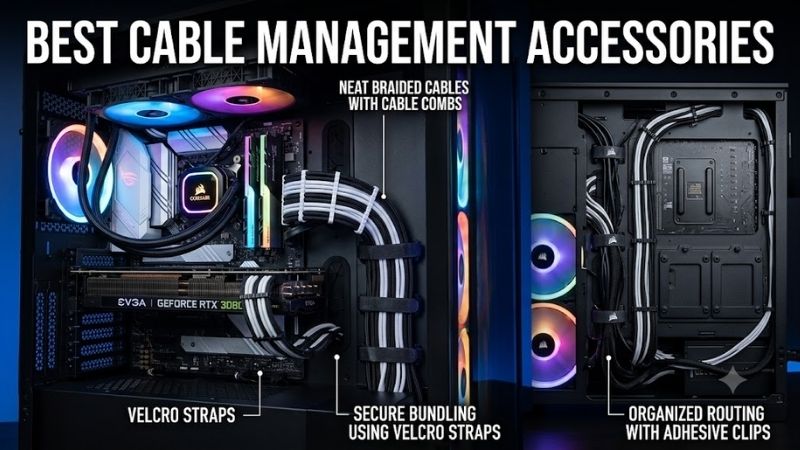
A cable tray holds weight and is best for the power strip, adapters, and excess cable beneath the desk. A raceway hides fixed routes along a desk or wall. A sleeve bundles cables that remain visible or need to move. These accessories solve different problems and work best when used together rather than interchangeably.
For a gaming desk, start with the tray, add reusable ties inside it, then sleeve the main cable drop. Use raceways only for fixed wall or floor routes and add small clips for charging cables that need regular access. This layered system is easier to troubleshoot and remains cleaner as hardware changes.
FAQ
What Cable Management Accessory Should I Buy First?
For a typical gaming desk, start with an under-desk cable tray. It creates a home for the power strip, charging bricks, and excess cable length, removing the largest source of clutter. Reusable cable ties are the next most useful addition because they organize the smaller bundles inside and outside the tray.
Are Cable Sleeves Worth It?
Yes, when several cables follow the same visible route. A sleeve can turn a messy group of different wires into one clean bundle. It does not replace a tray or cable box because it cannot safely support heavy power components, but it is excellent for desk-to-floor drops and monitor cable bundles.
Are Velcro Ties Better Than Zip Ties?
For gaming desks, reusable hook-and-loop ties are usually more practical. Hardware changes frequently, and reusable ties can be opened without tools. Zip ties are stronger for permanent installations, but every modification requires cutting them off and installing new ones, which creates unnecessary work.
How Do I Manage Cables on a Standing Desk?
Attach the power strip and most cable slack to the moving desktop using a tray. Bundle device cables beneath the desk and leave one flexible route for power, Ethernet, or other connections that must reach the wall. Test everything with the desk at its highest and lowest positions before finalizing the routing.
Can Adhesive Cable Clips Damage a Desk?
They can potentially leave residue or affect delicate finishes, especially after long periods. Surface type and adhesive formulation matter. Test an inconspicuous location when the desk has a sensitive finish, and avoid strong adhesive products if preserving the surface is more important than achieving completely hidden cable routing.
How Do I Hide a Power Strip Under My Gaming Desk?
An under-desk tray is usually the cleanest solution because it can hold the power strip along with adapters and excess cable. If the desk cannot accept a tray, use a cable box on the floor or shelf. Bundle the cables leaving the power area with reusable ties or a sleeve to finish the installation.
Conclusion
The best cable management accessories work as a system rather than a single product. Start with an under-desk tray, use reusable ties for organization, add a sleeve for visible bundles, install raceways for fixed routes, keep active cables accessible with clips, and use a cable box when the power strip cannot be mounted.
Ready to decide? Our #1 pick for 2026 is the Accessory.
Live price & availability on Amazon.