🛒 Best Price Today on Amazon
Prime members get fast, free shipping on everything above, plus member-only deals. New members get a 30-day free trial — cancel anytime.
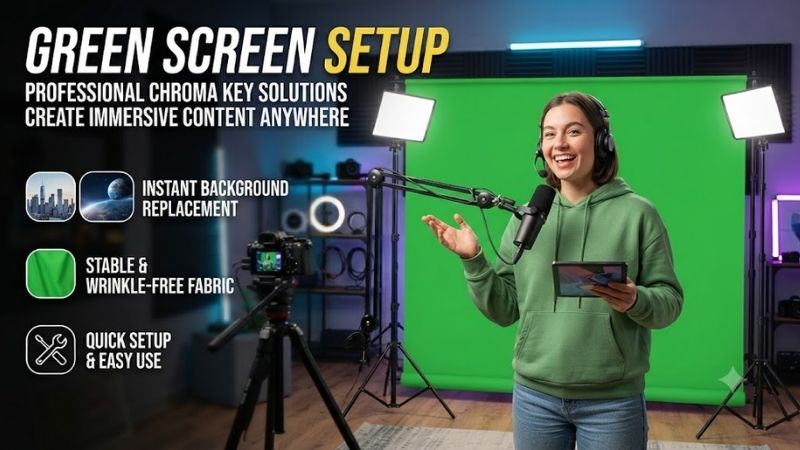
Green Screen Setup challenges frequently ruin live streams when amateur creators struggle with harsh wrinkles, terrible lighting, and rough edge shadows. This comprehensive evergreen buyer guide solves those frustrating visual problems by reviewing top-performing studio backdrops to elevate your production value effortlessly.
How to Choose the Best Green Screen Setup
Selecting the right backdrop gear requires understanding key physical factors that directly affect digital compositing efficiency. Rushing into a purchase without evaluating room dimensions, stand construction, and fabric textures leads to poor chroma keying results. Analyzing fundamental criteria first guarantees smooth video workflow.
Fabric Material and Wrinkle Resistance
High-density polyester fabrics provide superior wrinkle resistance compared to cheap woven cotton alternatives. When material gathers creases during storage, it creates uneven shadows that force broadcasting software to render blurry fringes around your silhouette. Investing in premium matte finishes prevents unwanted reflections.
Heavier textiles naturally stretch flatter across tension bars, reducing preparation time before beginning your live stream. While muslin remains popular for classic portrait studios, modern content creators prefer synthetic blends because they resist dust and clean easily. Durable materials save hours in color keying adjustments.
Frame Durability and Mounting System
A sturdy support framework prevents frustrating wobbles, sags, and accidental collapses while recording dynamic footage. Look for aluminum alloy uprights featuring wide tripod bases or heavy weighted floor brackets that resist sudden room breezes. Reliable locking collars allow swift adjustments without slipping under tension.
Spring-loaded roller frames offer remarkable convenience because they retract smoothly into self-contained metallic housings. Traditional crossbar configurations require manual assembly using multiple tension clamps, which demands more patience. Selecting robust metal hardware ensures your equipment endures frequent studio reconfigurations.
Backdrop Dimensions and Studio Space
Accurately measuring available floor area prevents buying oversized equipment that overpowers your dedicated workspace. While expansive green screen setup kits accommodate multiple on-camera speakers, solo broadcasters thrive with compact pull-up panels. Matching dimensions to camera lens focal lengths avoids wasted floor real estate.
Wider backgrounds allow natural lateral movement and gesturing without revealing real room walls during broadcast sessions. However, larger frames demand deeper clearances so you can sit at least four feet away to prevent color reflection. Always balance physical canvas coverage against available room dimensions for best results.
Deployment Speed and Portability Needs
Creators who share living spaces need equipment that unpacks quickly and stores away discreetly after filming. Collapsible designs featuring pneumatic scissor arms rise from portable cases in seconds, eliminating time-consuming assembly. This swift process encourages frequent broadcasting without annoying operational friction.
Conversely, stationary studio builders can choose permanent wall-mounted rollers that free up valuable room floor footprint. If you travel regularly for on-location interviews, prioritize lightweight carrying bags with padded handles and reinforced seams. Assessing mobility requirements prevents buyer regret over unwieldy studio gear.
Lighting Compatibility and Surface Reflection
Flawless chroma keying relies upon consistent illumination across the entire fabric surface rather than camera resolution. Non-reflective fabric weaves diffuse soft studio lighting evenly, preventing bright highlights from confusing keying filters. Shiny materials reflect ambient illumination, causing unnatural digital transparency artifacts.
Separating backdrop illumination from subject fill lights creates sharp contrast between talent and background. When maintaining a balanced green screen setup, quality textiles absorb excess lumens without shifting the target chroma hue. Choosing color-accurate emerald fabric keeps edge detection algorithms working smoothly and accurately.
Top Picks for Chroma Key Streaming
Selecting an optimal green screen setup depends heavily on your budget, available studio dimensions, and workflow speed. We evaluated leading market options across key metrics including build sturdiness, fabric quality, and setup convenience. Review the comparison breakdown below before exploring detailed assessments for each product.
| Model Name | Design Type | Working Dimensions | Ideal User | Rating |
|---|---|---|---|---|
| Elgato Collapsible Panel | Pneumatic Pull-Up | 58 x 79 inches | Daily Solo Streamers | 4.8 / 5 |
| Neewer Chromakey Kit | Double-Sided Oval | 5 x 7 feet | Mobile Creators | 4.6 / 5 |
| Emart Studio Stand | Modular Crossbar | 8.5 x 10 feet | Full-Body Production | 4.5 / 5 |
| MountDog Photo Screen | Tripod Stand System | 6.5 x 10 feet | Budget Home Studios | 4.4 / 5 |
Elgato Green Screen Collapsible Panel
Engineered specifically for content creators working in compact spaces, this premium green screen setup caters to streamers wanting rapid daily deployment. The pneumatic scissor frame lifts effortlessly from an aluminum floor case, standing rigid without extra support. Solo creators loving instantaneous broadcast prep will find it unmatched.
Its primary advantage is wrinkle-free polyester fabric that yields pristine digital transparency right out of the sturdy case. However, the limited fifty-eight-inch width restricts wide camera angles, and the higher price tag may deter casual hobbyists. Despite premium pricing, its stellar construction delivers remarkable long-term reliability.
Neewer Chromakey Collapsible Backdrop Kit
Mobile videographers and traveling remote workers will appreciate this reversible, dual-colored oval panel that packs into a compact circular pouch. The flexible steel spring frame pops open instantly, providing vibrant chroma green on one side and clean royal blue on the reverse. It represents an ingenious solution for roving producers.
Users gain immense versatility from the dual surfaces, while the resilient perimeter wire stretches fabric tight to eliminate creases. On the downside, refolding the tensioned steel ring demands substantial practice, and absence of an integrated stand requires external mounting gear. It remains an exceptional value for creators on the go.
Emart Photo Video Studio Backdrop Stand
Commercial video producers and fitness instructors requiring wide panoramic coverage will benefit immensely from this heavy-duty stand ensemble. The expansive ten-foot crossbar holds generous muslin sheets that allow dynamic physical movements and multi-person interviews. It suits stationary creators building a dedicated recording room.
The vast physical coverage provides unmatched framing freedom, complemented by rugged aluminum tripods and heavy-duty spring clamps. Conversely, setting up multiple interlocking crossbars takes considerable time, and the included muslin sheet requires regular steaming. Still, its outstanding coverage makes it an essential studio workhorse.
MountDog Photography Chroma Key Screen
Budget-conscious beginners venturing into online streaming will find this standalone tripod kit both approachable and reasonably capable. Featuring a centered single-stand support with an upper hanging bar, it delivers dependable canvas extension without complex frame assembly. Novice podcasters building their first video corner will love it.
Adjustable height levers combined with included background clips make this reliable green screen setup an affordable entry point for newcomers. However, the centered tripod base can tip over if bumped, and the lightweight fabric requires careful tensioning to prevent edge curling. It remains an attractive choice for cost-conscious creators.
Frequently Asked Questions About Video Backdrops
Mastering digital chroma keying involves addressing common practical questions regarding studio geometry, illumination calibration, and equipment maintenance. Resolving these technical hurdles early guarantees polished broadcasts and saves countless troubleshooting hours. Explore our expert answers below to refine your video setup.
How Far Should You Stand from a Green Backdrop?
Maintaining four to six feet of physical separation when configuring a clean green screen setup in a small room prevents ugly color spill. When talent sits directly against the fabric, bright green light bounces onto shoulders, ears, and hair strands. This reflection confuses keying algorithms, resulting in jagged, discolored edges.
Adequate forward spacing also casts subject shadows onto the floor behind you rather than across the backdrop canvas. When shadows fall across the green fabric, software keyers struggle to distinguish between dark green background and dark clothing. Giving yourself ample room ensures smooth digital isolation during streaming sessions.
What Is the Ideal Studio Lighting Arrangement?
An effective chroma lighting configuration utilizes two dedicated softbox lights to illuminate the background completely separate from subject lights. Even illumination across the green textile is essential because brightness variations force broader tolerance settings in software. Balanced luminescence produces seamless background removal.
For talent illumination, implement a classic three-point setup featuring a key light, fill light, and subtle hairline backlight. The backlight is particularly beneficial because it carves a sharp separation rim around your head, counteracting ambient green reflections. Using diffuse continuous LED panels provides reliable color warmth.
Can You Steam or Iron Chroma Key Fabric?
Wrinkled backdrops can be restored using low-heat handheld garment steamers while the fabric hangs fully tensioned upon the frame. Steam softens tight synthetic fibers without requiring the hassle of taking the massive screen down to an ironing board. Always keep the steam nozzle moving steadily to avoid localized water drop stains.
If using a traditional household iron, place a clean damp cotton towel between the iron soleplate and backdrop fabric. Direct metal heat can easily scorch sensitive synthetic polymers, permanently ruining color uniformity across the screen. Taking preventive care by rolling rather than folding fabric minimizes tedious future ironing.
Which Software Provides the Cleanest Chroma Keying?
Broadcasting applications like OBS Studio incorporate reliable built-in chroma filters equipped with adjustable similarity and smoothness sliders. For live Twitch and YouTube streamers, fine-tuning key color spill reduction inside OBS yields clean edges without taxing system hardware. It remains the gold standard for zero-cost keying.
For post-production video editing, professional suites such as DaVinci Resolve and Adobe Premiere Pro offer superior edge refining algorithms. These powerful platforms utilize advanced delta keyers and matte feathering controls that preserve fine details like frizzy hair strands. Selecting competent software ensures your hardware shines.
View more products:
Final Thoughts on Choosing Your Kit
Selecting a dependable green screen setup elevates your video production from distracting amateur clips to polished broadcasting content. If convenience matters most, choose Elgato for rapid deployment, or select Emart for expansive studio coverage. Invest in proper lighting and enjoy seamless background compositing on your next stream.