🛒 Best Price Today on Amazon
Prime members get fast, free shipping on everything above, plus member-only deals. New members get a 30-day free trial — cancel anytime.
Stream lighting setup mistakes often leave ambitious creators battling harsh shadows, unflattering skin tones, and grainy video that undermines their hard work. This definitive guide helps you choose the perfect illumination gear, transforming amateur streams into polished, broadcast-quality productions that captivate every viewer.
How to Choose a Stream Lighting Setup
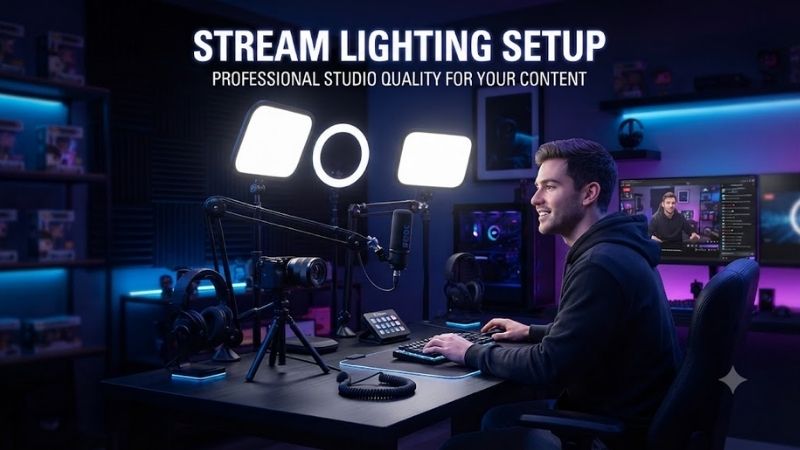
Building an effective stream lighting setup requires understanding how light interacts with your camera sensor and studio environment. Rather than buying random desk lamps, prioritizing specific optical features guarantees a clean presentation. Evaluating these vital criteria ensures you invest in hardware that flatters your appearance.
Color Temperature and CRI Accuracy
Color temperature dictates the overall warmth or coolness of your video image, measured along the Kelvin scale. Most content creators aim for a balanced range between daylight and warm white to match room ambient fixtures. Reliable hardware lets you adjust these values seamlessly so your camera white balance remains consistent every broadcast.
Color rendering index evaluates how faithfully an illumination source reveals true human skin tones and background colors. Low ratings introduce muddy green or unnatural magenta tints that software filters cannot easily correct. Demanding a rating above ninety guarantees vibrant textures that make your webcam presentation pop with professional realism.
Adjustable Brightness and Diffusion Quality
Raw luminous power means nothing if you cannot dial back intensity during intimate late night broadcasts. High lumen ratings give you headroom for daytime sunlight, yet granular dimming controls prevent harsh facial overexposure. Quality units allow smooth incremental dimming from full brightness down to subtle fills without visible flickering.
Diffusion softens direct beams, spreading illumination evenly across your face to eliminate severe nose and chin shadows. Bare bulbs create glaring hotspots and strain your eyes during lengthy gaming sessions. Built-in frosted layers or attachable softboxes scatter light gently, producing an inviting glow that flatters your facial features.
Mounting Versatility and Desk Footprint
Desk space remains prime real estate for content creators juggling dual monitors, boom arms, and audio mixers. Traditional light tripods consume massive floor area and create annoying clutter around your workstation. Modern studio clamps attach directly to desktop edges, elevating fixtures above screens while preserving valuable surface space.
Articulating ball heads and telescoping poles give you total freedom to angle beams precisely where needed. Fixed brackets force awkward placements that cause unwanted glare on spectacles or desktop surfaces. Selecting sturdy metal mounts with extendable reach ensures your lamps stay locked into position throughout intense streaming sessions.
Software Integration and Remote Control
Reaching behind monitors mid-broadcast to tweak brightness dials disrupts your show and breaks audience connection. Premium fixtures incorporate onboard wireless receivers that pair with desktop applications or smartphone companions. This seamless connectivity lets you adjust illumination parameters on the fly without ever leaving your seat.
Hardware deck compatibility represents the peak of modern stream lighting setup convenience for busy creators. Mapping custom brightness presets to dedicated macro keys lets you alter scene moods instantly between gaming segments and talking head chats. Instant digital controls eliminate workflow friction and keep your focus squarely on entertaining.
Top Picks for Your Stream Lighting Setup
Selecting the right gear depends heavily on your available budget, physical workspace layout, and technical expectations. We evaluated top market models to highlight options delivering dependable build quality and flattering output. The curated recommendations below cater to diverse production scales from modest desks to pro studios.
| Product Name | Form Factor | Max Brightness | Best For |
|---|---|---|---|
| Elgato Key Light | Edge-lit Panel | 2800 Lumens | Dedicated Streamers |
| Razer Key Light Chroma | RGB Edge-lit Panel | 2800 Lumens | RGB Enthusiasts |
| Neewer Bi-Color 660 | Traditional LED Panel | 3360 Lux | Budget Studio Spaces |
| Logitech Litra Glow | Compact Monitor Mount | 250 Lumens | Small Desks and Travel |
Elgato Key Light
Full-time creators seeking effortless studio automation will find the Elgato Key Light nearly impossible to beat. Its massive twenty-eight hundred lumen output provides brilliant illumination through multilayer diffusion, keeping temperatures surprisingly cool. The bundled desk clamp frees up floor space while keeping the fixture solidly anchored.
The primary downside remains its steep retail price and strict reliance on stable Wi-Fi network connectivity. Pairing hiccups occasionally occur if your router operates on congested frequencies without clean separation. Despite these technical quirks, the flawless Stream Deck synchronization makes this investment worthwhile for serious broadcasters.
Razer Key Light Chroma
Gamers who want immersive ambient lighting paired with broadcast illumination should consider this versatile unit. Integrating seamlessly into your existing stream lighting setup, it outputs vibrant RGB accents alongside accurate white ranges. The solid desk clamp mount and broad color customization offer remarkable aesthetic flexibility.
On the negative side, Razer Synapse software can feel bloated and demanding on system memory during gameplay. Physical controls on the chassis are completely absent, forcing total dependence on desktop software or phone apps. It remains an excellent choice for flashy personalities, though minimalist users may find the interface overly complex.
Neewer Bi-Color 660 LED Panel
Budget-conscious video creators needing high optical output across larger studio spaces will appreciate this sturdy panel. Featuring durable aluminum housing and barn doors, it directs beams efficiently to illuminate broad scenes. Manual rear knobs allow rapid adjustments without requiring software installations or wireless pairing.
However, the included diffusion panel is fairly basic and can produce noticeable glare if placed too near your eyes. The bulky desktop footprint demands sturdy floor stands, which consume considerable physical space in compact bedrooms. Still, it delivers phenomenal dollar-for-dollar illumination value for podcasters and budget hobbyists.
Logitech Litra Glow
Solo streamers working on compact desks or laptop setups will love the ultra-portable form factor of the Litra Glow. Logitech TrueSoft technology wraps your face in smooth, diffused light that prevents optical fatigue during marathons. The clever monitor mount rests securely on displays without requiring clamps or permanent hardware.
Its modest illumination ceiling means it struggles to overpower bright windows or illuminate large background scenes. You will also notice a somewhat plasticky hinge construction that requires careful handling during daily adjustments. For creators with tight spatial limits seeking flattering close-up lighting, it serves as an unmatched budget tool.
Frequently Asked Questions About Stream Lighting Setup
Mastering your broadcast illumination often sparks practical questions regarding hardware placement, camera settings, and budgeting priorities. Clarifying these technical nuances ensures you avoid costly purchasing mistakes while maximizing your visual quality. The following answers address the most common setup dilemmas content creators encounter.
How Many Lights Do You Need for Streaming
A standard two-light configuration generally provides the ideal balance of face definition and spatial depth for live broadcasting. Position your primary key light at roughly forty-five degrees to brighten your features, while a softer fill softens opposite shadows. This setup eliminates unflattering darkness without cluttering your studio.
Advanced creators frequently introduce a third rim fixture positioned behind them to separate their silhouette from dark walls. Adding background practical lamps or colorful wall bars further enhances the cinematic presentation of your stream. Beginners can easily start with a single diffused panel and gradually expand as budgets allow.
Can You Use a Ring Light for Streaming
Ring lights work reasonably well for beauty vloggers, yet they present distinct drawbacks for serious gaming broadcasters. Placing a circular fixture directly in front of your face creates distracting doughnut-shaped reflections across your pupils. Furthermore, direct frontal exposure tends to flatten natural facial contours on camera.
Dedicated rectangular panels angled off-axis provide far superior three-dimensional depth and look significantly more natural on screen. If you already own a circular ring fixture, bouncing it against an adjacent white wall softens the beam considerably. Upgrading to edge-lit flat panels remains the preferable long-term investment.
Why Does Video Look Grainy Even with Studio Lights
Grainy video artifacts typically stem from webcam sensors boosting digital gain automatically to compensate for poor exposure. Even within an upgraded stream lighting setup, improper camera software settings can ruin your image clarity. Turning off automatic exposure and manually locking your camera gain stops unwanted digital noise instantly.
Ensure your shutter speed matches double your framerate, such as one-sixtieth of a second for thirty frames per second video. Once your manual camera settings remain locked, raise your lamp brightness until your face looks crisp and naturally exposed. This technical calibration extracts pristine image fidelity from your existing webcam gear.
How Do You Prevent Reflections on Glasses
Annoying lens reflections occur when studio lamps sit along the direct line of sight between your eyes and monitor screens. The easiest solution involves elevating your fixtures well above eye level and angling them downward at forty-five degrees. This geometric tilt deflects bright reflections harmlessly downward toward your desk surface.
Widening the distance between your left and right light panels also prevents glare from entering webcam angles. Additionally, applying broad diffusion sheets spreads direct hotspots, making remaining reflections far softer and less noticeable. These simple placement tweaks guarantee viewers see your eyes clearly throughout every stream.
View more products:
Final Thoughts
Investing in a reliable stream lighting setup elevates your channel presentation far more than buying an expensive camera. For seamless digital controls, the Elgato Key Light remains the premier choice, while the Litra Glow suits small desks. Assess your room dimensions and choose the gear that flatters your unique broadcast style.