🛒 Best Price Today on Amazon
Prime members get fast, free shipping on everything above, plus member-only deals. New members get a 30-day free trial — cancel anytime.
- Best Keyboards With Screens Compared
- ASUS ROG Azoth Extreme — Best Premium Keyboard With Screen
- SteelSeries Apex Pro Gen 3 — Best for Competitive Gaming
- EPOMAKER RT100 Pro — Best for Productivity and Retro Style
- EPOMAKER TH80 V2 Pro — Best Compact Wireless Option
- How to Choose the Best Keyboard With Screen
- FAQ
- Conclusion
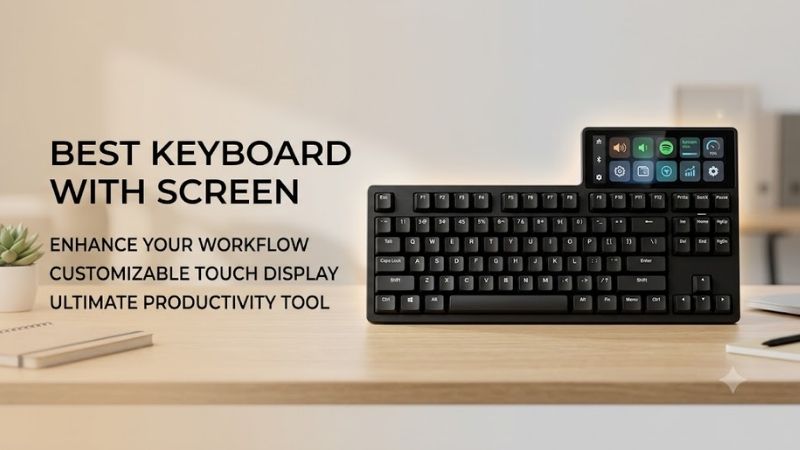
A keyboard with a built-in display can show system data, media details, battery status, custom GIFs, or quick settings without opening another app. The best keyboard with screen should pair that display with a useful layout, responsive switches, reliable software, and connectivity that fits your gaming or work setup.
Quick answer: For most people in 2026, the best keyboard with screen for gaming, work, and control is the Keyboard — our #1 rated choice. See the full ranked comparison, alternatives and buying advice below.
Best Keyboards With Screens Compared
| Keyboard | Best For | Layout | Screen | Connectivity |
|---|---|---|---|---|
| ASUS ROG Azoth Extreme | Premium gaming | 75% | 1.47-inch full-color OLED touchscreen | USB, 2.4 GHz, Bluetooth |
| SteelSeries Apex Pro Gen 3 | Competitive gaming | Full-size | OLED Smart Screen | USB |
| EPOMAKER RT100 Pro | Productivity and retro setups | 96% | 1.54-inch TFT | USB-C, 2.4 GHz, Bluetooth |
| EPOMAKER TH80 V2 Pro | Compact wireless setups | 75% | 1.06-inch glass screen | USB-C, 2.4 GHz, Bluetooth |
ASUS ROG Azoth Extreme — Best Premium Keyboard With Screen
Best For: Enthusiasts who want a premium compact gaming keyboard
The ROG Azoth Extreme combines a 75% mechanical layout with a 1.47-inch full-color OLED touchscreen and a three-way control knob. The display can show battery level, connection mode, media information, custom animations, CPU temperature, and keyboard status, making it useful beyond simple decoration.
Its adjustable gasket mount lets users switch between firmer and softer typing behavior, while a carbon-fiber positioning plate and multiple dampening layers shape the feel and acoustics. The compact layout keeps the mouse area open for gaming, although users who depend on a number pad will need a separate solution.
Tri-mode connectivity includes USB, Bluetooth, and ROG SpeedNova 2.4 GHz wireless, so the board can move between desktop gaming and multi-device use. The screen and knob also let users change settings directly from the keyboard, which reduces the need to leave a game or open software for basic adjustments.
The Azoth Extreme is aimed at buyers who want display functionality integrated into a premium mechanical platform rather than added as a novelty. Its strongest fit is an enthusiast gaming desk where build quality, hot-swappable switches, wireless flexibility, and direct hardware controls matter as much as the OLED panel.
Key Features
- 75% mechanical layout
- 1.47-inch full-color OLED touchscreen
- Three-way control knob and side button
- Adjustable gasket mount
- Hot-swappable mechanical switches
- USB, 2.4 GHz, and Bluetooth connectivity
- System monitoring and custom animation support
- Extended silicone wrist rest
What Makes It Different
The OLED panel is touch-enabled rather than being only a passive status display, and it works with the side controls for direct adjustments. That gives the screen a functional role in daily use. The adjustable gasket system also separates this model from keyboards that focus mainly on visuals without changing typing feel.
Pros
- Full-color OLED touchscreen
- Premium enthusiast-oriented construction
- Compact 75% footprint
- Tri-mode connectivity
- Adjustable typing feel
- Hot-swappable switches
- Useful system information on the display
Cons
- No dedicated number pad
- Premium feature set may be unnecessary for basic users
- Compact layout can require adjustment for full-size keyboard users
Use Case
This model works best for a gaming PC where the keyboard remains visible as part of the setup and the display is used for status information, media, or customization. The 75% form factor also leaves more lateral mouse space than a full-size board, which can help players who use lower mouse sensitivity.
Who It’s For
Choose the ROG Azoth Extreme if you want a high-end keyboard with screen functionality that is tightly integrated with controls and system monitoring. It suits enthusiasts who care about mechanical tuning, wireless flexibility, and premium construction, but it is excessive if the display is the only feature you need.
SteelSeries Apex Pro Gen 3 — Best for Competitive Gaming
Best For: Players who want an OLED screen with adjustable actuation
The full-size SteelSeries Apex Pro Gen 3 uses an OLED Smart Screen as a control center for keyboard settings, profiles, media, and status information. More importantly for competitive gaming, the board pairs that display with adjustable magnetic switches, allowing users to tune actuation instead of accepting one fixed trigger point.
The screen can be used to change actuation settings and enable or disable Rapid Trigger without leaving the game. That matters when switching between titles that benefit from different key behavior. A player can keep movement keys highly responsive while using less sensitive settings elsewhere to reduce accidental inputs.
Its full-size layout retains the number pad and dedicated navigation area, so it fits users who game and work on the same computer. The trade-off is desk space: a full-size chassis leaves less room for wide mouse movement than a 75% or TKL board, especially for players using large pads and low sensitivity.
The Apex Pro Gen 3 is less focused on decorative screen customization than some TFT-equipped keyboards. Its display is strongest as an interface for practical controls. That makes it a better fit for players who care about actuation, profiles, media management, and quick adjustments more than animated desk aesthetics.
Key Features
- Full-size layout
- OLED Smart Screen
- Adjustable magnetic switches
- Rapid Trigger controls
- Per-key RGB lighting
- SteelSeries Engine software
- Magnetic wrist rest
- Integrated media controls
What Makes It Different
The screen supports performance-oriented adjustments rather than serving only as a visual accessory. Adjustable actuation and Rapid Trigger make the display part of the gaming workflow, because settings can be changed without constant menu switching. That focus distinguishes it from keyboards built mainly around GIFs and system widgets.
Pros
- Useful OLED settings interface
- Adjustable actuation
- Rapid Trigger support
- Full-size key layout
- Dedicated media functionality
- Suitable for gaming and productivity
Cons
- Full-size footprint uses more desk space
- Wired design is less flexible for cable-free setups
- Display is less visually expressive than larger color TFT screens
Use Case
The Apex Pro Gen 3 makes sense for competitive games where movement and repeated key presses benefit from adjustable actuation. It also works for mixed-use desktops because the full-size layout keeps the number pad available. The screen becomes most useful when settings are changed often between games or profiles.
Who It’s For
Choose this keyboard if the display should help control gaming features rather than simply decorate the desk. It is aimed at players who want adjustable key behavior, a familiar full-size layout, and direct access to settings. Users prioritizing wireless freedom or colorful custom GIFs may prefer another option.
EPOMAKER RT100 Pro — Best for Productivity and Retro Style
Best For: Users who want a near-full-size layout with a removable display
The EPOMAKER RT100 Pro uses a 96% layout that preserves a number pad while reducing the gaps found on a traditional full-size keyboard. Its 1.54-inch TFT screen can display custom GIFs, while the modular design lets the screen be swapped with four extra keys, giving users a choice between visual information and extra controls.
A 5000mAh battery supports the keyboard’s wireless design, and connectivity includes Bluetooth, 2.4 GHz wireless, and USB-C. This combination makes the RT100 Pro suitable for desks where one keyboard needs to work with several devices or where a cable-free appearance matters as much as the mechanical typing experience.
The gasket-mounted structure and hot-swappable design appeal to users who want to tune switch feel without soldering. Its near-full-size arrangement is particularly useful for spreadsheets, creative work, and office tasks because the number pad remains available. The tighter spacing, however, can take time to learn.
The RT100 Pro stands out because its screen is modular instead of permanently built into the keyboard body. That gives the display a more playful, customizable character than the OLED panels on gaming-focused models. It is a strong match for users who want a functional keyboard that also contributes visual personality to the desk.
Key Features
- 96% mechanical layout
- 1.54-inch TFT screen
- Swappable screen module
- Custom GIF support
- 5000mAh battery
- Bluetooth, 2.4 GHz, and USB-C
- Gasket-mounted construction
- Hot-swappable PCB
What Makes It Different
The removable screen is the defining feature. Users can keep the TFT installed for custom visuals or replace it with four keys when screen space matters less than additional input. The 96% layout also keeps numeric entry available without requiring the width of a conventional full-size mechanical keyboard.
Pros
- Removable TFT display
- Compact layout with number pad
- Tri-mode connectivity
- Hot-swappable switches
- Custom GIF support
- Suitable for work and gaming
Cons
- 96% spacing can feel crowded initially
- Screen is smaller than a standalone desk display
- Retro styling may not match every setup
Use Case
The RT100 Pro works well on a mixed productivity and gaming desk where the number pad is still useful. Spreadsheet users retain numeric input, while gamers get a mechanical platform with wireless options and customization. The removable screen also lets owners shift between a cleaner work layout and a more visual setup.
Who It’s For
Choose the RT100 Pro if you want the best keyboard with screen for a desk that handles both productivity and casual gaming. It fits users who value a number pad, wireless flexibility, hot-swappable switches, and custom visuals. It is less ideal for competitive players seeking magnetic switches or specialized actuation control.
EPOMAKER TH80 V2 Pro — Best Compact Wireless Option
Best For: Compact desk setups that still want a customizable display
The EPOMAKER TH80 V2 Pro uses a 75% layout with a 1.06-inch glass screen and a metal multifunction knob. The display can show time, battery level, status information, and custom GIFs, while the knob handles functions such as volume, RGB, and display control. This keeps useful controls concentrated in a compact footprint.
Its 10,000mAh battery is paired with Bluetooth, 2.4 GHz wireless, and USB-C connectivity, giving users several ways to connect. The 75% layout keeps function keys and arrows but removes the number pad, so it suits gaming and general typing better than accounting or workflows that require frequent numeric entry.
The hot-swappable PCB supports three-pin and five-pin mechanical switches, allowing switch changes without soldering. A gasket-mounted structure and layered dampening focus on a softer acoustic profile. These features make the TH80 V2 Pro more customizable than basic screen keyboards built mainly around visual novelty.
The screen is smaller than the panels used on some premium models, but the compact size helps preserve desk space. Users should view it as a glanceable status and customization panel rather than a second monitor. That trade-off works well when a small keyboard footprint matters more than maximizing display size.
Key Features
- 75% 78-key layout
- 1.06-inch glass screen
- Custom GIF support
- Metal multifunction knob
- 10,000mAh battery
- Bluetooth, 2.4 GHz, and USB-C
- Hot-swappable three-pin and five-pin PCB
- Gasket-mounted construction
What Makes It Different
The TH80 V2 Pro combines a compact 75% layout with both a screen and physical knob while retaining tri-mode wireless support. It offers more desk efficiency than full-size models and more display functionality than many compact boards. The result is aimed at users who want visual customization without sacrificing mouse space.
Pros
- Compact 75% layout
- Customizable glass display
- Large battery capacity
- Tri-mode connectivity
- Hot-swappable switches
- Dedicated multifunction knob
Cons
- No number pad
- Small screen limits detailed information
- Compact navigation layout may require adjustment
Use Case
This keyboard is well suited to compact gaming desks, dorm setups, and shared workspaces where a smaller footprint helps. The display can handle quick status checks and custom visuals, while the knob simplifies volume changes. Wireless connectivity also makes it easy to move between systems without rearranging cables.
Who It’s For
Choose the TH80 V2 Pro if you want a compact wireless keyboard with screen functionality but do not need a number pad. It suits users who value hot-swappable switches, a multifunction knob, and custom display content. Full-size productivity users and competitive magnetic-switch fans should look elsewhere.
How to Choose the Best Keyboard With Screen
Decide What You Want the Screen to Do
Keyboard screens serve different purposes, so start with function rather than appearance. OLED panels may focus on settings, profiles, system information, or media, while TFT displays often emphasize color images and GIFs. Gamers benefit from direct controls, whereas desk enthusiasts may care more about visual customization.
Choose OLED or TFT Based on Your Priorities
OLED screens typically deliver strong contrast and work well for compact text, icons, and status data. Color TFT panels are often better suited to animated graphics and decorative content. The trade-off is that screen type alone does not determine usefulness; software support and hardware controls matter just as much.
Match the Layout to Your Games and Work
A 75% keyboard saves mouse space while keeping function keys and arrows, which suits gaming desks. A 96% or full-size board is better when a number pad matters for spreadsheets or data entry. Compact layouts reduce width, but they also compress or remove keys, so convenience depends on your daily workflow.
Check Connectivity Before Buying
Wireless models usually combine Bluetooth and 2.4 GHz connections, while some gaming boards remain wired for a fixed desktop setup. Bluetooth is convenient for multiple devices, and 2.4 GHz is aimed at responsive wireless use. USB remains useful for charging, firmware updates, configuration, or uninterrupted wired operation.
Look Beyond the Display
A screen cannot compensate for poor switch feel, awkward software, or the wrong layout. Evaluate hot-swap support, switch technology, keycap quality, wrist support, remapping, battery design, and physical controls alongside the display. The best keyboard with screen should still work well even when you stop looking at the screen.
FAQ
Are keyboards with screens actually useful?
They can be useful when the display shows information you would otherwise open software to check, such as battery status, profiles, media, connection mode, or gaming settings. A screen becomes less practical when it is limited to decoration. The best implementation combines useful data with easy hardware controls.
Can a keyboard screen display GIFs?
Some models support custom GIFs, but this feature depends on the keyboard and its software. EPOMAKER models with color TFT or glass displays often emphasize custom visual content, while gaming-oriented OLED screens may focus more on settings and system information. Always check the specific model’s display functions.
Is an OLED keyboard better than a TFT keyboard?
Neither technology is automatically better. OLED is well suited to high-contrast status information and compact interfaces, while TFT screens can be useful for colorful graphics and animated content. Choose based on what the keyboard can display, how easy the software is to use, and whether the screen supports your workflow.
Do screen keyboards affect gaming performance?
The presence of a screen does not inherently improve or reduce keyboard performance. Gaming behavior depends more on switch technology, actuation, polling, latency, and firmware. On models such as the Apex Pro Gen 3, the screen is useful because it gives direct access to gaming settings rather than changing input speed itself.
What layout is best for a keyboard with a screen?
A 75% layout suits gamers who want more mouse room, while 96% and full-size layouts are better for users who need a number pad. The screen should not force you into a layout that hurts your normal workflow. Choose the key arrangement first, then compare display features among models that fit that layout.
Conclusion
The best keyboard with screen depends on whether you want gaming controls, system data, custom visuals, or a compact productivity setup. ROG Azoth Extreme leads on premium integration, Apex Pro Gen 3 focuses on gaming control, RT100 Pro adds modular retro style, and TH80 V2 Pro balances a screen with compact wireless flexibility.
Ready to decide? Our #1 pick for 2026 is the Keyboard.
Live price & availability on Amazon.