
🛒 Best Price Today on Amazon
Prime members get fast, free shipping on everything above, plus member-only deals. New members get a 30-day free trial — cancel anytime.
- Top Pick: EPOMAKER Creamy Jade 45gf Gaming Keyboard Switches, 100 PCS Linear Switch, 5-Pin Pre-Lubed Switch, with PC/PA66 Case, POK Stem, Compatible with MX Keycaps for Mechanical Keyboard
- Best Value: Deftomo 50 Pcs Blue Keyboard Switches, 3-Pin Clicky Tactile Mechanical Keyboard Switches, Complete DIY Replacement Kit with Switch Puller & Brush
- Premium Choice: BlingKingdom 10 PCS Mechanical Keyboard Switches, MX Clicky Blue for Gaming
Gaming Keyboard Switches Guide insights resolve annoying input delay and uncomfortable finger fatigue while elevating competitive accuracy. Many buyers struggle with stiff springs, noisy clicks, and confusing stem specs when shopping. This breakdown clarifies top switch varieties so you can choose your ideal hardware for winning play.
How to Choose the Right Switch Mechanics
Selecting keys requires balancing sound, tactile response, and physical actuation points across daily gaming matches. Uninformed players frequently encounter hand strain and mistyped commands during intense competitive sessions. This gaming keyboard switches guide clarifies key factors to help you identify the perfect hardware setup.
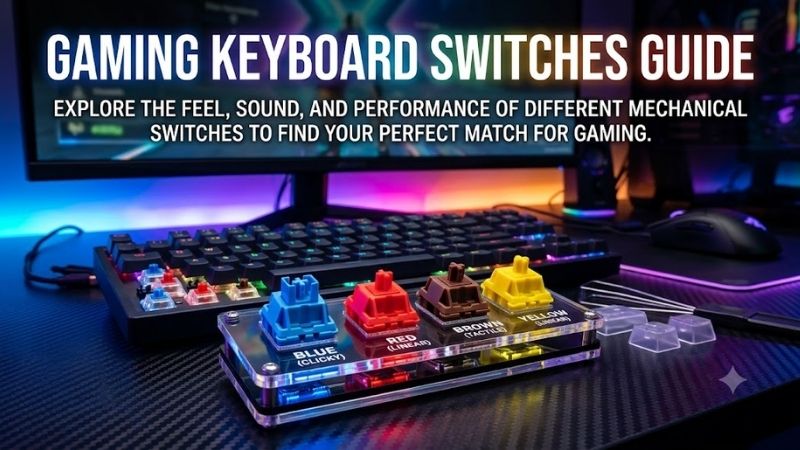
Linear Switch Characteristics
Linear switches deliver an uninterrupted keystroke from top to bottom without tactile bumps or audible clicks along the travel. Fast-paced first-person shooter competitors favor this smooth motion because rapid key depressions register instantly. You can double-tap crucial commands smoothly without waiting for a mechanical reset.
However, the total absence of physical confirmation can cause occasional accidental presses for novice typists during office tasks. Restful finger weight might actuate sensitive red switches unexpectedly, resulting in frequent spelling errors. Understanding your typing habits ensures you reap gaming benefits without sacrificing accuracy.
Tactile Switch Profiles
Tactile switches incorporate a noticeable physical bump midway through the downward press to confirm input registration clearly. This tactile sensation signals that your key actuation succeeded before the stem bottoms out against the housing base. Strategy enthusiasts and action gamers gain dependable feedback without excess acoustic noise.
Furthermore, tactile switches reduce finger fatigue during extended working hours because you do not need to depress keys fully. Many writers consider brown variants an optimal middle ground between competitive play and daily typing chores. Evaluating this balance within our gaming keyboard switches guide guarantees exceptional versatility.
Clicky Switch Dynamics
Clicky switches combine a sharp tactile bump with an auditory click sound generated by an internal click jacket or spring wire. Dedicated typists appreciate this unmistakable acoustic validation because it mimics classic vintage typewriter mechanisms. Every key press confirms that your digital instructions reached your operating system.
Nonetheless, loud acoustic feedback can easily disrupt roommates, coworkers, and online squad teammates over active microphones. Open discord channels frequently capture sharp click noises, creating unnecessary audio annoyance for your friends. Gamers in quiet shared environments should consider damping rings or quieter linear variants.
Optical and Magnetic Actuation
Optical switches replace physical metal leaf contacts with infrared light beams to trigger commands at the speed of light. Because there are no physical electrical contacts grinding together, optical stems experience zero contact debounce delay. Competitive players enjoy near-instantaneous command processing alongside extended durability.
Magnetic Hall effect switches push innovation even further by measuring magnetic flux to allow dynamic actuation point adjustments. Players can configure hair-trigger resets to counter-strafe with unmatched precision in tactical shooter lobbies. These cutting-edge modules represent the modern technological pinnacle of competitive input.
Actuation Force and Key Travel Distance
Actuation force measures the physical finger pressure required to trigger a keystroke, usually rated in grams or centinewtons. Lighter springs rating around forty grams facilitate effortless gliding that reduces strain during intense play sessions. However, featherweight keys can trigger unintended presses if your fingers rest heavily.
Heavier springs exceeding sixty grams demand intentional effort, offering firm tactile resistance that eliminates misclicks during high-stakes competitive matches. Travel distance similarly influences execution speed, with short two-millimeter paths registering faster than classic long throws. Finding your ideal balance optimizes comfort.
Top Picks for Competitive Performance
Selecting premier desktop gear requires comparing spring resistance, switch types, and physical construction across leading brands. We compared prominent boards to spotlight standout choices that cater to different playstyles and budgets. Following this gaming keyboard switches guide section directs you toward the ultimate gaming peripheral.
| Model Name | Switch Mechanism | Actuation Distance | Primary Advantage | | SteelSeries Apex Pro | OmniPoint 2.0 Magnetic | 0.1mm – 4.0mm | Rapid Trigger Reset | | Razer Huntsman V2 | Linear Optical Gen-2 | 1.2mm | Near-Zero Latency | | Logitech G Pro X | GX Blue Clicky | 2.0mm | Hot-Swappable Sockets | | Corsair K70 RGB PRO | Cherry MX Red Linear | 2.0mm | 8000Hz Hyper-Polling |
SteelSeries Apex Pro
Esports competitors who prioritize instantaneous counter-strafing and customizable sensitivity will excel with this magnetic powerhouse. The board features magnetic OmniPoint switches that let you tailor actuation points between zero point one and four millimeters. This rapid sensitivity provides an undeniable edge in tactical shooters.
A durable aluminum alloy frame withstands aggressive tournament play while an integrated OLED screen delivers quick visual profile adjustments. On the downside, the companion desktop software consumes noticeable system memory and the initial retail investment is high. It remains an extraordinary choice for elite players seeking speed.
Razer Huntsman V2
Speed-focused gamers who demand near-zero input latency will appreciate the refined optical technology packed into this performance deck. Second-generation linear optical switches actuate via light beams to eliminate debounce delay across every match. Dense sound dampening foam absorbs annoying hollow clatter during intense multiplayer games.
Textured double-shot PBT keycaps resist oily sheen and maintain crisp legend visibility through years of heavy daily typing. However, the non-detachable braided wrist rest connection can feel clumsy and the lightweight key stems may feel loose to traditionalists. It delivers blistering responsiveness for enthusiasts who demand rapid execution.
Logitech G Pro X
Aspiring tournament professionals who travel frequently and require customizable hardware will appreciate this compact tenkeyless board. Modular hot-swappable sockets permit effortless switch replacements without requiring soldering equipment or technical expertise. You can easily test different stems to refine your personal tactile preferences.
The detachable micro-USB cable promotes effortless backpack transport while rubber feet provide stable positioning during frantic sweeps. However, the stock ABS keycaps wear smooth rather quickly and the outdated charging connector feels behind modern standards. It stands as an adaptable weapon for competitors who prize flexibility.
Corsair K70 RGB PRO
Wired players who demand time-tested mechanical reliability will gravitate toward this full-sized competitive gaming workhorse. Genuine Cherry MX linear switches provide dependable fifty-million keystroke durability alongside consistent actuation depth. An integrated tournament switch disables macros to avoid disqualifications.
Our gaming keyboard switches guide highlights its hyper-polling rate that registers button presses eight times faster than ordinary decks. Premium double-shot PBT keycaps resist shine, though the included hard plastic wrist rest lacks plush padding for wrist comfort. It represents an exceptional wired platform for demanding ranked grinders.
Frequently Asked Questions
Prospective shoppers often harbor questions about switch longevity, actuation variations, sound profiles, and maintenance tips. Clarifying these practical technical concerns helps you select durable equipment tailored to your specific typing and gaming style. Review these essential answers to streamline your personal peripheral decision.
Which Switch Mechanism Fits Fast Competitive Gaming?
Linear and optical switches are generally considered optimal for fast-paced competitive esports titles like first-person shooters. Smooth vertical stem travel allows players to press keys without encountering resistance or distracting tactile bumps midway down. Instantaneous actuation facilitates lightning-quick strafing movements.
Furthermore, magnetic switches with adjustable trigger points allow competitors to reset keys the moment upward finger travel starts. This modern mechanism eliminates the mechanical return lag that traditional springs require before accepting a second input. Reviewing this gaming keyboard switches guide will help you choose your ideal actuation.
How Long Do Mechanical Switches Usually Last?
Quality mechanical switches offer remarkable lifespans ranging between fifty million and one hundred million keystrokes per key. Standard rubber membrane keyboards degrade quickly because their silicone domes stiffen and tear after five million compressions. Individual mechanical housings preserve their original tactile feel for years.
Optical and magnetic switches boast even higher longevity because their contact points avoid physical friction and electrical oxidation. Dust-resistant stem walls and gold-plated contacts ensure reliable electrical registration through decades of heavy gaming use. Investing in durable components guarantees dependable high-tier performance.
Can Hot-Swappable Boards Change Key Switches Easily?
Hot-swappable printed circuit boards allow you to pull out existing switches and insert brand-new ones without using a soldering iron. Specialized pin sockets grip the switch contacts firmly, making replacements as simple as pulling off a plastic keycap. This modular design lets you customize individual key zones with different switch feels.
Hot-swap functionality also extends the operational lifespan of your chassis because damaged stems can be swapped within seconds. Users can experiment with silent tactiles, clickies, or ultra-light linears without buying an entirely new keyboard deck. Following our gaming keyboard switches guide simplifies identifying compatible PCB pin layouts.
What Are the Quietest Switch Types Available?
Silent linear switches represent the quietest option on the modern market thanks to internal silicone sound dampening pads. These integrated rubber bumpers cushion the stem when it bottoms out and tops out, eliminating harsh plastic-on-plastic collisions. The resulting keystroke produces a muted thud that stays quiet across voice calls.
Lubricating the switch stems with specialized synthetic grease further diminishes internal spring ping and friction scratches. Installing thick desk mats beneath your keyboard chassis also absorbs desk resonance to create an ultra-quiet acoustic profile. Following this gaming keyboard switches guide helps you curate a serene work environment.
View more products:
Final Thoughts on Upgrading Your Switches
Finding your ideal desktop setup becomes straightforward once you understand how stem mechanics, actuation points, and sound profiles shape performance. Whether you prefer smooth linears, tactile bumps, or magnetic triggers, this gaming keyboard switches guide empowers your purchase. Invest in the right hardware today to elevate your play.
As an Amazon Associate we earn from qualifying purchases at no extra cost to you.
















