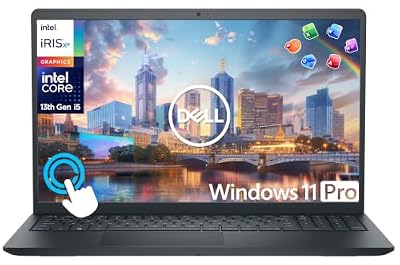
- Top Pick: Dell Latitude 5400 Laptop | 14"" 1920×1080 FHD | Core i5-8365U – 256GB SSD Hard Drive – 8GB RAM | 4 cores @ 4.1 GHz Win 11 Pro (Renewed), Black
- Best Value: HP 15.6" FHD Laptop 2026 Edition, Intel Processor, 8GB RAM, 256GB SSD
- Premium Choice: MELIUNA 15.6'' AI Laptop with Office 365, 12GB RAM 256GB SSD
With Windows 11 now the standard, choosing the right laptop means balancing genuine everyday performance against the temptation of rock-bottom pricing. The market spans renewed business-class machines, fresh mainstream notebooks, and ultra-budget models that bundle software but cut corners on hardware.
We compared a range of Windows 11 laptops across price points to help you find real value rather than a spec sheet that looks good until you open ten browser tabs. Here’s how the field breaks down.
As an Amazon Associate we earn from qualifying purchases at no extra cost to you.






🎮 Get More From Your Setup — Free
Prime Gaming gives you free PC games every month, in-game loot, and a free Twitch channel sub — plus fast free shipping on all the gear above. New members get a 30-day free trial.
Watch: Win 11 Laptop: Review & Buyer’s Guide — Video Review
Design & Build
Build quality varies widely in the Windows 11 laptop space. Renewed business machines like the Dell Latitude 5400 and 5420 feel notably sturdier than budget consumer models, with magnesium-alloy chassis, better keyboards, and business-grade ports including Thunderbolt on the 5420. Fresh mainstream options such as the HP 15.6-inch FHD laptop offer clean, lightweight designs, while ultra-budget entries like the MELIUNA 15.6-inch models prioritize a low price and bundled Office over premium materials. The Dell Inspiron 15 touchscreen splits the difference with a larger footprint and a responsive touch panel.
Performance
Performance is where price differences bite hardest. The Dell Latitude 5420 with a Core i5-1145G7, 16GB of RAM, and a 512GB NVMe SSD is the standout for smooth multitasking, and the Inspiron 15 with its 10-core i5 and 16GB of RAM is strong for students and home offices. The older Latitude 5400 remains a capable renewed value. Budget MELIUNA units with 6GB to 12GB of RAM and small SSDs handle web browsing and documents but slow under heavier loads, so match the spec to your actual workload rather than the headline price.
Pros & Cons
- Wide price range from budget to business-class
- Renewed Latitudes offer premium build for less
- Many bundle Office or Microsoft 365 subscriptions
- Touchscreen options like the Inspiron 15 add flexibility
- Budget models skimp on RAM and storage
- Renewed units vary in cosmetic condition
Alternatives to Consider
If you want the best all-round daily driver, the Dell Latitude 5420 and Inspiron 15 lead on RAM and storage. Shoppers on the tightest budget can consider the MELIUNA 15.6-inch with 12GB of RAM as the more usable of the ultra-cheap options, while the HP 15.6-inch FHD is a straightforward new-in-box pick for light users.
Frequently Asked Questions
How much RAM do I need for Windows 11?
8GB is the practical minimum for smooth use, but 16GB is strongly recommended if you multitask, keep many tabs open, or run Office alongside a browser.
Are renewed laptops reliable?
Certified renewed business laptops are often excellent value, having been tested and refurbished. Buy from reputable sellers and check the warranty and return policy.
Is bundled Office worth it?
A bundled Microsoft 365 or Office license adds real value if you’d buy it anyway, but confirm whether it’s a one-time license or a limited subscription.
Do I need an SSD?
Absolutely. An SSD is the single biggest factor in how fast a laptop feels; avoid models with slow eMMC storage or small drives that fill quickly.
Verdict
For dependable Windows 11 performance, the Dell Latitude 5420 and Dell Inspiron 15 are our top picks thanks to their 16GB of RAM and roomy SSDs. Budget buyers should stretch to a 12GB MELIUNA or a renewed Latitude rather than the smallest-spec models to avoid slowdowns.