
🛒 Best Price Today on Amazon
Prime members get fast, free shipping on everything above, plus member-only deals. New members get a 30-day free trial — cancel anytime.
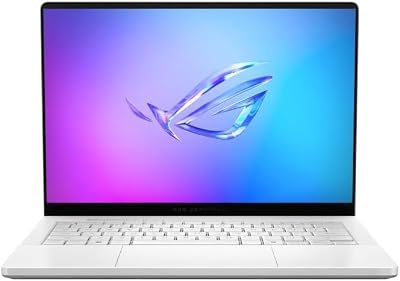
ASUS ROG Zephyrus G14 14" 3K OLED 120Hz Gaming Laptop Copilot+ PC AMD Ryzen AI 9 HX 370 RTX 5080 32GB RAM 2TB SSD Platinum White
Included for 'Best Gaming Laptop Under 1.8kg: Lightweight Gaming Picks' as a representative consumer electronics in this roundup; selection reflects the product set returned for this topic.
View on Amazon![HIDevolution [2026] ASUS ROG Zephyrus G14 GU405AR Gray 14" 3K 120Hz OLED, 1.6 GHz Ultra 9-386H, RTX 5070 Ti, 32 GB LPDDR5X RAM, 1 TB PCIe SSD, Windows 11 Pro](https://m.media-amazon.com/images/I/215VQzj0+7L._SL400_.jpg)
HIDevolution [2026] ASUS ROG Zephyrus G14 GU405AR Gray 14" 3K 120Hz OLED, 1.6 GHz Ultra 9-386H, RTX 5070 Ti, 32 GB LPDDR5X RAM, 1 TB PCIe SSD, Windows 11 Pro
Included for 'Best Gaming Laptop Under 1.8kg: Lightweight Gaming Picks' as a representative consumer electronics in this roundup; selection reflects the product set returned for this topic.
View on AmazonThe best gaming laptop under 1.8kg should feel meaningfully lighter in a backpack without giving up the dedicated GPU, high-refresh display, and cooling needed for real gaming. These picks focus on verified sub-1.8kg models, then separate them by GPU power, screen quality, battery capacity, and portability trade-offs.
Quick Comparison
| Laptop | Weight | GPU | Display | Battery | Source |
|---|---|---|---|---|---|
| ASUS ROG Zephyrus G14 (2026) GU405 | 1.50–1.58kg | RTX 5060 to RTX 5080, by SKU | 14-inch 3K OLED, 120Hz | 73Wh | |
| ASUS TUF Gaming A14 (2026) FA401GM | 1.46kg | RTX 5060 Laptop GPU | 14-inch 2.5K IPS-level, 165Hz | 73Wh | |
| Razer Blade 14 (2025) | 1.63kg | Up to RTX 5070 Laptop GPU | 14-inch 3K OLED, 120Hz | 72Wh | |
| Acer Predator Triton 14 AI | About 1.6kg | RTX 5070 Laptop GPU | 14.5-inch 2880×1800 OLED touch, 120Hz | 76Wh | |
| Lenovo Legion Slim 5 14APH8 | Starting under 1.75kg | RTX 4060 Laptop GPU | 14.5-inch 2880×1800 OLED, 120Hz | 73.6Wh |
How We Selected the Best Gaming Laptops Under 1.8kg
A strict 1.8kg ceiling changes the buying priorities. You are not simply shopping for the fastest GPU; you are balancing chassis mass, charger size, display type, cooling headroom, and battery capacity. For commuters and frequent travelers, a 300-gram difference can matter more over a full day than a small gain in peak frame rate.
We also treat exact configuration details carefully because one laptop family can span several GPUs, memory capacities, and regional SKUs. Weight may be listed as “starting at,” and power limits can change by configuration. Before buying, match the full model code to the manufacturer specification page rather than relying on the family name alone.
Best Gaming Laptops Under 1.8kg
1. ASUS ROG Zephyrus G14 (2026) GU405 — Best Overall Balance
Best For: Gamers who want the strongest mix of portability, OLED quality, and high-end GPU options.
Key Features
- Weight: 1.50–1.58kg, depending on configuration
- CPU: Intel Core Ultra 9 386H
- GPU: RTX 5060, 5070, 5070 Ti, or 5080 Laptop GPU, depending on SKU
- Display: 14-inch 3K OLED, 120Hz, G-SYNC
- Battery: 73Wh
What Makes It Different:
The Zephyrus G14 stands out by combining a very light chassis with GPU options that reach beyond the usual thin-and-light range. Its 3K OLED also suits creative work. The trade-off is fixed memory on listed configurations, so choosing enough RAM at purchase matters more than on an upgrade-friendly laptop.
Pros
- Extremely light for the available GPU range
- Sharp 3K OLED with adaptive sync
- High-end GPU configurations stay below 1.8kg
- Strong fit for gaming plus color-sensitive creative work
Cons
- Memory is soldered on listed configurations
- High-resolution OLED can be demanding at native resolution
- Higher GPU tiers raise heat and power demands
Use Case: Daily carry, AAA gaming, content creation, and travel where performance must stay high.
Who It’s For: Buyers who want a premium portable gaming laptop without dropping to entry-level graphics.
2. ASUS TUF Gaming A14 (2026) FA401GM — Best for Minimum Weight
Best For: Commuters and students who prioritize the lowest chassis weight while keeping a dedicated RTX GPU.
Key Features
- Weight: 1.46kg
- CPU: AMD Ryzen AI 9 465
- GPU: GeForce RTX 5060 Laptop GPU
- Display: 14-inch 2560×1600 IPS-level panel, 165Hz, G-SYNC
- Battery: 73Wh
- Storage: Dual M.2 2280 NVMe SSD support
What Makes It Different:
The TUF Gaming A14 is lighter than many premium 14-inch rivals while retaining a 165Hz 2.5K panel and a high-power RTX 5060 configuration. It favors mobility without dropping to an ultra-low-power GPU. Memory is soldered, but dual M.2 storage support gives buyers more room to expand SSD capacity later.
Pros
- Lightest chassis in this shortlist
- 165Hz refresh rate favors competitive play
- Matte IPS-level display avoids OLED glare
- Dual M.2 support improves storage flexibility
Cons
- Soldered memory cannot be upgraded
- OLED contrast is not part of the package
- Compact cooling still has less thermal mass than a larger gaming laptop
Use Case: Campus, commuting, esports, and mixed work-and-gaming schedules.
Who It’s For: Buyers who care more about low carried weight and a fast matte display than OLED.
3. Razer Blade 14 (2025) — Best for Premium Aluminum Portability
Best For: Travelers who want a slim aluminum chassis, OLED display, and modern connectivity.
Key Features
- Weight: 1.63kg
- CPU: AMD Ryzen AI 9 365
- GPU: Up to GeForce RTX 5070 Laptop GPU, up to 115W TGP
- Display: 14-inch 2880×1800 OLED, 120Hz, G-SYNC
- Battery: 72Wh
- Ports: Two USB4 Type-C ports, HDMI 2.1, UHS-II microSD
What Makes It Different:
The Blade 14 focuses on a thin aluminum build, OLED image quality, and useful travel connectivity rather than chasing the lowest possible weight. At 1.63kg, it stays easy to carry while supporting up to an RTX 5070 Laptop GPU. Fixed LPDDR5X memory means the desired RAM capacity should be chosen at purchase.
Pros
- Thin 15.7mm-class design at its slimmest point
- OLED panel suits games, movies, and creative work
- Useful port selection for travel and external displays
- Aluminum construction gives it a restrained premium feel
Cons
- Fixed LPDDR5X memory
- 120Hz refresh rate is below the TUF A14’s 165Hz
- Thin construction leaves less room for cooling than a larger chassis
Use Case: Frequent travel, hotel gaming, creative work, and desk setups using USB-C or HDMI displays.
Who It’s For: Buyers who value chassis finish and portability as much as raw gaming specifications.
4. Acer Predator Triton 14 AI — Best for Gaming and Creative Input
Best For: Creators who game and want a touch OLED, stylus-friendly touchpad, and RTX graphics.
Key Features
- Weight: about 1.6kg
- CPU: Intel Core Ultra 9 288V
- GPU: GeForce RTX 5070 Laptop GPU
- Display: 14.5-inch 2880×1800 OLED touchscreen, 120Hz
- Battery: 76Wh
- Extras: Haptic touchpad with active stylus support, microSD, HDMI 2.1
What Makes It Different:
The Predator Triton 14 AI is unusual here because its 14.5-inch OLED is touch-enabled and the chassis adds creator-focused input features. At about 1.6kg, it remains inside the portability target while offering an RTX 5070 option. It makes the most sense for users who mix gaming, design, and mobile creative work.
Pros
- Touch OLED expands creative use beyond gaming
- RTX 5070 option in a sub-1.8kg chassis
- 76Wh battery is the largest in this shortlist
- Strong port mix for cameras and external displays
Cons
- Glossy touch OLED can reflect more light
- 120Hz refresh rate is not aimed at maximum-refresh esports
- Creator extras may be unnecessary for gaming-only buyers
Use Case: Photo work, design, note-taking, content creation, and gaming from one compact machine.
Who It’s For: Hybrid users who want one portable laptop for both GPU-heavy creative tasks and games.
5. Lenovo Legion Slim 5 14APH8 — Best Older-Generation OLED Option
Best For: Buyers considering RTX 4060 gaming in a compact OLED chassis and who find this model at an attractive current price.
Key Features
- Starting weight: under 1.75kg
- CPU: Up to AMD Ryzen 9 7940HS on listed configurations
- GPU: GeForce RTX 4060 Laptop GPU, 105W on the cited configuration
- Display: 14.5-inch 2880×1800 OLED, 120Hz
- Battery: 73.6Wh
What Makes It Different:
The Legion Slim 5 14APH8 is older than the newest picks, but it still fits the brief at under 1.75kg and pairs an RTX 4060 with a 14.5-inch 120Hz OLED. Its appeal is simple: capable gaming hardware in a compact chassis. Buyers should compare its older platform with newer RTX 50-series options before ordering.
Pros
- 14.5-inch OLED provides more workspace than many 14-inch rivals
- RTX 4060 remains useful for modern gaming
- HDMI 2.1, dual USB-C, and SD reader support varied setups
- Sub-1.75kg starting weight meets the portability target
Cons
- Older CPU and GPU generation than the newest picks
- Soldered LPDDR5X memory on listed configurations
- Availability can vary because it is no longer the newest Legion generation
Use Case: Portable 1600p-class gaming, media, and creative work when the model is available at a sensible price.
Who It’s For: Buyers who do not need the newest GPU generation and prefer a 14.5-inch OLED form factor.
Performance Reality in a Sub-1.8kg Gaming Laptop
In this weight class, GPU model alone does not tell the whole story. Laptop GPUs operate within manufacturer-defined power limits, so similar graphics names can perform differently under sustained load. For demanding games, compare exact GPU wattage, cooling design, and display resolution instead of assuming the model number guarantees equal speed.
Display resolution changes the practical gaming load. A 3K OLED looks sharper for desktop work and media, but native-resolution gaming asks more from the GPU than 1600p. Competitive players may prefer a 165Hz IPS panel, while single-player gamers and creators may value OLED contrast, response time, and color coverage more.
Buying Guide: What Matters Most Below 1.8kg
Weight Plus Charger
Treat the laptop’s listed weight as only part of the travel equation. A 1.5kg notebook paired with a bulky high-wattage adapter can feel heavier than expected once packed with a mouse, headset, and cables. USB-C charging can reduce the load for light work, but full gaming performance usually requires the manufacturer’s higher-power adapter.
GPU Tier and Power Limit
Choose the GPU around the games you play. RTX 5060-class hardware is capable for modern 1600p gaming with sensible settings, while RTX 5070, 5070 Ti, or 5080 options add headroom for heavier ray tracing or high-resolution work. Higher GPU tiers also need more cooling and power, which can increase fan noise in compact chassis.
OLED vs High-Refresh IPS
For esports, prioritize refresh rate, adaptive sync, and a resolution the GPU can drive consistently. For RPGs, cinematic games, or creative work, OLED can be more rewarding because of deep blacks and fast pixel response. The trade-off is that OLED panels are glossy on many models and require more care with long-term static desktop elements.
Soldered Memory
Many sub-1.8kg gaming laptops use soldered LPDDR5X memory to save space and improve efficiency. That makes the purchase configuration more important because RAM cannot be upgraded later. If you keep many browser tabs open, edit video, run virtual machines, or expect to keep the laptop for years, prioritize a higher memory capacity at checkout.
Battery Capacity
Battery capacity matters for classes, flights, and office work, but gaming away from the wall is different. Dedicated GPUs can drain even large batteries quickly, and many laptops reduce performance on battery power. Use battery size and manufacturer runtime claims to judge mobility, not as a promise of long unplugged AAA gaming.
FAQ
Can a gaming laptop under 1.8kg run AAA games?
Yes, a gaming laptop under 1.8kg can handle modern games if it includes a capable dedicated GPU and adequate cooling. The main compromise is not whether it can game, but how much sustained GPU power, fan noise, and thermal headroom the compact chassis can support compared with heavier 16-inch or desktop-replacement models.
Is 14 inches the ideal size for a lightweight gaming laptop?
A 14-inch gaming laptop is usually the easiest route to staying below 1.8kg because the smaller display, chassis, and battery enclosure reduce mass. The trade-off is less screen area and tighter cooling. A 14.5-inch model can offer a little more workspace while still remaining portable, as several laptops in this roundup demonstrate.
Is OLED worth it on a portable gaming laptop?
OLED is worthwhile if you value deep contrast, fast pixel response, HDR media, and strong color performance for creative work. A high-refresh IPS panel can fit competitive gaming better because it may offer a higher refresh rate and a matte finish. The better choice depends on game type and how often you work in bright environments.
Can USB-C charging replace the main gaming charger?
USB-C charging is useful for travel because one compact charger can handle the laptop, phone, and accessories during light work. It does not automatically replace the main gaming adapter. When the GPU and CPU need maximum power, a smaller USB-C charger may limit performance or slowly discharge the battery under sustained heavy load.
How much RAM should a lightweight gaming laptop have?
For most buyers, 32GB is the safer long-term target when the memory is soldered, especially if the laptop will also handle video editing, development, streaming, or large creative projects. Sixteen gigabytes can still suit lighter gaming and everyday use, but fixed memory removes the option to add capacity later if workloads grow.
Conclusion
The best gaming laptop under 1.8kg depends on what you refuse to sacrifice. The Zephyrus G14 pushes performance and OLED quality, the TUF A14 minimizes weight, the Blade 14 favors premium portability, the Triton 14 AI adds creator-friendly features, and the Legion Slim 5 remains a compact RTX 4060 alternative.









