🛒 Best Price Today on Amazon
Prime members get fast, free shipping on everything above, plus member-only deals. New members get a 30-day free trial — cancel anytime.
- Best White Gaming Laptop Picks for 2026
- White Gaming Laptops With a White Finish in the Listing
- Cloud Gaming and Ultra-Light White Laptops: A Different Category
- Which White Gaming Laptop Fits Your Use Case?
- Resale and Long-Term Value: Does White Hold Up Differently?
- How the Top White Gaming Laptops Compare on Specs That Decide Performance
- Sizing and Compatibility Checklist Before You Order
- Setup and Care for a White Gaming Laptop
- More Picks Worth Considering
- Who Should Skip a White Gaming Laptop
- Common Mistakes When Buying a White Gaming Laptop
- Buyer Questions
- Frequently Asked Questions
- Related Articles
A white gaming laptop used to be a rarity, but in 2026 nearly every major brand offers a light-colored flagship—and they are genuinely competitive on performance, not just looks. A crisp white chassis pairs beautifully with minimalist desks and stands out in a sea of black-and-RGB rivals, but choosing one means weighing thermals, panel quality, and whether the finish resists yellowing. This guide rounds up the best white gaming laptops available now, explains what specs actually matter, and helps you pick a machine that stays fast and stays clean.
As an Amazon Associate I earn from qualifying purchases.
We compared current-generation models running RTX 50-series and Ryzen AI silicon using maker specifications, listing details and published reviews, focusing on GPU tier, cooling design and the finish of the white chassis. Here are the standouts.
Best White Gaming Laptop Picks for 2026
| Product | Key Spec | Best For |
|---|---|---|
| GIGABYTE AERO X16 (Lunar White) | RTX 5070, 16-inch 2560×1600 165Hz | Larger screen, balanced cost |
| ASUS ROG Zephyrus G16 (White) | RTX 5070 Ti, 16-inch 240Hz OLED | Premium all-rounder |
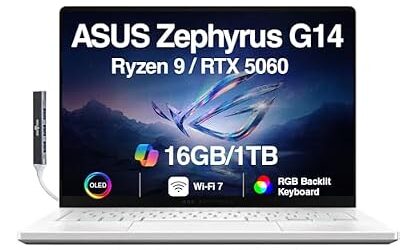
| ASUS ROG Zephyrus G14 (White) | RTX 5060, 14-inch 3K 120Hz OLED | Portability |
ASUS ROG Zephyrus G16: the white gaming laptop to beat
The white Zephyrus G16 is the most refined machine on this list. The listing pairs a 240Hz OLED panel with a GeForce RTX 5070 Ti, which has headroom for 1600p gaming at high settings, in a slim aluminum chassis with a white finish. If you want one white gaming laptop that does most things well, start here, and confirm the exact configuration and color on the listing before you buy.
What to look for in a white gaming laptop
Color aside, the fundamentals are GPU tier, panel refresh and resolution, and cooling. An RTX 5070 or better handles modern titles at high settings; pair it with a 165Hz-plus display. For the white finish specifically, aluminum and magnesium alloys resist yellowing far better than painted plastic, so favor metal chassis if longevity matters.
Thermals matter more than the color
A gorgeous white gaming laptop that throttles is a bad buy. Check independent thermal reviews for sustained clock speeds, not just peak numbers. Vapor-chamber cooling and liquid-metal thermal compound, found on some premium models, help keep temperatures in check. Thin chassis look great but leave less room for airflow, so balance portability against the performance you actually need.
Display quality: OLED versus MiniLED
The best white gaming laptops now ship with OLED or MiniLED panels. OLED delivers perfect blacks and vivid color, ideal for immersive single-player games, while MiniLED gets brighter for HDR and daylight use. Either beats a standard IPS panel. Match the resolution to the GPU: an RTX 5080 justifies a QHD panel, while a 5060 pairs best with 1080p for higher frame rates.
Keeping a white chassis looking new
White laptops show wrist oils and grime around the trackpad. Wipe the deck weekly with a slightly damp microfiber cloth and avoid abrasive cleaners that dull the finish. Anodized aluminum in white resists staining well; painted surfaces need more care. A skin or sleeve protects the lid during transport without hiding the aesthetic at your desk.
Battery life and everyday use
Modern white gaming laptops with efficient Ryzen AI or Intel Core Ultra chips manage a full day of light work when the discrete GPU is idle. Advanced Optimus and MUX switches route graphics through the integrated GPU for web and office tasks, then engage the RTX card for games. This dual personality makes a white gaming laptop viable as your only computer.
Value picks that still perform
You do not need to spend flagship money. Mid-range white models with an RTX 5060, a solid 165Hz panel and a durable build cost much less than the halo models. They run modern esports titles at high frame rates and handle AAA games at medium-high settings, making them the smart white gaming laptop buys for budget-conscious players.
Dig deeper into portable gaming: best budget gaming laptops, RTX 5070 vs 5080 laptop guide, OLED vs MiniLED explained, white gaming laptop accessories, laptop cooling pad reviews, and our gaming laptop buying checklist.
White Gaming Laptops With a White Finish in the Listing
A lot of “white” laptops are really champagne, cream or silver, so the safest approach is to shop listings that name the color. These three do: the first says Lunar White in the title and the other two say White. Specs below come from the listing titles; anything not stated is marked “not listed”.
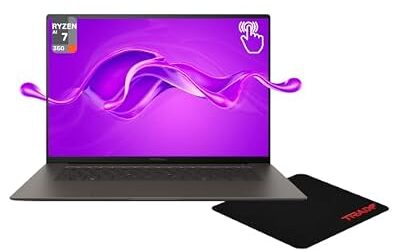
GIGABYTE AERO X16 (Ryzen AI 7 350, RTX 5070, Lunar White)
The AERO X16 is listed with a Ryzen AI 7 350, a GeForce RTX 5070, a 16-inch 2560×1600 display at 165Hz, 1TB of storage, 32GB of DDR5 and Windows 11 Home, finished in Lunar White. It is a Copilot+ PC.
It suits buyers who want a larger screen and a mid-high GPU without moving into the premium tier. A 16-inch 16:10 panel at 165Hz is a good match for an RTX 5070 at 1440p-class settings; you get smooth gameplay without paying for an OLED. It also works as a creator laptop thanks to the tall panel and 32GB of memory.
The drawbacks: the panel type is not listed in the title, so check whether it is IPS or another type before ordering, and battery capacity and weight are not listed. Compared with the Zephyrus options below, it gives up the OLED panel and portability for a lower cost and a larger screen. Of the three, it is the one to choose if budget matters most.
ASUS ROG Zephyrus G16 (White, Ultra 9, RTX 5070 Ti, 240Hz OLED)
This listing is sold through the HIDevolution reseller and names a White Zephyrus G16 (GU606AR) with a 16-inch WQXGA 240Hz OLED display, an Ultra 9 processor, a GeForce RTX 5070 Ti, 32GB of LPDDR5X memory, a 1TB SSD and Windows 11 Pro.
The appeal is the combination of a premium OLED panel and a high-end GPU in a thin white body. A 240Hz OLED is rewarding for competitive and cinematic games, and the RTX 5070 Ti has headroom for 1600p gaming at high settings. Windows 11 Pro is a small extra for remote desktop and disk encryption.
The trade-offs: it sits in the premium tier, the memory is soldered in this class of laptop, so it cannot be upgraded later, and the reseller may set its own return and warranty terms. Check them on the full listing. It is the better pick than the AERO X16 when you want OLED and a stronger GPU and are willing to pay for a slim chassis.
ASUS ROG Zephyrus G14 GA403UM (White, Ryzen 9 270, RTX 5060, 3K OLED)
The G14 is the portable option. The listing names a White 14-inch 3K 120Hz OLED display, a Ryzen 9 270, a GeForce RTX 5060, 16GB of LPDDR5X memory, a 1TB SSD and Windows 11 Pro.
It suits students and travelers who want a white laptop small enough to carry daily. An RTX 5060 is strong at 1080p and capable at 1440p with medium-high settings, and the OLED screen makes games look vivid. A 14-inch body also means a smaller battery-and-fan space than a 16-inch model, so expect the fans to ramp up in long sessions.
The drawbacks: 16GB of soldered memory is tight for demanding games and heavy multitasking, and it is a 2025 model, so the newer 2026 chips are not included. Compared with the Zephyrus G16 above, it costs notably less and weighs much less, but the GPU is a tier below. Choose it if you want the white ROG look at a lower cost and do not need 16-inch screen space.
Is It Really White? What to Check Before Buying
Maker color names are often vague. Lunar White, Glacier White, Platinum White and Mercury are not the same shade; some are closer to silver or champagne. Look for these signs that the finish is true white:
- The listing title or color field says White, not Silver, Gray or Platinum alone.
- Owner photos or the maker’s product page show the lid and the keyboard deck, not only the lid.
- The keyboard keycaps are described; many “white” laptops still have black keys or a dark deck.
Compare the Three Listings Side by Side
| Laptop | Screen | GPU | Memory | Tier | Best for |
|---|---|---|---|---|---|
| GIGABYTE AERO X16 | 16-inch 2560×1600, 165Hz | RTX 5070 | 32GB DDR5 | Mid-range | Larger screen, balanced cost |
| ROG Zephyrus G16 | 16-inch WQXGA 240Hz OLED | RTX 5070 Ti | 32GB LPDDR5X | Premium | OLED and high-end GPU |
| ROG Zephyrus G14 | 14-inch 3K 120Hz OLED | RTX 5060 | 16GB LPDDR5X | Upper mid-range | Portability |
Match the GPU to the Screen
| GPU | Screen to pair it with | What to expect |
|---|---|---|
| RTX 5050 or 5060 | 1080p to 1200p, up to 165Hz | High settings in most games, esports at high frame rates |
| RTX 5070 | 1440p to 1600p, 165Hz | High settings with upscaling in demanding games |
| RTX 5070 Ti and above | 1600p or higher, 240Hz | Headroom for long-term use |
Mistakes to Avoid
- Paying more for a color name than for the GPU and screen. Compare the spec lines, not the color.
- Buying a laptop with only 16GB of soldered memory if you plan to keep it for years.
- Assuming the color of the lid matches the keyboard deck and bottom panel.
- Ignoring the power adapter size on thin models; some come with large bricks.
- Buying a resold unit without checking the warranty and return terms.
Who Should Skip a White Gaming Laptop
If you want the best value per frame, a black or gray model with the same GPU is usually less expensive because white variants are rarer. If you will carry the laptop in a grimy bag every day, the white finish will show scuffs sooner, so use a sleeve.
Are there cheap white gaming laptops?
White variants are limited, and most come in the mid-range to premium tiers. If budget is tight, look at white mid-range models with an RTX 5060 and consider a color-matched sleeve or skin on a cheaper black or gray model.
Which white gaming laptop has the best screen?
Among the listings in this guide, the ROG Zephyrus G16 with a 240Hz OLED has the strongest display. The Zephyrus G14 also has an OLED panel in a smaller size.
Can I get a white laptop skin or cover for a black gaming laptop?
Yes. Skins and decals are made for many models, but they can trap heat near vents if placed badly. Cover only the lid and keep intake and exhaust vents clear.
Do white laptops get hotter in the sun?
A light finish reflects more sunlight than a dark one, so the lid may stay slightly cooler outdoors. The internal temperature during gaming is determined by the cooling system, not the color.
Is 16GB of RAM enough for a gaming laptop in 2026?
It is enough for most games, but 32GB is better for demanding titles, streaming and multitasking, especially when memory is soldered and cannot be upgraded later.
Cloud Gaming and Ultra-Light White Laptops: A Different Category
Not every buyer searching for a white gaming laptop wants a thick chassis with a discrete GPU inside it. A separate category has grown around thin, light laptops finished in white or light gray that lean on cloud gaming or game streaming services instead of local rendering power, trading raw frame rate for lower weight, longer battery life, and a lower price point. These machines typically rely on integrated graphics for everyday use and stream the gaming workload from a remote server, which means their real-world gaming performance depends far more on internet connection quality and server latency than on anything printed on the spec sheet.
This path makes sense for someone who travels often, wants a single light laptop for both work and casual gaming, and has reliably fast, low-latency internet available wherever they use it. It makes far less sense for competitive, latency-sensitive genres, where even a well-optimized streaming connection adds delay that a local discrete GPU does not have. Buyers drawn to a white finish for its lighter, less “gamer” look are often the same buyers who would be well served by this category, since it fits the aesthetic without the bulk of a high-wattage cooling system.
Latency is the number that actually determines whether this trade-off works, and the acceptable range narrows sharply for competitive play. General guidance for cloud gaming puts a smooth, responsive experience at roughly 30 to 40 milliseconds of network latency or lower, with casual, slower-paced genres remaining playable up to somewhere around 60 milliseconds before input lag becomes hard to ignore. Competitive, fast-reaction genres are far less forgiving of the extra encoding and rendering delay that streaming adds on top of raw network latency, so a connection that feels fine for browsing or video calls is not automatically fine for cloud gaming. A wired connection and a router placed close to the laptop will typically shave meaningful latency and jitter off a cloud session compared to a weak Wi-Fi signal from another room, often making a bigger practical difference than any setting inside the game itself.
Which White Gaming Laptop Fits Your Use Case?
Among the specific white and light-colored models already covered in this guide, the right pick depends less on raw benchmark numbers and more on how the laptop will actually be used day to day.
| If you… | Choose… |
|---|---|
| Want the strongest all-round white gaming laptop and can accept a premium price | The ASUS ROG Zephyrus G16 configuration with the higher-tier GPU and 240Hz OLED panel |
| Prioritize a larger screen for productivity alongside gaming | The GIGABYTE AERO X16 in its Lunar White finish |
| Want a smaller, lighter chassis without giving up a high-refresh OLED panel | The ASUS ROG Zephyrus G14 GA403UM configuration |
| Mainly want the look and plan to stream most demanding titles | A lighter cloud-gaming-focused white laptop instead of a discrete-GPU model |
Resale and Long-Term Value: Does White Hold Up Differently?
Color choice interacts with resale value in ways that are easy to overlook at purchase time. A white chassis shows scuffs, discoloration, and keyboard shine more visibly than a black one, so two otherwise identical laptops can look noticeably different after the same amount of use, which buyers in a secondhand market tend to notice immediately. At the same time, white and light-colored laptops are less common on the used market than black ones, so a well-kept example can stand out to a buyer specifically shopping for that look rather than competing against a flood of similar black listings.
The deciding factor is almost always maintenance rather than the color itself. A white laptop that has been kept in a sleeve, cleaned regularly, and not left on surfaces that transfer grime will hold its appearance far better than an identical model that was not, and that gap in visible condition is what ultimately shows up in resale price, not the finish choice at the time of manufacture. Buyers planning to resell or trade in within a few years should weigh the extra care a white finish demands against how much they value the look day to day.
The screen and keyboard deck tend to show age faster than the lid on a white laptop, since finger contact during daily typing concentrates oils and light scuffing in a smaller area than the outside surfaces ever see. A lid that still looks close to new after a year of use can sit above a keyboard deck with visible shine along the most-used keys, which matters because a buyer evaluating a listing usually looks closely at exactly that area first. Keeping a thin keyboard cover on during regular use, and removing it only for cleaning or photos, protects the part of the chassis that actually drives most of the visible wear over time.
Practical Steps That Affect Resale Condition
- Using a laptop sleeve or bag even for short trips around the house reduces the scuffing that accumulates from bags, desks, and backpacks.
- Wiping down the palm rest and keyboard area periodically prevents skin oils from setting into the finish over months of use.
- Keeping the original box and any documentation can matter more for white and limited-color models, since buyers shopping for a specific finish often value a complete, verifiable listing.
- Avoiding stacking other objects directly on a closed lid, since pressure marks and small dents show up far more visibly against a light finish than a dark one.
- Storing the laptop away from direct sunlight for long stretches, since some light plastics and coatings can discolor unevenly with prolonged UV exposure.
Cloud-Gaming Panels Versus Discrete-GPU Panels
A detail that gets lost once the focus shifts to color is whether a given panel actually suits the hardware class behind it. A lightweight, cloud-gaming-oriented white laptop with a premium 240Hz panel wastes most of that panel’s advantage, since the streamed frame rate is capped by connection quality long before the screen’s refresh ceiling matters. A discrete-GPU laptop pairs more naturally with a high-refresh panel because local rendering can actually feed it a variable, high frame rate in a wide range of titles. Checking which category a specific white laptop falls into, rather than assuming a high-refresh spec always means the same thing, avoids paying for a panel advantage that a particular configuration cannot realistically use.
How the Top White Gaming Laptops Compare on Specs That Decide Performance
A white finish can make two laptops look like close rivals when their internals point in different directions. The decision is easier when the comparison starts with graphics power, screen pairing, memory, storage, weight and upgrade room, rather than with the shade name on the lid. Graphics power is often quoted as a model number alone, yet the wattage behind that card, known as TGP, shapes sustained frame rates in long sessions. A card running at a higher wattage can hold its speed longer, while a lower-wattage version of the same card may run quieter and cooler in a thin body. Memory matters in a similar way. Soldered memory cannot be changed later, so a machine bought with 16GB stays at 16GB for its whole life, while a machine with socketed memory or a second storage slot leaves a clear upgrade path. Storage size also deserves a direct check, because modern games take up large amounts of space and a 512GB drive fills far sooner than a 1TB or 2TB drive. The table below brings the original picks and the new picks together on those points, using only the specifications named on their listings.
| Laptop | Screen | Graphics | Memory and Storage | Weight and Build Notes |
|---|---|---|---|---|
| GIGABYTE AERO X16, Lunar White | 16-inch, 2560 by 1600, 165Hz | RTX 5070 | 32GB DDR5, 1TB SSD | Larger 16-inch body, balanced mid-high tier |
| ASUS ROG Zephyrus G16, White | 16-inch WQXGA, 240Hz OLED | RTX 5070 Ti | 32GB LPDDR5X, 1TB SSD | Slim aluminium body, soldered memory |
| ASUS ROG Zephyrus G14, White | 14-inch 3K, 120Hz OLED | RTX 5060 | 16GB LPDDR5X, 1TB SSD | Portable 14-inch body, soldered memory |
| Lenovo Legion 7i Gen 10, Glacier White | 16-inch OLED, 2560 by 1600, 240Hz | RTX 5070, 115W TGP | 32GB DDR5, 2TB SSD | 4.52 pounds, full-size 16-inch design |
| Razer Blade 14, Mercury White | 14-inch 3K, 120Hz OLED | RTX 5070, 115W TGP | 32GB LPDDR5X, 1TB SSD | 0.62 inches thin, vapour-chamber cooling |
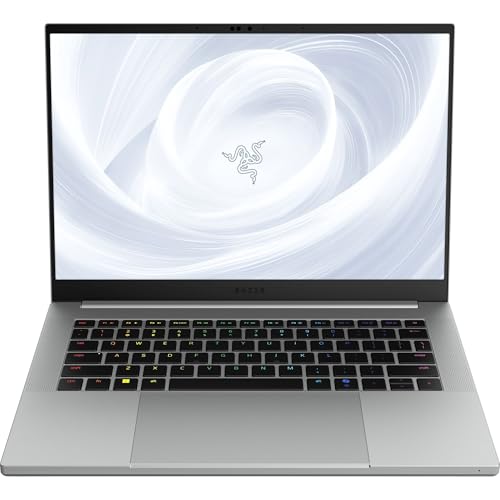
Use the table as a filter, not as a ranking. A 14-inch OLED machine suits daily carrying, a 16-inch machine suits a desk-first setup, and a 2TB drive suits a buyer who keeps many large games installed at once. If two listings share the same graphics card, look next at TGP, screen refresh, memory type and weight, because those four details explain most of the real difference between them.
Sizing and Compatibility Checklist Before You Order
Measure before ordering, because a white gaming laptop that does not fit a bag, desk or dock creates a daily annoyance that no specification can fix. Start with the laptop sleeve or backpack. A 14-inch machine fits most standard sleeves, while a 16-inch machine needs a sleeve made for that size, with room for the charger as well. Check the desk depth next. A 16-inch laptop plus an external keyboard needs more depth than a 14-inch machine used on its own, and rear vents need clear space behind the hinge so warm air is not trapped against a wall or a monitor stand. Count the ports against the gear already on the desk. A setup with an external monitor, a wired headset, a mouse and an external drive needs enough USB ports, a full-size HDMI port or a USB-C port with display output, and ideally a separate charging port so one cable does not have to do every job. Check the charger too. Thin laptops often ship with a large power brick, and that brick adds weight and bulk to a travel bag. Confirm the operating system edition, the keyboard layout, the webcam shutter, Wi-Fi generation and whether the memory is soldered or upgradeable. Finally, confirm the exact colour field on the listing, the model number, the screen resolution and refresh rate, and the return and warranty terms, especially when the seller is a reseller rather than the maker.
Setup and Care for a White Gaming Laptop
The first week sets the pattern for how a white laptop will look a year later. Unbox it on a clean surface, keep the original box and inserts until the return window has passed, and photograph the lid, deck and screen on arrival so any transit mark is easy to show later. Update the operating system and graphics driver before installing games, then set the fan profile to a balanced mode for everyday work and a performance mode for gaming, rather than leaving the machine on its loudest setting all day. Place it on a hard, flat surface during long gaming sessions so the intake vents stay clear, and avoid soft bedding or a cushion under the base. For cleaning, wipe the lid, palm rest and keys once a week with a slightly damp microfiber cloth, then dry the surface with a second clean cloth. Avoid abrasive pads, strong solvents and coloured cleaning wipes, which can dull a light finish or leave tint behind. Keep food and dark drinks away from the keyboard, wash hands before long typing sessions when practical, and use a sleeve for every trip, even a short one. Store the laptop out of prolonged direct sunlight, keep a thin keyboard cover on during regular typing if the maker allows it, and clean the vents gently with short bursts of air from a distance so dust does not build up inside the cooling system.
More Picks Worth Considering
Lenovo Legion 7i Gen 10 in Glacier White
The Legion 7i Gen 10 in Glacier White fills the gap between the slim Zephyrus models in the original guide and a larger desktop replacement. It pairs an Intel Core Ultra 9 275HX processor with a GeForce RTX 5070 graphics card, 32GB of DDR5 memory and a 2TB solid-state drive, so demanding games, editing work and heavy multitasking share one machine without constant storage juggling. The 16-inch OLED display runs at 2560 by 1600 and 240Hz, a strong match for the graphics card at high settings. Wi-Fi 7, a camera shutter and Windows 11 Home round out a practical daily setup. It does not fit buyers who want the lightest bag possible, because the listed weight is above four pounds. It also does not fit buyers who want a plain low-key keyboard, because per-key lighting is a visible part of the design.
Razer Blade 14 in Mercury White
The Razer Blade 14 in Mercury White is the portable alternative for buyers who liked the Zephyrus G14 but want a different maker and a thinner body. It uses an AMD Ryzen AI 9 365 processor, a GeForce RTX 5070 graphics card at up to 115W TGP, 32GB of LPDDR5X memory and a 1TB solid-state drive, with a 14-inch 3K OLED display at 120Hz. The aluminium unibody is 0.62 inches thin, the listed battery is 72 watt-hours, and the maker pairs the machine with a vapour chamber, dual USB4 ports, Wi-Fi 7 and a 200W adapter. It does not fit buyers who need upgradeable memory, because the memory is soldered and capped at 32GB. It also does not fit buyers who want a large screen for split-screen work. Choose it when a slim white laptop and a vivid OLED panel matter more than a larger display.
Who Should Skip a White Gaming Laptop
The original guide already notes that a black or grey model with the same graphics card is often the better value choice, and that a white finish shows scuffs sooner in a rough daily bag. Add three more groups to that list. Buyers who work in a dusty workshop, a kitchen, a garage or a shared family room where the laptop sits uncovered all day will spend more time cleaning a white deck than they would with a darker finish. Buyers who need the laptop to look identical to a fleet of office machines should also pause, because a white chassis stands out in a meeting room and may not match a workplace standard. Buyers who plan to resell quickly should think about condition rather than colour alone. A white laptop kept in a sleeve and cleaned weekly can photograph well, while one carried loose in a bag will show its history at a glance. If the look is not a strong personal preference, the same money usually buys a darker machine with a stronger graphics card, more storage or a better screen, and that trade is worth making.
Common Mistakes When Buying a White Gaming Laptop
The most common mistake is judging a laptop by its colour name instead of its specification line. Lunar White, Glacier White, Mercury White, Moonlight White and Platinum White are maker names, not a shared standard, and some sit closer to silver or champagne than to true white. Always check the colour field, owner photos and the keyboard deck, not only the lid photo. A second mistake is buying a high-refresh screen that the graphics card cannot feed, or a strong graphics card paired with a low-resolution panel that wastes its headroom. A third mistake is ignoring TGP, memory type and storage. Two laptops can share an RTX 5070 label while one runs it at a lower wattage, one solders its memory and the other leaves room to grow. A fourth mistake is forgetting the charger, the bag and the dock. A thin laptop with a heavy brick, a sleeve that is one size too small, or a monitor that needs a port the laptop does not have will annoy the owner every day. A fifth mistake is buying from a reseller without reading the warranty and return terms, because a customised or opened-box unit may carry different cover from a sealed retail unit.
Buyer Questions
How can I tell if a white laptop is truly white rather than silver or champagne? Look for the word White in the colour field, compare the lid and the deck in owner photos under normal indoor light, and check whether the keycaps and palm rest are light or dark. A listing that only shows the lid in bright studio light is not enough evidence.
Does a white finish change gaming performance? No. The colour is a surface treatment, and performance comes from the processor, graphics card, cooling design and power limits. A white machine and a black machine with identical internals should perform the same way, so compare those internals first.
What should I check first when the laptop arrives? Confirm the model number, colour, screen size and storage on the box and in the system settings, inspect the lid and deck for marks, test the keyboard, trackpad, Wi-Fi and speakers, and run a game for a short session to hear the fans and feel the heat. Keep the box until the return window ends.
Is a 14-inch or a 16-inch white gaming laptop better for travel? A 14-inch machine is easier to carry, fits smaller bags and usually weighs less, while a 16-inch machine gives more screen space and often more cooling room. Choose the smaller size for daily travel and the larger size for a desk-first setup with occasional trips.
Can I use a skin or cover to protect a white finish? Yes, on the lid only, and only if the vents, hinges and intake grilles stay clear. A full cover that blocks airflow can raise temperatures during gaming, so check the vent layout before applying anything.
Frequently Asked Questions
Do white gaming laptops perform worse than black ones?
No—a white gaming laptop uses identical internal components to its black counterpart, so performance is exactly the same. Color is purely cosmetic and does not affect the GPU, CPU, or cooling. The only practical difference is that white chassis can show grime more visibly, which is a maintenance consideration rather than a performance one.
Does a white gaming laptop turn yellow over time?
Quality white gaming laptops built from anodized aluminum or magnesium alloy resist yellowing very well because the color is part of the metal treatment rather than a surface paint. Cheaper plastic-bodied laptops with painted finishes are more prone to yellowing from UV and skin oils, so favoring a metal chassis is the best defense against discoloration.
Which white gaming laptop is best for portability?
Of the listings in this guide, the 14-inch ASUS ROG Zephyrus G14 in white is the most portable, followed by the 16-inch Zephyrus G16. Both pair an RTX 50-series GPU with a slim aluminum body. Check the weight and battery capacity on the exact listing, because maker figures vary by configuration.
Is a white gaming laptop worth the extra care?
For most people, yes. A white gaming laptop stands out, pairs with minimalist setups, and photographs well, and the extra maintenance is minimal—a weekly wipe with a microfiber cloth. If you are prone to eating at your desk or carry your laptop through rough conditions, a black or grey model may hide wear more forgivingly, but the difference is small.
What GPU should a white gaming laptop have in 2026?
Aim for at least an RTX 5060 for smooth 1080p high-settings gaming, an RTX 5070 or 5070 Ti for 1440p, and an RTX 5080 or 5090 for demanding QHD and creative workloads. Match the GPU to your display resolution and refresh rate so neither component bottlenecks the other in your chosen white gaming laptop.