🛒 Best Price Today on Amazon
Prime members get fast, free shipping on everything above, plus member-only deals. New members get a 30-day free trial — cancel anytime.
- Quick Comparison
- HP Victus 15 (Ryzen 7 7445HS): Best All-Rounder Under $1100
- Acer Nitro V (RTX 5050): Best for the Newest GPU
- Lenovo LOQ (Ryzen 5 7235HS): Best for Simple Brand Support
- MSI Cyborg 15: Best for a Light Gaming Build With RTX 5050
- HP Victus 15 (Core i5-12450H): Best Lowest-Outlay Option, Older GPU
- Acer Nitro V (RTX 4050): Best for a Fast Screen, Needs More RAM
- How to Choose Under $1100
- Frequently Asked Questions
The best gaming laptops under $1100 pair an RTX 4050 or RTX 5050 with a 144Hz to 165Hz screen, and the HP Victus 15 with a Ryzen 7 7445HS and 16GB of DDR5 is the best all-rounder. The Acer Nitro V with an RTX 5050 and the MSI Cyborg 15 are the picks if you want the newest GPU generation.
We compared the six laptops below from listing specifications, not by using them, so each figure is the seller’s claim. Every model is a 15.6 inch Full HD machine, so the real differences are the graphics card, memory, processor and screen refresh rate, and those are what the picks are ranked on.
Quick Comparison
| Model | CPU / GPU per listing | RAM / storage / screen | Best for |
|---|---|---|---|
| HP Victus 15 (Ryzen 7 7445HS) | Ryzen 7 7445HS / RTX 4050 6GB | 16GB DDR5 / 512GB / 144Hz FHD | Best all-rounder |
| Acer Nitro V (RTX 5050) | Core i5-13420H / RTX 5050 8GB GDDR7 | 16GB / 512GB PCIe / 165Hz IPS | Newest GPU generation |
| Lenovo LOQ (Ryzen 5 7235HS) | Ryzen 5 7235HS / RTX 4050 | 12GB DDR5 / 512GB / Full HD | Solid brand, low-fuss |
| MSI Cyborg 15 | Core i5-13420H / RTX 5050 8GB GDDR7 | 16GB DDR5 / 512GB NVMe / 144Hz | Lightweight-style gaming build |
| HP Victus 15 (Core i5-12450H) | Core i5-12450H / RTX 3050 | 16GB / 512GB / 144Hz FHD | Lowest outlay, older GPU |
| Acer Nitro V (RTX 4050) | Core i5-13420H / RTX 4050 | 8GB DDR5 / 512GB Gen 4 / 165Hz IPS | Fast screen, needs more RAM |
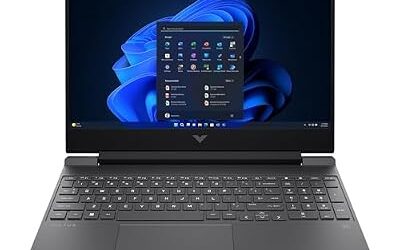
HP Victus 15 (Ryzen 7 7445HS): Best All-Rounder Under $1100
Listing specs: 15.6 inch FHD 144Hz, NVIDIA RTX 4050 6GB, AMD Ryzen 7 7445HS, 16GB DDR5, 512GB SSD, 6-core, backlit keyboard, Ethernet, webcam, Wi-Fi 6, Windows 11 Home.
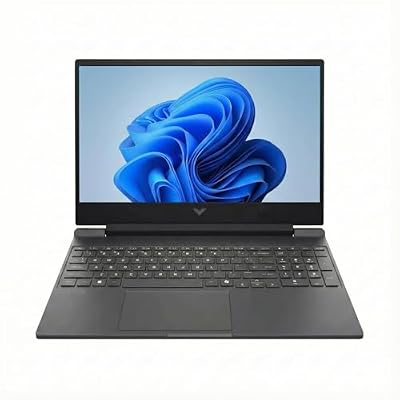
HP Victus 15 Gaming Laptop (15.6" FHD 144Hz, NVIDIA RTX 4050 6GB, AMD Ryzen 7 7445HS, 16GB DDR5 RAM, 512GB SSD, 6-Core (> Intel i7-13700H) ), Backlit KB, Ethernet, Webcam, Wi-Fi 6, Win 11 Home
Included for 'Best Gaming Laptops Under $1100: RTX 4050 and 5050 Picks' because the listing specifies NVIDIA RTX 4050 6GB and AMD Ryzen 7 7445HS, details this guide uses to compare options.
View on AmazonThe Victus is the most balanced machine here: an RTX 4050 with 6GB, a six-core Ryzen 7, 16GB of DDR5 and a 512GB SSD. It also lists Ethernet, a webcam and Wi-Fi 6, which are practical extras for students and streamers. The listing mentions a 144Hz panel but does not give the brightness or colour gamut, so it is a gaming screen rather than a creative one. The 6GB of graphics memory is the weak point if you play the newest titles at high texture settings, because the Acer and MSI RTX 5050 models have 8GB. For most players it is the safest all-round pick. If you will use it for school or remote work as well, the webcam and Ethernet port save you buying accessories, and DDR5 memory leaves room to grow if you add a second stick later.
Pros
- 16GB DDR5 and six-core Ryzen 7
- Ethernet and webcam listed
- 144Hz panel
Cons
- 6GB graphics memory
- Display colour details not listed
Acer Nitro V (RTX 5050): Best for the Newest GPU
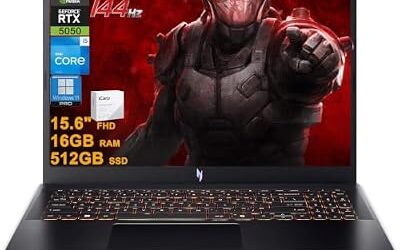
Listing specs: 15.6 inch FHD IPS 165Hz, Intel Core i5-13420H, NVIDIA GeForce RTX 5050 with 8GB GDDR7, 16GB RAM, 512GB PCIe SSD, Windows 11 Home, with mouse pad.

acer Nitro V 15.6” FHD IPS 165Hz Gaming Laptop, Intel Core i5-13420H, NVIDIA GeForce RTX 5050 with 8GB GDDR7 VRAM, Win11H, w/Mouse pad (16GB RAM, 512GB PCIe SSD)
Included for 'Best Gaming Laptops Under $1100: RTX 4050 and 5050 Picks' because the listing specifies Intel Core i5-13420H and NVIDIA GeForce RTX 5050 with 8GB GDDR7 VRAM, details this guide uses to compare options.
View on AmazonThis Nitro V combines the RTX 5050 and 8GB of GDDR7 with a 165Hz IPS panel and 16GB of RAM, which makes it the best choice if you care about newer graphics features and a faster screen. The Core i5-13420H is a mid-range processor, which suits a laptop at this ceiling. The listing does not state the DDR generation of the memory, so check the maker page if memory speed matters to you. It lands at the top of the price range for these six, but it also offers the most graphics memory, which will matter as games grow more demanding. The 165Hz panel is also worth having if you play shooters, since a higher refresh rate only helps when the GPU can produce frames fast enough, and the RTX 5050 is better placed to do that than the RTX 3050.
Pros
- RTX 5050 with 8GB GDDR7
- 165Hz IPS display
- 16GB RAM
Cons
- Memory type not stated in the listing
- Mid-range processor
Lenovo LOQ (Ryzen 5 7235HS): Best for Simple Brand Support
Listing specs: Lenovo LOQ 15.6 inch Full HD gaming laptop, AMD Ryzen 5 7235HS, GeForce RTX 4050, backlit keyboard, 12GB DDR5, 512GB SSD, Windows 11 Home, bundled mouse pad.

Lenovo LOQ 15.6" Full HD Gaming Laptop |AMD Ryzen 5 7235HS(Beat Intel Core i5-1155G7)|GeForce RTX 4050|Backlit| 12GB RAM DDR5 | 512GB SSD |Windows 11 Home |Bundle with Mouse Pad
Included for 'Best Gaming Laptops Under $1100: RTX 4050 and 5050 Picks' because the listing specifies AMD Ryzen 5 7235HS(Beat Intel Core i5-1155G7) and GeForce RTX 4050, details this guide uses to compare options.
View on AmazonThe LOQ is Lenovo’s value gaming line and this configuration lists an RTX 4050, a Ryzen 5 7235HS and 12GB of DDR5, which is an unusual amount that sits between 8GB and 16GB. That is workable for games but leaves less headroom than the 16GB Victus when you also run a browser and chat. The listing does not state the refresh rate, so check the maker page, because it decides how smooth fast games feel. It is a good pick if you want Lenovo’s build and keyboard and plan to add memory later. Check whether the memory is soldered or removable on the maker page, since that decides whether a later upgrade is possible at all.
Pros
- RTX 4050 with Ryzen 5 7235HS
- DDR5 memory
- Backlit keyboard
Cons
- 12GB RAM is below the 16GB sweet spot
- Refresh rate not stated
MSI Cyborg 15: Best for a Light Gaming Build With RTX 5050
Listing specs: MSI Cyborg 15 gaming laptop, 15.6 inch FHD 144Hz, Intel Core i5-13420H, 16GB DDR5, 512GB NVMe SSD, NVIDIA GeForce RTX 5050 8GB GDDR7, Windows 11 (C13WE-093US).

msi Cyborg 15 Gaming Laptop, 15.6" FHD 144Hz Display, Intel Core i5-13420H, 16GB DDR5 RAM, 512GB NVMe SSD, NVIDIA GeForce RTX 5050 8GB GDDR7, Windows 11, Gray, C13WE-093US
Included for 'Best Gaming Laptops Under $1100: RTX 4050 and 5050 Picks' because the listing specifies 15.6" FHD 144Hz Display and Intel Core i5-13420H, details this guide uses to compare options.
View on AmazonMSI gives the same CPU and GPU pairing as the Acer RTX 5050, with 16GB of DDR5 and a 512GB NVMe SSD, but a 144Hz panel instead of 165Hz. The listing does not state weight or thickness, so check the maker page if portability matters. It is a good alternative if the Acer is out of stock or if you prefer MSI’s look. The 512GB drive fills quickly with current game sizes, so plan to add a second SSD if the laptop has a slot. Modern games often take 50GB to 150GB each, so a 512GB drive holds only a handful of big titles next to Windows and your apps.
Pros
- RTX 5050 8GB GDDR7
- 16GB DDR5
- 512GB NVMe SSD
Cons
- Weight not listed
- 144Hz is slightly slower than the Acer
HP Victus 15 (Core i5-12450H): Best Lowest-Outlay Option, Older GPU
Listing specs: HP Victus 15.6 inch Full HD 144Hz gaming laptop, Intel Core i5-12450H, NVIDIA GeForce RTX 3050, 16GB RAM, 512GB PCIe SSD, Wi-Fi 6, backlit keyboard, Windows 11 Pro.

HP Victus 15.6" Full HD 144Hz Gaming Laptop, Intel Core i5-12450H, NVIDIA GeForce RTX 3050,16GB RAM, 512GB PCIe SSD, Wi-Fi 6, Backlit Keyboard,Windows 11 Pro, Performance Blue
Included for 'Best Gaming Laptops Under $1100: RTX 4050 and 5050 Picks' because the listing specifies Intel Core i5-12450H and NVIDIA GeForce RTX 3050, details this guide uses to compare options.
View on AmazonThis is the lowest-priced model in the group, and the trade-off is the graphics: the RTX 3050 is the previous generation and sits below the RTX 4050 in the same range. You still get 16GB of RAM, a 512GB PCIe SSD and Windows 11 Pro, which is helpful for work or school use, and it keeps the same 144Hz panel as the other HP. The Core i5-12450H is also one generation older. It makes sense for a student who games casually and wants the lowest outlay, but for a longer-lasting gaming machine, the RTX 4050 and 5050 models are better. It also works as a first gaming laptop for a teenager, where the games played are mostly esports titles that run well on an RTX 3050.
Pros
- 16GB RAM and 512GB PCIe SSD
- Windows 11 Pro
- 144Hz panel
Cons
- RTX 3050 is a previous-generation GPU
- Older Core i5-12450H
Acer Nitro V (RTX 4050): Best for a Fast Screen, Needs More RAM
Listing specs: Acer Nitro V gaming laptop, Intel Core i5-13420H, RTX 4050 laptop GPU, 15.6 inch FHD IPS 165Hz, 8GB DDR5, 512GB Gen 4 SSD, Wi-Fi 6, backlit keyboard (ANV15-52-586Z).

Acer Nitro V Gaming Laptop | Intel Core i5-13420H Processor | NVIDIA GeForce RTX 4050 Laptop GPU | 15.6" FHD IPS 165Hz Display | 8GB DDR5 | 512GB Gen 4 SSD | Wi-Fi 6 | Backlit KB | ANV15-52-586Z
Included for 'Best Gaming Laptops Under $1100: RTX 4050 and 5050 Picks' because the listing specifies Intel Core i5-13420H Processor and NVIDIA GeForce RTX 4050 Laptop GPU, details this guide uses to compare options.
View on AmazonThe listing pairs a 165Hz IPS screen and a Gen 4 SSD with an RTX 4050, which is attractive, but it ships with only 8GB of DDR5, which is thin for modern games and multitasking. A second 8GB stick, if the laptop has a free slot, would fix that, but the listing does not say, so check the maker page. The Gen 4 SSD is listed, so game loads should be quick, and the faster drive helps the system feel responsive. If you plan to upgrade the RAM, it is a good value, otherwise the 16GB models above are easier choices.
Pros
- 165Hz IPS display
- Gen 4 SSD
- RTX 4050
Cons
- Only 8GB of RAM
- Upgrade slot not confirmed in the listing
How to Choose Under $1100
Pick the GPU before anything else
At this ceiling you are choosing between an RTX 3050, RTX 4050 and RTX 5050. The RTX 5050 with 8GB gives the most headroom, the RTX 4050 (6GB on the HP listing) is the mainstream choice, and the RTX 3050 is the older option. Do not trade graphics for a faster CPU, since games are usually limited by the GPU first. Then check memory: 16GB is the goal, and 8GB should be treated as a reason to budget for an upgrade rather than a finished configuration.
Gaming laptops for streaming
Streaming needs RAM and a stable network. Look for 16GB or more, plus Ethernet if you stream from a desk. The HP Victus with a Ryzen 7 lists Ethernet and 16GB DDR5, which makes it the best fit for streaming among these. Use the NVIDIA encoder on the GPU instead of the CPU to keep frame rates up, and close background apps before you go live. A laptop on mains power performs better than one on battery, so plan to stream plugged in.
Gaming laptops for 1440p
All six have a Full HD built-in screen, so 1440p applies to an external monitor. An RTX 4050 or 5050 can drive a 1440p monitor at medium settings in many games, but expect to lower texture settings on a 6GB card such as the one in the HP. The RTX 5050 with 8GB is the most comfortable option. If your external monitor is 1440p at 144Hz, expect to lower settings or use upscaling features to reach that refresh rate in newer games, and check that the laptop has an HDMI or USB-C video output that supports it.
Gaming laptops for students
Students need a laptop that works for lectures as well as games. Prefer 16GB of RAM, a webcam and Wi-Fi 6, as on the Victus, and check weight and battery on the maker page. A Windows 11 Pro licence, as on the Core i5 Victus, can help with campus management tools. Keep the charger weight in mind as well, since a gaming laptop brick is heavier than an ordinary laptop charger and adds to what you carry to class.
Frequently Asked Questions
Is an RTX 4050 laptop good enough under $1100?
Yes for 1080p gaming. It handles most modern games at medium to high settings, though the 6GB of graphics memory can limit the newest titles.
Is the RTX 5050 better than the RTX 4050?
The RTX 5050 listings here have 8GB of GDDR7, more graphics memory than the 6GB on the RTX 4050 models, which helps in memory-hungry games.
How much RAM do I need?
16GB is the target. The 8GB Acer RTX 4050 model needs an upgrade, and the 12GB Lenovo is workable but leaves less room.
Can I stream on one of these laptops?
Yes. Use the GPU encoder, keep 16GB of RAM, and use Ethernet if the laptop has a port.
Do these laptops run cool?
Cooling varies by chassis and the listings do not give thermal details. Use the laptop on a hard surface and keep vents clear.
Last updated: November 2026