🛒 Best Price Today on Amazon
Prime members get fast, free shipping on everything above, plus member-only deals. New members get a 30-day free trial — cancel anytime.
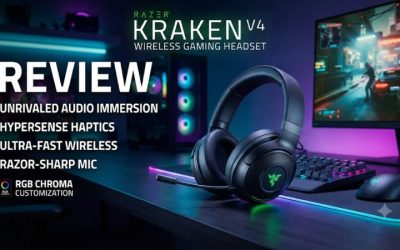
In Razer Kraken V4 vs Corsair Virtuoso Max, choose the Kraken for wired USB audio, a retractable mic, and a lighter fit. Choose the Virtuoso Max for ANC and simultaneous game and phone audio. Both work on PS5 through their receivers, but their controls and Windows features suit different gaming setups.
Which headset suits your setup?
The standard Kraken V4 is the easier choice for a Windows player who uses one main audio source and wants a wired USB fallback, a retractable microphone, and game/chat controls. The Corsair Virtuoso Max is built for a different routine. It can play receiver audio and Bluetooth audio together, with two volume rings, and gives you noise cancellation and transparency.
On PS5, both use their own USB receivers. The big differences on console are the way they handle a second source, the fit, and how useful the local controls are to you. If you are buying mainly for Xbox Series X, the separate Virtuoso Max for Xbox is the wireless option to check in this pair.
| Feature | Razer Kraken V4 | Corsair Virtuoso Max |
|---|---|---|
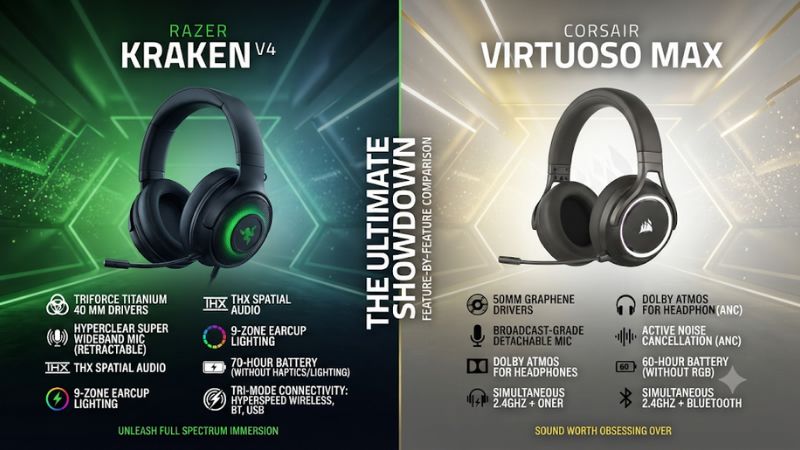
| Main gaming connection | HyperSpeed 2.4 GHz receiver | 2.4 GHz USB receiver |
| Wired playback | Documented wired USB audio | Plan on the receiver or Bluetooth for audio |
| Bluetooth alongside gameplay | SmartSwitch and documented incoming-call handling | Simultaneous receiver and Bluetooth playback |
| Room noise controls | Passive isolation | ANC, transparency, and off |
| Microphone | Retractable super-wideband boom | Detachable omnidirectional boom |
| Weight reference | Approximately 350 grams per Razer | About 422 grams without the boom in one published test |
| Battery rating | Up to 70 hours with lighting off or 35 with it on over 2.4 GHz | Up to 60 hours with RGB off or 30 with it on, per Corsair |
| Windows ecosystem | Synapse, THX, Chroma, game/chat mix | iCUE, SoundID, EQ, and Dolby Atmos for Headphones |
This comparison uses the standard Kraken V4
Razer sells the Kraken V4, the Kraken V4 Pro, and the Kraken V4 X. Some online comparisons quote a feature from the Pro and attach it to the standard model. Razer’s comparison table assigns simultaneous wireless media playback and the OLED hub to the Pro tier. The standard Kraken V4 has its own useful control set and supports three connection choices.
On Corsair’s side, this comparison uses the standard PC and PlayStation Virtuoso Max. The Virtuoso Max for Xbox covers another platform and has some edition-specific controls. The Virtuoso RGB Wireless XT is another distinct headset. Its wired audio modes are a common source of confusion when people discuss the newer Max.
Check the exact product name and image of the receiver or hub before drawing a price comparison. If a store combines several headsets into one listing, record the selected variation. The feature that makes a headset worthwhile can belong to a different product even when the page looks the same.
Decide whether you need one audio stream or two
Imagine a typical game with the phone on your desk. The Kraken V4 can take an incoming Bluetooth call from a paired device while using the gaming connection, and SmartSwitch gives you a way to move between sources. That suits a person who wants to answer an occasional call or switch to the phone after playing.
The Virtuoso Max can keep the phone’s media and the game audible together. That matters if a phone carries a voice channel, stream, or other sound you want to follow throughout the session. It also gives you direct controls for setting the balance between the two devices. For some players, this is the main reason to pay for the Corsair.
Calls are worth testing separately from music. A headset can receive audio from both sources while sending your microphone to a particular call or application. If your phone needs to share a live microphone with PC or console voice chat, verify how the setup behaves with the actual apps you use.
Connection options and controls
The Kraken has the clearer wired audio fallback
Razer documents digital USB playback on the standard Kraken V4. On a compatible PC, you can plug it in, select its wired audio output, and keep listening when you need to charge or when the receiver is unavailable. That is valuable if you use the headset across desks or want a simple way to check whether a dropout is isolated to wireless.
Corsair’s storefront text about Virtuoso Max wired playback is inconsistent. Its compatibility guide and setup manual describe receiver and Bluetooth audio, and several independent reviewers report that the headset does not provide wired playback. Plan to use the Corsair cable for charging and firmware servicing. You can keep listening through the receiver while supplying power if your setup allows it.
To verify either path, temporarily remove the receiver and see whether the device still produces sound through the cable. A live receiver can hide the difference between wired playback and wireless playback while charging. If cable-only listening is a requirement, choose the Kraken for its documented USB mode or a different model if you need analog.
The Corsair’s rings make source mixing intuitive
The Virtuoso Max’s default ring assignments separate the USB receiver from Bluetooth. Turn down the second source during a conversation, then raise it again without affecting game volume. This works well because the two sources remain separate at the headset controls after the audio has reached it.
The Kraken V4’s game/chat controls address a different problem. On a supported Windows setup, game and voice applications can use different Kraken playback endpoints. You can then change how much game and how much chat you hear. If both streams use a single endpoint, a hardware or software balance control has less to work with.
Decide where your voice traffic comes from. A Windows gamer who runs the game and Discord on the same PC may benefit from properly separated Game and Chat endpoints. A PS5 player who takes audio from the console and a phone may get more use from the Corsair’s two rings. A person who uses one source and one volume setting should give more weight to fit and price.
PS5 setup is similar, but PC features differ
Connect the matching receiver directly to an available PS5 USB data port. Select the headset for audio output and separately select it as the microphone input. Use All Audio if you want the headset to carry the game as well as chat. Test the microphone level with the headset boom attached or extended before starting a party.
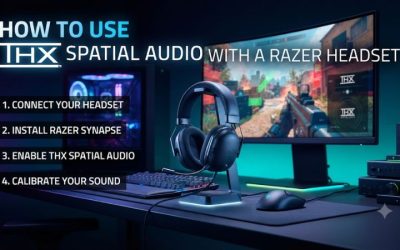
For PS5 spatial sound, use the console’s 3D Audio for Headphones controls if you want to compare the effect. THX in the Razer Windows workflow and Dolby Atmos for Headphones in a Corsair Windows workflow are separate features. A PS5-only buyer should value what the headset does on the console without assuming the Windows software carries across.
If you also own an Xbox, choose the named Virtuoso Max for Xbox model when you need licensed Xbox wireless. Corsair documents a PC mode for that model’s use on PS5. The standard Kraken V4’s PS5 compatibility is not evidence of Xbox wireless compatibility.
Plan the receiver and cable around the devices you own
The Kraken V4’s receiver uses USB-C. The Virtuoso Max uses a USB-A transmitter. At a desktop with both types of ports, that may be a minor difference. At a laptop or console with limited space, it can affect whether you need an adapter or where you can leave the receiver installed. Use a data-capable connection and give the receiver room around adjacent plugs.
If you put the headset receiver behind a monitor or inside a TV cabinet, test the wireless connection from your usual seat. A difference between two locations can be more important than a range number. Start with a direct port. Add a dock or extension after you have a stable baseline so you can recognize when the extra hardware changes the behavior.
A wired fallback also changes a two-device routine. The Kraken receiver can remain with one supported gaming device while you use wired USB on another. With the Max, plan where the wireless receiver will live and how often you will need to move it. The answer may decide which headset is more convenient over a week.
Sound, microphone, and room noise
Compare sound with the same source and volume
The Kraken uses 40 mm titanium drivers. The Virtuoso Max uses 50 mm graphene drivers. Published reviews report good gaming sound from both once configured, with differences in the way reviewers used tuning and outputs. Those outcomes do not establish a single winner. Cup fit, EQ, spatial audio, and the game’s own mix can affect the result more than the driver size suggests.
Start with a scene containing dialogue, footsteps, and music. Match subjective loudness, then listen for whether the quiet detail is still distinct when the scene gets busy. Use stereo first. Follow with one spatial mode at a time if you want to compare a game’s headphone setting with THX or another platform renderer.
For a buyer who cares about sound with minimal setup, test the default profile as well. If a headset needs repeated EQ changes before it sounds comfortable across your library, that can matter more than how good it sounds in one optimized game. If you like making profiles, evaluate how quickly you can save and recall the sound you prefer.
ANC makes the Max a stronger choice for a noisy room
The Virtuoso Max has ANC and transparency. Try ANC with a fan or HVAC running and the game paused, then resume the same scene. Steady room sound is a useful starting point. Nearby voices or keyboard clicks may remain audible. A consistent seal matters, so try the headset with the glasses or hair arrangement you usually wear.
Transparency serves another purpose. It lets you hear more of the room when someone speaks without removing the headset. The dedicated hardware gesture is useful if short interruptions happen regularly. A player who works and plays in a shared room can benefit from both modes, even if the difference matters less during a busy game scene.
The Kraken V4 relies on its ear cushions for isolation. That can be adequate when your main distractions are light household noise and the room is usually quiet. If you spend most sessions in those conditions, the Max’s noise modes are less likely to justify a heavier headset by themselves.
Choose the microphone you will deploy more often
The Kraken V4 has a boom that retracts into the earcup. If you alternate between games with chat and solo play, it is convenient to put away without removing a part. The Virtuoso Max mic detaches, which gives a cleaner exterior for music or video, but you need a place to keep it between sessions.
Independent reviews have praised the Kraken’s super-wideband mic and reported mixed impressions of the Virtuoso Max boom. A clearer result in one review can reflect mic placement, level, wireless mode, and processing. For a fair comparison, position each mic near the corner of your mouth, record the same sentence, and listen for breath noise, clipping, and voice clarity. Then use the chat app you normally run.
Pick based on your workflow if the microphones sound good enough. If chat is always part of a session, a retractable design lets you switch quickly. If you regularly remove the mic for phone or entertainment use, the Corsair’s detachable design is convenient as long as you store it reliably.
Know where mic monitoring comes from
Both headset ecosystems offer ways to tune the microphone on supported PCs. The useful distinction is between the input level other people hear and the sidetone you hear locally. Set them separately. A headset can sound too loud in your ears while teammates say your voice is quiet because the controls act on different signals.
On console, use the PlayStation microphone level controls to verify the outgoing signal. Treat software sidetone and custom EQ as features that need to be checked for the exact platform and device combination. A buyer who prioritizes adjustable local monitoring should establish that the intended console workflow supports it before paying more.
If you record or stream regularly, test your audio routing with an ordinary setup rather than relying on a headline mic feature. A local recording tells you what the headset puts into the PC. A party or a recorded stream tells you what the other application does with it.
Comfort, battery, and price
The Kraken is lighter, but test where each headset presses
Razer lists the Kraken at about 350 grams. A published Virtuoso Max test measured about 422 grams without the microphone. Those numbers were reported using different methods, but the Max is clearly a substantial headset. Reviews have also described a stiffer frame or pressure on the crown for some users. Comfort depends on whether that weight is distributed across your head.
Try each for a full session if you can. Check temple pressure with glasses, whether the ear cushions make even contact, and whether you adjust the band repeatedly. The lighter Kraken can be easier to live with if you spend long periods in chat. The Max can still make sense if its fit is acceptable and you use the ANC or source controls often.
Test the headset with the boom in the position you normally use. An even fit can improve the perceived bass and outside noise. If one headset sounds markedly different after a small position change, give pad fit more weight when deciding.
Turn lighting off when runtime matters most
Razer lists up to 70 hours for the Kraken V4 with lighting off over 2.4 GHz and up to 35 hours with lighting on. Corsair’s overview lists up to 60 hours with RGB off and up to 30 with it on for the Virtuoso Max. Those are manufacturer ceilings, and the conditions are not identical. The practical lesson is that lighting has a material effect on both headsets.
A buyer who often keeps two connections active or uses ANC will want to judge the Max under that routine. A buyer who leaves Chroma running should use the Kraken’s lighting-on rating as the more relevant reference. Measure what happens during a normal week and compare when you actually need the cable.
If both headsets already cover one or several sessions between charges, give other features greater weight. A dependable USB fallback on the Kraken can make an unexpected low battery easier to handle at a desk. The Corsair’s longer sessions with ANC or two sources are worth evaluating with the features you bought it to use.
Compare the complete setup cost
The Kraken offers more value when wired USB, a retractable boom, and its lower weight fit your habits. The Virtuoso Max is worth paying more for when you would regularly use ANC, transparency, and simultaneous receiver and phone audio. Check the current price spread at checkout rather than assuming the original list prices still represent the options.
For a used unit, confirm that the matching receiver is present and working. On the Corsair, check for the detachable mic and test the two rings and ANC modes. On the Kraken, extend and retract the boom, test the PC balance controls if you need them, and verify cable-only audio. A missing receiver or unreliable microphone can erase the savings.
Pack the comparison around a typical day. If you turn off lighting, use one source, and rarely wear the headset while moving from room to room, ask what either upgrade changes. If your existing headset has a problem you can describe clearly, select the model that fixes it with the fewest additional compromises.
Conclusion
Choose the Razer Kraken V4 for a lighter fit, documented wired USB audio, a retractable mic, and supported Windows game/chat controls. Choose the Corsair Virtuoso Max if you regularly mix game and phone audio or benefit from ANC and transparency. Both work on PS5 through their receivers. A console-only buyer should base the choice on fit, noise control, microphone use, and second-source playback before weighing the PC software.