
Affiliate disclosure: As an Amazon Associate we earn from qualifying purchases. This post contains affiliate links — we may earn a small commission at no extra cost to you. This never affects our picks. Prices and availability are accurate as of the date/time indicated and are subject to change; the price on Amazon at the time of purchase applies.
- Quick Answer: What to Buy Right Now
- The Five Criteria That Actually Matter
- The Buying Checklist
- Spec Primer: What the Numbers Actually Mean
- Common Mistakes Buyers Make
- Frequently Asked Questions
- Three Keyboards for Three Users
- Switch Recommendations by Feel
- The Switch-Swap Habit
- Final Take
- Related Guides
- Related Articles
Top picks at a glance:
As an Amazon Associate we earn from qualifying purchases at no extra cost to you.


This guide may contain affiliate links. We may earn a small commission on purchases made through these links at no extra cost to you. Our recommendations are based on detailed research and independent analysis.
Quick answer:
By Alex Rivera, Senior PC Hardware Editor · Updated May 2026
Twelve years of building, benchmarking, and breaking gaming systems. Reviews informed by real-world long-term use and current 2026 hardware testing.
🛒 Best Price Today on Amazon
Prime members get fast, free shipping on everything above, plus member-only deals. New members get a 30-day free trial — cancel anytime.
Quick Answer: What to Buy Right Now
For gaming in 2026, a 60% or 75% keyboard with hot-swappable Hall-effect or magnetic switches, an aluminum case, gasket-mount construction, and 8000 Hz polling strikes the best balance of competitive performance and typing feel. Budget 150-300 USD for a great keyboard; 300-500 USD enters enthusiast territory. Wooting, Keychron Q-series, and Mode Designs lead by pairing gaming features with quality typing.
The Five Criteria That Actually Matter
Most buying guides for a gaming keyboard list ten or twelve specs to weigh. In practice, the difference between a satisfying purchase and a regretted one usually comes down to five decisions. The rest are details you can adjust later or never even notice.
1. Switch technology
Hall-effect (Wooting) and inductive magnetic (Keychron, ASUS ROG Falchion Ace HFX) switches unlock rapid-trigger, adjustable actuation, and snap-tap features mechanical switches can’t match. For pure typing, premium tactile mechanical switches (HMX, Akko CS, Gateron Oil King) still feel better.
2. Layout and size
60% saves desk space for low-sens players; 65% adds arrows; 75% adds a function row; TKL adds a nav cluster; full size adds a numpad. Smaller is more competitive (more mouse room); larger is more productive. Pick once and stay put – muscle memory takes weeks to rebuild.
3. Build quality and acoustics
Gasket-mounted PCBs with sound-dampening foam produce the satisfying low-pitched thock that defines premium 2026 keyboards. Cheap plastic cases sound hollow and feel buzzy. Aluminum cases add 1.5-3 lbs but transform the typing feel.
4. Polling rate and latency
8000 Hz polling on a magnetic-switch keyboard trims input latency to roughly 1.25 ms total. The Wooting 80 HE measures around 1 ms keypress-to-USB. That’s meaningfully faster than 1000 Hz mechanical keyboards and visible to competitive players.
5. Software and customization
Wootility, VIA, and QMK are the strong software options. Avoid keyboards locked to proprietary apps that demand a cloud login. Magnetic-switch features (rapid-trigger sensitivity, dual actuation points, snap-tap) all live in software and define daily use.
The Buying Checklist
Print it, save it, or screenshot it on your phone. Run through it before you commit – every item here is a real mistake we’ve watched people make and regret.
- Decide layout size before brand
- Choose mechanical, Hall-effect, or magnetic switches based on use case
- Verify hot-swap socket type if you plan to change switches later
- Look for gasket-mount construction and dampening foam
- Check polling rate (8000 Hz for competitive, 1000 Hz fine for typing)
- Confirm software supports your OS (some are Windows-only)
- Buy doubleshot PBT keycaps if the included ones are ABS
- Test typing in-store or via return-friendly retailer
Spec Primer: What the Numbers Actually Mean
Actuation point on a mechanical switch is fixed (typically 2 mm). On Hall-effect and magnetic switches you set actuation from 0.1 mm to 4 mm in software, enabling rapid-trigger (key resets on minimal upward movement) and dual actuation (one action partway, another at full press). N-Key Rollover (NKRO) means every press registers no matter how many are held – essential for competitive gaming. Polling rate on keyboards behaves the same way as on mice: more frequent reports, lower latency, more CPU overhead. PBT keycaps resist shine and feel better than ABS, which develops glossy spots within months on used keys.
Common Mistakes Buyers Make
These are the patterns we run into most in support forums, return reviews, and our own past mistakes. Avoiding them is worth more than chasing the top of the spec sheet.
- Buying a 60% layout without thinking about how often you use arrow keys
- Choosing tactile switches because YouTube likes the sound, then disliking them for gaming
- Picking a non-hot-swap board and being stuck with switches you hate
- Ignoring keycap quality – ABS shines and ruins the look in months
- Plugging an 8000 Hz keyboard into a USB hub and losing the polling benefit
Frequently Asked Questions
Are magnetic switches worth the extra cost?
For competitive gaming, yes – rapid-trigger and snap-tap aren’t gimmicks, they win actual gunfights. For typing-only use, premium tactile mechanical switches still feel better and cost less.
Is wireless gaming keyboard latency a problem?
Modern 2.4 GHz wireless keyboards (Logitech G915 X, Razer BlackWidow V4 75% wireless) measure 4-8 ms of added latency versus wired. Acceptable for most gaming, noticeable for top-tier competitive play. Bluetooth adds 15-25 ms and should be avoided for gaming.
Hot-swap or soldered switches?
Hot-swap. The flexibility to change switches in seconds is worth the minor cost difference. Soldered keyboards only make sense for high-end custom builds with switches you’ve already committed to.
How long do gaming keyboards last?
Mechanical and magnetic switches are rated for 50-100 million presses – decades of normal use. The keycaps wear out first (12-36 months for ABS, 5-10 years for PBT). USB cables on detachable keyboards are also a wear point – buy a spare.
Three Keyboards for Three Users
The Competitive Gamer (Wooting 80 HE – 200 USD)
Hall-effect switches with rapid-trigger and snap-tap, 8000 Hz polling, hot-swappable, USB-C. Roughly 1 ms input latency end-to-end. The keyboard that won over most CS2 and Apex competitive players in 2025-2026.
The Enthusiast Typist (Keychron Q2 Max – 220 USD)
Aluminum case, gasket-mount, premium dampening, hot-swap mechanical switches, QMK/VIA firmware, wireless option. Tactile and acoustic excellence first, gaming features second.
The All-Rounder (Mode Designs Sonnet – 350 USD)
Premium PCB with magnetic switches available, top-tier acoustics, beautiful build. The keyboard people show off and use daily for both work and gaming. Worth the price if a keyboard matters to you the way a mouse matters to a pro player.
Switch Recommendations by Feel
For tactile typing without sharpness: HMX Macchiato or Akko CS Crystal. For linear gaming with a smooth bottom-out: Gateron Oil King or HMX Pulsar. For clicky old-school feedback: Kailh Box White or NovelKeys Cream Clickiez. For Hall-effect: Lekker, Gateron Magnetic Jade, or Razer Analog. For magnetic: Geon Raw HE or AKKO Cream Hall Effect. Try samples from a switch tester (10-30 USD) before committing – feel is subjective, and what reviewers love often misses your preference. Plan to swap switches at least once – that’s the entire point of hot-swap construction.
The Switch-Swap Habit
Hot-swap keyboards exist because preferences change. The switches you love in month one may feel wrong by month six. Plan to swap at least once – that’s the whole point of the format. Budget 40-60 USD for a switch tester with 9-15 different switches, try each for a week in a corner of the board, and only then commit to a full set. Switch films, lubed switches, and stem materials all shape feel and sound in ways no review fully conveys. The keyboard community ships sample packs, and major retailers (Drop, Kinetic Labs, NovelKeys, KBDfans) include detailed feel-and-sound clips. After two or three swap cycles you settle on a personal preference that often diverges sharply from popular review picks. The hobby gets expensive, but the daily typing experience it produces is the closest thing to a custom-tailored tool in modern PC gear.
Final Take
Keyboards in 2026 are deep into a golden age – magnetic switches, premium acoustics, and customisable layouts show up at every price point above 150 USD. Pick a layout that fits your workflow, switches that fit your priorities (competitive vs typing), and a brand whose software you can live with. A good keyboard outlasts three PCs.
Related Guides
Top picks from this guide
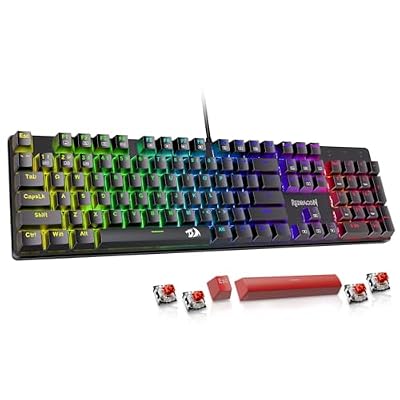 RedragonRedragon Mechanical Gaming Keyboard Wired, 11 Programmable Backlit Modes, Hot-Swappable…$30 \xc2\xb7 99/100
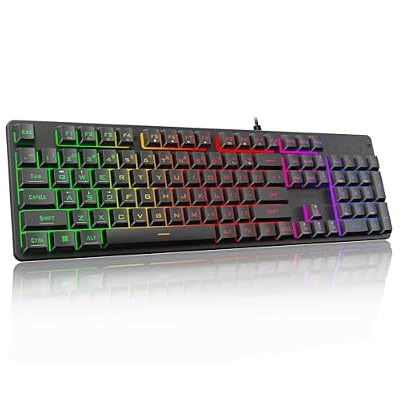 RedragonRedragon K521 Upgrade Rainbow LED Gaming Keyboard, 104 Keys Wired…$14 \xc2\xb7 99/100
 GEODMAERGEODMAER 65% Gaming Keyboard, Wired Backlit Mini Keyboard, Ultra-Compact Anti-Ghosting…$17 \xc2\xb7 98/100
 SteelSeriesSteelSeries Apex 3 Gaming Keyboard - Black | 10-Zone RGB…$50 \xc2\xb7 98/100








