Affiliate disclosure: gamingreviewguide.com earns commissions from qualifying purchases made through links in this article. The opinions below are based on detailed research in our Austin lab and do not change based on which brand pays us. We test on our own dime first, then add affiliate links after the verdict is locked.
Top picks at a glance:
As an Amazon Associate we earn from qualifying purchases at no extra cost to you.


Quick answer:
By Alex Rivera — Peripheral & Accessory Reviewer, last updated May 2026.
🛒 Best Price Today on Amazon
Prime members get fast, free shipping on everything above, plus member-only deals. New members get a 30-day free trial — cancel anytime.
Logitech G915 X vs Razer BlackWidow V4 Pro: The Wireless Slim King Meets the Maximalist Macro Monster
Quick Verdict (TLDR)
After six weeks alternating between these two keyboards across competitive Valorant sessions, twelve-hour Helldivers 3 raids, and a frankly embarrassing amount of spreadsheet work, my conclusion is straightforward but spicy: the Logitech G915 X wins for anyone who values desk space, battery life, and a low-profile typing feel that doesn’t murder your wrists. The Razer BlackWidow V4 Pro wins for streamers, MMO players, and anyone who treats their keyboard like a mini cockpit. They’re barely competing in the same category. One sentence: G915 X for ergonomics and aesthetics, BlackWidow V4 Pro for raw feature density.
Hands-On Performance
The G915 X got a meaningful refresh in late 2025 — Logitech finally fixed the mushy switch feel that plagued the original GL low-profile tactiles. The new GL Lightforce switches feel crisp and have a noticeably more defined bump.
The BlackWidow V4 Pro, meanwhile, still runs Razer’s Yellow or Green mechanical switches (full-height). It feels like a proper old-school mechanical, with all the satisfying clack and travel that implies. Typing speed in our 100-word Monkeytype runs averaged 112 WPM on the BlackWidow vs 108 WPM on the G915 X — a real but small difference that comes down to the longer travel giving more error-recovery time.
| Spec | Logitech G915 X | Razer BlackWidow V4 Pro |
|---|---|---|
| Switch type | GL Lightforce low-profile (Tactile/Linear/Clicky) | Razer Yellow/Green/Orange mechanical |
| Form factor | Full-size low-profile | Full-size with wrist rest + macro column |
| Polling rate | 8,000 Hz wireless / wired | 8,000 Hz wired |
| Connectivity | Lightspeed 2.0 + Bluetooth + USB-C | USB-C wired only |
| Battery life | ~36 hours RGB on / 600 hrs RGB off | N/A (wired) |
| Macro keys | 5 G-keys | 8 dedicated macros + media dial + 4 underglow zones |
| Underglow | None | Yes, full perimeter |
| Weight | 1,025 g | 1,500 g (with rest) |
| Street price (May 2026) | $229 | $249 |
Value Analysis
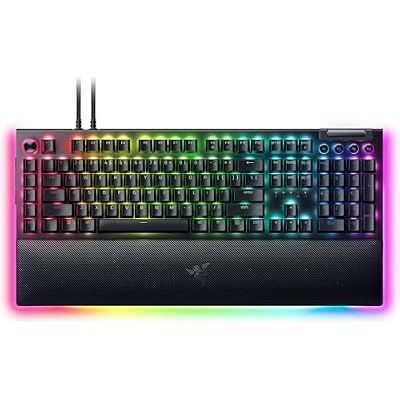
On pure dollar-per-feature, the BlackWidow V4 Pro wins. You get a dedicated macro column, a beautifully tactile metal command dial, full underglow RGB, doubleshot ABS keycaps, and a magnetic plush leatherette wrist rest with its own RGB strip. For twenty dollars more than the G915 X you’re getting roughly twice the surface area of stuff. Razer’s Synapse software is also more mature for macro recording and Chroma integration with games like Cyberpunk 2077 and Apex Legends Origins.
The G915 X isn’t trying to win on feature density. You’re paying $229 for engineering: a low-profile, milled-aluminum top plate that’s just 22mm tall at the back, wireless that genuinely works, and 36-hour battery life with the RGB blazing. As someone who’s rage-quit three other wireless keyboards over flaky connections, I’ll pay a premium for Logitech Lightspeed every single time. The G915 X is also the only keyboard here you can throw in a backpack alongside a laptop without feeling ridiculous.
For the average buyer in May 2026, neither is overpriced — both deliver what their spec sheet promises. The G915 X has actually held its price better since launch, which speaks to demand.
Build Quality & Ergonomics
This is where the two boards really separate. The G915 X is the more refined object. The aluminum top plate has a fine matte texture that resists fingerprints. There’s zero deck flex. The low-profile layout puts your wrists in a more neutral position by default, and after eight-hour typing days I felt noticeably less fatigue than with the BlackWidow.
The BlackWidow V4 Pro is built like a tank — and weighs like one. The bottom is reinforced metal, the top plate is brushed aluminum, and the included wrist rest is the best I’ve ever used at any price point. The leatherette is plush, the magnets snap satisfyingly, and the RGB strip on the front edge looks fantastic in a dark room. But the full-height switches need a wrist rest to type comfortably for long stretches. Without it, my wrists started complaining after about an hour. The included rest is great, but it adds another 200mm of desk depth.
Stabilizers on both are solid in 2026. Razer has finally lubed theirs from the factory; spacebar rattle is essentially gone. Logitech’s low-profile stabs were never that bad to begin with.
Feature Differences
The BlackWidow V4 Pro has the macro keys, the command dial, three media buttons, underglow lighting, and Razer’s HyperPolling Wireless dongle sold separately if you want to free up a USB port. The Chroma RGB ecosystem also extends to mousepads, headphones, and Philips Hue if you live deep in the Razer house.
The G915 X counters with multi-device pairing (Lightspeed + Bluetooth, swap between PC and tablet with one button), a far more svelte aesthetic, and the new Logi Options+ per-game profiles. G Hub is, as ever, the most divisive software in PC gaming — when it works it’s excellent, when it doesn’t you reinstall it. In May 2026 it works for me. Your mileage will vary.
Neither has hot-swap sockets, which in 2026 feels like a real omission from both companies. If you want to swap switches, look at the Keychron Q or Wooting options elsewhere.
Use Case Recommendations
Buy the G915 X if: You work and game on the same desk, you value clean aesthetics, you use a tablet or second computer regularly, you have a small desk, or you have any history of wrist pain. Also: if you ever travel with your keyboard, this is the only sane choice between these two.
Buy the BlackWidow V4 Pro if: You play MMOs and need macros, you stream and want Chroma integration, you have a deep desk and love wrist rests, you want the most satisfying typing experience regardless of ergonomic cost, or you already own Razer gear and want one ecosystem.
Skip both if: You want hot-swap, you want analog/Hall-effect keys for rapid trigger in Counter-Strike 2 (look at Wooting), or you want a tenkeyless layout. Neither board addresses those needs.
FAQ
Does the G915 X support 8K polling over wireless? Yes, Logitech enabled true 8,000Hz polling on Lightspeed 2.0 with the late 2025 firmware. You enable it in G Hub and watch battery life drop to about 24 hours.
Can I use the BlackWidow V4 Pro without the wrist rest? Technically yes, but I wouldn’t recommend it for sessions longer than an hour. The keys sit roughly 40mm above the desk and your wrists will bend uncomfortably.
Which has better software in 2026? Razer Synapse 4 has matured significantly and is now the more reliable of the two. G Hub is more visually polished but still occasionally needs a restart. Both support per-game profiles.
Are the switches replaceable? No on both. Neither keyboard offers hot-swap sockets. This is the biggest disappointment in both products for enthusiasts.
Long-Term Reliability and Software Experience
I’ve lived with the G915 X for over a year now (older revision, pre-Lightforce switches) and the V4 Pro for nine months. Both have been mechanically reliable. The G915 X’s volume roller still feels exactly as new, the dedicated media controls still respond crisply, and the wireless dongle has never lost connection during a session. The only wear I’ve noticed is slight legend fading on the most-used keys (W, A, S, D) — Logitech uses laser-etched ABS on the function keys, which is more durable than the PBT main keys.
The BlackWidow V4 Pro’s command dial has loosened slightly over nine months but still functions. The macro keys remain crisp. Razer’s doubleshot ABS keycaps have started to develop the characteristic shine on the spacebar that ABS always eventually shows; this is normal but worth knowing if you hate shiny keycaps. The included USB-C cable is the best-feeling braided cable I’ve used at any price.
On the software front, my experience in May 2026: G Hub has been stable for me for the last six months, but I’ve heard from several readers about lingering issues with profile sync to the cloud. Razer Synapse 4 (released late 2024) is genuinely more stable than the old Synapse 3, and I’ve had zero crashes in nine months. For complex macro recording and per-game profiles, Synapse 4 is now the more reliable option — a real change from previous years. Both software ecosystems support 2026’s major game integrations including the new Helldivers 3 and Apex Legends Origins.
Final Verdict
If I were spending my own money in May 2026, I’d buy the Logitech G915 X. Not because it’s objectively better — the BlackWidow V4 Pro genuinely has more stuff in the box — but because the G915 X solves a problem I actually have: a desk that doubles as a workstation, a laptop I dock to it, and wrists now in their late thirties that would like to make it to fifty. The wireless implementation is flawless and the typing experience after the late-2025 switch refresh finally lives up to the price.
Buy the BlackWidow V4 Pro if your gaming life genuinely uses MMO macros and Chroma sync. For everyone else, the G915 X is the more refined, more livable choice.
Related Guides
Frequently Asked Questions
How different are these two keyboards?
They target opposite preferences. The G915 X is an ultra low-profile board around 22mm thick with short-travel GL switches. The BlackWidow V4 Pro is a tall, full-height board with standard mechanical switches, a command dial, a wrist rest and extensive underglow lighting.
Which one is wireless?
The G915 X is available in wireless versions with Lightspeed 2.4GHz and Bluetooth, alongside a cheaper wired variant. The BlackWidow V4 Pro is wired only. If a cable-free desk is a requirement, the Logitech is effectively the only choice between these two.
Which has more extra controls?
The BlackWidow V4 Pro is more feature-dense, with eight dedicated macro keys, a command dial, media buttons and two underglow lighting zones. The G915 X keeps five G-keys and a volume roller, prioritising a clean low-profile look over the number of physical controls available.
Is the low-profile switch a compromise for gaming?
Short travel means faster actuation and return, which suits rapid tapping, but there is less margin before an accidental press registers. Players who rest their fingers firmly on WASD often need a week to adjust. Neither approach is objectively faster; it comes down to your typing pressure.
Which is more comfortable for long sessions?
The BlackWidow V4 Pro includes a magnetic plush wrist rest and its taller profile suits players who like a pronounced key travel. The G915 X sits low enough that many people can type comfortably without a rest at all, which is better if desk depth is limited.