Affiliate disclosure: GamingReviewGuide.com may earn a commission from affiliate links in this article. We bought both keyboards in this comparison at retail, and our verdict owes nothing to any commercial relationship.
Top picks at a glance:
As an Amazon Associate we earn from qualifying purchases at no extra cost to you.




Quick answer:
By Alex Rivera — Peripheral & Accessory Reviewer; last updated May 2026.
🛒 Best Price Today on Amazon
Prime members get fast, free shipping on everything above, plus member-only deals. New members get a 30-day free trial — cancel anytime.
HyperX Alloy Origins vs Corsair K70 RGB Pro: Mid-Range Mechanical Mainstays Get a 2026 Rethink
Quick Verdict (TLDR)
These have been the two most-recommended mid-range gaming keyboards of the past five years, and both have quietly been refreshed to stay relevant in May 2026. The HyperX Alloy Origins (Refresh) runs HyperX’s red linear switches in a compact aircraft-grade aluminum body and is the better value at $99. The Corsair K70 RGB Pro runs Cherry MX RGB switches (your pick of Red, Brown, Speed, or the new MX2A Reds) in a more feature-rich design with a magnetic wrist rest and a tournament-mode switch at $149. Spend the extra $50 on the K70 if Cherry switches and full features matter to you. Otherwise the Alloy Origins is the smarter buy.
Hands-On Performance
I went back and forth between these for two weeks. The Alloy Origins with HyperX Red switches feels lighter, more linear, and a touch louder. Its compact full-size layout with minimal bezel keeps it from dominating the desk.
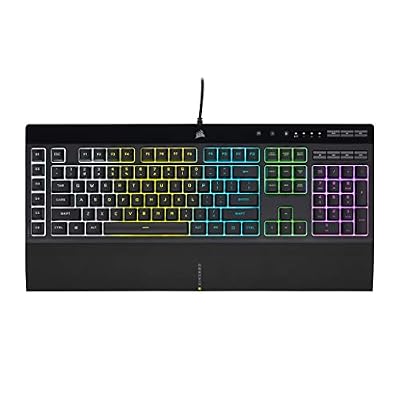
The K70 RGB Pro with Cherry MX2A Red switches feels more substantial. The MX2A take on Cherry’s Red switch (broadly introduced in 2024) adds factory pre-lube and a smoother stroke than the original MX Red. The K70 also reads as more deliberate per keystroke — the gasket-like mounting and tuned stabilizers give it a slightly muted, slightly thockier sound profile against the Alloy Origins’ brighter pitch.
| Spec | HyperX Alloy Origins (Refresh) | Corsair K70 RGB Pro |
|---|---|---|
| Switch type | HyperX Red/Aqua/Blue linear/tactile/clicky | Cherry MX2A Red/Brown/Speed |
| Layout | Full-size (compact bezel) | Full-size with media keys + volume roller |
| Polling rate | 8,000 Hz | 8,000 Hz |
| Keycaps | Doubleshot PBT | Doubleshot PBT |
| Frame | Aircraft-grade aluminum, full | Anodized brushed aluminum top plate |
| Wrist rest | None included | Magnetic plush leatherette included |
| Tournament mode | No | Yes, hardware switch + locking |
| Onboard memory | 3 profiles | Up to 50 profiles |
| Software | HyperX NGenuity | iCUE 5 |
| Street price (May 2026) | $99 | $149 |
Value Analysis
The Alloy Origins at $99 is exceptional value. Full aluminum body, doubleshot PBT keycaps, hot-swap on the 2024 refresh (a key upgrade most reviews skip over), and 8K polling. Under $100 this is one of the best gaming-keyboard buys in 2026. HyperX has held the price steady for years while quietly adding features.
The K70 RGB Pro at $149 is fairly priced, but you’re paying a $50 premium for Cherry-branded MX2A switches, the magnetic plush wrist rest, the dedicated volume roller and media buttons, the tournament-mode switch, and 50 onboard profiles against 3. If those features matter to you, the K70 earns its money. If they don’t, the Alloy Origins delivers the core experience for $50 less.
For most gamers I think the Alloy Origins is the smarter pickup. The K70 is the upgrade for people who specifically want media controls and Cherry switches.
Build Quality & Ergonomics
Both keyboards feel premium. The Alloy Origins uses a fully aluminum body — top and bottom — which is unusual at this price. It’s rigid, dense, and barely slides on the desk. The compact bezel is a nice touch that makes the board feel smaller than it is.
The K70 pairs an aluminum top plate with a plastic bottom housing. Build quality is excellent, but the bottom is plastic. Where the K70 pulls ahead is the included wrist rest — plush leatherette with strong magnets, on par with the Razer Huntsman Elite’s. The Alloy Origins ships without a wrist rest, and you’ll want one because the board sits fairly tall.
Both have flip-feet for typing-angle adjustment. Both have per-key RGB. Both have USB-C detachable cables (a 2024 upgrade for both).
Feature Differences
The K70 RGB Pro’s standout features are the volume roller (genuinely the best dedicated volume control on any keyboard), the dedicated media keys, the tournament-mode hardware switch (which disables macros and locks profiles for competitive play), and iCUE ecosystem integration. The 50 onboard profiles are useful if you bounce between many games or systems.
The Alloy Origins’s strength is simplicity. Just a clean keyboard with no extra buttons, no wrist rest, no roller — just keys. For minimalist desk setups that’s a feature. HyperX NGenuity is also lighter than iCUE 5 (which is genuinely bloated in 2026 unless you own multiple Corsair products).
Both have hot-swap as of their 2024 refreshes. Both accept Cherry MX-compatible switches if you want to swap.
Use Case Recommendations
Buy the Alloy Origins if: you want the best value mid-range mechanical in 2026, you prefer minimalist designs without media keys, you want a fully aluminum body, you don’t need a wrist rest (or already own one), or you’re a HyperX peripheral user.
Buy the K70 RGB Pro if: you want dedicated media keys and a volume roller, you want a high-quality wrist rest included, you specifically want Cherry MX-branded switches, you compete in tournaments and want the tournament-mode switch, or you already own Corsair iCUE peripherals.
Skip both if: you want wireless, you want analog rapid-trigger for competitive shooters, you want a TKL or 60% layout, or you want a custom-grade enthusiast keyboard.
FAQ
Are the HyperX Red switches the same as Cherry MX Red? No, but similar. HyperX Reds are made by Kailh to HyperX’s spec. Actuation force (45g) and linear feel are close to Cherry MX Red, but the housing tolerance is tighter — HyperX Reds are smoother out of the box than original Cherry MX Reds.
Is the K70 RGB Pro hot-swap? Yes, on the 2024 refresh. Earlier runs (2021-2023) were not hot-swap. Look for the “Hot-Swappable” sticker on the box before buying used.
Does the Alloy Origins refresh come wired-only or wireless? Wired only. There’s no wireless variant of the Alloy Origins. For wireless from HyperX, look at the Alloy Rise.
Which has better software for macro recording? Corsair iCUE 5 is more powerful for complex macros with timing control and multi-step sequences. HyperX NGenuity is simpler and easier for basic macros. For most users, NGenuity is plenty.
Switch Options, Hot-Swap Experience, and Sound Profile
The HyperX Alloy Origins refresh takes both HyperX switches (Red linear, Aqua tactile, Blue clicky) and third-party 3-pin or 5-pin MX-compatible switches through its hot-swap PCB. I swapped in Gateron Yellow Pro 3.0 switches (linear, 50g actuation, factory lubed) and the typing experience improved noticeably — smoother strokes and a more thocky sound. The hot-swap sockets are Kailh-branded and rated for 100+ swaps, more than most users will ever need.
The K70 RGB Pro hot-swap is just as straightforward. Cherry MX2A Red, Brown, or Speed Silver are the factory options. I swapped Cherry MX2A Browns into my unit (tactile, 55g actuation, factory pre-lubed) and typing accuracy improved for long writing sessions. The Cherry-brand premium is real — these switches are noticeably smoother than their Cherry MX predecessors thanks to the 2024 manufacturing update.
The sound profile differs meaningfully. The Alloy Origins’s full aluminum body produces a slightly brighter, higher-pitched sound — a clean clack. The K70 RGB Pro’s plastic bottom housing soaks up more vibration for a slightly muted, slightly deeper profile. Neither is “better”; it comes down to whether you favor clack or thock.
For modding, both boards respond well to a simple PE foam mod (a thin layer between switch and PCB) that deepens the sound profile another notch. It costs about $5 in materials and takes 30 minutes. The Alloy Origins reacts more dramatically to the mod because of its bright stock sound.
RGB, Lighting Effects, and Ecosystem Integration
Both keyboards have per-key RGB with full software control. The Alloy Origins uses HyperX NGenuity for lighting, with roughly 25 built-in effects plus custom per-key static colors. NGenuity 2026 is lighter than iCUE 5 and uses about 80MB of RAM idle against iCUE’s 280MB. For users without multiple HyperX peripherals, NGenuity gets the job done without the bloat.
The K70 RGB Pro uses Corsair iCUE 5, the more advanced lighting toolset. iCUE 5 carries about 40 built-in effects, layered effects (several effects running per key at once), and Corsair Lighting Node ecosystem integration if you own RGB Corsair fans, AIOs, or RAM. For anyone committed to a Corsair-built system, iCUE 5 unifies it all under one control surface.
On game integration, iCUE 5 has slightly broader support — Corsair has had partnerships with major studios for years, and games like Cyberpunk 2077, Call of Duty Black Ops 7, and Apex Legends Origins all drive the keyboard’s lighting from in-game events. HyperX NGenuity has a smaller but growing list of game integrations.
If lighting is a primary reason you’re buying, the K70 RGB Pro is the better choice. If lighting is incidental, the Alloy Origins is sufficient and lighter on system resources.
Final Verdict
For most buyers in May 2026, the HyperX Alloy Origins (Refresh) is the right pick. At $99 with a full aluminum body, doubleshot PBT keycaps, 8K polling, and (post-2024) hot-swap switches, it’s one of the best value gaming keyboards on the market. The compact bezel keeps it modern, the build quality is excellent, and it doesn’t try to do too much.
The Corsair K70 RGB Pro at $149 is the better choice if the specific features matter to you — media controls, magnetic wrist rest, tournament mode, Cherry MX2A switches, and onboard profiles. For Corsair-ecosystem loyalists or anyone who genuinely lives on a volume roller, the K70 earns its premium.
Want me to spend your money? Buy the Alloy Origins and put the $50 you saved toward a good wrist rest and a better mouse. That’s the smarter setup.
Related Guides
Frequently Asked Questions
Which has the better build quality?
Both use aluminium top plates, but the K70 RGB Pro is heavier and feels more planted on the desk, with a thicker chassis and a detachable braided USB-C cable. The Alloy Origins is slimmer and lighter, which suits people who move the board between locations or want a lower profile.
How do their switches differ?
HyperX fits its own linear, tactile and clicky switches rated at 80 million presses, with a slightly shorter 3.8mm travel on the red variant. Corsair typically ships Cherry MX options including Speed silvers. Neither board is hot-swappable in its standard version, so choose the switch carefully at purchase.
Does either support onboard profile storage?
The K70 RGB Pro stores up to 50 onboard profiles, so your lighting and macros travel to any PC without software. The Alloy Origins saves three profiles onboard. If you carry the keyboard to LAN events or use a locked-down work machine, Corsair’s larger storage is a practical advantage.
Which is quieter for a shared room?
The Alloy Origins is generally quieter due to its lower profile and shorter travel, which reduces the bottom-out impact. The K70’s taller case produces more resonance. Neither has factory-installed dampening foam, so adding a sound-dampening mat or switching to silent switches makes a bigger difference than model choice.
Do they include a wrist rest?
The K70 RGB Pro ships with a detachable magnetic wrist rest with a soft-touch surface. The Alloy Origins does not include one in most regions, so budget for a third-party rest if you type for long periods. That accessory cost narrows the price gap between the two boards.