
The Lenovo Legion Pro 5i Gen 10 lands as one of the most talked-about gaming laptops of 2026, and for good reason. It packs Intel’s brutal 24-core Core Ultra 9 275HX alongside NVIDIA’s GeForce RTX 5070 Ti, then feeds them into a 16-inch WQXGA display that ranges from a fast 165Hz IPS to a stunning 240Hz OLED depending on the configuration.
- Legion Pro 5i Gen 10 Specs at a Glance
- Watch: Lenovo Legion Pro 5i Gen 10 Gaming Laptop: Review & Buyer’s Guide — Video Review
- Design & Build
- Best Legion Pro 5i Gen 10 Configuration by Budget Tier
- Which Configuration Should You Buy?
- Performance
- Ports, Battery and Charging in Detail
- Thermals and Noise: What Reviewers Report
- OLED or IPS: Which Legion Pro 5i Gen 10 Display to Choose
- Where the Legion Pro 5i Gen 10 Falls Short
- Pros & Cons
- Alternatives to Consider
- Legion Pro 5i Gen 10 vs Rival 16-Inch Gaming Laptops
- How We Compared This Review
- Legion Pro 5i vs Legion Pro 7i vs Legion 5i: Which Legion Fits You?
- Is the Legion Pro 5i Gen 10 Right for You?
- Frequently Asked Questions
- Verdict
- Related Articles
- Related Guides
This is Lenovo’s mainstream-flagship formula: near top-tier performance at a price that undercuts the halo Legion Pro 7i. In this review we dig into how the Pro 5i Gen 10 handles demanding games, how loud and hot it runs, and which of its many configurations delivers the best value for serious players who also want a capable creative machine.

Lenovo Legion Pro 5i Gen 10 Gaming Laptop, Ultra 9 275HX, 16" WQXGA (2560 x 1600) 165Hz, RTX 5070 Ti GPU 12GB GDDR7, 64GB DDR5 RAM, 8TB SSD, Low Blue Light, 24zone RGB Backlit, Wi-Fi 7,Win 11pro
Included for 'Lenovo Legion Pro 5i Gen 10 Gaming Laptop: Review & Buyer's Guide' because the listing specifies Ultra 9 275HX and 16" WQXGA (2560 x 1600) 165Hz, details this guide uses to compare options.
View on Amazon
Lenovo Legion 5i – Gaming Laptop - Intel® Core™ i7-14700HX - 15" 2.5K WQXGA PureSight OLED Display–165Hz Refresh Rate–NVIDIA® GeForce RTX™ 5070 – 16 GB Memory – 1 TB Storage – 3 Months of PC GamePass
Included for 'Lenovo Legion Pro 5i Gen 10 Gaming Laptop: Review & Buyer's Guide' because the listing specifies Gaming Laptop and Intel® Core™ i7-14700HX, details this guide uses to compare options.
View on Amazon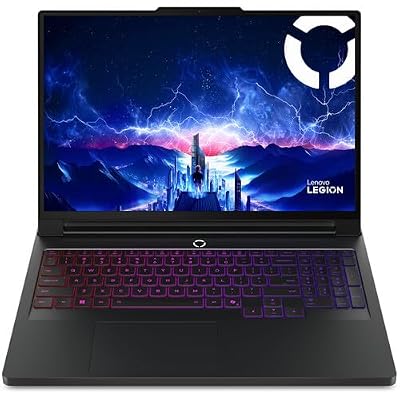
Lenovo Legion Pro 7i Gen 10 w/ Ultra 9, NVIDIA GeForce RTX 5080, 16” OLED | Gaming Laptop with Intel Core Ultra 9 275HX 24C, 16GB, 32GB RAM, 1TB Gen 5 NVMe SSD, WQXGA 500 nits 240Hz, Windows 11 Pro
Included for 'Lenovo Legion Pro 5i Gen 10 Gaming Laptop: Review & Buyer's Guide' because the listing specifies NVIDIA GeForce RTX 5080 and 16” OLED, details this guide uses to compare options.
View on Amazon
Lenovo Legion Pro 5i Gen 10 with Core Ultra 9 275HX, NVIDIA GeForce RTX 5070, OLED 16" Non-Touch, 32GB RAM, 2TB SSD, 24zone RGB, 3YR Courier/Carry-in
Included for 'Lenovo Legion Pro 5i Gen 10 Gaming Laptop: Review & Buyer's Guide' because the listing specifies NVIDIA GeForce RTX 5070 and OLED 16" Non-Touch, details this guide uses to compare options.
View on Amazon
Lenovo Legion 5i 16" Gaming Laptop - Intel Core Ultra 9 275HX - GeForce RTX 5060 - WQXGA (2560x1600) - Windows 11 Home-W/HDMI Cable (32GB RAM | 1TB PCIe SSD)
Included for 'Lenovo Legion Pro 5i Gen 10 Gaming Laptop: Review & Buyer's Guide' because the listing specifies Intel Core Ultra 9 275HX and GeForce RTX 5060, details this guide uses to compare options.
View on AmazonUpdated October 2026 — Our Lenovo Legion Pro 5i Gen 10 review pulls together Lenovo’s specification sheets and independent reviews to answer one question: which configuration is worth buying?
Quick answer: The Lenovo Legion Pro 5i Gen 10 is a good buy for players who want a 16-inch 2560 x 1600 screen, a Core Ultra 9 275HX or Ultra 7 255HX, and upgradeable RAM and SSDs. Reviewers consistently point to the RTX 5060 and RTX 5070 trims as the best value, while the RTX 5070 Ti with the 240Hz OLED is the choice for high textures at native resolution. Its biggest weaknesses are short battery life, weak speakers and a heavy charger.
Top three picks in this guide by exact model: the Lenovo Legion Pro 5i Gen 10 (RTX 5070 Ti, 240Hz OLED) for balanced power, the Acer Predator Helios Neo 16 AI for performance per dollar, and the ASUS ROG Strix G16 (2025) for a larger battery. If you want more headroom, the Lenovo Legion Pro 7i Gen 10 is the step-up option covered below.
Legion Pro 5i Gen 10 Specs at a Glance
Best for: gamers who want strong 1440p-class performance, a high-refresh 16-inch OLED and an upgradable chassis without paying Legion Pro 7i money. Skip if: you carry your laptop daily, need long unplugged battery life or want an SD card reader.
| Spec | Legion Pro 5i Gen 10 (16IAX10) |
|---|---|
| Processor | Intel Core Ultra 7 255HX or Core Ultra 9 275HX |
| Graphics | RTX 5060, RTX 5070 or RTX 5070 Ti Laptop GPU, MUX switch and Advanced Optimus |
| Display | 16-inch 16:10, 2560 x 1600; OLED up to 240Hz, 500 nits SDR, 100% DCI-P3 on reviewed units; other configurations list 165Hz panels |
| Memory | DDR5 in two SO-DIMM slots, user-upgradable |
| Storage | Two M.2 PCIe Gen4 SSD slots |
| Ports | Thunderbolt 4 USB-C with DisplayPort 2.1, second USB-C (10Gbps) with power delivery, three USB-A, HDMI 2.1, Ethernet, 3.5mm jack |
| Wireless | Up to Wi-Fi 7 and Bluetooth 5.4 |
| Battery | 80Wh with Super Rapid Charge |
| Charger | 245W slim-tip; some RTX 5070 Ti units ship with a 300W adapter |
| Weight and size | About 2.4 kg (5.3 lb), 364 x 268 x 21.7-26 mm |
| Keyboard | Full-size with number pad, 24-zone RGB |
| Price tier | Upper mid-range to premium depending on GPU and screen |
🎮 Get More From Your Setup — Free
Prime Gaming gives you free PC games every month, in-game loot, and a free Twitch channel sub — plus fast free shipping on all the gear above. New members get a 30-day free trial.
Watch: Lenovo Legion Pro 5i Gen 10 Gaming Laptop: Review & Buyer’s Guide — Video Review
Design & Build
The Legion Pro 5i Gen 10 keeps Lenovo’s clean, understated gaming aesthetic in Eclipse Black, with a rigid chassis and a well-cooled deck. The 16-inch 16:10 display is the centerpiece: the WQXGA 240Hz OLED option delivers inky blacks and 500 nits for HDR, while the 165Hz IPS panels prioritize response time and value. A 24-zone or per-key RGB keyboard, Low Blue Light certification, and a generous port layout including Wi-Fi 7 make it as comfortable for daily work as it is for gaming. It is not a thin ultraportable, but it travels better than most 16-inch rigs.
Best Legion Pro 5i Gen 10 Configuration by Budget Tier
The Legion Pro 5i Gen 10 is sold in many trims, and the graphics chip and screen decide both price and experience. These three tiers summarize the realistic choices, using maker specifications and independent review findings.
Value Tier: Core Ultra 7 255HX with RTX 5060
Spec line: Core Ultra 7 255HX · RTX 5060 Laptop 8GB GDDR7 · 16-inch 2560 x 1600 · 16GB to 32GB DDR5 · two M.2 slots
What to expect at this tier:
- High settings at 1080p and strong esports frame rates at 1600p with upscaling.
- An 8GB VRAM buffer that can limit maximum textures in newer AAA games.
- A cooler, quieter chassis than the RTX 5070 Ti trims, according to reviewers.
- The best starting point if you plan to upgrade RAM and storage yourself.
Balanced Tier: Core Ultra 7 255HX or Ultra 9 275HX with RTX 5070
Spec line: Core Ultra 7 255HX or Ultra 9 275HX · RTX 5070 Laptop 8GB GDDR7 · 16-inch 2560 x 1600 · 32GB DDR5 recommended
What to expect at this tier:
- Higher frame rates than the RTX 5060 at the same resolution and settings.
- The same 8GB VRAM limit as the 5060, so texture settings still need care in demanding titles.
- A common sweet spot recommended by reviewers who flag the RTX 5070 Ti version as the warmest.
- Noticeably less fan noise in Balanced mode than at the top tier.
Premium Tier: Core Ultra 9 275HX with RTX 5070 Ti and 240Hz OLED
Spec line: Core Ultra 9 275HX · RTX 5070 Ti Laptop 12GB GDDR7 up to 140W · 16-inch 2560 x 1600 OLED 240Hz · 32GB DDR5 · Thunderbolt 4
What to expect at this tier:
- High settings and DLSS-assisted ray tracing at the panel’s native resolution.
- 12GB of VRAM, which gives real headroom for the next few years of games.
- Higher temperatures and fan noise under load than the lower trims.
- A larger 300W adapter on some configurations, adding weight to your bag.
Which Configuration Should You Buy?
The Legion Pro 5i Gen 10 is sold in many trims, and the GPU choice matters far more than the CPU. The table below uses Lenovo and NVIDIA specifications for the laptop GPUs, which differ from desktop cards with the same names.
| GPU | VRAM | Power (TGP) | Good fit for | Watch for | Price tier |
|---|---|---|---|---|---|
| RTX 5060 Laptop | 8GB GDDR7 | Up to 115W | 1080p high settings, esports, lighter 1600p with upscaling | 8GB limits max textures in new AAA games | Upper mid-range |
| RTX 5070 Laptop | 8GB GDDR7 | Up to 115W | Higher frame rates than the 5060 at the same resolutions | Same 8GB buffer as the 5060 | Upper mid-range |
| RTX 5070 Ti Laptop | 12GB GDDR7 | Up to 140W including Dynamic Boost | Native 2560 x 1600 at high settings, ray tracing with DLSS | Runs warmest and costs the most | Premium |
RTX 5070 vs RTX 5070 Ti: The Key Difference Is VRAM
A detail many listings skip: the RTX 5070 Laptop GPU has 8GB of VRAM, the same as the RTX 5060, while the RTX 5070 Ti Laptop GPU steps up to 12GB. If you plan to play new AAA games at the panel’s native 2560 x 1600 with high textures for several years, the 5070 Ti is the configuration with real headroom. If you mostly play esports titles or are happy using DLSS and medium-high textures, the 5060 and 5070 trims are the better value, and several reviewers recommend them for that reason.
Core Ultra 7 255HX vs Core Ultra 9 275HX
The Ultra 7 255HX has 20 cores and the Ultra 9 275HX has 24. In games the difference is small because the GPU sets the limit at this resolution. The Ultra 9 is worth it mainly if you also compile code, render video or run other heavily multithreaded work. For a gaming-first buyer, putting money into the GPU tier or the OLED panel makes more sense.
RAM and Storage
16GB works for gaming today, but 32GB is the comfortable target for gaming plus streaming or creative apps. Because the laptop uses two SO-DIMM slots and two M.2 slots, you can buy a lower memory and storage configuration and upgrade later, which is often cheaper than paying for a factory upgrade.
Performance
This is where the Pro 5i Gen 10 shines. The Core Ultra 9 275HX paired with an RTX 5070 Ti and up to 64GB of DDR5 crushes AAA titles at 1440p with high frame rates, and DLSS 4 pushes ray-traced games well beyond 100fps. Storage scales dramatically, from dual 1TB drives up to a massive 8TB configuration for creators who hoard game libraries and video projects. Lower-cost builds with the Ultra 7 255HX and RTX 5060 or 5070 still deliver excellent 1440p gaming, making this a rare laptop where nearly every trim is a smart buy. Lenovo’s cooling holds sustained clocks steady during long sessions.
Ports, Battery and Charging in Detail
The port layout is one of this laptop’s quiet strengths. Lenovo puts most cables on the sides and rear area: a Thunderbolt 4 USB-C port with DisplayPort 2.1, a second 10Gbps USB-C port with power delivery and DisplayPort 2.1, three USB-A ports (one 10Gbps, two 5Gbps), HDMI 2.1 rated up to 8K at 60Hz, wired Ethernet and a headset jack. There is no SD card reader and no fingerprint reader, so photographers and anyone who wants Windows Hello fingerprint login should note that.
Battery Life Expectations
The 80Wh battery is average for a performance 16-inch laptop; several rivals carry 83Wh to 90Wh cells. Lenovo rates it at about 4.7 hours in the MobileMark 30 office test and longer for local video playback at low brightness. Independent reviewers generally report around three hours or a little more of mixed use, and much less while gaming unplugged. Super Rapid Charge refills about 70 percent in roughly 30 minutes with the main adapter, which softens the short runtime.
Charging Over USB-C
You can top up over USB-C for light work, which is handy when travelling. Lenovo’s spec sheet lists up to 100W over USB-C; that is fine for browsing and office work but not enough to sustain gaming, so pack the main adapter for any heavy use. The full-power brick adds noticeable weight to your bag, especially the larger 300W unit some RTX 5070 Ti models ship with.
Thermals and Noise: What Reviewers Report
The Gen 10 uses Lenovo’s Legion ColdFront cooling with a large rear and side exhaust layout. Independent reviews describe the fans as clearly audible in Performance mode, which is normal for this class. The RTX 5070 Ti and Core Ultra 9 configuration is the one reviewers single out as running warmest under long loads, while the RTX 5060 and 5070 versions are easier for the chassis to keep quiet. Using the Balanced mode in Lenovo Legion Space, or capping frame rates in less demanding games, cuts fan noise noticeably with a modest performance trade-off. A laptop stand that raises the rear also helps airflow.
OLED or IPS: Which Legion Pro 5i Gen 10 Display to Choose
Both panel types are 16-inch, 16:10, 2560 x 1600 screens, so sharpness is the same. The difference is in contrast, refresh rate and cost.
| Trait | 240Hz OLED | 165Hz IPS |
|---|---|---|
| Refresh rate | Up to 240Hz | 165Hz |
| Brightness (SDR) | About 500 nits on reviewed units | Varies by configuration |
| Color | 100% DCI-P3 on reviewed units | Varies by configuration |
| Contrast | Deep blacks, strong HDR feel | Standard IPS contrast |
| Best for | Single-player games, video, creative work | Competitive play and tighter budgets |
| Watch for | Higher cost; static elements can cause image retention over years | Less contrast, lower peak refresh |
Choose the OLED if you play story-driven games, watch video on the laptop or edit photos and video. Choose the IPS if you mostly play esports titles and want to save money for a higher GPU tier. As with any OLED, using dark mode, a moving wallpaper and an auto-hiding taskbar helps keep static elements from sitting on the same pixels for hours.
Where the Legion Pro 5i Gen 10 Falls Short
Independent reviewers praise the build, screen and ports, but they also point to a consistent list of weak spots. Knowing them helps you decide whether the trade-offs fit.
- Battery life: The 80Wh battery lasts around three hours in mixed use according to reviewers and far less when gaming unplugged.
- Speakers: At least two reviewers describe the built-in audio as ordinary, so plan on headphones or a headset.
- Keyboard lighting: The keyboard uses 24-zone RGB instead of per-key control, and one review finds the feel a little softer than on the Legion Pro 7i.
- Surface finish: The matte black lid and deck pick up fingerprints easily.
- Warmest trim: The RTX 5070 Ti with Core Ultra 9 is the version reviewers single out for running hottest and loudest.
- Missing features: No SD card reader and no fingerprint reader.
None of these is a deal breaker for a desk-based gaming laptop, but they are why portability-focused buyers often look at slimmer 16-inch models or at the ASUS ROG Strix G16 for its larger battery.
Pros & Cons
- Pros: Elite Core Ultra 9 plus RTX 5070 Ti performance
- Gorgeous 240Hz OLED display option
- Excellent cooling and sustained clock speeds
- Configurations for every budget, up to 8TB storage
- Cons: Heavy and thick compared with thin gaming laptops
- Battery life is short away from the charger
- Top OLED configurations get pricey
Alternatives to Consider
If you want even more power, the Legion Pro 7i Gen 10 steps up to an RTX 5080 and a 16-inch OLED for enthusiasts with bigger budgets. Gamers who prioritize portability over raw frames might prefer a slimmer RTX 5060 laptop, while those on a tighter budget can get the standard Legion 5i with an RTX 5060 for strong 1440p play at a lower price.
Legion Pro 5i Gen 10 vs Rival 16-Inch Gaming Laptops
The Legion Pro 5i competes in a crowded tier. The table compares it with the 16-inch models buyers most often cross-shop, using maker specifications for comparable RTX 5070 Ti or similar configurations.
| Laptop | CPU (typical) | Screen | Battery | Weight | Watch for | Price tier |
|---|---|---|---|---|---|---|
| Lenovo Legion Pro 5i Gen 10 | Core Ultra 7 255HX / Ultra 9 275HX | 16″ 2560×1600 OLED up to 240Hz | 80Wh | About 2.4 kg | Smaller battery | Upper mid to premium |
| Lenovo Legion Pro 5 Gen 10 (AMD) | Ryzen 9 9955HX | 16″ 2560×1600, OLED or IPS options | 80Wh | About 2.3 kg | No Thunderbolt | Upper mid to premium |
| ASUS ROG Strix G16 (2025) | Core Ultra 9 275HX | 16″ 2.5K 240Hz | 90Wh | About 2.6-2.8 kg | Heavier | Premium |
| Acer Predator Helios Neo 16 AI | Core Ultra 9 275HX | 16″ WQXGA 240Hz | 90Wh | About 2.7 kg | Shorter measured battery life | Upper mid-range |
| MSI Vector 16 HX AI | Core Ultra 7 255HX / Ultra 9 | 16″ FHD+ 144Hz or QHD+ 240Hz | 90Wh | About 2.7 kg | Base screens are lower resolution | Upper mid-range |
| HP OMEN MAX 16 | Ryzen AI 9 HX 375 | 16″ WQXGA 240Hz IPS | 83Wh | About 2.7 kg | IPS, not OLED | Premium |
Lenovo Legion Pro 5 Gen 10 (AMD): Best Same-Chassis Alternative
Key specs: AMD Ryzen 9 9955HX (16 cores, Zen 5), RTX 50-series Laptop GPU options, 16-inch 2560 x 1600 display, 80Wh battery, about 2.3 kg, Wi-Fi 7.

Lenovo Legion Pro 5 Gen 10 Gaming Laptop, AMD Ryzen 9-9955HX, 32 GB DDR5 RAM, 1 TB PCIe SSD, 16" WQXGA (2560x1600) 165Hz, Nvidia G-Force RTX 5070, 24-Zone RGB Backlit, W11 Pro, Black Traix Mousepad
Included for 'Lenovo Legion Pro 5i Gen 10 Gaming Laptop: Review & Buyer's Guide' because the listing specifies AMD Ryzen 9-9955HX and 32 GB DDR5 RAM, details this guide uses to compare options.
View on AmazonBest for: buyers who like the Pro 5i design and want AMD’s 16-core chip. Skip if: you need Thunderbolt 4, which is an Intel-model feature.
The AMD twin shares the chassis, keyboard and display family. The Ryzen 9 9955HX is a strong multithreaded chip, so the choice often comes down to which version is cheaper with the GPU you want.
ASUS ROG Strix G16 (2025): Best for Battery Capacity and a Bright Display
Key specs: Intel Core Ultra 9 275HX, RTX 5070 Ti Laptop GPU, 16-inch 2.5K 240Hz ROG Nebula display, 90Wh battery, USB-C charging up to 100W, roughly 2.6-2.8 kg.

ASUS ROG Strix G16 (2025) Gaming Laptop, 16” ROG Nebula 16:10 2.5K 240Hz/3ms, NVIDIA® GeForce RTX™ 5070 Ti, Intel® Core™ Ultra 9 Processor 275HX, 32GB DDR5, 1TB SSD, Wi-Fi 7, Win11 Home, G615LR-AS96
Included for 'Lenovo Legion Pro 5i Gen 10 Gaming Laptop: Review & Buyer's Guide' because the listing specifies 16” ROG Nebula 16:10 2.5K 240Hz/3ms and NVIDIA® GeForce RTX™ 5070 Ti, details this guide uses to compare options.
View on AmazonBest for: gamers who want a larger battery and ASUS’s software and RGB styling. Skip if: you want an OLED panel or a lighter bag.
The Strix G16 carries a bigger battery than the Legion and a fast IPS-class panel. It is heavier, so it suits desk-bound gamers who occasionally move the laptop.
Acer Predator Helios Neo 16 AI: Best Value With the Same CPU
Key specs: Intel Core Ultra 9 275HX, RTX 5070 Ti Laptop GPU, 16-inch WQXGA 240Hz display, 90Wh battery, about 2.7 kg.

acer Predator Helios Neo 16 AI Gaming Laptop | Intel Core Ultra 9 Processor 275HX | NVIDIA GeForce RTX 5070 Ti | 16" WQXGA 240Hz G-SYNC | 16GB DDR5 | 1TB Gen 4 SSD | Killer Wi-Fi 6E | PHN16-73-92B8
Included for 'Lenovo Legion Pro 5i Gen 10 Gaming Laptop: Review & Buyer's Guide' because the listing specifies Intel Core Ultra 9 Processor 275HX and NVIDIA GeForce RTX 5070 Ti, details this guide uses to compare options.
View on AmazonBest for: buyers chasing the strongest specs per dollar. Skip if: you care about build finish and battery life; reviewers measured shorter runtimes than rivals.
The Helios Neo often lands a price tier below similarly specced Legion and ROG models, which makes it the value pick if you can accept a plainer chassis.
MSI Vector 16 HX AI: Best for Performance per Dollar on a Budget
Key specs: Intel Core Ultra 7 255HX, RTX 5070 Ti Laptop GPU, 16-inch FHD+ 144Hz display on this configuration, 90Wh battery, about 2.7 kg, 330W adapter.

msi Vector 16 HX AI 16” 144Hz FHD+ Gaming Laptop: Intel Core Ultra 7-255HX, NVIDIA Geforce RTX 5070Ti, 16GB DDR5, 512GB NVMe SSD, Thunderbolt 5, Wi-Fi 6E, Win 11 Home: Cosmo Gray A2XWHG-212US
Included for 'Lenovo Legion Pro 5i Gen 10 Gaming Laptop: Review & Buyer's Guide' because the listing specifies NVIDIA Geforce RTX 5070Ti and 16GB DDR5, details this guide uses to compare options.
View on AmazonBest for: players who prioritise GPU tier over screen quality. Skip if: you want a sharp 2560 x 1600 panel; pick a QHD+ configuration instead.
Reviewers have praised the Vector’s sustained RTX 5070 Ti performance. The entry configuration saves money with a 1920 x 1200 screen, which also helps frame rates.
HP OMEN MAX 16: Best AMD Alternative With a Big Power Budget
Key specs: AMD Ryzen AI 9 HX 375 (12 cores), RTX 5070 Ti Laptop GPU, 16-inch WQXGA 240Hz IPS, up to 250W total system power, 83Wh battery, about 2.7 kg, Wi-Fi 7.
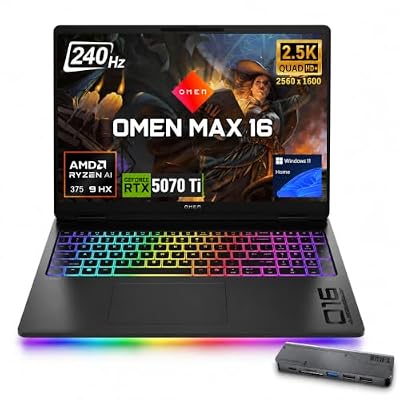
HP OMEN 16 MAX RTX 5070 Ti AMD Ryzen AI 9 HX 375 QHD+ Gaming Laptop | 16" Anti-Glare WQXGA 240Hz 500nits, 64GB DDR5, 2TB SSD, Per-Key RGB Backlit KB, Wi-Fi 7, Low Blue Light, Windows 11 Home
Included for 'Lenovo Legion Pro 5i Gen 10 Gaming Laptop: Review & Buyer's Guide' because the listing specifies 16" Anti-Glare WQXGA 240Hz 500nits and 64GB DDR5, details this guide uses to compare options.
View on AmazonBest for: buyers who want a high combined power budget and a matte IPS screen. Skip if: you want OLED contrast or the lightest chassis.
The OMEN MAX pushes a high total power budget and offers an anti-glare IPS panel, a good fit for bright rooms where a glossy OLED shows reflections.
Alienware 16 Area-51: Best Same-Class Rival With Dell Support

Alienware 16 Area-51 Gaming Laptop, RTX5070 Ti, Intel Core Ultra 9 275HX | 2560x1600 Display, 240Hz, 32GB DDR5 RAM, 1TB SSD, NVIDIA GeForce, Windows 11 Home, Esports Ready, AA16250
Included for 'Lenovo Legion Pro 5i Gen 10 Gaming Laptop: Review & Buyer's Guide' because the listing specifies RTX5070 Ti and Intel Core Ultra 9 275HX, details this guide uses to compare options.
View on AmazonSpec line: Core Ultra 9 275HX · RTX 5070 Ti Laptop GPU · 16-inch 2560 x 1600 240Hz · 32GB DDR5 · 1TB SSD (listed configuration)
Best for: buyers who want the same CPU and GPU tier as the Legion Pro 5i Gen 10 with Alienware styling and Dell’s warranty options. Skip it if… you want the cheapest route to RTX 5070 Ti power; Lenovo and Acer often undercut it.
MSI Stealth 16 AI+: Best Slimmer OLED Alternative

msi Stealth 16 AI+ 16” 240Hz QHD+ OLED Gaming Laptop: Intel Core Ultra 9 386H, NVIDIA Geforce RTX 5070Ti, 32GB DDR5, 1TB NVMe SSD, Wi-Fi 7, Win 11 Home: Charcoal Black B3WH-036US
Included for 'Lenovo Legion Pro 5i Gen 10 Gaming Laptop: Review & Buyer's Guide' because the listing specifies NVIDIA Geforce RTX 5070Ti and 32GB DDR5, details this guide uses to compare options.
View on AmazonSpec line: Core Ultra 9 386H · RTX 5070 Ti Laptop GPU · 16-inch QHD+ 240Hz OLED · 32GB DDR5 · 1TB SSD (listed configuration)
Best for: players who carry a laptop often and want OLED in a thinner chassis than the Legion Pro 5i. Skip it if… you want a bigger cooling system and upgradeable parts; thin designs usually trade sustained performance and expandability for portability.
ASUS ROG Strix Scar 16 (2025): Best Step-Up for Raw Power

ASUS ROG Strix SCAR 16 (2025) Gaming Laptop, 16” ROG Nebula HDR 16:10 2.5K 240Hz/3ms, NVIDIA GeForce RTX 5090, Intel Core Ultra 9 275HX, 32GB DDR5, 2TB PCIe Gen 4 SSD, Wi-Fi 7, Win 11 Pro, G635LX-XS97
Included for 'Lenovo Legion Pro 5i Gen 10 Gaming Laptop: Review & Buyer's Guide' because the listing specifies 16” ROG Nebula HDR 16:10 2.5K 240Hz/3ms and NVIDIA GeForce RTX 5090, details this guide uses to compare options.
View on AmazonSpec line: Core Ultra 9 275HX · RTX 5090 Laptop GPU · 16-inch ROG Nebula HDR 2.5K 240Hz · listed premium configuration
Best for: enthusiasts who want flagship graphics and are willing to pay for it. Skip it if… your target is 1600p at high settings; the RTX 5070 Ti in the Legion Pro 5i already covers that for a lower price tier.
How We Compared This Review
This review is research-based, not based on personal use. We used Lenovo’s official PSREF specification sheets, NVIDIA’s laptop GPU specifications and independent reviews from established hardware publications to describe configurations, ports, battery and thermals. For rivals, we compared maker spec pages and published reviews. Where sources disagreed, such as weight or USB-C charging wattage, we noted the range or used Lenovo’s figure. Prices are given only as tiers because configurations and street prices change frequently.
Legion Pro 5i vs Legion Pro 7i vs Legion 5i: Which Legion Fits You?
Lenovo sells three closely related 16-inch gaming lines, and the names are easy to mix up. This comparison uses Lenovo’s published specifications and independent reviews.
| Model | GPU range | Keyboard lighting | Best for | Price tier |
|---|---|---|---|---|
| Legion Pro 5i Gen 10 | RTX 5060, RTX 5070, RTX 5070 Ti | 24-zone RGB | Balanced 1600p gaming with upgradeable parts | Upper mid-range to premium |
| Legion Pro 7i Gen 10 | RTX 5080 and higher | Per-key RGB | Maximum performance and a premium feel | Premium |
| Legion 5i | RTX 5060 class | Varies by trim | Lower-cost 1440p-class gaming | Mid-range |
The Legion Pro 5i Gen 10 is the middle choice. It shares the Pro-series chassis with the 7i, but it stops at the RTX 5070 Ti and uses a simpler keyboard. If you want RTX 5080-class graphics or per-key lighting, move up to the Pro 7i. If you only need 1080p to 1440p-class gaming at the lowest tier, the regular Legion 5i is the cheaper route.
Is the Legion Pro 5i Gen 10 Right for You?
- You play at 1600p and want high textures for years: buy the RTX 5070 Ti trim with 12GB of VRAM.
- You play esports titles or 1080p: the RTX 5060 trim is enough and costs less.
- You also edit video or code: take the Core Ultra 9 275HX and 32GB of RAM.
- You travel daily: look at slimmer laptops such as the MSI Stealth 16 AI+ or accept that the full-power charger adds weight.
- You value battery life: the ASUS ROG Strix G16 (2025) carries a larger 90Wh battery than the Legion’s 80Wh.
- You want to upgrade later: the two SO-DIMM and two M.2 slots make this one of the easier gaming laptops to expand.
Frequently Asked Questions
Is the RTX 5070 Ti version worth it over the RTX 5060?
If you game at high refresh rates or dabble in 3D and video work, the 5070 Ti is a meaningful upgrade. For 1080p or casual 1440p gaming, the 5060 saves money.
Should I get the OLED or IPS display?
The 240Hz OLED is spectacular for immersive single-player games, while the 165Hz IPS is a great value pick for competitive play.
How is the battery life?
Like most powerful gaming laptops, it is best used plugged in. Expect a few hours of light use unplugged, but gaming drains it quickly.
Can it double as a work and creation machine?
Absolutely. The high core count, up to 64GB RAM, and color-accurate OLED make it strong for editing and rendering alongside gaming.
Is the Legion Pro 5i Gen 10 good for gaming at 2560 x 1600?
Yes, with the right GPU. The RTX 5070 Ti configuration handles most current games at the panel’s native resolution with high settings, especially with DLSS. The RTX 5060 and 5070 trims are better matched to high settings with upscaling or to esports titles at high refresh rates.
How much does the Legion Pro 5i Gen 10 weigh?
Lenovo lists about 2.43 kg (5.36 lb) for the laptop alone. The charger adds close to another kilogram depending on the adapter, so expect a travel weight of roughly 3.3 kg or more.
Can you upgrade the RAM and SSD?
Yes. The laptop has two DDR5 SO-DIMM slots and two M.2 PCIe Gen4 SSD slots, so both memory and storage are user-upgradable. Check Lenovo’s warranty terms for your region before opening the bottom panel.
Does the Legion Pro 5i Gen 10 have Thunderbolt?
Yes. One USB-C port supports Thunderbolt 4 and USB4 at 40Gbps with DisplayPort 2.1 output. A second USB-C port runs at 10Gbps and supports power delivery and display output.
Legion Pro 5i or Legion Pro 7i Gen 10?
Choose the Pro 5i for the best balance of price and performance with up to an RTX 5070 Ti. Choose the Pro 7i if you want RTX 5080 or higher graphics and a more premium build, and you are comfortable paying a tier more.
Does the Legion Pro 5i Gen 10 have a MUX switch?
Yes. It supports a MUX switch with NVIDIA Advanced Optimus, which lets the GPU drive the display directly in games for better frame rates, then switch back to integrated graphics to save battery.
Is the Lenovo Legion Pro 5i Gen 10 worth buying?
Yes, the Lenovo Legion Pro 5i Gen 10 is worth buying if you want a 16-inch 1600p gaming laptop with upgradeable parts. Choose the RTX 5060 or RTX 5070 for value, or the RTX 5070 Ti for headroom. Skip it if battery life or portability matters most.
Which Legion Pro 5i Gen 10 configuration is the best value?
The RTX 5070 trim with the Core Ultra 7 255HX or Ultra 9 275HX is the best value for most players. It keeps the sharp 2560 x 1600 screen and upgradeable RAM and SSD slots while avoiding the warmest, most expensive RTX 5070 Ti version.
Does the Legion Pro 5i Gen 10 have an OLED display?
Yes, some Legion Pro 5i Gen 10 configurations have a 16-inch 2560 x 1600 OLED screen at up to 240Hz, while other trims use a 165Hz IPS panel. Check the exact model number and display listing before buying, because the panel varies by configuration.
Legion Pro 5i Gen 10 or Legion Pro 5 Gen 10 AMD: which is better?
Neither is better for every buyer. The Intel Legion Pro 5i offers Thunderbolt 4 and a Core Ultra processor, while the AMD Legion Pro 5 uses a Ryzen 9 9955HX. Pick whichever version is cheaper with the GPU and screen you want.
Verdict
The Lenovo Legion Pro 5i Gen 10 is a near-perfect balance of power, price, and polish. The Core Ultra 9 275HX with RTX 5070 Ti and a 240Hz OLED is the configuration enthusiasts should chase, while the RTX 5060 trims deliver superb value. If you want flagship-adjacent gaming without paying flagship money, this is the laptop to beat.









