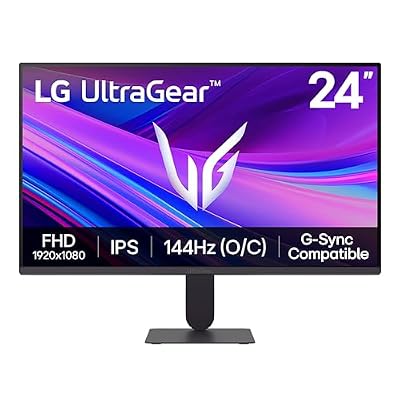
- Top Pick: Building Your Own Gaming PC Made Easy: How to Choose, Build, Overclock and Optimize a High-Performance Gaming Desktop
- Best Value: Digital Defense for Families: How to Keep Your 8 to 18-Year-Old Safe on TikTok, Instagram, and Every Screen in Between
- Premium Choice: Sceptre Curved 24.5-inch Prime Gaming Monitor up to 240Hz 1080p R1500 1ms DisplayPort x2 HDMI x2 Blue Light Shift Build-in Speakers, Machine Black 2025 (C255B-FWT240 Series)
Choosing a gaming monitor in 2026 is less about chasing the biggest number on a spec sheet and more about matching the panel to the games you actually play. A competitive shooter fan has completely different priorities than someone sinking hours into sprawling single-player worlds, and the good news is that the market now serves both extremes at prices that would have seemed impossible a few years ago. Screens like the Sceptre Curved 24.5-inch 240Hz panel or the LG 24G411A-B UltraGear prove you no longer need a flagship budget to get genuinely fast, sharp gameplay.
This guide walks through every decision that matters, refresh rate, resolution, panel type, response time, and connectivity, so you can confidently pick a display that fits your rig and your budget. We will point to concrete examples along the way, from the value-focused SANSUI 24-inch 200Hz to the balanced Viewedge 24-inch 144Hz, so the abstract specs stay grounded in real hardware you can buy today.
As an Amazon Associate we earn from qualifying purchases at no extra cost to you.






⚡ Save on Your Next PC — Amazon Prime
Prime members get fast free shipping on the systems above, plus early access to Prime Day & Black Friday PC deals. New members get a 30-day free trial.
Watch: How To Choose A Gaming Monitor — Video Review
Refresh Rate: How Smooth Is Smooth Enough?
Refresh rate, measured in hertz, tells you how many times per second the screen redraws. Higher numbers mean smoother motion and, in fast games, a real competitive edge. For most players, 144Hz is the practical sweet spot and it is exactly where affordable panels like the LG 24G411A-B and the Viewedge 24-inch land. If you play twitch shooters seriously, stepping up to a 200Hz screen such as the SANSUI 24-inch, or the 240Hz Sceptre Curved model, sharpens your reaction window even further.
- 60Hz: Fine for slower, story-driven games but noticeably choppy in shooters.
- 144Hz: The mainstream default in 2026, a huge jump over 60Hz for the money.
- 200Hz and up: Reserved for competitive players who benefit from every millisecond.
Resolution and Screen Size
Resolution defines how many pixels fill the panel, while size determines how large those pixels appear. A 24-inch 1080p display, the most common gaming size, keeps pixel density crisp and lets a mid-range GPU push very high frame rates. Larger 27-inch and ultrawide panels look immersive but demand more graphics horsepower to feed them, so be honest about what your system can sustain before chasing extra inches.
Panel Technology: IPS vs VA vs TN
Panel type shapes color, contrast, and viewing angles. IPS panels, like the one in the Sceptre IPS 24-inch, deliver vivid color and wide angles, making them a great all-rounder. VA panels lean into deep contrast and rich blacks, which suits atmospheric single-player titles and curved designs. TN is the old speed-first option, now largely replaced by fast IPS. For a mix of gaming and everyday use, a modern IPS panel is usually the safest pick.
Response Time and Adaptive Sync
Response time measures how quickly a pixel shifts color; a 1ms rating helps eliminate smearing behind fast-moving objects. Just as important is adaptive sync, either AMD FreeSync or NVIDIA G-Sync Compatible, which locks the monitor’s refresh to your GPU’s output to kill screen tearing. Budget favorites like the LG 24G411A-B and SANSUI 24-inch include these features, so you rarely have to pay a premium for tear-free play anymore.
Connectivity and Extras
Check that the monitor’s ports match your graphics card. DisplayPort is the preferred connection for high refresh rates, while dual HDMI inputs are handy if you also connect a console. Built-in speakers, present on many Sceptre and SANSUI models, are a convenient bonus though no substitute for a dedicated headset. Blue-light filtering and flicker-free backlights round out the comfort features worth having for long sessions.
Frequently Asked Questions
Is 144Hz enough for gaming in 2026?
Yes. For the overwhelming majority of players, 144Hz feels dramatically smoother than 60Hz and pairs well with mid-range GPUs. Only dedicated competitive shooter players will feel a meaningful benefit from 200Hz or higher.
Should I choose 1080p or 1440p?
At 24 inches, 1080p stays sharp and easy for a mid-range card to drive at high frame rates. Move to 1440p only if you have a 27-inch panel and a GPU strong enough to keep frame rates high at that resolution.
Do I really need FreeSync or G-Sync?
Adaptive sync is not mandatory but it noticeably reduces tearing and stutter, and it now comes standard on affordable panels. There is little reason to skip it when features like FreeSync appear even on budget monitors.
Are curved gaming monitors worth it?
Curved panels add immersion, especially on larger or ultrawide screens, and pair naturally with high-contrast VA technology. On a 24-inch display the effect is subtle, so choose based on preference rather than expecting a performance change.
Conclusion
The best gaming monitor is the one that matches how you play, not the one with the flashiest marketing. Decide first on refresh rate and resolution based on your GPU, then pick a panel type that fits your game library, and finally confirm the ports and sync features you need. Whether you land on the fast Sceptre Curved 240Hz, the balanced LG 24G411A-B, or the value-driven SANSUI 24-inch, following these priorities ensures you buy a display you will be happy with for years.