🛒 Best Price Today on Amazon
Prime members get fast, free shipping on everything above, plus member-only deals. New members get a 30-day free trial — cancel anytime.
A diode laser is a different tool from a CO2 machine, and choosing between them starts with the physics. A desktop diode uses a blue semiconductor laser, air-cooled and compact, with no glass tube and no water circuit. That makes enclosed diode machines smaller, simpler to maintain and easier to place on a desk. The trade-off is material range: diodes excel at engraving wood, leather, coated surfaces and dark, opaque acrylic, and higher-power models cut wood and opaque acrylic well, but they cannot work clear acrylic or glass, because the blue beam passes through transparent material instead of being absorbed by it. Bare metal is also outside a standard blue diode’s reach, unless the machine adds an infrared module for marking metal surfaces.
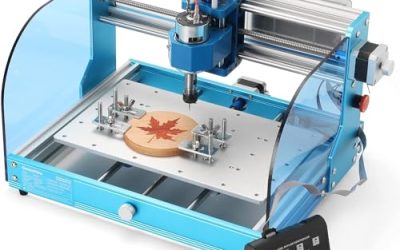
If your range is wooden gifts, leather goods, slate, coated tumblers and opaque acrylic items, an enclosed diode machine covers the work with far less infrastructure than a CO2 system. This guide compares three enclosed models sold on Amazon US, because the enclosure is what makes a diode practical at a shop counter or craft desk: it contains smoke, shields the beam and keeps the work area tidy.
Disclosure: As an Amazon Associate, this site may earn from qualifying purchases made through links in this article, at no additional cost to you.
Quick picks
- xTool S1 40W Enclosed Diode Laser Engraver and Cutter – ASIN: B0CQ7ZW5KK
- Creality Falcon2 Pro 22W Enclosed Laser Engraver – ASIN: B0D1C4QGV2
- AtomStack Kraft Enclosed Dual Laser Engraver – ASIN: B0G15PRFVZ
xTool S1 40W Enclosed Diode Laser Engraver and Cutter
Best for: Personalization businesses that want the largest work area in this group and a mature enclosed diode platform for batch work.
The S1 is a fully enclosed diode machine rated as a Class 1 safety design, with a bed size of 23.93 by 15.16 inches, the largest listed here, and a working speed of up to 600 mm per second. The basic bundle behind this ASIN includes air assist and a honeycomb panel. Positioning is handled by a twin-point system designed to place designs accurately on blanks, and the enclosure incorporates flame detection in several directions and an emergency stop. The laser module family is swappable, so owners can change power levels or fit an infrared module for metal marking as their product range develops.
Strengths: The large bed is a genuine production advantage: layouts of coasters, keyrings, ornaments or leather pieces can be engraved in one run instead of several. The enclosed Class 1 design filters the laser light through its protective cover, so it can be observed without protective eyewear for everyone nearby. Air assist and the honeycomb bed support cleaner cuts in wood and opaque acrylic.
Points to consider: This is a premium-sized desktop machine, so check the full footprint including the rear exhaust connection. Diode cutting of thicker wood is slower than a comparable CO2 machine, and clear acrylic and glass remain impossible regardless of settings. Confirm which module and accessories the chosen bundle includes, because S1 packages range from basic to fully loaded.
Creality Falcon2 Pro 22W Enclosed Laser Engraver
Best for: Sellers who want an enclosed diode machine with camera positioning and a workspace sized for boards, boxes and batch layouts.
The Falcon2 Pro 22W wraps a 22W diode module in a full enclosure with an integrated camera for positioning, air assist and an automatic fan system that manages smoke extraction through the housing. Its workspace is listed at 400 by 415 mm, and the maker lists engraving speeds up to 25,000 mm per minute. The machine is presented as a Class 1 safety design, and it works with the mainstream laser software used by small businesses, including LightBurn and LaserGRBL.
Strengths: Camera positioning is the feature personalization sellers feel most: place a chopping board, wallet or blank inside, see it on screen, and drop the name or design where it belongs. The enclosure and fan system keep smoke directed out of the work area instead of drifting across the desk. The workspace is large enough for batch layouts of smaller products while still sitting on a workbench.
Points to consider: At 22W, cutting thick material takes multiple passes or slower speeds compared with the 40W class, so it suits engraving-led product ranges better than cutting-led ones. As with every diode, plan your product range around opaque materials. Check the listing for the exact included accessories, because risers, rotary tools and honeycomb panels are packaged differently across bundles.
AtomStack Kraft Enclosed Dual Laser Engraver
Best for: Personalization work that mixes organic materials with marked metal items, because this machine carries two laser sources in one enclosed body.
The Kraft combines a 20W blue diode with a 1.2W infrared laser, switchable between modes, inside a Class 1 enclosed housing. The diode side handles wood, leather, cardboard, stone and opaque acrylic work, while the infrared source marks metals and some plastics directly, which covers personalised jewellery, metal tags, tools and drinkware finishes that a blue diode alone cannot mark cleanly. The work area is listed at 50 by 32 cm, and the listing highlights a built-in HD camera, autofocus, air assist, door detection and an automatic extinguisher feature among its safety systems.
Strengths: Two sources in one machine removes the usual diode compromise: most enclosed diodes force a choice between organic materials and metal marking, and this one addresses both. The safety package is unusually complete for the class, with enclosure monitoring and flame response systems. The work area is wide, which helps with signs, panels and batch layouts.
Points to consider: The infrared source is a marking tool, not a deep metal engraver, so set expectations at surface marks on metal rather than cut or deeply etched designs. The diode side, at 20W, is in the same cutting class as other mid-power diodes. This is a newer model line, so check the current listing carefully for bundle contents, software details and availability of the exact configuration before planning a product launch around it.
How to choose an enclosed diode laser for personalization
Start with materials, because diode limits are absolute. List your products and check each one against what a blue diode can do: wood, leather, slate, coated and painted surfaces, dark opaque acrylic and cardboard are in; clear acrylic, glass and uncoated bare metal are out, unless the machine adds an infrared module for metal marking. If your best sellers include clear acrylic awards or glassware, you need a CO2 machine instead, and no setting will change that.
Next, match power to your mix of engraving and cutting. Engraving-led ranges, such as names on boards and leather, run happily at 20 to 22W. If you cut product shapes from wood or opaque acrylic sheet every day, the 40W class shortens job times and handles thicker stock in fewer passes. Speed figures are maximum travel speeds, so judge cutting expectations by power and material, not headline numbers.
Then value the enclosure features that protect your workflow: a camera for placing designs on finished blanks, air assist for cleaner edges, flame detection and door sensing, and effective smoke extraction. A machine that is tidy and predictable is worth more than raw specifications.
Finally, think about growth. Swappable modules, rotary accessories for drinkware, riser bases for taller objects and conveyor options decide whether the machine you buy now still fits your range in a year. Check which of those exist for the exact model you are considering, and what the bundle in the listing already includes.
Setup and safety tips
Even inside an enclosure, a diode laser produces smoke and fumes that need extraction: route the exhaust outside or through a suitable purifier, and keep the enclosure closed while a job runs so the extraction and light filtering work as designed. Never leave a cutting job completely unattended, and keep flammable offcuts and cleaning solvents away from the machine. Diodes are air-cooled, so keep vents clear and the lens clean; a soot-filmed lens is the most common cause of gradually weakening engraving. Use the flame detection and door interlocks as intended rather than bypassing them. For repeat products, build physical jigs that hold blanks in the same position every time, and keep a settings log per material and supplier, because leather, wood and acrylic vary between batches.
FAQ
Can a diode laser engrave metal?
A standard blue diode cannot engrave bare metal. It can mark coated, painted and anodized surfaces. Machines with an added infrared module, such as the AtomStack Kraft in this guide, can mark bare metal surfaces directly, though the result is a surface mark rather than a deep engraving.
Why can diode lasers not cut clear acrylic?
The blue diode beam passes through transparent material instead of being absorbed, so clear acrylic and glass do not engrave or cut. Opaque and dark acrylics absorb the energy and work well. Clear materials are a CO2 laser job.
Is an enclosed diode safer than an open-frame diode?
The enclosure shields the beam path, contains smoke for extraction and usually adds flame detection and door sensing, and Class 1 enclosed designs are built to be observed without special eyewear during normal operation. Good practice still applies: extraction running, enclosure closed, and no unattended cutting.
What can I personalize with a 20 to 40W diode?
Wooden boards, boxes and ornaments, leather wallets and belts, slate coasters, coated tumblers, opaque acrylic signs and keyrings, cardboard packaging and stone items are all realistic products. Cutting is practical in wood and opaque acrylic within the thickness range the maker lists for each model.
Do these machines need water cooling like a CO2 laser?
No. Diode modules are air-cooled, which is one of their advantages: no chiller, no water changes and no tube to replace. Maintenance centres on lens cleaning, extraction and keeping the motion system free of debris.
Conclusion
Pick the xTool S1 40W if bed size and batch throughput lead your range. Pick the Creality Falcon2 Pro 22W if camera-guided placement on boards and gifts is your daily need. Pick the AtomStack Kraft if your range mixes wood and leather with marked metal items. Whichever you choose, confirm the bundle and module on the Amazon listing first, and make sure your product list respects what diode technology can and cannot mark.