🛒 Best Price Today on Amazon
Prime members get fast, free shipping on everything above, plus member-only deals. New members get a 30-day free trial — cancel anytime.
A 6K monitor changes what a workstation feels like. Text stays sharp at any size, timelines stretch across the screen without scrolling, and photographs show detail that a 4K panel simply cannot resolve. For editors, designers and engineers who study fine detail all day, the jump from 4K to 6K is not a luxury: it is the difference between guessing at a pixel and seeing it clearly. The extra pixels also mean less scrolling and zooming, which adds up to real time saved across a working week.
This guide is for workstation users upgrading from 4K, for video editors and photographers who need colour they can trust, and for anyone building a desk around a single superb display. The three monitors below were chosen from the names and specifications on their Amazon listings, and each one is a true 6K panel. The panels themselves are proven, with strong colour, brightness and connectivity for serious daily work.
Quick Picks
As an Amazon Associate we earn from qualifying purchases
| Product | Best for | Key spec from title |
|---|---|---|
| LG UltraFine 6K 32U990A-S | The newest 6K panel, with Thunderbolt 5 | 32-inch 6K 6144×3456 Nano IPS Black |
| ASUS ProArt Display PA32QCV | Colour accuracy for professional work | 32-inch 6K 6016×3384 with Calman Verified colour |
| Apple Pro Display XDR Standard Glass | The reference display for demanding work | 32-inch Retina 6K with 1000 nits sustained |
How to Choose
True 6K resolution, not a marketing number
A real 6K monitor has roughly six thousand pixels across its width: 6144 by 3456 or 6016 by 3384 are the two common resolutions. Some listings use 6K loosely, so read the specification table rather than the headline. At 32 inches, that density makes text crisp and gives photo and video work room to breathe. Also check the panel size: the same resolution on a smaller screen looks sharper, but a 32-inch panel gives you the desk space a workstation deserves.
Panel type and colour accuracy
Colour accuracy decides whether a monitor is a tool or just a big screen. Look for a wide colour gamut, factory calibration and a low Delta E value, which measures how far the displayed colour strays from the true colour. IPS Black panels improve contrast over standard IPS, which helps with dark scenes and photo work. If your work involves print, video or brand colours, a calibrated panel with verified accuracy is worth more than extra brightness or a faster refresh rate.
Brightness and HDR
Brightness matters in two ways: how the monitor handles a bright office, and how it shows HDR content. A sustained brightness of 600 nits keeps the screen readable in daylight, while a peak of 1600 nits gives HDR highlights real punch. Check the HDR standard on the listing, since DisplayHDR 600 and above mean the panel has been measured rather than merely labelled. For most workstation work, steady brightness and even backlighting matter more than a high peak number. In a bright office, even backlighting matters as much as peak brightness, since a panel that is bright in the centre and dim at the corners distracts during long editing sessions.
Ports, charging and the desk setup
A 6K monitor usually serves as the hub of the desk, so its ports decide how many cables you live with. Thunderbolt 4 or 5 carries video, data and charging over one cable, and 96W of power delivery charges a laptop while you work. Check how many inputs the monitor provides, whether it has USB ports for peripherals, and whether its stand adjusts for height and tilt. A monitor that needs a separate dock and a separate charger adds cost and clutter to the desk it was meant to simplify.
The 3 Best Options
LG UltraFine 6K 32U990A-S

The LG UltraFine 6K is the newest panel in this guide, and its headline feature is Thunderbolt 5, which carries the full 6K signal, data and charging over a single cable. Its 32-inch Nano IPS Black display resolves 6144 by 3456 pixels, and DisplayHDR 600 with 96W charging makes it a one-cable home for a laptop-based workstation. At 60Hz it is built for accuracy and detail rather than gaming speed, which is exactly what a workstation monitor should be. The Nano IPS Black panel also improves contrast over standard IPS, which helps with dark scenes and photo work in a bright office.
Specs
- 32-inch 6K display, 6144 x 3456 resolution
- Nano IPS Black panel
- Thunderbolt 5 connectivity
- DisplayHDR 600
- 96W power delivery charging
- 60Hz refresh rate
- 20.9 lb item weight
Best for: A laptop-based workstation that wants the newest single-cable connection
Watch out for: Confirm your computer supports Thunderbolt 5 or 4 before buying for a one-cable setup
ASUS ProArt Display PA32QCV
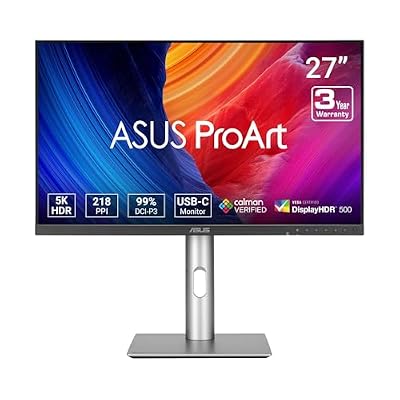
The ASUS ProArt PA32QCV is the colour-accurate choice in this guide, built for professionals who need to trust what they see. Its 32-inch 6K panel resolves 6016 by 3384 pixels with 98 percent DCI-P3 coverage, a Delta E under 2 and Calman Verified calibration, so colours stay true from the first day. Thunderbolt 4, DisplayHDR 600 and 96W power delivery cover the connections, and a three-year warranty backs a monitor built for daily professional use. The 98 percent DCI-P3 coverage and Delta E under 2 mean colours stay true for print and video work alike.
Specs
- 32-inch 6K display, 6016 x 3384 resolution
- 98 percent DCI-P3 colour coverage
- Delta E under 2, Calman Verified
- Thunderbolt 4 connectivity
- DisplayHDR 600
- 96W power delivery
- 60Hz refresh rate, 5ms response
- 3-year warranty
- 20.5 lb item weight
Best for: Photographers and editors who need verified colour accuracy
Watch out for: A 6K signal needs a capable graphics output, so check your computer’s display support first
Apple Pro Display XDR Standard Glass

The Apple Pro Display XDR is the reference monitor in this guide, built for work where colour and brightness cannot be compromised. Its 32-inch Retina 6K panel resolves 6016 by 3384 pixels with 1000 nits of sustained brightness and 1600 nits at peak, plus a contrast ratio of one million to one. That combination makes it the choice for HDR grading, high-end photography and any work where the display itself is the instrument. Note that the Pro Stand is sold separately. The standard glass finish suits controlled lighting, and the panel’s extreme brightness keeps HDR highlights vivid in a bright studio.
Specs
- 32-inch Retina 6K display, 6016 x 3384 resolution
- 1000 nits sustained brightness, 1600 nits peak
- 1,000,000:1 contrast ratio
- P3 wide colour gamut
- Standard glass finish
- Pro Stand sold separately
Best for: HDR grading and high-end work where the display is the instrument
Watch out for: The Pro Stand is sold separately, so budget for a stand or a VESA mount
Which One Fits Your Situation
You work from a laptop and want one cable
Choose the LG UltraFine 6K 32U990A-S. Thunderbolt 5 carries video, data and 96W charging over a single cable, and its Nano IPS Black panel gives you deep contrast for photo and video work. It is the cleanest laptop-first setup in this guide, with one cable between the machine and everything on the desk.
Colour accuracy is your first priority
Choose the ASUS ProArt Display PA32QCV. Its Calman Verified calibration, Delta E under 2 and 98 percent DCI-P3 coverage mean you can trust the colours on screen, and the three-year warranty backs daily professional use. Thunderbolt 4 and 96W charging cover the connections, so it works as the hub of a workstation desk as well as a colour-accurate display.
You grade HDR or work at the highest level
Choose the Apple Pro Display XDR Standard Glass. Its 1000 nits of sustained brightness and one-million-to-one contrast make it the reference display here, built for work where the monitor cannot be the weak link. It suits HDR grading, high-end photography and any job where brightness and contrast are measured rather than assumed.
You are upgrading a workstation from 4K
Choose the ASUS ProArt Display PA32QCV for the best balance of colour, connections and value, or the LG UltraFine 6K if your workflow is laptop-first. Either way, confirm your computer can drive a 6K signal before ordering, since a 6K panel needs a capable graphics output and the right cable to show its full resolution.
Common Mistakes
- Buying a monitor labelled 6K without checking the actual pixel resolution in the specification table.
- Choosing a bright panel for colour work without checking its calibration and Delta E value.
- Forgetting that a 6K signal needs a capable graphics output and the right cable.
- Placing the monitor where window light washes out the screen, then blaming the panel.
- Skipping the stand question, and discovering too late that the mount you need is sold separately.
Frequently Asked Questions
Is a 6K monitor worth it over a 4K monitor?
For detail work, yes. A 6K panel shows roughly fifty percent more pixels than 4K, which makes text sharper, timelines longer and photographs more detailed. For general office work the difference is smaller, and a good 4K monitor may serve you just as well. Buy 6K when your work involves fine detail, colour or long timelines that benefit from the extra space. The difference is visible from the first hour.
Can my computer drive a 6K monitor?
Most modern workstations and recent laptops can, but check first. A 6K signal needs a Thunderbolt or DisplayPort output that supports the resolution, plus a cable rated for the bandwidth. Older graphics cards and basic laptop docks may top out at 4K. Check your computer’s display specifications and the monitor’s input requirements before ordering. A short check now saves a return later.
What does Delta E mean for a monitor?
Delta E measures how far a displayed colour strays from the true colour, with lower numbers meaning better accuracy. A Delta E under 2 is considered excellent and is the standard for professional work, since the human eye struggles to see differences below that level. Factory calibration and verification, such as Calman Verified, mean the panel was measured before it left the factory. Trust the measurement, not the marketing.
Do I need a special stand for a 6K monitor?
Most 6K monitors include a stand, but not all. The Apple Pro Display XDR sells its Pro Stand separately, so you need to budget for a stand or a VESA mount. Check the listing for what is included, and confirm the monitor’s weight against your monitor arm’s limit if you plan to use one. Measure twice, order once.