Black Friday is the single best window of the year to buy a gaming desktop, and 2026 is shaping up to be a genuinely strong one. Prebuilt machines that felt out of reach in spring routinely shed a chunk of their price during the holiday rush, and the newest RTX 50-series cards are finally trickling into mainstream configurations. The trick is knowing which discounted towers are actually good value and which are just old stock wearing a sale sticker.
- Watch: Black Friday Deals On Gaming Desktops: Review & Buyer’s Guide — Video Review
- Design & Build
- Performance
- Pros & Cons
- Alternatives to Consider
- How to Read a Deal Before You Commit
- Which Kind of Deal Should You Take?
- Common Mistakes When Shopping Black Friday Gaming Desktop Deals
- After the Box Arrives: A 30-Day Checklist
- Frequently Asked Questions
- Verdict
- Related Articles
- Related Guides
We evaluated a spread of Black Friday-friendly desktops, from premium RTX 5070 builds to wallet-friendly entry rigs, to help you spend your money where it counts. Here is how these machines stack up on build, performance, and long-term value.
As an Amazon Associate we earn from qualifying purchases at no extra cost to you.





🎮 Get More From Your Setup — Free
Prime Gaming gives you free PC games every month, in-game loot, and a free Twitch channel sub — plus fast free shipping on all the gear above. New members get a 30-day free trial.
Watch: Black Friday Deals On Gaming Desktops: Review & Buyer’s Guide — Video Review
Design & Build
Build quality varies wildly across this price spectrum, and Black Friday makes that gap easy to see. The Alienware Aurora leads with a genuinely engineered chassis, tidy cable routing, and airflow tuned for its RTX 5070. At the flashy end, the Horizon Autherium Dragon RGB piles on tempered glass, a 360mm AIO, and lighting for buyers who want their rig to be a centerpiece. Budget STGAubron and WIWB towers keep things plain and functional, prioritizing components over cosmetics, which is exactly the right call at their prices.
Performance
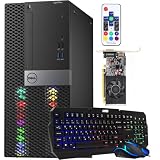
The performance ladder here is steep. The Alienware Aurora with its RTX 5070 and Intel Core Ultra 7 265F, and the Horizon Dragon with an RTX 5070 OC paired to a Core i9, are true 1440p-and-beyond machines that will handle modern titles at high settings for years. The STGAubron builds with RX 560, RX 580, and Core i5/i7 combos target 1080p esports and older AAA games, delivering playable frame rates without pretending to be flagship hardware. The WIWB Ryzen 5 4500 with an RTX 3050 sits in between as a competent 1080p starter.
Pros & Cons
- Pro: Black Friday pricing turns mid-tier RTX 50-series builds into legitimate value buys.
- Pro: Wide range of options means there is a genuine gaming desktop at almost any budget.
- Pro: Premium picks arrive with modern CPUs, fast SSDs, and Windows 11 preinstalled.
- Pro: Prebuilt convenience with warranty support beats sourcing and assembling parts.
- Con: Budget towers lean on older GPUs like the RX 560 that limit future headroom.
- Con: Some heavily discounted configs pair a strong GPU with modest RAM or storage.
Alternatives to Consider
If none of these fit, keep an eye on last-gen flagship towers, which often see the deepest Black Friday cuts as retailers clear inventory. A machine built around an RTX 4070 or Ryzen 7000-series chip can outperform a newer entry rig for similar money. Alternatively, a compact STGAubron build makes a fine second machine or a gift for a younger gamer stepping up from console.
How to Read a Deal Before You Commit
A big discount only helps if the machine underneath is worth owning. Holiday listings tend to emphasize one eye-catching component while quietly trimming others, so the most reliable defense is a short audit of the specification sheet. The sections below turn that audit into a routine.
When the Sales Actually Happen
Black Friday falls on the day after U.S. Thanksgiving, which is the fourth Thursday of November. In 2026 that puts Thanksgiving on November 26, Black Friday on November 27, and Cyber Monday on November 30. Many retailers open deals earlier in the week and extend them through the weekend, so a listing that looks unmissable on Thursday may still be around on Monday. Limited-stock doorbuster items are the exception, because they can sell out within hours.
Match the Graphics Card to Your Target Resolution
The graphics card is the single most important line item in a gaming desktop. The table gives rough guidance for NVIDIA’s RTX 50 series, which pairs memory capacity with the screen you intend to use.
| Target | Typical GPU tier | Memory to look for |
|---|---|---|
| 1080p at high refresh | RTX 5060 class | 8GB |
| 1440p at high settings | RTX 5070 or 5060 Ti with 16GB | 12GB to 16GB |
| 4K or very high 1440p refresh | RTX 5070 Ti and above | 16GB or more |
Beware of name overlap. The RTX 5060 Ti exists in both 8GB and 16GB versions, so the memory size in the listing matters as much as the model name.
The Spec-Sheet Audit
- Memory: Look for 16GB at minimum, in two matched sticks. 32GB gives headroom for newer games and background apps.
- Storage: An NVMe SSD of at least 1TB is a practical floor. Drives marked only “SSD” can be slower SATA types.
- Power supply: Look for a named brand, a wattage that meets NVIDIA’s guidance for the card, and an 80 Plus rating.
- CPU: A recent six-core or better processor is enough for most gaming. Avoid very old generations offered with a new GPU.
- Cooling and case: Look for front intake fans and ventilation. A sealed, fanless case invites thermal throttling.
- Ports and Wi-Fi: Confirm DisplayPort or HDMI on the graphics card and that Wi-Fi is included if you do not have a wired connection.
The Build-It-Yourself Comparison
Before buying, list the CPU, GPU, memory, SSD, motherboard, power supply, and case in the prebuilt and add up the typical street cost of equivalent parts. If the discounted machine comes in below what the parts alone would cost, the deal is good. If it is above, you are paying for assembly, a warranty, and convenience, which can still be worth it, but the offer is not the bargain it appears to be.
Which Kind of Deal Should You Take?
| If you… | Choose… |
|---|---|
| Play at 1080p and want strong value | A system with an RTX 5060-class or comparable card, 16GB of RAM, and a 1TB NVMe drive |
| Play at 1440p and want headroom for several years | An RTX 5070-class desktop, 32GB of RAM if offered, and a quality power supply |
| Stream or edit video as well as game | A desktop with 32GB of RAM and a CPU with eight or more cores |
| Want to upgrade later | A model with a standard ATX power supply, an open M.2 slot, and a current motherboard socket |
| Are tempted by a very low listing | A different machine, unless the memory, SSD, and power supply are clearly named |
Common Mistakes When Shopping Black Friday Gaming Desktop Deals
- Pursuing the discount instead of the specification. A deep markdown on a weak build is still a weak build.
- Missing the VRAM trap. Cards with similar names can carry different memory capacities.
- Accepting vague components. Listings that say “gaming power supply” or “high-speed SSD” without a brand or model deserve caution.
- Ignoring the return window. Holiday purchases often come with extended return periods, but terms vary, so read them before you click buy.
- Forgetting the rest of the setup. A monitor, keyboard, and mouse may not be included, and a mismatch such as a 1080p screen with a 1440p-class card wastes capability.
- Waiting too long on a scarce model. The best-value configurations tend to sell out first, so decide on your must-have specs ahead of time.
After the Box Arrives: A 30-Day Checklist
A discounted machine deserves the same scrutiny as any other purchase, and the first weeks are the time to catch problems while the return window is still open.
- Verify the specifications in software. Open Task Manager and a system information tool, then compare the processor, memory amount, storage size, and graphics card with the listing.
- Confirm dual-channel memory and rated speed. Use the BIOS or a monitoring tool, and enable the memory profile if the machine runs at a lower default speed.
- Run a demanding game for an hour. Watch the temperatures and look for crashes, shutdowns, or loud fan noise.
- Update drivers and firmware. Install the newest graphics driver and any BIOS update the manufacturer provides.
- Check the warranty registration. Register the system if the maker requires it, and save the order record in a safe place.
- Decide before the return window closes. If the machine misses the specification, throttles, or has faulty parts, start a return or replacement while you still can.
Also keep the original packaging for the first few weeks. Returns and warranty swaps move faster when the box and foam are still available.
Questions to Ask Before You Order
Short answers to a few questions prevent most disappointments. Which exact graphics card model and memory size is included? Are the two memory sticks matched, and what speed do they run? Which brand and wattage is the power supply? Is the SSD NVMe, and how large is it? How long is the warranty, and who handles claims, the seller or the manufacturer? If the listing cannot answer these plainly, treat the discount as a warning sign rather than a bargain.
Frequently Asked Questions
Are Black Friday gaming desktop deals actually worth it?
Generally yes. Desktops see some of the year’s largest discounts, and prebuilt margins leave room for real savings. Just verify the full spec sheet rather than trusting the headline price.
Should I buy a prebuilt or build my own?
During Black Friday, prebuilts often match or beat DIY pricing thanks to bulk component deals, plus you get a single warranty. Build your own only if you want specific parts or the hobby itself.
Is an RTX 5070 build overkill for 1080p?
It is more than you need for 1080p, but it future-proofs you for 1440p, higher refresh rates, and heavier titles down the line, which many buyers find worth the premium.
How much RAM do I need in 2026?
16GB is the practical floor for modern gaming, but 32GB gives comfortable headroom for multitasking, streaming, and memory-hungry newer releases.
Verdict
The strongest Black Friday buy for most people is the Alienware Aurora with its RTX 5070 and modern Core Ultra CPU, offering flagship-class gaming with dependable engineering. Enthusiasts chasing maximum spectacle and specs will love the Horizon Autherium Dragon, while budget shoppers get real gaming for less from the STGAubron Core i7 RX 580 build.
Top picks from this guide
 STGAubronSTGAubron Gaming PC Desktop,Core I5,RX 560 4G,16G RAM,512G SSD |…$389 \xc2\xb7 98/100
 WIWBWIWB Prebuilt Gaming PC – Ryzen 5 4500, GeForce RTX…$750 \xc2\xb7 96/100
 AlienwareAlienware Aurora Gaming Desktop, RTX 5070, Intel Core Ultra 7…$2,188 \xc2\xb7 95/100
 The Horizon PcsThe Horizon Autherium Dragon RGB I9 RTX Gaming PC ||…$3,200 \xc2\xb7 95/100