🛒 Best Price Today on Amazon
Prime members get fast, free shipping on everything above, plus member-only deals. New members get a 30-day free trial — cancel anytime.
Choosing a hard mouse pad is really a decision about friction. A cloth mat grips the mouse and helps you stop on a pixel, while a rigid surface lets the mouse glide with far less effort, which suits fast flicks and wide swipes. The trade is real: that low resistance makes tracking feel quick but small corrections easier to overshoot, and a hard surface does not roll up, fold away or forgive a desk that is not flat. Material, thickness and base grip decide whether that speed feels controlled or slippery.
This guide is for gaming buyers who already know they prefer a fast, rigid surface over cloth, from competitive players chasing low-effort glide to anyone tired of frayed cloth edges. Every product below was selected from its name and specifications on its own Amazon product page, and a pad appears here only when that page states a hard surface in its own wording.
Quick Picks
As an Amazon Associate we earn from qualifying purchases.
| Product | Best for | Key spec from title |
|---|---|---|
| Logitech G440 Hard Gaming Mouse Pad | A plain, sensor-tuned hard surface with no lighting to manage | Moderate Surface Friction |
| Razer Firefly Hard V2 | A hard pad with customizable lighting and tidy cable routing | Built-in Cable Management |
How to Choose
Know What the Surface Is Made Of
Hard pads are not one material, and the surface decides most of what you feel. A hard plastic or polymer surface, like the one on the Logitech G440 below, gives a consistent glide with a small amount of texture the sensor can read. Glass surfaces sit at the extreme end of speed and smoothness, while aluminum-core pads feel cool and rigid with a sharper stopping edge. Each material also wears differently: plastic can polish smooth in the main tracking zone over time, glass resists wear but feels unforgiving, and metal can be loud under a moving mouse. Match the material to how much glide you actually want, not to the fastest claim on the box.
Match Friction to Your Aim Style
Friction is the real specification on a hard pad, even when it is described in words instead of numbers. A moderate-friction surface still offers some stopping help, which suits tactical shooters and mixed gaming where you alternate between wide turns and precise holds. A very low-friction surface favors high-speed tracking and arm aiming, because the mouse keeps moving with little push, but fingertip players who rely on small braking movements may find it hard to settle on small targets. The listings below describe friction in their own wording, so compare those descriptions against the games you play most rather than assuming every hard pad feels equally fast.
Plan for Wear, Noise and Cleaning
A hard pad trades the problems of cloth for a different set. There are no stitched edges to fray and no fabric to absorb spills, and a rigid surface can be wiped clean in seconds, which keeps the glide consistent week after week. In exchange, the surface itself becomes the wear item: mouse feet slide directly on it, so feet wear faster than on cloth, and a scratched or polished patch changes how the pad feels. Hard pads also transmit more sound, so clicks and swipes are more audible on a bare desk. If you play at night or share a room, factor that noise into the choice before you buy.
Check Size, Thickness and the Base
A rigid pad cannot be trimmed or rolled, so the stated footprint has to fit your desk exactly as it is, with room for your keyboard position and your full swipe range at your sensitivity. Low-sensitivity players need width above all; a pad that is too narrow forces constant lifting and recentering. Thickness matters less than on cloth, but a thinner pad sits flatter and interferes less with your wrist angle. Finally, look for a non-slip base in the listing wording: a hard pad has no fabric weight to hold it in place, so the rubber underneath is the only thing stopping the whole surface from sliding during a hard flick.
The 2 Best Options
Logitech G440 Hard Gaming Mouse Pad

The G440 is the straightforward hard pad in this guide: a rigid black surface with no lighting, no software and nothing to configure. Its listing describes the surface as optimized for gaming sensors with moderate surface friction, which places it in the middle of the hard-pad range rather than at the slippery extreme. That balance makes it a sensible first hard pad for players moving away from cloth, because the glide is clearly faster than fabric while the moderate friction still helps you stop. The non-slip base keeps the rigid surface planted, and the plain finish wipes clean instead of trapping dust like cloth.
Specs
- Hard gaming mouse pad surface
- Optimized for gaming sensors
- Moderate surface friction
- Non-slip mouse mat base
- Color: Black
- Model 943-000790
Best for: Players who want a fast, plain hard surface for everyday competitive gaming without lighting or setup.
Watch out for: The moderate friction means this is not the slickest glide available, and there is no RGB lighting for players building a lit setup.
ASIN: B0BHMK6B2X
Razer Firefly Hard V2
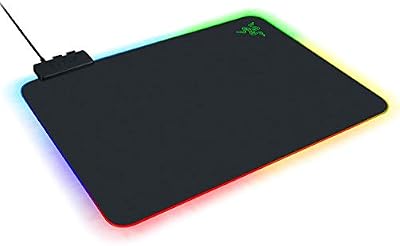
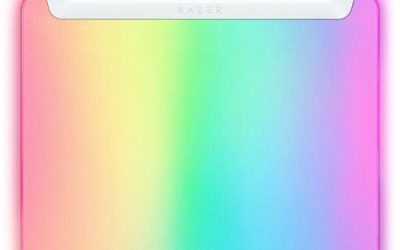
The Firefly Hard V2 is the pick when the hard surface is only half the purchase and the desk presentation matters too. Its listing describes a hard pad with customizable Chroma lighting that matches other Razer gear, and the built-in cable management keeps the pad’s own wire routed instead of loose across the desk. Razer describes the surface as balanced for control and speed, which suits players who want hard-pad glide without giving up all stopping feel. The non-slip rubber base holds the rigid mat in place during fast movements, and the hard finish is easy to wipe down between sessions.
Specs
- Hard gaming mouse pad, Firefly V2 Hard series
- Customizable Chroma lighting
- Built-in cable management
- Balanced control and speed surface
- Non-slip rubber base
- Model RZ02-03020100-R3U1
Best for: Players who want a hard, balanced surface plus customizable lighting that matches a wider RGB setup.
Watch out for: The lighting runs through the pad’s cable, so it takes a port and adds a wire to the desk that the plain G440 does not.
ASIN: B07ZDWHL4M
Which One Fits Your Situation
You Are Switching From Cloth for the First Time
Start with the Logitech G440. Its moderate surface friction is the gentler step away from fabric: the mouse clearly moves more freely than on cloth, yet you keep enough stopping help to adjust without relearning your aim from zero. There is also nothing to plug in or configure, so the only change in your setup is the surface itself, and you can judge the hard-pad feel on its own before spending on extras.
You Play Fast Games and Want Maximum Glide With Some Control
Both pads here sit in the balanced part of the hard-pad range rather than at the glass extreme, so choose by the rest of your desk. The Firefly Hard V2 describes its surface as balanced control and speed, which fits fast shooters where you still hold angles. The G440’s moderate friction wording points the same way. If your priority is pure glide above everything, note honestly that neither listing promises an ultra-low-friction surface.
Your Desk Setup Is Built Around Lighting
Choose the Razer Firefly Hard V2. The customizable Chroma lighting is stated in its own listing, and the built-in cable management keeps the pad’s wire tidy, which matters on a desk that is already carrying a keyboard and mouse cable. The G440 has no lighting at all, so it disappears visually into a plain setup instead. Pick the Firefly when the pad is part of the look, and the G440 when it is purely a playing surface.
You Play on a Shared or Multi-Use Desk
The G440 suits a desk that has to go back to work or study, because it is a plain black mat with no glow to switch off and a surface that wipes clean after snacks or a spill. It also asks nothing from the computer, so it can move between machines freely. The Firefly Hard V2 is better left on a dedicated gaming desk, where its cable and lighting can stay connected as you like them.
Common Mistakes
- Assuming every hard pad feels the same, when friction wording in the listing ranges from moderate to balanced to near frictionless.
- Buying by desk photos instead of the stated footprint, then finding a rigid pad cannot be trimmed to fit the space left beside the keyboard.
- Ignoring mouse feet wear, even though a hard surface wears feet faster than cloth and worn feet change the glide.
- Forgetting the base, and ending up with a rigid pad that slides across the desk because its underside has no grip.
- Choosing a lit hard pad for a laptop setup without checking that you have a free port for its cable.
Frequently Asked Questions
Is a hard mouse pad faster than a cloth pad?
Generally yes, because a rigid surface offers less resistance than fabric, so the mouse starts moving with a lighter push and keeps gliding longer. How much faster depends on the friction level the listing states: a moderate-friction hard pad like the G440 feels quicker than cloth but still controlled, while very low-friction surfaces feel dramatically faster and take more time to adapt to.
Will a hard pad wear out my mouse feet?
Hard surfaces do wear mouse feet faster than cloth, simply because the feet slide against a rigid material instead of soft fabric. The wear is gradual and the feet are replaceable on most gaming mice, but it is a real running cost of choosing a hard pad. Keeping the surface wiped clean slows the wear, since grit trapped on a hard pad acts like sandpaper under the mouse.
Can I use a hard pad on any desk?
You need a flat, stable area at least as large as the pad itself, because a rigid mat cannot drape over a desk edge or fold around obstacles the way cloth can. Check the stated dimensions against your free desk space before buying, and make sure the listing mentions a non-slip base, since that grip is what keeps a hard pad from shifting during play on smooth desktops.
Does the Razer Firefly Hard V2 need software to work as a pad?
The surface works as a mouse pad as soon as it is on the desk, and its listing highlights customizable Chroma lighting plus built-in cable management rather than any requirement to play. The cable is there to power and control the lighting, so a setup that never uses the lighting can still use the pad, though a plain pad like the G440 is the simpler choice in that case.