🛒 Best Price Today on Amazon
Prime members get fast, free shipping on everything above, plus member-only deals. New members get a 30-day free trial — cancel anytime.
A cooling stand is easy to buy and hard to buy quietly. Most product pages lead with fan speed and light shows, while the question that decides whether the stand stays on your desk is how much noise it adds to the room. That matters most for anyone who plays at night, shares a living room, or records voice chat while a fan spins nearby. The real decision is which stand keeps its noise promise in the listing itself, before you plug it in.
This guide is for PlayStation 5 owners, because every stand here fits PS5, PS5 Slim or PS5 Pro and its page states quiet or low-noise operation in its own title or bullets. The Cocubal G12 leads with an ultra quiet turbo fan in its description. The VidPPluing station calls its fans silent and ultra-quiet in its feature list. The ZYTHRONE station puts the words quiet cooling fan in its product name. Listings that promised only strong wind were left out.
Quick Picks
As an Amazon Associate we earn from qualifying purchases.
| Product | Best for | Key spec from title |
|---|---|---|
| Cocubal G12 PS5 Cooling Station | PS5 owners who want the quiet wording in the listing itself | Ultra quiet turbo fan at 5,200 RPM |
| VidPPluing PS5/Slim/Pro Cooling Station | DualSense Edge owners | Silent cooling fans with 3 speed levels |
| ZYTHRONE PS5/Slim/Pro Cooling Station | Players who charge between short sessions | Quiet cooling fan with fast controller charger |
How to Choose
Look for the Noise Claim in the Listing
The first check is wording. A stand that takes noise seriously says so on its own product page, with terms like quiet, low noise, silent or ultra-quiet in the title or the feature bullets. A decibel figure is even stronger evidence, because it can be compared across brands, but many makers publish wording instead of a number, and none of the three stands in this guide states one. Treat fan speed figures as airflow language rather than noise language: a high RPM number describes how fast the fan spins, not how loud the room gets. Always confirm that a low speed setting exists, since that is the mode the quiet wording usually describes.
Match the Stand to Your Console Revision
PlayStation 5 hardware comes in three body shapes, and a stand built for one does not always sit right under another. The original 2020 console is the tallest and heaviest, the Slim is smaller, and the Pro shares the Slim’s footprint. Listings handle this with interchangeable fit frames or a safety screw that locks the console to the base. Read the compatibility line for your exact model and edition, disc or digital, before ordering. All three stands here name the original PS5, the Slim and the Pro, but the fit hardware is what makes that claim real, so check that the screw or frame for your version is included.
Check How the Fan Is Controlled
Noise is partly a control problem. A stand with three fan speed levels lets you run the lowest setting during night sessions and save the higher levels for long summer afternoons, while a single-speed fan gives you no such choice. Look at how the levels are changed: a touch panel on the base, a button, or a dial you can reach without moving the console. Separate controls for the fan and the lights matter too, because a light show you cannot switch off is its own kind of distraction in a dark room. A memory function that restores your last settings after a restart saves a nightly setup chore.
Count the Charging and Port Extras
Most cooling stands are also furniture, and the extras decide how much clutter leaves your desk. A dual charging dock removes two cables and keeps both controllers in one known place. Check which controllers the dock accepts: some stations charge the standard DualSense only, while others also fit the DualSense Edge with its different shape. USB hub ports vary from none to four, and they decide whether a headset dongle or external drive plugs into the stand instead of behind the console. A headset holder, a media remote slot and a small footprint all compete for the same base, so decide which extras you will use before paying for the longest feature list.
The 3 Best Options
Cocubal G12 PS5 Cooling Station

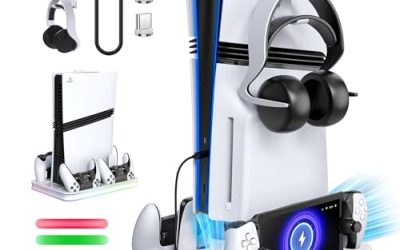
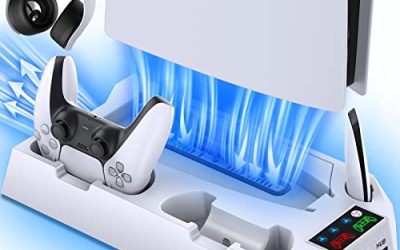
The Cocubal G12 is the clearest noise pick of the three because the claim sits in the product description itself: a high-performance ultra quiet turbo cooling fan, with bullets that describe low-noise cooling across three fan levels. The station fits every current PlayStation 5 body — the original console, the Slim and the Pro, in disc and digital editions — and locks down with a safety screw. Around the fan it builds the usual all-in-one kit: a dual controller charging dock, three USB hub ports and nine RGB light modes for players who want the glow as well as the hush.
Specs
- Fits PS5, PS5 Slim and PS5 Pro consoles, Disc and Digital editions
- Ultra quiet turbo cooling fan, 5,200 RPM
- 3 fan speed levels with low-noise cooling
- Dual controller charging dock
- 3 USB hub ports
- 9 RGB light modes
- Safety screw secures the console to the stand
Best for: PS5 owners who want the low-noise claim stated in the listing before anything else.
Watch out for: The listing gives no decibel figure, so judge the claim by the fan level you plan to run, not by a number.
ASIN: B0DJ59SVJ3
VidPPluing PS5/Slim/Pro Cooling Station

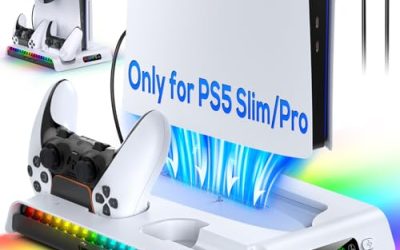
The VidPPluing station makes its noise case twice: the Amazon title calls the fan ultra quiet, and the feature list describes adjustable silent cooling fans that use ultra-quiet technology to reduce noise. Three speed levels let you pick how hard the fans work. The base is shaped for the original PS5, the Slim and the Pro in both disc and digital editions, and it is cut so it does not block the console’s vents or ports. Charging covers the standard DualSense and the DualSense Edge, and four USB ports handle headsets and other accessories.
Specs
- Fits PS5, PS5 Slim and PS5 Pro consoles, Disc and Digital editions
- Silent cooling fans with ultra-quiet technology
- 3 fan speed levels
- RGB lights with 3 LED modes and 7 color options
- 3 USB-A ports and 1 USB-C port
- Fast dual controller charging for DualSense and DualSense Edge
- Input voltage: 5 volts, USB Type-C connector
Best for: Players who charge a DualSense Edge alongside a standard controller.
Watch out for: The listing publishes no decibel figure, so the silent wording is a maker’s description rather than a measured rating.
ASIN: B0F8V1NVFC
ZYTHRONE PS5/Slim/Pro Cooling Station

The ZYTHRONE station carries its noise claim in the product name itself, which lists a quiet cooling fan alongside RGB light and a headset holder. The base is built for the PlayStation 5 family in full: the original console, the Slim and the Pro, in disc and digital editions, held firm with a safety screw. Its charger is the fast dual type, and the dock accepts the standard controller and the Edge controller, so a two-player household can park both pad types on one base between sessions.
Specs
- Fits PS5, PS5 Slim and PS5 Pro consoles, Disc and Digital editions
- Quiet cooling fan
- Fast dual controller charger for standard and Edge controllers
- RGB light
- Headset holder
- Safety screw secures the console
Best for: Two-controller households that want the quiet claim in the product name and a headset hook on the same base.
Watch out for: The listing gives no decibel figure and no fan speed in RPM, so its noise wording is the only evidence to go on.
ASIN: B0FFM36CYZ
Which One Fits Your Situation
You Play Late in a Room Where Others Sleep
Night play is where the quiet wording earns its place. All three stands state a low-noise claim in their listings and offer fan speed levels, so the routine is simple: run the lowest level after dark and keep higher levels for daytime. The Cocubal G12 describes low-noise cooling directly in its bullets, making it the natural first look for a bedroom setup. Keep the stand on a solid surface, since a hollow shelf can carry vibration.
Your Console Lives in the Living Room
In a living room, fan noise competes with conversation and television sound, so the extras take over. Light modes become part of the furniture: the Cocubal G12 lists nine RGB modes, and the VidPPluing station lists three LED modes in seven colors. Fit still comes first, because a stand that wobbles under a Pro looks worse than any light effect. Pick the base that matches your console revision and shelf depth, then let the lighting be the tiebreaker.
You Charge Two Controllers Every Night
If both controllers go back on a dock after every session, charging fit matters more than any other extra. All three stations charge two controllers. The ZYTHRONE pairs its quiet fan with a fast dual charger, while the VidPPluing dock is the one that names the DualSense Edge alongside the standard pad. Households with two standard controllers can choose freely; households with an Edge in the rotation should shortlist the stations whose listings name it.
You Own More Than One PS5 Model
Some households run an original PS5 in one room and a Slim or Pro in another, and a stand that fits only one body shape means buying twice. Every station here names all three console generations, in disc and digital editions, and uses a safety screw or fit hardware to hold its console. Any of the three is a reasonable spare-room purchase, as long as the fit parts stay with the stand when it moves.
Common Mistakes
- Treating a high RPM figure as a noise rating, when it only describes how fast the fan spins.
- Running the top fan level around the clock when the lowest level is the setting the quiet wording describes.
- Ordering for the wrong console revision because the compatibility line was never checked against the exact model and edition.
- Assuming the word quiet in a headline means a measured decibel figure, when the listing publishes wording only.
- Tucking the stand inside a closed cabinet, where any fan sounds more present and air has nowhere to circulate.
Frequently Asked Questions
Do any of these stands publish a decibel rating?
No. Each of the three listings states its noise claim in words — quiet, low-noise, silent or ultra-quiet — in the title or the feature bullets, and none of them publishes a decibel figure. Read the wording as the maker’s description of the fan rather than a laboratory measurement, and judge the result at the lowest fan level in your own room.
Will these stands fit the PS5 Pro as well as the Slim?
Yes, each listing names the original PS5, the PS5 Slim and the PS5 Pro, in both disc and digital editions, and each uses a safety screw or fit hardware to hold the console. Body shapes still differ between generations, so match the compatibility line to your exact model before ordering, and keep every fit part from the box if the stand moves consoles later.
Is the lowest fan speed the right one for night play?
The listings present three fan levels as a choice of cooling intensity, and the lowest is the setting that suits a quiet room best, since it is the level the low-noise wording is written around. In a warm room or a long session you may prefer the middle level. Start low, listen for a minute, and step up only when you feel you need to.
Can I turn the lights off while the fan keeps running?
Light arrangements differ by model: the Cocubal G12 lists nine RGB modes and the VidPPluing station lists three LED modes with seven color options, so check the product page for how its lights are switched. If the console sits in a bedroom, prefer a model with a clear light-off step over one that ties lights to the fan button.