
🛒 Best Price Today on Amazon
Prime members get fast, free shipping on everything above, plus member-only deals. New members get a 30-day free trial — cancel anytime.
- Best Gaming Laptop for Blender by Need
- Best Gaming Laptops for Blender Compared
- How We Chose the Best Gaming Laptop for Blender
- 1. MSI Raider 18 HX AI A2XW
- 2. Lenovo Legion Pro 7i Gen 10
- 3. GIGABYTE AORUS MASTER 16 AM6H
- 4. ASUS ROG Zephyrus G16 (2025) GU605
- 5. Razer Blade 16 (2025)
- More Gaming Laptops for Blender: 18-Inch Power and Value Picks
- Buying Guide: What Matters for Blender?
- RTX 5090 vs RTX 5080 for Blender: Which VRAM Tier Do You Need?
- FAQ
- Conclusion
The best gaming laptop for Blender needs more than high FPS. Cycles rendering rewards a powerful NVIDIA GPU and generous VRAM, while modeling, sculpting, simulation, and multitasking also depend on CPU speed, memory, cooling, and storage. These picks balance Blender workloads with serious gaming performance.
Updated October 2026 – compared on manufacturer specifications, Blender’s published requirements and recurring buyer feedback.
The best gaming laptop for Blender is one with an RTX 5090 Laptop GPU, 24GB of VRAM and at least 32GB of RAM. Our top three are the MSI Raider 18 HX AI A2XW for maximum sustained rendering, the Lenovo Legion Pro 7i Gen 10 for a balanced 16-inch build, and the ASUS ROG Zephyrus G16 GU605 for travel. If your scenes fit in 16GB of VRAM, the RTX 5080 laptops near the end of this guide cost far less.
Best Gaming Laptop for Blender by Need
| Need | Laptop | Spec line |
|---|---|---|
| Fastest sustained renders | MSI Raider 18 HX AI A2XW | RTX 5090 24GB · up to 175W · 18-inch · up to 96GB DDR5 |
| Balanced 16-inch | Lenovo Legion Pro 7i Gen 10 | RTX 5090 24GB · 175W · 16-inch OLED 240Hz · 64GB DDR5 |
| Upgradeable RAM and SSDs | GIGABYTE AORUS MASTER 16 AM6H | RTX 5090 24GB · 175W · Gen5 + Gen4 M.2 · 64GB DDR5 |
| Travel | ASUS ROG Zephyrus G16 GU605 | RTX 5090 24GB · 120W · about 1.85kg · LPDDR5X |
| Thin and premium | Razer Blade 16 (2025) | RTX 5090 24GB · up to 155W · about 2.14kg |
| Value, 16GB VRAM | MSI Vector 16 HX AI | RTX 5080 16GB · Core Ultra 9 275HX · 32GB DDR5 · 2TB |
Best Gaming Laptops for Blender Compared
| Laptop | Best For | Top GPU Option | VRAM | Memory | Display |
|---|---|---|---|---|---|
| MSI Raider 18 HX AI A2XW | Maximum sustained rendering | RTX 5090 Laptop GPU, up to 175W | 24GB GDDR7 | Up to 96GB DDR5 | 18-inch UHD+ Mini LED option |
| Lenovo Legion Pro 7i Gen 10 | Balanced 16-inch performance | RTX 5090 Laptop GPU, 175W | 24GB GDDR7 | Up to 64GB DDR5 | 16-inch 2560 x 1600 OLED, 240Hz |
| GIGABYTE AORUS MASTER 16 AM6H | Full-power 16-inch GPU | RTX 5090 Laptop GPU, 175W | 24GB GDDR7 | Up to 64GB DDR5 | 16-inch 2560 x 1600 OLED, 240Hz |
| ASUS ROG Zephyrus G16 GU605 | Portable Blender workstation | RTX 5090 Laptop GPU, 120W | 24GB GDDR7 | Up to 64GB LPDDR5X | 16-inch 2.5K OLED, 240Hz |
| Razer Blade 16 (2025) | Premium thin creator/gaming use | RTX 5090 Laptop GPU, up to 155W | 24GB GDDR7 | Up to 64GB LPDDR5X | 16-inch OLED, 240Hz |
How We Chose the Best Gaming Laptop for Blender
Blender officially recommends 32GB of RAM and 8GB of VRAM, but complex Cycles scenes, high-resolution textures, geometry nodes, and GPU rendering can exceed that baseline quickly. For demanding work, 12GB to 24GB of VRAM gives more headroom, while 64GB of system memory is useful for heavier scenes and multitasking.
NVIDIA remains especially practical for Blender because Cycles supports CUDA and OptiX acceleration on compatible GeForce RTX GPUs. Laptop GPU wattage also matters: two machines with the same RTX 5090 name can deliver different sustained rendering behavior when one allows substantially more graphics power than the other.
1. MSI Raider 18 HX AI A2XW
Best For: Maximum Blender rendering power in a laptop
Key Features
- Up to NVIDIA GeForce RTX 5090 Laptop GPU
- 24GB GDDR7 VRAM
- Up to 175W Maximum Graphics Power
- Up to Intel Core Ultra 9 285HX
- Up to 96GB DDR5 memory
- 18-inch UHD+ Mini LED display option
- Up to 260W combined CPU-GPU power
What Makes It Different
The MSI Raider 18 HX AI is built for users who want desktop-style Blender performance in a movable system rather than a thin travel laptop. Its RTX 5090 Laptop GPU can run at up to 175W with 24GB of GDDR7 VRAM, giving large Cycles scenes far more breathing room than lower-VRAM gaming models during sustained rendering.
Pros
- 24GB VRAM suits unusually large GPU-rendered scenes
- High GPU power limit favors prolonged rendering workloads
- Memory capacity reaches workstation-friendly territory
- Large display provides generous Blender workspace
- Strong gaming hardware when rendering work is finished
Cons
- Large 18-inch chassis is inconvenient for daily commuting
- High-performance operation is designed around AC power
- More machine than lighter Blender workloads require
Use Case
Its 18-inch chassis also gives MSI more room for cooling and sustained power, while memory support up to 96GB makes it attractive for simulation, large asset libraries, and Blender plus Adobe or Unreal workflows. The trade-off is obvious: this is a heavy workstation-class gaming laptop meant to stay near a desk and outlet.
Who It’s For: Professional Blender artists, visualization studios, animators, and users rendering complex Cycles scenes regularly.

MSI Raider 18 HX AI A2XWJG-445CA 18" QHD+ 240Hz Gaming Laptop, Intel Core U9-285HX, RTX 5090, 64GB (32GB*2) DDR5 6400MHz Memory, 2TB Gen 5x4 NVMe PCIe SSD, Windows 11 Home
Included for 'Best Gaming Laptop for Blender: 10 Powerful Picks in 2026' as a representative home product in this roundup; selection reflects the product set returned for this topic.
View on Amazon2. Lenovo Legion Pro 7i Gen 10
Best For: High-end Blender performance in a balanced 16-inch design
Key Features
- Up to NVIDIA GeForce RTX 5090 Laptop GPU
- 24GB GDDR7 VRAM
- Up to 175W GPU power
- Up to Intel Core Ultra 9 275HX
- Up to 64GB DDR5 memory
- Two M.2 storage slots
- 16-inch 2560 x 1600 OLED display at 240Hz
What Makes It Different
The Lenovo Legion Pro 7i Gen 10 combines a full-power RTX 5090 option with a more manageable 16-inch format. Its 175W GPU ceiling and 24GB of VRAM suit long Cycles renders, while the Core Ultra 9 275HX gives strong CPU resources for baking, simulation, decompression, and workloads that do not stay entirely on the GPU.
Pros
- Full-power RTX 5090 option
- 24GB VRAM for demanding Cycles projects
- Upgradeable DDR5 memory
- Dual M.2 storage support
- OLED panel suits creative work and gaming
Cons
- Starting weight is above many thin 16-inch gaming laptops
- High-power hardware requires substantial cooling
- Premium GPU configurations may exceed what casual Blender users need
Use Case
The 16-inch 2560 x 1600 OLED panel is also useful for texture work and content review, with 100% DCI-P3 coverage and a 240Hz refresh rate for gaming. Lenovo supports up to 64GB of DDR5 memory and two M.2 drives, making this a strong fit for artists who want upgradeable storage and memory without moving to an 18-inch chassis.
Who It’s For: Blender users who want high GPU wattage and upgradeability without carrying an 18-inch desktop replacement.
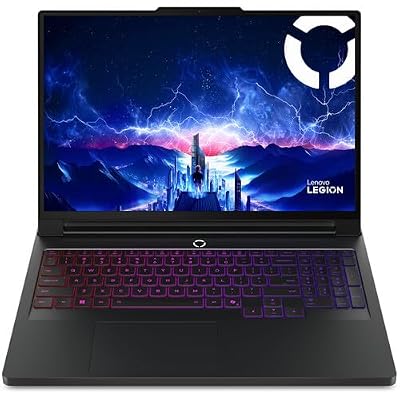
Lenovo Legion Pro 7i Gen 10 w/Ultra 9, RTX 5090, 64GB RAM, 2TB,16” OLED | Gaming Laptop w/ Intel Core Ultra 9 275HX 24C, NVIDIA GeForce RTX 5090 24GB, 2TB NVMe SSD, WQXGA 500 nits 240Hz, Win 11 Home
Included for 'Best Gaming Laptop for Blender: 10 Powerful Picks in 2026' as a representative home product in this roundup; selection reflects the product set returned for this topic.
View on Amazon3. GIGABYTE AORUS MASTER 16 AM6H
Best For: Full-power RTX rendering with a 16-inch OLED display
Key Features
- NVIDIA GeForce RTX 5090 Laptop GPU
- 24GB GDDR7 VRAM
- Up to 175W Maximum Graphics Power
- Intel Core Ultra 9 275HX
- Up to 64GB DDR5 memory
- PCIe Gen5 plus PCIe Gen4 M.2 slots
- 16-inch 2560 x 1600 OLED, 240Hz
What Makes It Different
The AORUS MASTER 16 AM6H is another strong option when Blender performance matters more than ultra-thin design. Its RTX 5090 Laptop GPU is specified at up to 175W with 24GB of GDDR7 VRAM, while the Core Ultra 9 275HX and dual memory slots support demanding rendering, viewport work, and simulation-heavy projects.
Pros
- Maximum-power RTX 5090 implementation
- 24GB VRAM for complex GPU rendering
- Replaceable DDR5 memory
- Two generations of PCIe M.2 storage support
- OLED panel combines creative and gaming strengths
Cons
- Around 2.5kg before adding the power adapter
- Less portable than thin creator-focused gaming laptops
- 24GB RTX 5090 configuration is unnecessary for simple projects
Use Case
Its 16-inch 2560 x 1600 OLED display covers 100% DCI-P3 and runs at 240Hz, so the same machine can handle color-sensitive creative work and fast gaming. Up to 64GB of DDR5 and separate PCIe Gen5 and Gen4 M.2 slots add useful expansion, though the roughly 2.5kg chassis is less commuter-friendly than thinner rivals.
Who It’s For: 3D artists wanting maximum RTX 5090 power in a conventional 16-inch chassis with replaceable RAM. Note: the card above links to an AORUS MASTER 16 listing with an RTX 5080 configuration (16GB VRAM); check the GPU on the listing if you need the 24GB RTX 5090 version.

GIGABYTE AORUS Master 16 Gaming Laptop - 240Hz 2560x1600 OLED - NVIDIA GeForce RTX 5080 - Intel Core Ultra 9 275HX - 2TB SSD with 32GB DDR5 RAM - Windows 11 Home AD
Included for 'Best Gaming Laptop for Blender: 10 Powerful Picks in 2026' as a representative home product in this roundup; selection reflects the product set returned for this topic.
View on Amazon4. ASUS ROG Zephyrus G16 (2025) GU605
Best For: Blender artists who travel frequently
Key Features
- Up to NVIDIA GeForce RTX 5090 Laptop GPU
- 24GB GDDR7 VRAM
- RTX 5090 configuration up to 120W
- Intel Core Ultra 9 285H
- Up to 64GB LPDDR5X memory
- 16-inch 2560 x 1600 OLED, 240Hz
- Approximately 1.85kg chassis
What Makes It Different
The ROG Zephyrus G16 is the portability pick for Blender users who still want top-tier VRAM. ASUS offers an RTX 5090 Laptop GPU with 24GB of GDDR7 in a chassis around 1.85kg, but the GPU is limited to 120W. That means scene capacity is excellent, while sustained rendering speed can trail thicker 175W RTX 5090 systems.
Pros
- 24GB VRAM in a notably portable chassis
- Much lighter than desktop-replacement models
- Sharp 2.5K OLED screen
- Up to 64GB memory configurations
- Second M.2 storage slot available
Cons
- RTX 5090 runs at a lower power limit than thicker competitors
- Memory is soldered
- Buyers must choose sufficient RAM at purchase
Use Case
The 16-inch 2.5K OLED display, 240Hz refresh rate, and up to 64GB of LPDDR5X memory make the Zephyrus G16 appealing for creators who travel frequently. Memory is soldered, however, so buyers should choose enough RAM at purchase. Its second M.2 slot helps offset that limitation by keeping storage expansion practical.
Who It’s For: Freelancers, students, traveling artists, and Blender users who value mobility more than maximum sustained RTX 5090 wattage.
![HIDevolution [2025] ASUS ROG Zephyrus G16 GU605CX [Grey] 16" WQXGA 240Hz OLED, 2.7 GHz Ultra 9-285H, RTX 5090, 32 GB LPDDR5X RAM, 2 TB PCIe SSD, Windows 11 Home](https://m.media-amazon.com/images/I/213nzADEy4L._SL400_.jpg)
HIDevolution [2025] ASUS ROG Zephyrus G16 GU605CX [Grey] 16" WQXGA 240Hz OLED, 2.7 GHz Ultra 9-285H, RTX 5090, 32 GB LPDDR5X RAM, 2 TB PCIe SSD, Windows 11 Home
Included for 'Best Gaming Laptop for Blender: 10 Powerful Picks in 2026' as a representative home product in this roundup; selection reflects the product set returned for this topic.
View on Amazon5. Razer Blade 16 (2025)
Best For: Premium portability for Blender and gaming
Key Features
- Up to NVIDIA GeForce RTX 5090 Laptop GPU
- 24GB GDDR7 VRAM
- Up to 155W graphics power
- Up to AMD Ryzen AI 9 HX 370
- Up to 64GB LPDDR5X memory
- 16-inch OLED display at 240Hz
- Approximately 2.14kg
What Makes It Different
The Razer Blade 16 is aimed at creators who value a thin premium chassis but still need serious GPU memory for Blender. The 2025 model offers up to an RTX 5090 Laptop GPU with 24GB of GDDR7 and up to 155W graphics power, giving it more rendering headroom than many slim laptops while remaining easier to carry than 18-inch systems.
Pros
- 24GB VRAM in a relatively slim format
- Higher RTX 5090 power ceiling than some thin competitors
- OLED display is well suited to mixed creative and gaming use
- Up to 64GB memory configurations
- Aluminum chassis emphasizes portability
Cons
- LPDDR5X memory is fixed
- Thinner chassis still trades sustained power against larger systems
- Premium construction may not matter to desk-bound users
Use Case
Its 16-inch OLED display runs at 240Hz, and configurations support up to 64GB of LPDDR5X memory. Like the Zephyrus, that memory is fixed, so there is no later RAM upgrade path. The Blade makes the most sense for artists who split time between travel, client work, 3D creation, and gaming and accept a premium-focused design.
Who It’s For: Mobile professionals who want Blender capability, gaming performance, and a thinner premium chassis in one machine.

Razer Blade 16 (2025) Gaming Laptop, RTX 5090, 64GB DDR5 RAM, 4TB, Black | AMD Ryzen AI 9 HX 370, QHD+ 240Hz OLED Display, Copilot+ PC, Chroma RGB
Included for 'Best Gaming Laptop for Blender: 10 Powerful Picks in 2026' as a representative home product in this roundup; selection reflects the product set returned for this topic.
View on AmazonMore Gaming Laptops for Blender: 18-Inch Power and Value Picks
Five main picks leave two gaps: a second 18-inch desktop replacement, and lower price tiers for artists whose scenes fit in 16GB of VRAM or less. Spec lines below come from the product listings and maker pages; confirm the exact configuration before ordering, because laptops with the same name ship with different GPUs and memory.
ASUS ROG Strix SCAR 18 (2025) RTX 5090 – Best Large-Screen Rival to the MSI

ASUS ROG Strix SCAR 18 (2025) Gaming Laptop, 18” ROG Nebula HDR 16:10 2.5K 240Hz/3ms, NVIDIA GeForce RTX 5090, Intel Core Ultra 9 275HX, 32GB DDR5, 2TB PCIe Gen 4 SSD, Wi-Fi 7, Win 11 Pro, G835LX-XS97
Included for 'Best Gaming Laptop for Blender: 10 Powerful Picks in 2026' as a representative home product in this roundup; selection reflects the product set returned for this topic.
View on Amazon18-inch Nebula HDR 2.5K · 240Hz · RTX 5090 24GB. It is the closest rival to the MSI Raider 18 HX AI: same 24GB VRAM class, same big-chassis cooling logic and a 16:10 screen that shows more of the Blender timeline and node editor. Pros: 24GB VRAM, large cooled chassis, roomy 18-inch workspace. Cons: heavy and tied to a desk, high price tier, loud fans under a long render. Skip it if you carry your laptop daily.
ASUS ROG Strix SCAR 18 (2025) RTX 5080 – Best 18-Inch Step Down
ASUS ROG Strix SCAR 18 (2025) Gaming Laptop, 18” ROG Nebula HDR 16:10 2.5K 240Hz/3ms, NVIDIA® GeForce RTX™ 5080, Intel® Core™ Ultra 9 275HX, 32GB DDR5-5600, 2TB PCIe Gen 4 SSD, Wi-Fi 7, Windows 11 Pro
Included for 'Best Gaming Laptop for Blender: 10 Powerful Picks in 2026' as a representative home product in this roundup; selection reflects the product set returned for this topic.
View on Amazon18-inch Nebula HDR 2.5K · 240Hz · RTX 5080 16GB. The same chassis with the RTX 5080 costs noticeably less and still gives 16GB of VRAM, which fits most architectural scenes and product renders. Pros: big screen, strong cooling, lower price tier than the 5090 version. Cons: 16GB VRAM can run out in heavy texture scenes, and the weight is the same. Skip it if you need 24GB for large Cycles projects.
MSI Vector 16 HX AI RTX 5080 – Best Value Under $3,000

msi Vector 16 HX AI 16" QHD+ 240Hz Gaming Laptop, Intel Ultra 9 275HX, NVIDIA GeForce RTX 5080 16GB GDDR7, 32GB DDR5, 2TB Storage (1TB SSD+1TB Docking Station), Backlit Keyboard, Win 11 Pro, Gray
Included for 'Best Gaming Laptop for Blender: 10 Powerful Picks in 2026' as a representative home product in this roundup; selection reflects the product set returned for this topic.
View on Amazon16-inch QHD+ 240Hz · Intel Core Ultra 9 275HX · RTX 5080 16GB GDDR7 · 32GB DDR5 · 2TB SSD. This configuration already meets Blender’s recommended 32GB of RAM and ships with a roomy drive. Pros: 16GB VRAM, 32GB RAM out of the box, 2TB storage. Cons: no OLED, and 16GB VRAM is a ceiling for the largest scenes. Skip it if you regularly render beyond 16GB.
Lenovo Legion Pro 7i Gen 10 RTX 5080 – Best OLED Value
Lenovo Legion Pro 7i Gen 10 w/ Ultra 9, NVIDIA GeForce RTX 5080, 16” OLED | Gaming Laptop with Intel Core Ultra 9 275HX 24C, 16GB, 32GB RAM, 1TB Gen 5 NVMe SSD, WQXGA 500 nits 240Hz, Windows 11 Pro
Included for 'Best Gaming Laptop for Blender: 10 Powerful Picks in 2026' as a representative home product in this roundup; selection reflects the product set returned for this topic.
View on Amazon16-inch OLED · 240Hz · Intel Core Ultra 9 275HX · RTX 5080 16GB. It keeps the OLED screen and chassis of the RTX 5090 Legion above at a lower tier. Pros: colour-rich display, two M.2 slots, strong CPU for baking and simulation. Cons: 16GB VRAM instead of 24GB, premium weight. Skip it if scene capacity matters more than screen quality.
ASUS ROG Zephyrus G16 RTX 5070 – Best Lighter-Workload Pick

ASUS ROG Zephyrus G16 All-Around Gaming Laptop, Ultra 9 285H, TGP RTX 5070 | 16" 2.5K OLED 240Hz Display, 16GB LPDDR5X RAM, 1TB PCIe 4.0 SSD, Wi-Fi 7, Bag-ready Notebook PC for Study Gaming Bussiness
Included for 'Best Gaming Laptop for Blender: 10 Powerful Picks in 2026' as a representative home product in this roundup; selection reflects the product set returned for this topic.
View on Amazon16-inch 2.5K OLED · 240Hz · Intel Core Ultra 9 285H · RTX 5070 · 16GB LPDDR5X. A portable choice for modeling, animation and lighter Cycles or Eevee work. Pros: light chassis, sharp OLED. Cons: 8GB-class VRAM limits large scenes, and the 16GB of soldered RAM is below Blender’s recommended 32GB. Skip it if you render big scenes on the GPU.
Buying Guide: What Matters for Blender?
GPU and VRAM
For Blender, prioritize GPU VRAM before chasing small CPU differences. A scene that fits comfortably in VRAM can render efficiently on the GPU, while a scene that exceeds available memory may force compromises in texture size, geometry, or render strategy. Eight gigabytes is the official recommendation; heavier work benefits from much more.
GPU Power Limit
GPU power limits matter because laptop RTX chips are not identical in practice. A 175W RTX 5090 has more thermal and electrical headroom than a 120W implementation, especially during long Cycles renders. Thin machines can still be excellent for Blender, but their advantage is mobility rather than maximum sustained throughput.
System Memory
Choose 32GB of RAM for moderate Blender work and 64GB when you regularly handle large scenes, high-poly sculpting, fluid or cloth simulation, multiple creative apps, or Unreal Engine beside Blender. Models with replaceable SO-DIMMs offer a safer upgrade path; soldered memory requires choosing the right capacity before purchase.
SSD Capacity and Expansion
Blender projects can consume storage quickly once textures, caches, simulations, HDRIs, asset libraries, and rendered frames accumulate. A 1TB SSD is workable, but 2TB is easier to live with for professional use. A second M.2 slot is especially valuable because it lets you separate applications from active projects and cache data.
Display Quality
A good Blender laptop display should offer enough resolution for dense interfaces and dependable color for texture and material work. OLED and Mini LED panels provide strong contrast, while wide-gamut coverage helps creative tasks. For gaming, 240Hz is useful, but Blender buyers should prioritize GPU power, VRAM, and memory before refresh rate.
RTX 5090 vs RTX 5080 for Blender: Which VRAM Tier Do You Need?
Choose the RTX 5090 laptop (24GB) if your Cycles scenes use more than 16GB of VRAM or you render daily. Choose the RTX 5080 laptop (16GB) if your projects are architectural, product or character work with moderate textures. Choose an RTX 5070-class laptop (8GB-class VRAM) only for modeling, animation and Eevee-style work.
- 24GB tier: MSI Raider 18 HX AI, Lenovo Legion Pro 7i Gen 10, GIGABYTE AORUS MASTER 16 AM6H, ASUS ROG Zephyrus G16 GU605, Razer Blade 16 (2025) and ASUS ROG Strix SCAR 18 with RTX 5090.
- 16GB tier: ASUS ROG Strix SCAR 18 with RTX 5080, MSI Vector 16 HX AI and Lenovo Legion Pro 7i Gen 10 with RTX 5080.
- Entry tier: ASUS ROG Zephyrus G16 with RTX 5070.
When a scene runs out of VRAM
If Cycles exceeds VRAM on the GPU, the render fails or falls back to slower handling, so reduce texture resolution, use instancing, or render in tiles and layers. More VRAM avoids that workflow tax, which is why this guide ranks VRAM above small CPU differences.
Plugged in or on battery?
Every laptop here reaches its listed GPU power only on AC power. Treat battery use as modeling-only, and plan to plug in for renders.
FAQ
What GPU is good enough for Blender on a gaming laptop?
For Blender, an RTX 5070-class laptop can handle modeling, animation, and many Cycles projects, but VRAM is the key constraint. Larger scenes and high-resolution textures benefit from 12GB, 16GB, or 24GB. If GPU rendering is central to your work, buying more VRAM often improves long-term usefulness more than a small CPU upgrade.
Is 16GB or 32GB RAM better for Blender?
Blender can run on 16GB of RAM, but 32GB is the official recommended level and a better starting point for a new gaming laptop. Users working with complex simulations, large environments, high-poly sculpts, or several creative programs at once should strongly consider 64GB, especially if the laptop cannot be upgraded later.
Are gaming laptops good for Blender rendering?
Yes. NVIDIA GeForce RTX gaming laptops are widely used for Blender because Cycles supports CUDA and OptiX. A gaming model can also offer stronger GPU cooling and higher power limits than many thin creator notebooks. The main compromises are usually weight, fan noise, battery life, and a design that may be less office-oriented.
Do I need an RTX 5090 laptop for Blender?
An RTX 5090 laptop is not required for Blender. It becomes valuable when you render large scenes frequently, need 24GB of VRAM, or want the shortest practical render times from a portable Windows system. For lighter modeling and occasional rendering, a lower RTX tier with enough VRAM can offer better value and lower weight.
Should I upgrade RAM or storage first for Blender?
For Blender, upgrading from 32GB to 64GB of RAM usually helps more than moving from a 1TB to 2TB SSD if your scenes are memory-heavy. Storage is easier to expand on laptops with a second M.2 slot, while RAM may be soldered. Check upgradeability before buying, because fixed memory removes that option later.
How much VRAM does Blender need for Cycles?
Blender lists 8GB of VRAM as the recommended minimum. Heavy scenes with large textures benefit from 16GB to 24GB, which is why most picks here carry 24GB of GDDR7.
What is the best gaming laptop for Blender on a budget?
The MSI Vector 16 HX AI with RTX 5080 16GB and 32GB of RAM is the value pick here. The ASUS ROG Zephyrus G16 with RTX 5070 is the lower tier for lighter work.
Is a 120W RTX 5090 slower than a 175W one?
Usually yes in long renders, because the higher power limit sustains higher clocks. The 24GB VRAM capacity is the same, so the 120W ASUS ROG Zephyrus G16 GU605 still handles large scenes, just more slowly.
Conclusion
The best gaming laptop for Blender depends on whether you value maximum render speed, upgradeability, or mobility. MSI, Lenovo, and AORUS favor sustained GPU power, while ASUS and Razer trade some wattage for thinner designs. Prioritize enough VRAM and RAM first, then choose the chassis and display that fit your workflow.









