
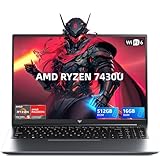
- Top Pick: Light Gaming Laptop, ΑΜD Ryzen 7430U (Up to 4.3GHz), 16GB RAM 512GB NVMe
- Best Value: Gaming laptop Core processor (up to 3.40GHz) 16GB RAM 512GB SSD,traditional laptop computers 15.6 Inch FHD Display 1920*1080,with WIFI BT 5.0 Lap top-For Students/Commuters/Business Professionals
- Premium Choice: KAIGERR 2026 Gaming Laptop, 24GB DDR5 512GB NVMe SSD Laptop Computer with AMD Ryzen 7 H255(8C/16T, Up to 4.9GHz), 16.0 inch Windows 11 Laptop, Radeon RX Vega 8 Graphics,WiFi 6, Backlit KB
Shopping for a gaming laptop under $800 in 2026 is genuinely difficult, and not because the options are scarce — it’s because the listings are crowded with machines that use the word “gaming” loosely. Many budget models pair a capable processor with integrated graphics, which is fine for esports titles and older games but will not deliver a smooth experience in demanding AAA releases. Others advertise impressive-sounding clock speeds while quietly shipping with slow storage, a dim panel, or 8GB of soldered memory that cannot be upgraded later.
- Watch: Best Gaming Laptop Under $800 — Video Review
- How to Choose Gaming Laptop Under $800
- The Best Picks Reviewed
- What to Look For in a Budget Gaming Laptop
- Which Laptop Should You Choose?
- Common Mistakes When Buying a Gaming Laptop on a Budget
- Getting More Performance From a Budget Laptop
- Storage Planning
- Reading the Specification Label Carefully
- Frequently Asked Questions
- Final Thoughts
- Related Articles
This guide focuses on realistic expectations at this price point. Every machine below sits comfortably under $800, and each is evaluated on the things that actually determine day-to-day performance: processor generation, memory capacity and type, storage speed, and display quality. We explain what to prioritise, review the strongest options currently available, and answer the questions buyers most often ask before committing.
As an Amazon Associate we earn from qualifying purchases at no extra cost to you.





⚡ Save on Your Next PC — Amazon Prime
Prime members get fast free shipping on the systems above, plus early access to Prime Day & Black Friday PC deals. New members get a 30-day free trial.
Watch: Best Gaming Laptop Under $800 — Video Review
How to Choose Gaming Laptop Under $800
- Set realistic graphics expectations: At this budget you are almost always buying integrated graphics such as AMD Radeon RX Vega. That is enough for CS2, Valorant, League of Legends, Fortnite at lower settings, and most indie and older titles — but plan to lower settings for recent AAA games rather than expecting ultra presets.
- Prioritise memory capacity and type: 16GB is the practical minimum in 2026, and 24GB of DDR5 is a meaningful upgrade. Integrated graphics borrow system RAM, so extra memory directly improves gaming performance rather than just multitasking headroom.
- Insist on NVMe storage: A 512GB NVMe SSD loads levels and boots Windows dramatically faster than older SATA drives. Given that modern games routinely consume 60–100GB each, treat 512GB as a starting point and budget for an external drive if you keep a large library.
- Check the processor generation, not just the GHz: A high boost clock tells you little on its own. Look for core and thread counts — an 8-core, 16-thread chip will handle streaming, background apps, and modern game engines far better than a quad-core with a flashy peak frequency.
- Do not overlook the display and cooling: A 15.6″ or 16″ FHD 1920×1080 IPS panel is the sweet spot here. IPS gives you better colour and viewing angles than cheaper TN alternatives, and a slightly larger chassis usually means more room for airflow during long sessions.
The Best Picks Reviewed
KAIGERR 2026 Gaming Laptop (Ryzen 7 H255, 24GB DDR5)
This is the most complete package on the list, pairing an 8-core/16-thread Ryzen 7 H255 with 24GB of DDR5 and Radeon RX Vega 8 graphics on a roomy 16-inch panel. The extra memory bandwidth genuinely helps integrated graphics, and the backlit keyboard plus WiFi 6 round out a specification sheet that punches well above its price.
Gaming Laptop with Ryzen 7 H255 (24GB DDR5, 512GB NVMe)
Essentially the same silicon as the KAIGERR in a more conventional chassis, this model is worth comparing directly on price since the two frequently trade places. If you prefer a smaller footprint over the 16-inch screen, this is the one to watch.
NIMO 15.6″ IPS FHD Light Gaming Laptop (Ryzen 5 6600H)
The Ryzen 5 6600H is a proper H-series mobile chip rather than a low-power U-series part, which means noticeably higher sustained performance under gaming loads. Combined with a genuine IPS FHD panel, this is the best choice for buyers who care most about picture quality and consistent frame pacing.
Light Gaming Laptop (AMD Ryzen 7430U, 16GB RAM)
The Ryzen 7430U is a power-efficient U-series processor, so this machine trades peak gaming performance for longer battery life and a cooler, quieter chassis. It is a sensible pick for students who want esports capability during the evening and all-day portability the rest of the time.
Tunhail 15.6″ Laptop (16GB RAM, 512GB, Windows 11 Pro)
The headline feature here is Windows 11 Pro out of the box, which is unusual at this price and useful if you need BitLocker or Remote Desktop. Treat it as a capable everyday machine with light gaming ability rather than a dedicated gaming rig.
What to Look For in a Budget Gaming Laptop
Processor Suffix and Power Class
Mobile processor names end in letters that signal power class. AMD “H” and “HS” chips are designed for higher power limits and generally sustain performance better in games, while “U” chips target thin, efficient machines and trade away speed. A Ryzen 5 6600H or a Ryzen 7 H-series chip will usually outperform a Ryzen 7 7430U in sustained gaming, even though the U-series name looks impressive.
Graphics: Integrated or Discrete
Several laptops at this budget rely on integrated graphics rather than a separate GPU. That is fine for esports titles, older games, and indie releases at 1080p with reduced settings. Demanding new games will struggle. Look for a listing that names the exact graphics chip, since “gaming laptop” alone does not guarantee a discrete card.
Memory Configuration
Integrated graphics share system memory, so dual-channel RAM matters more than usual. Two matched sticks (for example two 8GB modules) deliver more bandwidth than a single 16GB stick. Check whether the RAM is soldered or upgradeable, and confirm the DDR generation, since DDR5 is newer and faster than DDR4.
Screen, Cooling, and Battery
A 15.6 in 1080p IPS panel is the standard at this budget, and a 60Hz panel is common. Higher refresh rates smooth motion but only help if the machine can render enough frames. Thin chassis can run hot, so look for mentions of dual fans and heat pipes. Gaming draws power quickly, so expect battery life to drop to a couple of hours under load.
Which Laptop Should You Choose?
| If you… | Choose… |
|---|---|
| Want the most memory for multitasking and heavier games | KAIGERR 2026 Gaming Laptop (Ryzen 7 H255, 24GB DDR5) |
| Prefer a similar H-series spec with a standard 512GB drive | Gaming Laptop with Ryzen 7 H255 (24GB DDR5, 512GB NVMe) |
| Want a proven six-core H-series chip in a light gaming design | NIMO 15.6 in IPS FHD Light Gaming Laptop (Ryzen 5 6600H) |
| Want an efficient, quieter machine for lighter games and everyday use | Light Gaming Laptop (AMD Ryzen 7430U, 16GB RAM) |
| Mostly need a general-purpose laptop with occasional casual gaming | Tunhail 15.6 in Laptop (16GB RAM, 512GB, Windows 11 Pro) |
Common Mistakes When Buying a Gaming Laptop on a Budget
- Trusting the word “gaming” in the title. Confirm the graphics chip and power class before buying.
- Chasing core counts and ignoring cooling. A powerful chip in a poorly cooled chassis throttles quickly.
- Overlooking storage speed. NVMe drives load games faster than SATA or eMMC storage.
- Forgetting the charger. Gaming performance can drop on battery power, so plan to play plugged in.
- Skipping the port check. Look for HDMI, enough USB ports, and a headphone jack.
- Ignoring the warranty. Lesser-known brands sometimes offer short coverage, so keep receipts and packaging.
Getting More Performance From a Budget Laptop
- Play plugged in and set the Windows power mode to its performance option.
- Lower the resolution scale or use upscaling options such as FSR where the game supports them.
- Keep vents clear and use a hard surface or a stand to improve airflow.
- Close background apps, since browsers and launchers consume memory that integrated graphics need.
- Update graphics drivers, which sometimes improve performance in new releases.
Storage Planning
A 512GB drive holds the operating system, drivers, and apps before any games are installed, which leaves perhaps 400GB free. Modern releases often occupy 50GB or more each, so a handful of large games fill it quickly. Many laptops include a spare M.2 slot or a replaceable drive, so check before buying whether you can upgrade later.
Reading the Specification Label Carefully
Budget laptop listings often bundle many specs into one title. Separate them into four lines: processor model, graphics chip, memory amount and type, and storage type and size. Then compare each line against what your favorite games list as minimum and suggested requirements. If a game’s suggested graphics card is far above integrated graphics, lower your expectations for that title or pick it up on a different device. A listing that skips any of those four lines deserves a question to the seller before you buy.
Frequently Asked Questions
Can you really game on a laptop under $800?
Yes, within limits. Esports titles, indie games, emulation, and most releases more than a few years old run well on modern integrated graphics. Current AAA games are possible at 1080p with reduced settings, but you should expect compromises rather than high frame rates on maximum detail.
Is 16GB of RAM enough, or should I pay more for 24GB?
16GB is workable, but 24GB of DDR5 is the better buy if the price difference is modest. Integrated graphics share system memory, so the additional capacity and bandwidth translate into measurably smoother gameplay as well as easier multitasking.
How important is the difference between H-series and U-series processors?
It matters a great deal for gaming. H-series chips like the Ryzen 5 6600H and Ryzen 7 H255 are designed for higher sustained power draw and deliver stronger performance under load, while U-series parts such as the 7430U prioritise battery life and thermals.
Will 512GB of storage be enough for my game library?
For a handful of titles, yes. If you keep several large AAA installs, 512GB fills up quickly once Windows and applications take their share. Most of these laptops accept an additional or larger NVMe drive, and an external SSD is an inexpensive alternative.
Final Thoughts
For most buyers, the KAIGERR 2026 Gaming Laptop is the strongest all-round value here, combining an 8-core Ryzen 7 H255, 24GB of DDR5, and a 16-inch display for well under the $800 ceiling. If you prioritise display quality and sustained performance in a 15.6-inch form factor, the NIMO Ryzen 5 6600H is the smarter choice, while the Ryzen 7430U model remains the pick for anyone who values battery life and portability over raw frame rates.











