Our Short List of 3

- Best for: WiFi 6E motherboard owners replacing short stock stubs with a repositionable tri-band base.
- Bands: 2.4 GHz (2400-2500 MHz), 5 GHz (5150-5850 MHz), 6 GHz (5900-7125 MHz)
- Standards: 802.11 b/g/n/ac/ax (WiFi 6, WiFi 6E)
- Connector: RP-SMA male
- Cable: 6.5 ft extension cable

- Best for: Owners of ASUS ROG and similar two-port boards, especially white builds, replacing a lost or damaged stock antenna.
- Model: NF1204_W-W1
- Bands: 2.4 GHz (2400-2500 MHz), 5 GHz (5150-5850 MHz), 6 GHz (5900-7125 MHz)
- Standards: 802.11 b/g/n/ac/ax (WiFi 6, WiFi 6E)
- Connector: RP-SMA
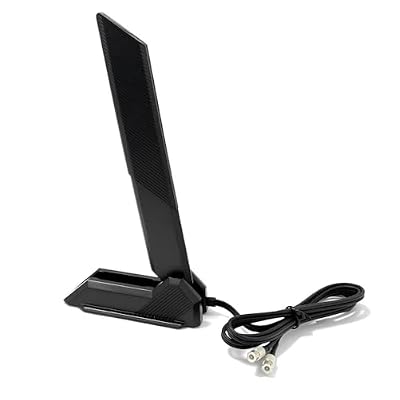
- Best for: MSI WiFi 7 motherboard owners whose boards use the quick-connect EZ antenna ports instead of threaded RP-SMA.
- Bands: 2.4 GHz (2400-2500 MHz), 5 GHz (5150-5850 MHz), 6 GHz (5900-7125 MHz)
- Standards: 802.11be WiFi 7, plus WiFi 6 and WiFi 6E
- Gain: 9 dBi
- Connector: threadless quick-connect (MSI WiFi 7 EZ antenna interface)
All 3 Picks at a Glance
| Product | Specs | Action |
|---|---|---|
| Eightwood WiFi 6E Tri-Band Antenna (EWUA0175) |
| Check price on Amazon |
| ZAHARA RP-SMA Tri Band WiFi 6E Antenna (NF1204_W-W1) |
| Check price on Amazon |
| ZAHARA WiFi 7 Quick-Connect Antenna for MSI Boards |
| Check price on Amazon |
🛒 Best Price Today on Amazon
Prime members get fast, free shipping on everything above, plus member-only deals. New members get a 30-day free trial — cancel anytime.
The antennas bundled with WiFi motherboards are usually short screw-on stubs that end up trapped behind the case, inches from a wall and surrounded by cables. Replacing them is rarely about raw power. The real decision is whether you need the same stub in a better position, a cabled magnetic base that moves the antenna up onto the case or a shelf, or a newer antenna that actually covers the 6 GHz band your WiFi 6E or WiFi 7 board already supports.
The five picks below come from the antenna listings sold for motherboard rear I/O ports, and they split into clear groups. WiFi 7 and WiFi 6E builders get tri-band magnetic-base models from Eightwood, MSI owners with quick-connect ports get a threadless ZAHARA option, white ASUS ROG builds get a short-cable board-specific antenna, and older dual-band boards get a simple high-gain replacement pair on one base.
Quick Picks
As an Amazon Associate we earn from qualifying purchases.
| Product | Best for | Key spec from title |
|---|---|---|
| Eightwood WiFi 7 Tri-Band Antenna (EWAN0113) | WiFi 7 boards | Tri-band 2.4/5/6 GHz, dual RP-SMA magnetic base |
| Eightwood WiFi 6E Tri-Band Antenna (EWUA0175) | WiFi 6E boards | Tri-band WiFi 6E, RP-SMA magnetic base, 6.5 ft cable |
| ZAHARA RP-SMA Tri Band WiFi 6E Antenna (NF1204_W-W1) | ASUS ROG and white builds | Tri-band WiFi 6E, RP-SMA, 80 cm cable |
| ZAHARA WiFi 7 Quick-Connect Antenna | MSI WiFi 7 boards | WiFi 7, threadless quick-connect, 9 dBi |
| Eightwood Dual Band WiFi Antenna | Dual-band WiFi 6 boards | Dual band 2.4/5.8 GHz, 6 dBi, 6.5 ft cable |
How to Choose
Match the Connector to Your Board’s Ports
Most WiFi motherboards use threaded RP-SMA female ports on the rear I/O, and most replacement antennas are RP-SMA male, so they screw straight on. The exception matters: newer MSI WiFi 7 boards use a threadless quick-connect EZ antenna interface that a threaded antenna cannot attach to at all. Before ordering, look at your board’s rear panel or manual and confirm which interface you have, count the ports, and check whether the antenna’s connector has a center pin or a hole, because RP-SMA and SMA look alike but are not interchangeable.
Match the Bands to Your Board’s Radio
An antenna can only carry the bands it is built for, so a dual-band antenna on a WiFi 6E board leaves the 6 GHz band with nothing to receive on. Check the listing’s frequency ranges rather than the marketing name: tri-band models here cover 2400-2500 MHz, 5150-5850 MHz, and 5900-7125 MHz, which maps to 2.4, 5, and 6 GHz. If your board and router are WiFi 6 or older, a dual-band antenna covers everything they can use. If either side is 6E or WiFi 7, tri-band is the correct match.
Decide Between Stubs and a Cabled Magnetic Base
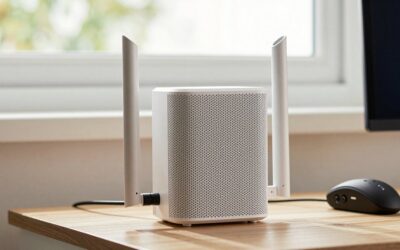
Screw-on stubs are tidy but fixed behind the case, where the chassis and wall block and reflect signal. A magnetic base on an extension cable moves the same antennas to the top of the case, a shelf, or a metal desk leg, which is often the bigger upgrade. Cable length decides how much freedom you get: the 6.5 ft cables on the Eightwood bases reach most shelves near a desk, while the 80 cm cable on the ZAHARA board antenna only repositions within arm’s reach of the PC.
Replace Both Antennas as a Matched Pair
Motherboard WiFi uses two antenna ports for 2T2R MIMO, and the pair also carries Bluetooth on most boards. Replacing only one antenna, or mixing two unrelated models, leaves the second stream and your Bluetooth peripherals on the weaker path. Every pick here is a dual-antenna unit or a matched configuration for two ports, so both streams get the same treatment. Keep the pair’s elements spaced apart and angled differently rather than parallel and touching, and route the two cables so they are not tightly bundled together along their whole run.
The 5 Best Options
Eightwood WiFi 7 Tri-Band Antenna (EWAN0113)
This is the forward-looking pick for anyone whose board already speaks WiFi 7. The listing covers all three bands, including the full 6 GHz range up to 7125 MHz, and supports 802.11be alongside WiFi 6 and 6E, so it stays matched to the radio through a router upgrade as well. The dual RP-SMA connectors ride on a 6.5 ft RG174 cable with a magnetic base, which lets the antenna sit on top of the case instead of behind it. At 5 dBi the stated gain is modest and honest for an omnidirectional unit of this size.
Specs
- Bands: 2.4 GHz (2400-2500 MHz), 5 GHz (5150-5850 MHz), 6 GHz (5900-7125 MHz)
- Standards: 802.11 b/g/n/ac/ax/be (WiFi 6, WiFi 6E, WiFi 7)
- Gain: 5 dBi
- Connector: dual RP-SMA male (no center pin)
- Cable: RG174, 6.5 ft (200 cm)
- Impedance: 50 Ohm; VSWR below 2.0
- Direction: omnidirectional
- Total height: 20.8 cm; weight 7.8 oz
- Package: 1 tri-band antenna with magnetic base
Best for: WiFi 7 motherboard owners who want one antenna that covers every band their board and router can use.
Watch out for: The connectors are RP-SMA male with no center pin, so confirm your board’s ports match before ordering, and the WiFi 7 support only matters if your board and router also support it.
Eightwood WiFi 6E Tri-Band Antenna (EWUA0175)
- Best for: WiFi 6E motherboard owners replacing short stock stubs with a repositionable tri-band base.
- Bands: 2.4 GHz (2400-2500 MHz), 5 GHz (5150-5850 MHz), 6 GHz (5900-7125 MHz)
- Standards: 802.11 b/g/n/ac/ax (WiFi 6, WiFi 6E)
- Connector: RP-SMA male
- Cable: 6.5 ft extension cable
WiFi 6E motherboard owners replacing short stock stubs with a repositionable tri-band base.
The magnetic base needs a steel surface to grip, and on a WiFi 6-only board the 6 GHz coverage simply goes unused rather than adding anything.
For the large installed base of WiFi 6E boards, this Eightwood model covers the same three frequency ranges as the WiFi 7 version, rated for 802.11ax and WiFi 6E. It uses the same formula of dual RP-SMA connectors, a magnetic base, and a 6.5 ft extension cable, so placement options are identical: top of the case, a nearby shelf, or any steel surface within reach. The black finish and low-profile base suit most gaming builds, and the listed dimensions make it easy to check clearance against a monitor arm or shelf before it arrives.
Watch out for: The magnetic base needs a steel surface to grip, and on a WiFi 6-only board the 6 GHz coverage simply goes unused rather than adding anything.
ZAHARA RP-SMA Tri Band WiFi 6E Antenna (NF1204_W-W1)
- Best for: Owners of ASUS ROG and similar two-port boards, especially white builds, replacing a lost or damaged stock antenna.
- Model: NF1204_W-W1
- Bands: 2.4 GHz (2400-2500 MHz), 5 GHz (5150-5850 MHz), 6 GHz (5900-7125 MHz)
- Standards: 802.11 b/g/n/ac/ax (WiFi 6, WiFi 6E)
- Connector: RP-SMA
Owners of ASUS ROG and similar two-port boards, especially white builds, replacing a lost or damaged stock antenna.
The 80 cm cable limits placement to the area right around the case, and this listing is the white colorway, so check the variant before ordering for a black build.
ZAHARA sells this antenna by motherboard family rather than as a generic part: the listing names ASUS ROG Strix and Maximus boards and other two-port boards from Gigabyte, MSI, and ASRock, which makes it a sensible check-first pick when a stock antenna is lost or broken. It is a 2T2R tri-band unit covering WiFi 6E with Bluetooth support, finished in white to match light-themed builds. The trade-off is reach: the 80 cm cable is far shorter than the Eightwood bases, so this antenna repositions around the PC rather than across the desk.
Watch out for: The 80 cm cable limits placement to the area right around the case, and this listing is the white colorway, so check the variant before ordering for a black build.
ZAHARA WiFi 7 Quick-Connect Antenna for MSI Boards
- Best for: MSI WiFi 7 motherboard owners whose boards use the quick-connect EZ antenna ports instead of threaded RP-SMA.
- Bands: 2.4 GHz (2400-2500 MHz), 5 GHz (5150-5850 MHz), 6 GHz (5900-7125 MHz)
- Standards: 802.11be WiFi 7, plus WiFi 6 and WiFi 6E
- Gain: 9 dBi
- Connector: threadless quick-connect (MSI WiFi 7 EZ antenna interface)
MSI WiFi 7 motherboard owners whose boards use the quick-connect EZ antenna ports instead of threaded RP-SMA.
It fits the MSI quick-connect interface only and will not thread onto standard RP-SMA ports, so it is the wrong buy for ASUS, Gigabyte, or ASRock boards.
MSI changed the antenna interface on its WiFi 7 boards to a threadless quick-connect port, and standard RP-SMA antennas simply do not attach. This ZAHARA antenna is built for that interface, with gold-plated brass quick-connect plugs on dual 32.2 in cables and a magnetic, 180-degree rotatable mount. The listing rates it at 9 dBi with tri-band coverage across 2.4, 5, and 6 GHz and 802.11be WiFi 7 support, and it names a long list of compatible MSI MEG, MPG, MAG, and PRO boards, which makes fit-checking straightforward before you buy.
Watch out for: It fits the MSI quick-connect interface only and will not thread onto standard RP-SMA ports, so it is the wrong buy for ASUS, Gigabyte, or ASRock boards.
Eightwood Dual Band WiFi Antenna
Not every board needs the 6 GHz band. For WiFi 6 and older motherboards, this long-running Eightwood dual-band model covers 2.4 and 5.8 GHz with a stated 6 dBi gain, dual RP-SMA connectors, and the same practical 6.5 ft cable and magnetic base formula as its tri-band siblings. The antenna stands 8.6 in tall including the base, and the listing’s application notes explicitly include motherboard and PCIe card replacement, which is exactly the job here. It is the straightforward choice when the stock stubs are damaged or stuck behind a case and no band upgrade is planned.
Specs
- Bands: dual band 2.4 GHz and 5/5.8 GHz
- Standards: 802.11 b/g/n/ac/ax (WiFi 6)
- Gain: 6 dBi
- Connector: dual RP-SMA male
- Cable: 6.5 ft (200 cm) extension cable
- Base: magnetic; antenna height 8.6 in including base
- Impedance: 50 Ohm
- Polarization: vertical; direction omnidirectional
- Package: 1 pc
Best for: WiFi 6 and older dual-band motherboard owners who want a taller, repositionable replacement for stock stubs.
Watch out for: There is no 6 GHz band, so a WiFi 6E or WiFi 7 board paired with this antenna cannot use its fastest band at all.
Which One Fits Your Situation
Your PC Sits Under a Desk or Behind Furniture
Pick one of the Eightwood magnetic-base models with the 6.5 ft cable, in the WiFi 7 or WiFi 6E version that matches your board. Moving the antennas from behind the case to the top of the desk or case is the change that matters here, and the long cable is what makes that move possible. The base grips any steel surface, so a case top or metal desk frame works as the mount.
You Built a Recent MSI WiFi 7 System
Your board’s quick-connect ports rule out every threaded antenna in this guide, so the ZAHARA quick-connect model is the pick by default. Check your exact board against the compatibility list in its listing, since it names the MEG, MPG, MAG, and PRO WiFi 7 models it fits. Its dual cables are shorter than the Eightwood leads, so plan on mounting the base on or near the case rather than across the room.
Your Stock Antenna Is Lost or Broken
Match the replacement to the board first and the bands second. The ZAHARA NF1204_W-W1 is sold against named ASUS ROG and other two-port board families, which suits a like-for-like replacement, while the Eightwood models are generic RP-SMA fits for any board with threaded ports. If the original antenna is simply missing, any dual RP-SMA pick here restores both WiFi streams and Bluetooth in one part.
Your Board Is WiFi 6 or Older and Staying That Way
Save the tri-band premium and take the Eightwood Dual Band model. Your radio cannot use the 6 GHz band, so a tri-band antenna adds nothing today, and this pick still gets you the taller elements, the magnetic base, and the long cable that fix the usual placement problem. If a board upgrade to WiFi 6E or WiFi 7 is already planned, skip ahead to a tri-band pick instead of buying twice.
Common Mistakes
- Ordering an RP-SMA antenna for an MSI WiFi 7 board with quick-connect ports, or a quick-connect antenna for a threaded board; the two interfaces do not adapt to each other.
- Confusing SMA and RP-SMA connectors, which look nearly identical but reverse the pin and hole, so the antenna never seats properly.
- Buying a dual-band antenna for a WiFi 6E or WiFi 7 board and leaving the 6 GHz band with no antenna connected.
- Replacing only one of the two antennas, which leaves the second MIMO stream and Bluetooth on the old, weaker path.
- Sticking a magnetic base to a plastic or aluminum surface and blaming the antenna when it slides off; the magnet needs steel.
Frequently Asked Questions
Will a new antenna make my internet faster?
An antenna does not change your plan speed or your router’s maximum rate. What it can change is the quality of the link between the PC and the router, especially when the stock stubs sit behind a metal case. A better-placed antenna mainly buys a steadier connection at the speed your hardware already supports, not a higher headline number.
Can I use one of these antennas on a PCIe WiFi card?
Yes, as long as the card’s bracket ports are the same connector type. Most PCIe WiFi cards use RP-SMA female ports just like motherboard rear I/O, so the RP-SMA picks here attach the same way. The MSI quick-connect model is the exception: it only fits MSI motherboard EZ antenna ports and will not attach to a card’s threaded ports.
Does the antenna affect Bluetooth as well as WiFi?
On most WiFi motherboards, yes. The same two antenna ports carry Bluetooth from the board’s wireless module, so a lost or damaged stock antenna often shows up as short-range Bluetooth for controllers and headsets. Replacing the pair with a dual-antenna unit restores both radios at once, and the ZAHARA board antenna lists Bluetooth support explicitly in its specifications.
How do I know if my board needs RP-SMA or quick-connect?
Check the rear I/O or the board manual. Threaded metal posts with a knurled nut on the stock antenna mean RP-SMA, which covers most ASUS, Gigabyte, ASRock, and older MSI boards. Smooth push-on ports on a recent MSI WiFi 7 board mean the quick-connect EZ interface. When the manual lists an antenna part number, match it against the compatibility notes in the listing.