🛒 Best Price Today on Amazon
Prime members get fast, free shipping on everything above, plus member-only deals. New members get a 30-day free trial — cancel anytime.
Short answer: The MSI Stealth 17 Studio is the strongest all-round pick here, pairing an RTX 4080 with a Thunderbolt 4 port and a big QHD 240Hz screen. For a newer platform, the Lenovo Legion Pro 7 adds an OLED 240Hz display and WiFi 7 alongside its Thunderbolt 4 port.
A Thunderbolt 4 port changes how a gaming laptop fits into a desk setup, because one cable can carry a display signal, data and charging to a dock while the machine still delivers full gaming performance away from that desk. The real decision is which laptop pairs that port with the graphics card, screen and cooling you actually need, since plenty of models advertise fast USB-C connections that are not Thunderbolt 4 at all.
This guide is for players who dock at a desk with monitors and storage, students and creators who move between rooms, and anyone replacing a desktop with a single machine. Every product below was chosen from the names and specifications printed on its Amazon product page, and each page states a Thunderbolt 4 port explicitly.
Quick Picks
As an Amazon Associate we earn from qualifying purchases.
| Product | Best for | Key spec from title |
|---|---|---|
| MSI Stealth 17 Studio | Big-screen gaming with a full dock setup | RTX 4080, 17.3-inch QHD 240Hz, Thunderbolt 4 |
| Lenovo Legion Pro 7 | Newest platform with an OLED display | RTX 5070 Ti, 16-inch OLED 240Hz, Thunderbolt 4 |
| Acer Predator Helios 16 | Two Thunderbolt 4 ports on a 16-inch frame | RTX 4060, 16-inch 2560 x 1600 165Hz, two Thunderbolt 4 ports |
| Alienware m16 R2 | High-refresh 16-inch gaming with per-key RGB | RTX 4070, 16-inch 240Hz WQXGA, Thunderbolt 4 |
How to Choose
Confirm the port is really Thunderbolt 4
Start by reading the port list on the product page word for word, because a USB-C socket alone tells you nothing about what it can carry. A genuine Thunderbolt 4 port supports fast data transfers, an external display signal and power delivery through one connector, which is what makes a single-cable dock possible. Some gaming laptops ship with USB4 or plain USB-C ports that look identical yet drop one of those abilities. If the page only says USB-C, treat the port as unconfirmed and keep looking, since the four laptops in this guide each name Thunderbolt 4 directly in their printed specifications.
Match the graphics card to your games
The port handles your desk connections, but the graphics card decides how your games actually run, so weigh the two together rather than shopping on connectivity alone. An RTX 4080 or RTX 5070 Ti suits high settings at QHD resolutions, while an RTX 4060 or RTX 4070 targets smooth play at the native panel resolution with adjusted settings in heavier titles. Check the exact GPU name in the title, because the same laptop family often sells several graphics tiers under near-identical names. Pair the card with enough memory for texture-heavy games, and remember that a stronger GPU also gives an external monitor more headroom later.
Weigh the display you will stare at daily
Screen choice shapes everyday use more than most buyers expect, especially on a machine that doubles as a work computer. A 240Hz panel rewards fast-paced games where frame rates climb high, while a 165Hz panel still feels fluid for a broad mix of titles. OLED panels, like the one on the Legion Pro 7 here, deliver deep contrast that suits darker games and video work. Size matters too: a 17.3-inch screen fills a desk nicely but adds bulk in a bag, whereas 16-inch models split the difference between viewing area and portability for most people.
Check the rest of the connection layout
Thunderbolt 4 earns its keep only when the remaining ports support your routine, so scan the full layout before deciding. Look for HDMI 2.1 if you plan to connect a television or a second monitor directly, an Ethernet socket if you want wired networking without a dock, and enough USB-A ports for a mouse, keyboard and headset dongles. Card readers help creators who move footage from cameras. Also confirm which side of the chassis the Thunderbolt 4 port sits on, because cable runs to a dock are tidier when the port faces the back or the correct side of your desk.
The 4 Best Options
MSI Stealth 17 Studio

The Stealth 17 Studio suits players who want a large screen and a powerful graphics card in a comparatively restrained design that does not shout across an office. Its 17.3-inch QHD panel runs at 240Hz, the RTX 4080 handles demanding games at that resolution, and the Thunderbolt 4 port anchors a one-cable desk setup with a dock, monitor and storage. A six-speaker Dynaudio system adds value for media work, and the Core Black finish keeps the machine appropriate for shared workspaces as well as late-night sessions at home.
Specs
- Screen size: 17.3 inches, 2560 x 1440 QHD, 240Hz
- Processor: 13th Gen Intel Core i9-13900H
- Graphics: NVIDIA GeForce RTX 4080
- Memory: 32GB DDR5
- Storage: 1TB NVMe SSD
- Ports: Thunderbolt 4, USB-Type C, Cooler Boost Trinity+ cooling
- Operating system: Windows 11 Home
- Model: Stealth 17 Studio A13VH-053US, Core Black
Best for: Desk-based players who want a big, fast screen and a single-cable dock connection.
Watch out for: Confirm the dock you plan to use supports the display output you need through Thunderbolt 4 before ordering both together.
ASIN: B0BT3DFR8W
Lenovo Legion Pro 7

The Legion Pro 7 fits buyers who want the newest hardware generation in this group, built around an Intel Core Ultra 9 275HX processor and an RTX 5070 Ti graphics card with GDDR7 memory. Its 16-inch OLED display runs at 240Hz with a glossy finish, and the connectivity list pairs Thunderbolt 4 with WiFi 7, a 2.5Gb LAN socket and HDMI 2.1, which covers docked desks and wired networking without extra adapters. Two 1TB drives give room for a large library, making this the natural choice for players who keep many big titles installed at once.
Specs
- Screen size: 16 inches, OLED, 240Hz, glossy display
- Processor: Intel Core Ultra 9 275HX, 24 cores, up to 5.4GHz
- Graphics: NVIDIA GeForce RTX 5070 Ti 12GB GDDR7
- Memory: 32GB DDR5-6400 RAM
- Storage: 2TB, as 2 x 1TB PCIe 4.0 NVMe SSD
- Connectivity: WiFi 7, 2.5Gb LAN, Bluetooth 5.4, Thunderbolt 4, HDMI 2.1
- Operating system: Windows 11 Pro
- Model: Legion Pro 7, model number 16IAX10H, Black
Best for: Players who want current-generation parts, an OLED screen and wired networking built in.
Watch out for: Check which physical port carries the Thunderbolt 4 connection, since the machine also has other USB-C ports with different abilities.
ASIN: B0G3VDSH3D
Acer Predator Helios 16
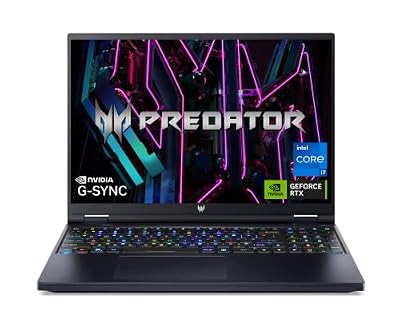
The Predator Helios 16 is the pick for buyers who value port count above raw graphics tier, because its page lists two Thunderbolt 4 USB-C ports alongside HDMI 2.1 and a full range of USB 3.2 Gen2 connections. That makes it easy to leave a dock on one port and still connect a fast external drive directly to the laptop. The 16-inch 2560 x 1600 display runs at 165Hz with G-SYNC, the RTX 4060 covers a wide range of games at that resolution, and Killer Wi-Fi 6E handles wireless networking when you are away from the desk.
Specs
- Screen size: 16 inches, 2560 x 1600, 165Hz, G-SYNC display
- Processor: 13th Gen Intel Core i7-13700HX
- Graphics: NVIDIA GeForce RTX 4060
- Memory: 16GB DDR5
- Storage: 1TB Gen 4 SSD
- Ports: Two Thunderbolt 4 USB-C ports, HDMI 2.1, USB 3.2 Gen2
- Networking: Killer Wi-Fi 6E
- Model: PH16-71-74UU
Best for: Buyers who want two Thunderbolt 4 ports for a dock plus a direct fast-storage connection.
Watch out for: With 16GB of memory fitted, check whether your games and multitasking habits call for a higher-capacity configuration instead.
ASIN: B0BXMNSXDD
Alienware m16 R2

The Alienware m16 R2 suits players who prefer a 16-inch high-refresh machine from Dell’s gaming line, with a 240Hz WQXGA panel and per-key RGB backlighting on the keyboard. Its Intel Core Ultra 7-155H processor and RTX 4070 graphics form a balanced pairing for fast-paced titles, while the port selection combines Thunderbolt 4 with HDMI 2.1, a second USB-C connection and an SD card reader. That mix works well for a desk where a dock handles daily peripherals and the reader serves quick transfers from a camera or handheld console between gaming sessions.
Specs
- Screen size: 16.0 inches, 240Hz, WQXGA 2560 x 1600
- Processor: Intel Core Ultra 7-155H, 16 cores, up to 4.8GHz
- Graphics: NVIDIA GeForce RTX 4070 8GB GDDR6
- Memory: 16GB DDR5 5600MHz RAM
- Storage: 1TB PCIe NVMe SSD
- Ports: 1 x HDMI 2.1, Thunderbolt 4 (Type-C), USB 3.2 Type-C, SD Reader, headphone and microphone combo jack
- Networking: WiFi, Bluetooth 5.4, Ethernet LAN (RJ-45)
- Operating system: Windows 11 Home
Best for: Players who want a 240Hz 16-inch screen, per-key RGB and a card reader in one machine.
Watch out for: This configuration is professionally upgraded by the seller, so confirm the exact memory and storage listed match what you intend to receive.
ASIN: B0D8LHXGRS
Which One Fits Your Situation
You dock at one desk every day
Choose the MSI Stealth 17 Studio if your laptop lives on a desk most of the time and travels only occasionally. The Thunderbolt 4 port feeds a dock for your monitor, keyboard and storage, the 17.3-inch screen gives you room to work without an external display for shorter tasks, and the RTX 4080 keeps demanding games running well at the panel’s native resolution.
You want the newest platform and an OLED screen
Pick the Lenovo Legion Pro 7 when current-generation hardware matters most to you. The Core Ultra 9 processor, RTX 5070 Ti graphics and DDR5-6400 memory form the freshest combination in this guide, the OLED 240Hz display suits both fast games and darker cinematic titles, and Thunderbolt 4 plus a 2.5Gb LAN socket cover docked and wired setups without extra hardware.
You connect lots of gear at once
Take the Acer Predator Helios 16 if your desk routine involves a dock, external drives and a second display at the same time. Two Thunderbolt 4 ports mean the dock does not consume your only high-speed connection, so a fast drive can plug straight into the laptop while everything else stays attached, and the 165Hz G-SYNC panel still covers fast-paced gaming comfortably.
You split time between desk and travel
Consider the Alienware m16 R2 when the laptop moves between a desk, a classroom and friends’ houses. The 16-inch 240Hz screen keeps games fluid anywhere, the SD reader simplifies moving clips and photos, and Thunderbolt 4 lets you rebuild your full desk setup through one cable when you return, rather than reconnecting every peripheral one by one.
Common Mistakes
- Assuming every USB-C port is Thunderbolt 4, when many gaming laptops mix Thunderbolt, USB4 and plain USB-C sockets on the same chassis.
- Buying a dock before checking that it matches the laptop’s display output and charging abilities through the Thunderbolt 4 port.
- Choosing a graphics card tier from the laptop family name alone, without reading the exact GPU printed in the product title.
- Overlooking which side of the machine the Thunderbolt 4 port sits on, then fighting awkward cable runs to a dock.
- Ignoring memory capacity in upgraded configurations, where two listings for the same model can ship with different RAM and storage.
Frequently Asked Questions
What does Thunderbolt 4 actually add to a gaming laptop?
Thunderbolt 4 gives you one port that can carry data, a display signal and power at the same time, which is what allows a single-cable dock setup. That means your monitor, keyboard, mouse and external storage can stay connected to the dock while the laptop comes and goes. It also provides a fast connection for external drives. For gaming itself, the graphics card still does the heavy lifting, so treat the port as a setup and convenience upgrade rather than a performance feature.
Is USB4 the same as Thunderbolt 4 on these laptops?
Not necessarily, and that distinction is exactly why this guide only includes laptops whose product pages state Thunderbolt 4 by name. USB4 shares the same connector shape and some capabilities, but individual ports vary in what they support. A page that lists only USB-C or USB4 leaves the display and docking abilities unclear. When a clean one-cable desk setup is the goal, the printed Thunderbolt 4 specification is the safer evidence to rely on before you buy.
Can I connect two external monitors through one Thunderbolt 4 port?
That depends on the dock or hub you place between the laptop and the monitors, plus the display outputs the laptop supports through the port. Many Thunderbolt docks are built to run more than one external display from a single connection. The laptops here also carry HDMI 2.1, so a second screen can connect directly if your dock handles only one. Check the dock’s own specification for the number of displays it drives, and match it to the screens you already own.
Does using a dock reduce gaming performance?
A dock mainly handles displays and peripherals, and games still run on the laptop’s own graphics card, so the setup itself does not change which GPU does the work. Performance differences usually come from settings, resolution and cooling rather than the connection method. Driving a high-resolution external monitor does ask more of the graphics card than the built-in screen in some cases. Keep the vents clear at the desk and use the manufacturer’s power adapter for gaming sessions, since these machines draw full power from their own chargers.