🛒 Best Price Today on Amazon
Prime members get fast, free shipping on everything above, plus member-only deals. New members get a 30-day free trial — cancel anytime.
A wireless RGB gaming mouse has to do two jobs at once: track precisely without a cable and light up a desk without looking like a toy. Shoppers usually start with the glow — how many lighting zones it has and whether the colors sync with the rest of the setup — then discover that battery life, weight, and sensor quality decide whether the mouse still feels right after a month of nightly sessions. Getting the balance wrong means either a mouse that dies mid-match or one that looks great in photos and drags in fast games.
This guide covers competitive players who want lighting that matches a full RGB build, casual gamers who play after work and charge their gear rarely, and MMO fans who need extra buttons without giving up wireless freedom. The four mice below were picked from the names and specifications stated on their Amazon product pages, with each one fitting a different hand size, grip, or lighting priority.
Quick Picks
As an Amazon Associate we earn from qualifying purchases
| Product | Best for | Key spec from title |
|---|---|---|
| Razer Basilisk V3 Pro | Ergonomic players who want the richest RGB underglow | 13-zone Chroma RGB, Focus Pro 30K sensor, 90-hour battery |
| Logitech G502 X Plus | Feature-heavy players who want bright lighting plus many buttons | 8-LED LIGHTSYNC RGB, HERO 25K sensor, up to 120-hour battery |
| SteelSeries Aerox 5 Wireless | Lightweight players who want RGB shining through a holey shell | 3-zone PrismSync RGB, 74g shell, 180-hour battery |
| Razer Basilisk V3 X HyperSpeed | Players who want months of battery between charges | Chroma RGB, 5G Advanced 18K sensor, 535-hour battery |
How to Choose
Compare the lighting zones, not just the glow
Two mice can both say RGB on the box and look nothing alike on a desk. Count the lighting zones first: the Basilisk V3 Pro spreads color across thirteen zones with a full underglow, the G502 X Plus runs eight LEDs along the palm rest, and the Aerox 5 Wireless lights three zones that shine through its perforated shell. More zones mean smoother waves and per-zone color control, while a single lit scroll wheel, like the one on the Basilisk V3 X HyperSpeed, keeps the effect subtle. Check whether the lighting syncs with your keyboard and headset software, because matched colors look far better than a desk full of clashing effects.
Read the battery figure with RGB switched on
RGB lighting draws power, so the headline battery number often assumes the lights are off. Logitech lists the G502 X Plus at up to 120 hours, yet that figure drops to 37 hours once RGB is switched on, which is the number that matters for a desk setup that stays lit. Razer quotes the Basilisk V3 Pro at 90 hours and the V3 X HyperSpeed at 285 hours on its wireless link, while the Aerox 5 Wireless stretches to 180 hours. Before buying, find the with-lighting figure, check whether the mouse works while plugged in, and decide whether a rechargeable cell or a swappable AA battery fits your routine better.
Match the sensor and polling rate to your games
Sensor ceilings sound dramatic, yet most players aim between 400 and 1600 DPI, so the number to trust is clean tracking at speed rather than the maximum. The Basilisk V3 Pro tops this guide at 30,000 DPI, the G502 X Plus reaches 25,600 DPI, and both the Aerox 5 Wireless and the Basilisk V3 X HyperSpeed stop at 18,000 DPI, which still covers every sensitivity a casual or competitive player uses. Polling rate matters alongside it: a 1000 Hz report rate updates position every millisecond, and higher rates feel slightly smoother in fast flicks. Pick the sensor that matches your genre, then confirm the mouse holds its tracking when you swipe hard across the pad.
Weigh the mouse against your grip and hand size
Weight changes how a mouse feels more than any lighting effect does. SteelSeries lists the Aerox 5 Wireless at 74 grams, so it flicks and stops with very little effort, while Logitech lists the G502 X Plus at 106 grams, which feels planted and steady in a palm grip. Ergonomic right-handed shells like the two Basilisk models support the thumb and palm through long sessions, whereas the symmetrical Aerox shape suits claw and fingertip grips and works for either hand. Before ordering, compare the listed weight and dimensions with your current mouse, because a shape that fights your hand will annoy you long after the RGB stops impressing guests.
The 4 Best Options
Razer Basilisk V3 Pro
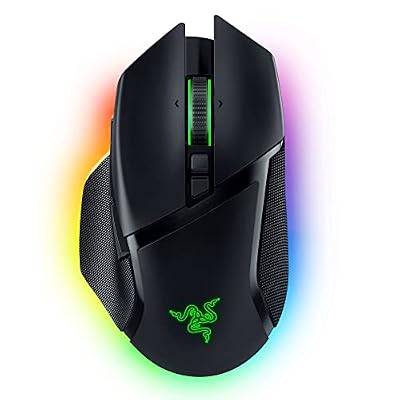
Razer built the Basilisk V3 Pro around its HyperScroll tilt wheel and a full underglow, so the lighting wraps the base of the mouse instead of sitting in a single strip. Thirteen programmable controls cover macros, DPI shifts, and media keys, while the Focus Pro 30K optical sensor handles fast flicks without smoothing. Three connection modes — HyperSpeed wireless, Bluetooth, and wired USB — let the same mouse move between a gaming PC and a laptop. Gen-3 optical switches keep clicks crisp, and the ergonomic right-handed shell with a thumb rest suits long sessions.
Specs
- 13-zone Chroma RGB lighting with full underglow
- Focus Pro 30K optical sensor
- HyperScroll tilt wheel
- Gen-3 optical switches
- 13 programmable controls
- HyperSpeed wireless, Bluetooth, and wired USB connections
- 90-hour battery life
Best for: Ergonomic-grip players who want the most lighting zones in this guide and a thumb rest for long sessions.
Watch out for: Confirm the listing is the wireless Pro model, since the Basilisk name also covers wired versions, and check that the right-handed shape fits your hand.
Logitech G502 X Plus

Logitech took its most popular shape and added an 8-LED LIGHTSYNC strip across the palm rest, which makes the G502 X Plus the clearest showpiece in this lineup. Thirteen programmable controls, a dual-mode scroll wheel, and a reversible DPI-shift button give MMO and strategy players plenty of bindings without extra software tricks. The HERO 25K sensor tracks cleanly at high speeds, LIGHTFORCE hybrid switches blend optical speed with a mechanical click feel, and USB-C charging plus PowerPlay support keep the mouse ready between sessions.
Specs
- 8-LED LIGHTSYNC RGB lighting
- HERO 25K gaming sensor, 100–25,600 DPI
- LIGHTFORCE hybrid optical-mechanical switches
- 13 programmable controls
- Dual-mode scroll wheel with infinite scroll toggle
- Up to 120-hour battery life, 37 hours with RGB on
- USB-C charging port
- PowerPlay wireless charging compatible
Best for: Players who want a bright RGB showpiece with many buttons and a familiar ergonomic shape.
Watch out for: Check the battery figure with RGB switched on, since lighting cuts run time sharply, and confirm the listing is the Plus model because the standard G502 X Lightspeed has no RGB.
SteelSeries Aerox 5 Wireless

SteelSeries cut holes through the Aerox 5 Wireless shell to drop its weight to 74 grams, and the PrismSync lighting shines through those openings instead of hiding under the palm. Nine programmable buttons include a five-button side panel and an up-down flick switch, which suits MMO and MOBA players who bind abilities to the thumb. Quantum 2.0 wireless runs on 2.4 GHz for gaming or Bluetooth for a second device, the TrueMove Air sensor covers up to 18,000 DPI, and AquaBarrier sealing guards the internals against splashes.
Specs
- 3-zone PrismSync RGB lighting with 16.8 million colors
- 74g ultra-lightweight holey shell
- TrueMove Air optical sensor, up to 18,000 DPI
- 9 programmable buttons with 5-button side panel
- Quantum 2.0 Wireless: 2.4 GHz and Bluetooth 5.0
- Up to 180-hour battery life
- IP54 AquaBarrier water and dust resistance
- Fast charging: 40 hours of use from a 15-minute charge
Best for: Lightweight players and MMO or MOBA fans who want RGB visible through the shell and a long battery life.
Watch out for: Check whether the perforated shell suits your grip, since dust can collect in the holes, and confirm the listing is the wireless version rather than the wired Aerox 5.
Razer Basilisk V3 X HyperSpeed
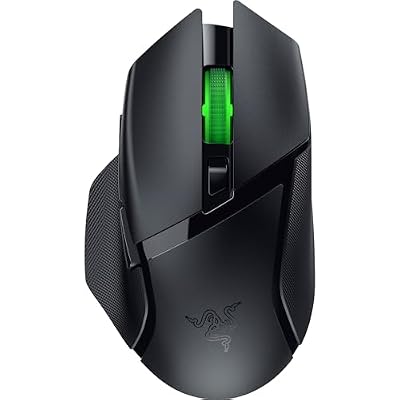
Razer aimed the Basilisk V3 X HyperSpeed at players who want Chroma lighting and a long battery life without paying flagship money. Its scroll wheel carries the RGB here, so the glow stays subtle while the desk still gets color, and nine programmable controls cover the bindings most games need. A 5G Advanced 18K optical sensor handles everyday aiming cleanly, Gen-2 mechanical switches give a familiar click, and the mouse runs on a single AA battery for hundreds of hours of HyperSpeed play before it needs a swap.
Specs
- Chroma RGB lighting on the scroll wheel
- 5G Advanced 18K optical sensor
- 9 programmable controls
- Mechanical Switches Gen-2
- HyperSpeed wireless and Bluetooth connections
- 285-hour battery life on HyperSpeed wireless, 535 hours on Bluetooth
- Runs on a single AA battery
Best for: Players who want RGB lighting with the longest battery life here and no charging cable to manage.
Watch out for: Confirm the listing is the wireless HyperSpeed model, since the Basilisk V3 name also covers a wired version, and keep a spare AA battery handy because there is no built-in rechargeable cell.
Which One Fits Your Situation
You want the brightest RGB centerpiece for your desk
Choose the Razer Basilisk V3 Pro. Its thirteen-zone Chroma lighting with a full underglow puts more color on the desk than any other mouse here, and the glow reacts with Chroma-compatible games. The ergonomic shell and thumb rest keep it comfortable during long sessions, while the HyperScroll tilt wheel adds a control that streamers and MMO players use constantly.
You play MMO or strategy games and want many buttons
Choose the Logitech G502 X Plus. Thirteen programmable controls cover ability bars, macros, and DPI shifts without reaching for the keyboard, and the dual-mode scroll wheel flips between precise clicks and free spinning. Its 8-LED LIGHTSYNC strip keeps the RGB visible across the palm rest, so the mouse looks the part in a lit setup while doing heavy work.
You want the lightest mouse that still glows
Choose the SteelSeries Aerox 5 Wireless. At 74 grams it is the lightest mouse in this guide by a clear margin, and its PrismSync lighting shines through the perforated shell for a look no solid mouse can copy. Nine buttons still cover MOBA and FPS binds, while the 180-hour battery means charging stays a rare chore rather than a nightly one.
You want RGB lighting without charging the mouse every week
Choose the Razer Basilisk V3 X HyperSpeed. Its Chroma-lit scroll wheel gives the desk color while the mouse runs for 285 hours on HyperSpeed wireless or 535 hours on Bluetooth from a single AA battery. Nine programmable controls and an 18K sensor cover everyday gaming cleanly, and swapping a battery takes seconds when the cell finally runs flat.
Common Mistakes
- Buying the brightest mouse on the list and then finding its battery drains in days because the lighting stays on full brightness.
- Picking the standard G502 X Lightspeed instead of the Plus model, then discovering the standard version has no RGB lighting at all.
- Running the mouse on Bluetooth in ranked matches instead of the 2.4 GHz receiver, which is the low-latency link for competitive play.
- Setting DPI to the sensor maximum instead of a comfortable aiming range, which makes small adjustments harder to control.
- Ignoring hand size and grip style, so an ergonomic right-handed shell ends up fighting a left hand or a fingertip grip.
Frequently Asked Questions
Does RGB lighting drain a wireless gaming mouse battery?
Yes, lighting is one of the biggest power draws on a wireless mouse. Logitech lists the G502 X Plus at up to 120 hours with the lights off, yet that figure falls to 37 hours once RGB is switched on. Lowering brightness, choosing a static color instead of animated effects, or turning the lights off during daytime play all stretch the time between charges noticeably.
Is a wireless RGB mouse fast enough for competitive play?
Yes. Modern 2.4 GHz receivers report at 1000 Hz, which matches wired timing closely enough that latency is no longer the deciding factor. All four mice in this guide use low-latency wireless links, so choose by weight, shape, sensor, and lighting instead. Keep Bluetooth for a laptop or a second device, since it is the slower connection of the two.
How many RGB zones should a gaming mouse have?
It depends on the look you want. Thirteen zones on the Basilisk V3 Pro give smooth waves and a full underglow, while eight LEDs on the G502 X Plus light the palm rest evenly. Three zones on the Aerox 5 Wireless still look striking because the light shines through the shell. A single lit scroll wheel suits players who want only a hint of color.
What is the best wireless RGB mouse for small hands?
The SteelSeries Aerox 5 Wireless is the easiest fit here, because its 74-gram shell and symmetrical shape suit smaller hands and claw or fingertip grips without forcing the palm onto the mouse. The Basilisk models are larger right-handed designs with thumb rests, so they suit medium and large hands better. Check the listed dimensions against your current mouse before ordering.