🛒 Best Price Today on Amazon
Prime members get fast, free shipping on everything above, plus member-only deals. New members get a 30-day free trial — cancel anytime.
Choosing a ROG wireless mouse is less about the logo and more about matching three things: the shape your hand actually rests on, the connection you will use every day, and how much mouse you want to move. ASUS sells featherweight esports shells, sculpted right-handed models with swappable switches, and one heavyweight MMO design with a charging dock, all under the same ROG badge. Picking by badge alone is how buyers end up with a fingertip mouse for palm-grip play, or a 168-gram button bank for fast-paced shooters.
This guide is for PC gamers who have already decided on ROG and need help narrowing the line down: competitive FPS players chasing the lightest shell, MMO players who need buttons under the thumb, and anyone who wants one mouse to cover gaming and a second machine. Every pick below is a current Amazon listing, and each product section is built from the specifications and features published on that product’s own Amazon page.
Quick Picks
As an Amazon Associate we earn from qualifying purchases
| Product | Best for | Key spec from title |
|---|---|---|
| ASUS ROG Harpe Ace Aim Lab Edition | Competitive FPS players who want a proven esports shape | 54 g with a 36,000-dpi AimPoint sensor |
| ASUS ROG Harpe Ace Mini | Small hands and fingertip grips | 49 g with up to 105 hours of battery |
| ASUS ROG Keris Wireless AimPoint | Right-handed comfort across gaming and work | 75 g with up to 119 hours of battery |
| ASUS ROG Gladius III Wireless AimPoint | Palm grips that want a taller ergonomic shell | 79 g with hot-swappable switches |
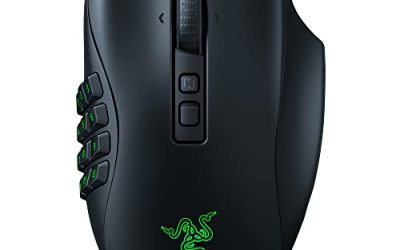
| ASUS ROG Spatha X | MMO and MOBA players who live on macros | 12 programmable buttons and a charging dock |
How to Choose
Shape and weight come first
ROG’s wireless range spans 49 to 168 grams, which is a wider spread than most brands offer, so start with your grip and hand size rather than the sensor. Fingertip and claw players generally do better with the low, light Harpe shells; palm grippers usually prefer the taller, sculpted Keris or Gladius bodies that support the whole hand. Weight changes how a mouse feels over a full evening: a 54-gram mouse is easy to flick and stop, while the Spatha X’s mass keeps slow, deliberate movements planted. If your current mouse leaves your ring finger or palm unsupported, treat that as the first filter.
Know which wireless you are actually getting
Four of the five mice here are tri-mode: 2.4 GHz RF through a USB receiver, Bluetooth, and a wired USB connection for charging while you play. The 2.4 GHz link uses ROG SpeedNova technology on the AimPoint models and is the mode to game on; Bluetooth is for second machines, laptops and office hours, and the Keris can stay paired to three Bluetooth devices at once. The Spatha X is the exception, with 2.4 GHz and wired modes only. If your setup includes a work laptop beside the gaming PC, that missing Bluetooth radio is a real limitation, not a footnote.
Sensor numbers: what matters past the headline
ASUS uses two sensor tiers in this roundup. The AimPoint Pro in the Harpe Ace Mini reaches 42,000 dpi with 750 IPS tracking and track-on-glass support; the standard AimPoint in the other three newer mice is rated at 36,000 dpi and 650 IPS; the older Spatha X sensor stops at 19,000 dpi. In practice, almost nobody plays above a few thousand dpi, so treat the headline number as headroom rather than a quality score. Tracking speed, a sub-1-percent deviation rating and clean lift-off behaviour matter more. One caution: marketplace headlines occasionally disagree with the detailed spec table on the same page, so confirm the sensor in the product details before ordering.
Switches, battery and the extras you will live with
Battery figures on these pages are quoted with lighting off at a 1,000 Hz polling rate, so expect less with RGB running or an 8,000 Hz booster attached — the ROG Polling Rate Booster that unlocks 8,000 Hz on the Harpe models is a separate purchase. Switch design splits the range too: the Harpe mice use fixed ROG optical switches, while the Keris, Gladius III and Spatha X have Push-Fit sockets that accept replacement 3-pin mechanical or compatible optical switches. If you keep a mouse for years, socketed switches are cheap insurance against a worn or double-clicking button.
The 5 Best Options
ASUS ROG Harpe Ace Aim Lab Edition

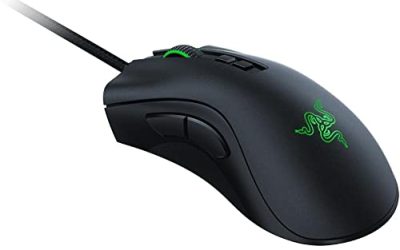
The Harpe Ace Aim Lab Edition is the default starting point for ROG buyers who play shooters. Its 54-gram semi-symmetrical shell was shaped with esports players and the Aim Lab training team, and the Aim Lab Settings Optimizer software suggests sensitivity settings based on your play inside the trainer. Under the shell sits the 36,000-dpi AimPoint sensor and ROG optical micro switches, so clicks register with no debounce delay. Tri-mode connectivity covers a gaming PC over 2.4 GHz, a laptop over Bluetooth and a wired fallback, which makes it the easiest ROG mouse to recommend first.
Specs
- Sensor: ROG AimPoint optical sensor, up to 36,000 dpi
- Tracking: up to 650 IPS and 50G acceleration
- Weight: 54 g
- Connectivity: 2.4 GHz RF with ROG SpeedNova, Bluetooth, wired USB
- Battery life: up to 90 hours over 2.4 GHz RF (lighting off)
- Switches: ROG optical micro switches
- Extras: Aim Lab Settings Optimizer software support
Best for: FPS players who want the reference ROG esports shape with a flagship sensor.
Watch out for: The 8,000 Hz polling rate needs the ROG Polling Rate Booster, which is sold separately, and the 90-hour battery figure assumes the lighting is off.
ASIN: B0BSKX9V7C
ASUS ROG Harpe Ace Mini

Everything about the Harpe Ace Mini is the Harpe formula shrunk: a 49-gram shell in a shorter, narrower body for small to medium hands and fingertip or claw grips. It actually steps up in hardware, moving to the AimPoint Pro sensor with a 42,000-dpi ceiling, 750 IPS tracking and track-on-glass support, plus optical switches rated for 100 million clicks. Battery life is the surprise strength here — up to 105 hours over 2.4 GHz with lighting off, and longer still over Bluetooth — so the smallest ROG mouse also asks for the charging cable least often.
Specs
- Sensor: ROG AimPoint Pro optical sensor, up to 42,000 dpi
- Tracking: up to 750 IPS and 50G acceleration, with track-on-glass support
- Weight: 49 g
- Connectivity: 2.4 GHz RF with ROG SpeedNova, Bluetooth 5.1, wired USB
- Battery life: up to 105 hours over 2.4 GHz RF (lighting off); up to 139 hours over Bluetooth
- Switches: ROG Optical Micro Switches, rated for 100 million clicks
- Polling rate: 1,000 Hz, up to 8,000 Hz with the ROG Polling Rate Booster (sold separately)
Best for: Small to medium hands, fingertip and claw grips, and players who hate charging.
Watch out for: The listing headline shows a lower dpi figure than the 42,000-dpi AimPoint Pro sensor detailed for this model, so confirm the spec table on the page; the compact shell can also feel cramped under large hands.
ASIN: B0DG6DQ2DP
ASUS ROG Keris Wireless AimPoint

The Keris Wireless AimPoint is the comfort pick in this line: a 75-gram right-handed ergonomic shape that fills the palm instead of disappearing under the fingers. It runs the same 36,000-dpi AimPoint sensor as the Harpe Ace Aim Lab, but adds the Push-Fit Switch Socket II, so the main switches can be swapped without soldering when they wear or when you want a different click feel. Battery life is listed at up to 119 hours, and tri-mode connectivity with pairing for up to three Bluetooth devices suits a desk shared between a gaming rig and a work machine.
Specs
- Sensor: ROG AimPoint optical sensor, up to 36,000 dpi
- Tracking: up to 650 IPS and 50G acceleration
- Weight: 75 g
- Connectivity: 2.4 GHz RF with ROG SpeedNova, Bluetooth (up to three devices), wired USB
- Battery life: up to 119 hours
- Switches: ROG Micro Switches in Push-Fit Switch Socket II (hot-swappable)
- Buttons: 5 programmable buttons
Best for: Right-handed players who split time between gaming and desk work.
Watch out for: The listing headline advertises a higher dpi figure than the 36,000-dpi AimPoint sensor described in the product details, so check the spec section before ordering.
ASIN: B0CNL46V1R
ASUS ROG Gladius III Wireless AimPoint

The Gladius III Wireless AimPoint is the traditionalist’s ROG mouse: a 79-gram right-handed shape in the long-running Gladius style, with a textured, taller body that palm and relaxed claw grips tend to prefer. It shares the AimPoint sensor, tri-mode connectivity and 119-hour battery ceiling with the Keris, then adds a sixth programmable button and the same Push-Fit Switch Socket II system for hot-swappable switches. ASUS also bundles ROG grip tape in the box, which helps if your hands sweat through long sessions or you simply like a tackier shell.
Specs
- Sensor: ROG AimPoint optical sensor, up to 36,000 dpi
- Tracking: up to 650 IPS and 50G acceleration
- Weight: 79 g
- Connectivity: 2.4 GHz RF with ROG SpeedNova, Bluetooth, wired USB
- Battery life: up to 119 hours
- Switches: ROG Micro Switches in Push-Fit Switch Socket II (hot-swappable)
- Buttons: 6 programmable buttons
- Extras: ROG grip tape included
Best for: Palm and relaxed claw grips that want a taller shell and swappable switches.
Watch out for: This listing family also includes white and special-edition variants, so confirm the colour and edition selected at checkout match the standard model described here.
ASIN: B0CCZQTF73
ASUS ROG Spatha X

The Spatha X ignores the ultralight trend entirely, and MMO players are the reason. At 168 grams it carries 12 programmable buttons, including a six-button thumb cluster laid out for ability rotations, plus a magnetic charging dock that doubles as a desk stand between sessions. The 19,000-dpi sensor and 2.4 GHz connection are a generation older than the AimPoint models above, and there is no Bluetooth at all — this is a one-PC mouse. In return you get hot-swappable switch sockets, Aura Sync lighting and a shape built for long raids rather than fast flicks.
Specs
- Sensor: optical sensor, up to 19,000 dpi
- Tracking: up to 400 IPS and 50G acceleration
- Weight: 168 g
- Connectivity: 2.4 GHz RF and wired USB (no Bluetooth)
- Battery life: up to 67 hours over 2.4 GHz (lighting off)
- Buttons: 12 programmable buttons
- Switches: ROG Micro Switches, rated for 70 million clicks, in Push-Fit hot-swap sockets
- Extras: magnetic charging dock, Aura Sync RGB lighting
Best for: MMO and MOBA players who map whole rotations to the mouse.
Watch out for: There is no Bluetooth on this model, and at 168 g it is more than three times the weight of the Harpe Ace Mini — make sure that trade suits your games.
ASIN: B09726KT4R
Which One Fits Your Situation
You play competitive FPS and want the lightest ROG shell
Start with the Harpe Ace Mini if your hands are small to medium or you steer with your fingertips — 49 grams and the strongest sensor in this guide. Larger hands that palm or claw a full-size shell should take the Harpe Ace Aim Lab Edition instead; it gives up a little sensor headroom but adds the Aim Lab Settings Optimizer and a roomier shape.
You raid and need abilities under your thumb
The Spatha X is the only mouse here designed around a rotation. Its six-button thumb cluster plus six more programmable inputs keep abilities, mounts and consumables off the keyboard, and the charging dock means it is always topped up at the start of a session. Accept the trade-offs knowingly: no Bluetooth, and a 168-gram body that suits deliberate movement.
You want one mouse for gaming and a work laptop
Pick a tri-mode model and use each radio for what it does best: 2.4 GHz for the gaming PC, Bluetooth for the laptop. The Keris Wireless AimPoint is the natural fit because it holds three Bluetooth pairings and its ergonomic shape stays comfortable through office hours, then recharges over its wired USB connection when the battery finally dips after weeks of use.
Your hand prefers a sculpted right-handed shape
Between the two ergonomic AimPoint mice, the Gladius III Wireless AimPoint is the taller, more filled-out shell with an extra programmable button and bundled grip tape, while the Keris Wireless AimPoint is a touch lighter and slightly more compact. Both let you swap switches later. If your current mouse feels small under your palm, lean Gladius; if it feels bulky, lean Keris.
Common Mistakes
- Buying on dpi alone — every mouse here offers far more dpi than anyone uses in game; shape, weight and connection type change your aim more than the headline sensor number.
- Assuming every ROG wireless mouse has Bluetooth — the Spatha X is 2.4 GHz and wired only, which surprises buyers planning to pair it with a laptop or tablet.
- Expecting the quoted battery life with RGB on — the hour figures are measured with lighting off, and higher polling rates through the booster drain the battery faster.
- Ordering the wrong colour or edition variant — several of these listings group black, white and special editions under one page, so check the selected style before checkout.
- Ignoring the booster — 8,000 Hz polling on the Harpe models needs the ROG Polling Rate Booster, which is sold separately and is not in the mouse’s box.
Frequently Asked Questions
Do all ASUS ROG wireless mice connect over Bluetooth?
No. The Harpe Ace Aim Lab Edition, Harpe Ace Mini, Keris Wireless AimPoint and Gladius III Wireless AimPoint are all tri-mode and include Bluetooth, but the Spatha X connects only over 2.4 GHz RF or its wired USB cable. If you plan to pair with a laptop, tablet or handheld that lacks a free USB port for the receiver, choose one of the tri-mode models instead.
What polling rate do these mice run at out of the box?
All five report at 1,000 Hz in their standard wireless modes, which is the rate their battery figures are based on. The Harpe Ace Aim Lab Edition and Harpe Ace Mini can go further — up to 8,000 Hz — when paired with the ROG Polling Rate Booster, an optional receiver sold separately. Higher polling smooths cursor movement slightly but drains the battery noticeably faster.
Can I replace the main switches when they wear out?
On three of them, yes. The Keris Wireless AimPoint, Gladius III Wireless AimPoint and Spatha X use ROG Push-Fit switch sockets, so the main switches pull out and replacements push in without soldering; the sockets accept 3-pin mechanical switches and compatible 5-pin optical ones. The Harpe Ace models use fixed ROG optical switches instead, which are rated for long click lifespans but are not user-swappable.
Which of these mice lasts longest between charges?
By the figures on their Amazon pages, the Keris Wireless AimPoint and Gladius III Wireless AimPoint lead at up to 119 hours, followed by the Harpe Ace Mini at up to 105 hours over 2.4 GHz. Those numbers assume lighting off at 1,000 Hz polling; turning RGB on, or adding the polling rate booster, shortens them. The Spatha X sits at the other end, at up to 67 hours.