🛒 Best Price Today on Amazon
Prime members get fast, free shipping on everything above, plus member-only deals. New members get a 30-day free trial — cancel anytime.
A wired mouse only feels wireless when its cable stops behaving like an anchor. The real decision behind buying a bungee is not whether you need one, but which style of cable control suits your desk: a heavy spring-arm base that never moves, a suction pad that locks down, a hub model that earns its footprint, or a tiny adhesive mount that takes no space at all. Pick the wrong style and you have bought desk clutter; pick the right one and cable drag quietly disappears from every flick and micro-adjustment you make.
This guide is for wired-mouse players who feel their cord catch on a monitor stand, drag across the desk edge, or pull against low-sensitivity swipes. The four bungees below were chosen from their Amazon product titles and listed specifications, covering weighted bases, suction mounting, built-in USB hubs, and an adhesive micro mount, so there is a sensible option for full-size battlestations and cramped desks alike.
Quick Picks
As an Amazon Associate we earn from qualifying purchases
| Product | Best for | Key spec from title |
|---|---|---|
| Razer Mouse Bungee V3 Chroma | Most wired gaming desks | Weighted base with anti-slip feet |
| Cougar Bunker RGB | RGB setups short on USB ports | 2x USB 2.0 ports on the base |
| ENHANCE Pro Gaming Mouse Bungee | Swapping peripherals at the desk | 4-port USB hub with 7 LED color modes |
| Pulsar Micro Bungee ES | Small desks and monitor mounting | Super compact size, attaches to your monitor |
How to Choose
Base stability: weight, suction, or adhesive
A bungee only works if the base stays exactly where you put it. Weighted bases rely on mass: the Razer V3 Chroma carries a 240 g weighted base with anti-slip feet, which suits fast, wide swipes on a large pad. Suction designs such as the Cougar Bunker RGB trade mass for grip, using a patented suction pad that locks onto smooth desktops. Adhesive mounts go furthest, fixing a tiny holder to a monitor or desk edge. Match the method to your surface: suction and adhesive need smooth, clean areas, while a weighted base works on almost any desk, including textured or wood-grain finishes.
Arm design and cable slack control
The arm decides how the cable behaves once it leaves the mouse. A spring arm, like the clip-on design on the Razer, holds the cord up and feeds it out smoothly as you move, keeping a consistent loop of slack above the pad. Flexible rubber arms bend with the cable instead of resisting it, which some players prefer for slower, deliberate aim. What matters most is the balance of slack: too little and the cord tugs at the end of a swipe; too much and the excess flops onto the pad. Look for a holder that lets you set the cable length once and keeps that setting during play.
Cable compatibility and grip style
Not every holder grips every cable equally well. Modern gaming mice ship with rubber cords, braided sleeves, or soft paracord-style cables, and each behaves differently inside a clip or channel. A clip-on cable catch pinches the cord at one point and suits most standard diameters, while a silicone channel cradles thinner, flexible cables more gently. Thick, stiff braided cables are the troublemakers: they can lever a light bungee around or pop out of a shallow holder. If your mouse has a chunky braided cord, favor a heavier base and a deep, positive grip rather than a minimal adhesive mount.
Extra features versus footprint
Some bungees justify extra desk space by doing a second job. The Cougar Bunker RGB adds two USB 2.0 ports and lighting effects, and the ENHANCE Pro goes further with a four-port hub for hot-swapping keyboards, headsets, and flash drives right at the desk. Those ports are genuinely useful if your PC sits under the desk or its front panel is out of reach. The trade-off is size and cabling: hub models need their own USB connection back to the PC. If ports mean nothing to you, a plain weighted base or the Pulsar’s adhesive micro mount keeps the setup simpler and smaller.
The 4 Best Options
Razer Mouse Bungee V3 Chroma

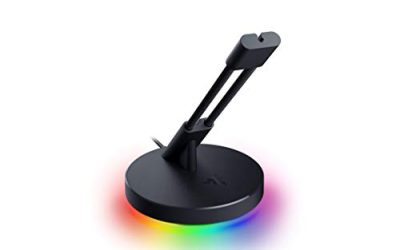
The V3 Chroma is the safe default for a wired gaming desk, built around the classic formula of a spring arm and a base heavy enough to ignore hard swipes. Its clip-on cable catch holds the cord securely while the spring flexes with your movement, so the cable floats instead of scraping. The 240 g weighted base and anti-slip feet keep it planted on big low-sensitivity pads, and the Chroma RGB underglow lets it match a lit setup rather than fight it. Choose it if you want proven, set-and-forget cable control with a bit of style on top.
Specs
- Spring arm with clip-on cable catch
- Weighted base: 240 g (8.5 oz)
- Anti-slip feet on the base
- Powered by Razer Chroma RGB underglow, 16.8 million colors
- Footprint: 3.55 x 4.83 in
- Fits rubber, braided, and paracord mouse cables
Best for: Most wired gaming desks that want stable, drag-free cable control.
Watch out for: The lighting needs a USB connection and Razer software to customize, which is extra overhead for a cable holder.
ASIN: B08HCF3W5Q
Cougar Bunker RGB
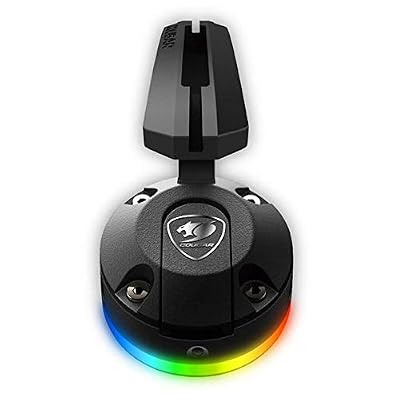
The Bunker RGB takes a different route to stability: instead of relying on weight, its patented suction pad grips the desktop, so the light 105 g body stays put without a heavy puck at the back of your pad. A flexible rubber arm holds the cable above the surface, and the base doubles as a small hub with two USB 2.0 ports for a headset dongle or a spare mouse. Fourteen RGB lighting effects let it blend into an illuminated build. It suits players whose desk surface is smooth and who want lighting and ports without a bulky base.
Specs
- Flexible rubber cable arm
- Patented suction pad base for stability
- 2x USB 2.0 ports built into the base
- 14 RGB lighting effects
- Item weight: 105 g
- Model: CGR-XXNB-MB1RGB
Best for: RGB-focused setups that also need a couple of easy-reach USB ports.
Watch out for: Suction needs a smooth, clean, flat desktop; textured or dusty surfaces weaken the grip.
ASIN: B07JYX47QN
ENHANCE Pro Gaming Mouse Bungee

The ENHANCE Pro is the pick for players who treat the bungee spot as prime desk real estate and want it to work harder. Its spring-loaded cable support responds to mouse movement in all directions, while the base hides a four-port USB 2.0 hub for hot-swapping keyboards, headsets, mice, and flash drives without reaching down to the PC. Seven LED color modes handle the looks, and the weighted design with a non-slip grip keeps the unit steady during sharp movements. A three-year manufacturer warranty is unusually long for this category and softens the risk of the extra electronics.
Specs
- Spring-loaded cable support arm
- 4-port USB hub with active USB 2.0 ports
- 7 LED color modes, including red, blue, green, and rainbow
- Weighted design with non-slip grip
- Model: ENPCGHB100BKEW
- 3-year manufacturer warranty
Best for: Desk setups that swap peripherals often and lack front-panel USB ports.
Watch out for: The ports are USB 2.0, fine for peripherals and flash drives but slow for large file transfers.
ASIN: B074XKRKL1
Pulsar Micro Bungee ES

The Micro Bungee ES abandons the desktop base entirely. This single-pack holder weighs just 9 g and sticks to the underside of a monitor, a case panel, or a desk edge with residue-free 3M VHB adhesive, then guides the cable through a flexible silicone arm with free 360-degree motion. Because nothing sits on the desk, your mousepad keeps its full area, which matters on small desks and in tight gaming corners. An extra adhesive pad in the pack lets you reposition it once. It is the least intrusive way to lift a cable, provided you can commit to one mounting spot.
Specs
- Super compact size: 45 x 45 mm (1.77 x 1.77 in)
- Item weight: 9 g
- Polycarbonate body with flexible silicone cable arm
- Residue-free 3M VHB adhesive mount, extra pad included
- 360-degree free motion cable guidance
- Model: PMB03
Best for: Small desks, laptop stations, and anyone who wants zero bungee footprint on the pad.
Watch out for: Adhesive mounting is a commitment; it will not suit thick, stiff cables or rough, dusty surfaces.
ASIN: B0C81FSVCC
Which One Fits Your Situation
You play low-sensitivity FPS on a big pad
Wide arm swipes put the most stress on a bungee, because every flick tries to drag the base across the desk. The Razer Mouse Bungee V3 Chroma fits best here: its 240 g weighted base and anti-slip feet stay put, and the spring arm feeds cable smoothly so the loop of slack above your pad stays consistent through repeated 180-degree turns.
Your desk is small and the pad takes most of it
When the mousepad already crowds out your keyboard and monitor stand, a desktop base has nowhere good to live. The Pulsar Micro Bungee ES solves this by moving the mount onto the monitor or desk edge, leaving the whole pad free. Just clean the mounting surface properly before sticking it down, and route enough slack for your longest swipe.
You keep swapping headsets, keyboards, and drives
If your PC tower sits on the floor and its ports are a stretch away, a hub bungee earns its keep. The ENHANCE Pro puts four USB 2.0 ports at the back of your pad for quick peripheral swaps, while the Cougar Bunker RGB offers two ports in a smaller, lighter body. Pick the ENHANCE for frequent swapping, the Cougar for occasional use.
Your setup is built around RGB lighting
A plain black puck can look like a missing tooth in a fully lit build. Both the Razer V3 Chroma and the Cougar Bunker RGB light up: the Razer syncs its underglow through the Chroma ecosystem, while the Cougar cycles fourteen effects from the unit itself with no software required. Choose based on whether the rest of your desk already runs Razer’s software.
Common Mistakes
- Placing the bungee too close to the pad, leaving so little slack that the cable tugs at the end of long swipes.
- Feeding far too much cable through the holder, so the excess loop collapses onto the pad and snags anyway.
- Sticking an adhesive or suction mount onto a dusty or textured surface, then blaming the mount when it lets go mid-game.
- Pairing a thick, stiff braided cable with the lightest holder on the list and expecting it to stay put.
- Buying a hub bungee for ports you never use, then dealing with an extra USB cable across the desk for nothing.
Frequently Asked Questions
Do I still need a mouse bungee if my mouse has a paracord cable?
Often, yes. A soft paracord-style cable reduces drag, but it still drapes across the desk and can catch on a monitor stand or the pad’s edge during wide movements. A bungee lifts the cable and fixes the slack point, which keeps the feel consistent. The lighter the cable, the lighter the bungee you can get away with, so micro mounts work well here.
Will a mouse bungee work with any wired gaming mouse?
Almost any wired mouse works, because a bungee only holds the cable and never touches the mouse itself. The exceptions are extremes: very thick braided cables can strain small clips, and ultra-stiff cables can push light bases around. Check your cable’s thickness and stiffness against the holder style, and favor weighted bases or strong mounts for stubborn cords.
Where should I position a mouse bungee on my desk?
Place it behind the mousepad, roughly centered on your mouse’s resting position, far enough back that the suspended cable loop clears the pad’s rear edge. Leave enough slack for your longest swipe in each direction without the cord going taut. If the cable touches the desk in front of the bungee, move the unit closer or feed a little more cable through.
Is a hub bungee a good substitute for a standalone USB hub?
For peripherals, yes; for storage speed, no. The hub bungees in this guide use USB 2.0 ports, which handle keyboards, headsets, mouse dongles, and small flash drives comfortably. They are the wrong tool for moving large files or running a fast external drive. Treat the hub as a convenience for swapping devices at the desk, not as high-speed expansion.