🛒 Best Price Today on Amazon
Prime members get fast, free shipping on everything above, plus member-only deals. New members get a 30-day free trial — cancel anytime.
Buying a mouse for the couch is really a decision about distance and surfaces, not raw sensor speed. Your PC or console sits across the room, the receiver has to hold a clean signal over that gap, and the mouse will spend its life sliding over a sofa arm, a cushion or a lap tray instead of a flat desk mat. Battery life matters more here too, because nobody wants to cross the room mid-session to plug in a cable.
This guide is for living-room PC players, people running a small media PC under the TV, and anyone who games from a recliner with the mouse on whatever surface is nearby. Every pick below is a standalone wireless mouse, chosen from the names and specifications on its Amazon product page, with the connection type, battery figure and sensor details taken from that listing.
Quick Picks
As an Amazon Associate we earn from qualifying purchases
| Product | Best for | Key spec from title |
|---|---|---|
| Logitech G305 LIGHTSPEED | Long sessions on one battery | HERO 12K sensor, 250h battery life |
| Razer Basilisk V3 X HyperSpeed | Switching between PC and a second device | 5G Advanced 18K optical sensor |
| Corsair Harpoon RGB Wireless | Couch players who also own consoles | 10,000 DPI, low-latency Bluetooth |
| Razer Orochi V2 | A small mouse that travels between rooms | Up to 950hrs battery life, under 60g |
How to Choose
Pick the wireless link that survives your room
A couch setup puts metres of air, furniture and sometimes a media cabinet between the mouse and its receiver. A 2.4GHz dongle link such as Logitech LIGHTSPEED, Razer HyperSpeed or Corsair SLIPSTREAM is built for low-latency gaming and is the safer default at living-room distances. Bluetooth reaches just as far on paper, but it is the mode listings usually tie to longer battery life rather than fastest response. If your PC sits inside a closed cabinet, plan to bring the receiver out on a short USB extension so the signal path stays clear, whichever mouse you choose.
Match the battery plan to how you actually play
Listings state battery life in hours, and the spread in this guide is wide: 60 hours on the Corsair, 250 on the Logitech, and far longer Bluetooth figures on both Razer models. Think about your weekly hours on the couch and how you feel about charging. A rechargeable mouse that dies mid-evening needs a cable run across the room, while the AA-powered picks here can be revived in seconds with a spare cell from the remote drawer. Long stated figures also mean the mouse can live on the sofa table for weeks without a routine.
Check what the sensor will track on
Couch gaming rarely happens on a proper mouse pad. An armrest is curved, a cushion gives under pressure, and a wooden side table can be glossy. Optical sensors, which every mouse in this guide uses, handle most matte household surfaces well, but a soft cushion still tilts the mouse and changes its distance from the surface as you press down. The practical fix is a thin lap tray or a hardcover book under the mouse, which gives the sensor a flat, consistent plane. Check the listing’s stated tracking details, and favour a mouse whose shape stays stable when the surface underneath it is not.
Size the shape for an armrest, not a desk
On a desk your whole forearm supports the mouse. On a sofa arm or a tray across your knees, your wrist often rests at an angle and your grip does more of the work. A compact, lighter mouse such as the Orochi V2 or G305 is easier to reposition in a small space, while a larger ergonomic shape like the Basilisk V3 X gives your palm somewhere to settle during slower games. Button count matters too: extra thumb buttons help in strategy and MMO titles, but they are also easier to press by accident when the mouse shifts on a soft surface.
The 4 Best Options
Logitech G305 LIGHTSPEED

The G305 fits couch play because it removes the two usual living-room annoyances: cables and charging. Its LIGHTSPEED link talks to a small USB receiver that stores inside the mouse body, so the dongle will not get lost between the sofa cushions, and a single AA battery is listed at 250 hours of continuous gameplay. The symmetrical shell and 99 gram weight suit fingertip and claw grips on a tray, and the HERO sensor’s 200 to 12,000 DPI range covers both slow menu work and faster shooters without swapping mice.
Specs
- Sensor: HERO optical sensor, 200 to 12,000 DPI
- Tracking speed: up to 400 IPS
- Connection: LIGHTSPEED wireless via USB receiver, 1ms report rate
- Battery: up to 250 hours on a single AA battery
- Buttons: 6 programmable buttons
- Weight: 99 grams
- Memory: on-board memory for settings
- Compatibility: PC and Mac
Best for: Players who want one mouse that stays on the coffee table for months of couch sessions.
Watch out for: There is no Bluetooth mode, so the USB receiver has to stay plugged into your PC or console, and the AA battery is replaceable rather than rechargeable.
ASIN: B07CMS5Q6P
Razer Basilisk V3 X HyperSpeed
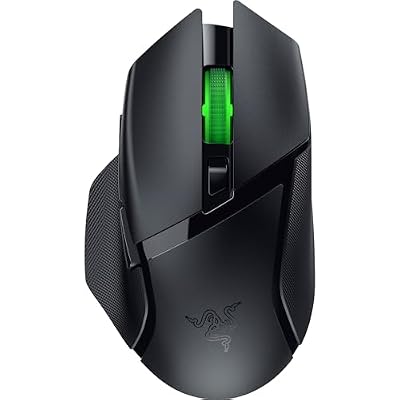
This is the pick for a couch that doubles as a second workstation. The Basilisk V3 X carries two wireless modes: Razer HyperSpeed through its dongle for gaming, and Bluetooth for pairing with a laptop or tablet without moving any hardware. Razer lists up to 285 hours of battery on HyperSpeed and up to 535 hours on Bluetooth from one AA battery, so mode switching is also a battery strategy. The right-handed ergonomic shell with a thumb rest suits palm grips during long, slower sessions, and nine programmable controls leave room for media and ability shortcuts.
Specs
- Sensor: Razer 5G Advanced 18K optical sensor, up to 18,000 DPI
- Connection: Razer HyperSpeed Wireless and Bluetooth
- Battery: up to 285 hours on HyperSpeed, up to 535 hours on Bluetooth, single AA battery
- Controls: 9 programmable controls
- Switches: Razer Mechanical Mouse Switches Gen-2
- Lighting: Razer Chroma RGB
- Weight: 110 grams
Best for: Palm-grip players who split time between a gaming PC and a Bluetooth laptop in the same room.
Watch out for: At 110 grams it is the heaviest mouse here, and its larger ergonomic shape needs a wider tray or armrest than the compact picks.
ASIN: B0BXBC26X8
Corsair Harpoon RGB Wireless

The Harpoon RGB Wireless earns its place in a living room because of how many machines it can talk to. Its listing covers PC, Mac, PS5, PS4 and Xbox, and it offers three connection paths: sub-1ms SLIPSTREAM wireless through the dongle, Bluetooth, and a plain USB wired mode that keeps you playing while the battery recovers. Six programmable buttons and a 10,000 DPI optical sensor cover mainstream gaming needs, and at 99 grams it stays easy to lift and reset on a small tray. It is the most flexible option here for a shared family setup.
Specs
- Sensor: optical sensor, up to 10,000 DPI
- Connection: SLIPSTREAM Wireless, Bluetooth, or USB wired
- Battery: up to 60 hours
- Buttons: 6 programmable buttons
- Weight: 99 grams
- Software: iCUE compatible
- Compatibility: PC, Mac, PS5, PS4 and Xbox as listed
Best for: A shared living room where the same mouse moves between a PC and consoles.
Watch out for: The stated 60 hour battery is the shortest in this guide, so expect regular top-ups, and full button customisation runs through iCUE on a computer.
ASIN: B07KQWR72Z
Razer Orochi V2

The Orochi V2 is built like a travel mouse that happens to game well, which is exactly what some couch setups need. It weighs under 60 grams, small enough to perch on a narrow armrest or the edge of a lap tray, and it pairs over HyperSpeed for gaming or Bluetooth for everything else. The headline figure is battery life: up to 950 hours on Bluetooth and up to 425 hours on HyperSpeed, per the listing, from a single battery. Its symmetrical shape suits smaller hands and fingertip grips, and the 18K sensor means the small body gives up nothing on sensitivity range.
Specs
- Sensor: Razer 5G Advanced 18K DPI optical sensor
- Connection: Razer HyperSpeed Wireless and Bluetooth, 2 wireless modes
- Battery: up to 950 hours on Bluetooth, up to 425 hours on HyperSpeed
- Switches: 2nd-gen Razer Mechanical Mouse Switches
- Weight: under 60 grams
- Shape: compact, symmetrical mobile design
Best for: Small-handed players and anyone who carries the mouse between a desk and the sofa.
Watch out for: The compact shell can feel cramped for large hands in a palm grip, and there is no wired fallback mode listed if the battery runs flat.
ASIN: B0916N2LPZ
Which One Fits Your Situation
Your PC lives under the TV, several metres away
Choose the Logitech G305 LIGHTSPEED. Its dongle-based LIGHTSPEED connection is the gaming-focused link in this guide, the receiver stores inside the mouse when you tidy up, and 250 hours on one AA battery means the mouse rarely needs attention. Bring the receiver forward on an extension cable if your PC sits inside a cabinet, and the setup stays dependable from the far end of the sofa.
One mouse for the gaming PC and a work laptop
Take the Razer Basilisk V3 X HyperSpeed. HyperSpeed handles game nights on the PC, Bluetooth pairs with the laptop without unplugging anything, and switching modes stretches the battery from 285 hours toward the 535 hour Bluetooth figure. The bigger ergonomic shell also suits the longer, mixed work-and-play sessions this situation usually involves.
The whole household shares one entertainment setup
The Corsair Harpoon RGB Wireless fits best here. Its listing names PC, Mac, PS5, PS4 and Xbox, and the wired mode rescues a session when someone else forgot to charge it. Keep the dongle in whichever machine gets used most, and use Bluetooth for the rest, so nobody has to crawl behind the TV to move a receiver.
You game on a recliner with a narrow armrest
Pick the Razer Orochi V2. Under 60 grams and compact in every dimension, it stays controllable where a full-size mouse would hang off the edge, and its battery figures are the longest in this guide, which suits a mouse that lives on the armrest full time. Pair it with a small rigid tray if your chair’s upholstery is soft.
Common Mistakes
- Assuming Bluetooth and a 2.4GHz dongle feel identical in games, then blaming the mouse for input delay that the connection mode caused.
- Leaving the receiver plugged into the back of a PC inside a closed cabinet, where the furniture blocks the signal path to the sofa.
- Playing directly on a cushion or duvet, where the soft surface tilts the mouse and makes tracking inconsistent from one movement to the next.
- Choosing a large ergonomic mouse for a narrow armrest, so half the shell hangs in the air and every click shifts its position.
- Forgetting that a rechargeable mouse still needs a charging plan, and discovering the flat battery at the start of a session instead of between sessions.
Frequently Asked Questions
Can a wireless gaming mouse really reach across a living room?
Yes, within the limits of its wireless link. Dongle connections such as LIGHTSPEED, HyperSpeed and SLIPSTREAM are designed for gaming at normal room distances, but walls, cabinets and metal shelving weaken any radio signal. Keeping the receiver in open air, ideally on a short extension cable near the front of your setup, makes more difference than the mouse model itself.
Will these mice track on a sofa or an armrest?
Optical sensors track on most matte, opaque surfaces, and all four mice here use optical sensors. The problem with upholstery is not the fabric itself but the give underneath: the mouse tilts as you press, which changes tracking mid-movement. A thin lap tray, a large hardback book or any rigid flat layer under the mouse solves it cheaply.
Is Bluetooth good enough for couch gaming?
For slower games, menus, turn-based titles and everyday media control, Bluetooth is perfectly serviceable and it returns the longest battery figures in these listings. For fast shooters or anything where input delay is obvious, the 2.4GHz dongle modes on these mice are the better choice. Owning a dual-mode mouse means you do not have to decide permanently.
AA batteries or a rechargeable mouse for the couch?
AA-powered mice, three of the four picks here, swap back to full power in seconds and suit a mouse that lives far from a charger. A rechargeable model avoids buying cells but needs a cable within reach when it runs low. Match the choice to your habits: if you keep spare AAs in the room anyway, the replaceable route is simpler.