🛒 Best Price Today on Amazon
Prime members get fast, free shipping on everything above, plus member-only deals. New members get a 30-day free trial — cancel anytime.
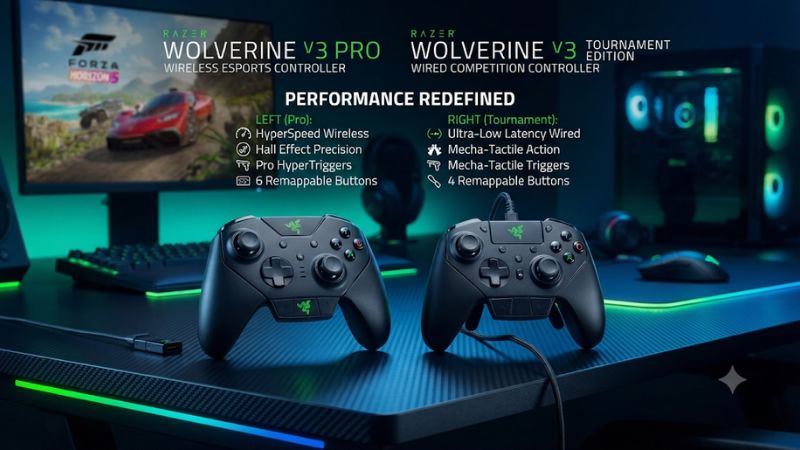
In Razer Wolverine V3 Pro vs Wolverine V3 Tournament Edition, the Tournament Edition is the better buy if you always play wired. Both have Hall-effect sticks, click stops, and six extra controls. Choose the Pro if you want wireless on Xbox or PC, interchangeable stick caps, or the included travel case.
The main differences between the Xbox models
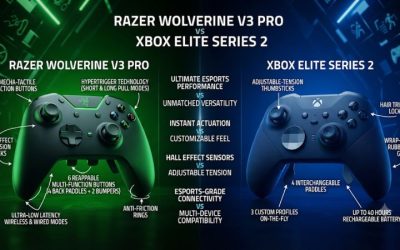
The Xbox-compatible Wolverine V3 Pro and Wolverine V3 Tournament Edition share the features that usually draw players to the range. Both offer Hall-effect sticks, short click trigger stops, four back buttons, and two extra shoulder buttons. On a cable, both support Razer’s 1,000 Hz Tournament Mode on compatible Windows PCs. The Pro’s main advantages are the wireless receiver, interchangeable stick caps, a carry case, and differences in haptics and lighting.
| Feature | Wolverine V3 Pro for Xbox | Wolverine V3 Tournament Edition for Xbox |
|---|---|---|
| Model family | RZ06-0520 | RZ06-0521 |
| Xbox Series X/S and Windows | Supported | Supported |
| Connection | Included HyperSpeed receiver or detachable USB cable | Detachable USB cable |
| Xbox polling rate listed by Razer | 250 Hz | 250 Hz |
| Wired PC Tournament Mode | Up to 1,000 Hz | Up to 1,000 Hz |
| Analog sticks | Hall-effect sticks with interchangeable caps | Hall-effect sticks with fixed caps |
| Trigger modes | Full analog travel or short mouse-click stops | Full analog travel or short mouse-click stops |
| Additional inputs | Four back buttons and two extra bumpers | Four back buttons and two extra bumpers |
| Carry case | Included | No included case |
Check the Xbox compatibility and the exact model family on the box or listing before buying. Razer sells controllers with “Wolverine V3,” “Tournament Edition,” and “8K PC” in closely related names. The Xbox comparison here concerns the standard Xbox-compatible pair. A PC-focused listing with a similar name can describe a different controller, its own firmware, and different platform support.
Who should buy the Tournament Edition?
Buy the Tournament Edition if your regular sessions happen at a desk, your cable stays out of your way, and the features you want are the short trigger clicks and additional inputs. You get the four back buttons and the two extra bumpers, so you can move jump, crouch, reload, or other frequently used actions to controls that keep your thumb near the aim stick.
It is also a sensible replacement for an older wired Wolverine if your cable setup already works. Measure the actual distance from the USB port to your hands. Leave room for the cable to bend without tugging the controller or hanging over your mouse area. If your connection route passes underneath a desk, the advertised cable length may give you less seated reach than it first appears to.
Choose the TE when you also plan to use 1,000 Hz on a compatible wired PC. The polling option is shared. The extra cost of the Pro only makes sense if its wireless capability, physical accessories, or other differences matter in your setup.
Who should buy the Pro?
Buy the Pro if you change seats, play on a TV, or regularly alternate between wired desk sessions and wireless play. Its included HyperSpeed receiver gives you wireless on Xbox and Windows. The controller can still use a USB cable, so you can choose the connection for each room or session.
The Pro also makes more sense if you already know you use a taller right stick or want to experiment with both included cap styles. A different cap height can change reach and leverage even when the game’s sensitivity stays the same. The case is useful if you move the pad, cable, and receiver together. It can also keep loose caps where you can find them.
A good way to assign value is to identify your actual routine. If you will leave the Pro plugged into the same desktop port most of the week, the lower-cost TE gets you to the same basic control layout. If you would otherwise run a cable across a walking path or regularly unplug and reroute it, wireless is part of the controller’s everyday usability.
How they compare for shooting, movement, and racing
Trigger modes are a shared reason to buy either one
Both models let you select a short click stop or full analog pull on each trigger. Use the short setting for repeated digital actions such as firing a semiautomatic weapon. Try full analog for a racing game that needs small throttle changes and gradual brake release. You can test different settings on the left and right if one finger is more likely to activate a short trigger accidentally.
A click trigger can make a press feel immediate and reduce the distance your finger travels between shots. The game still determines when an action fires and whether a second press can trigger it again. Weapon fire rates, in-game thresholds, and controller input are all separate parts of the experience. If you do most of your shooting with automatic weapons, the short click may matter more for the initial press or for burst control than for continuous fire.
If you are coming from an Xbox Elite with three trigger depths, try both Razer positions before deciding. The Razer switch mainly gives you a choice between two distinct feels. You may prefer that clear tactile distinction or discover that your most comfortable position on the old pad was the middle one.
Hall-effect sticks give both models a similar starting point
Both controllers sense stick movement magnetically. The centering mechanism and your preferred grip still matter for what deadzone works best. Start with the standard cap and a stable center. In a training area, repeatedly release the aim stick from several directions and then try a small correction against a fixed point. A new pad’s default settings are a place to start, especially if your previous setup used a large game-side deadzone to deal with wear.
The Pro allows cap changes without replacing the whole stick mechanism. Try a taller right cap if you want more leverage for small inputs. Keep the same in-game sensitivity for the first comparison. Give it enough time to see whether fine aim improves while large turns and access to face buttons remain comfortable.
The TE’s fixed caps are a good fit if the stock height is already right for you. When the primary draw is the Hall-effect sensor, you get that on both models. Cap height and deadzone should each earn their place through a practical test, especially if you play several games with different camera controls.
Six extra controls change grip more than the spec sheet suggests
The basic positions are shared. You get four rear inputs and two extra bumpers around the top of the controller. A player who uses index fingers for both the triggers and extra bumpers may have to alter their approach to simultaneous actions. A player whose middle and ring fingers naturally rest over the rear inputs can often use more of the layout without moving either thumb.
Start with two assigned actions. Put an action you use while aiming, such as jump, on a control you can reach without squeezing the grip. Put a second action such as crouch on the other side and play a training sequence. Use the other controls after you can trigger the first two deliberately in the heat of play.
The six controls are valuable when they remove thumb travel. A larger list of mapped actions alone is a poor measure of better play. Use only the controls you can reach consistently and leave an uncomfortable position unassigned if the app allows it. If you already know the Razer rear-button layout fits, the TE gives you that layout without the wireless premium.
Haptics and feedback are worth comparing in your own genres
Razer identifies more advanced haptics as a Pro feature. That is more likely to matter if you value feedback in driving games or want to feel effects such as changes in traction. On either model, start with a reasonable vibration level and check whether feedback disrupts small corrections during a shooter. A player who disables rumble for every game gains little from the Pro’s haptics advantage.
Sound is also part of feel. The buttons and short trigger stops produce tactile feedback you can hear. Try a series of shots or quick menu commands in a quiet room if you share a space or play near an open microphone. Then try the full trigger pull in a game that uses analog input. You may end up using different modes in different rooms as well as different games.
The shared mechanical layout accounts for most of the difference you will feel when switching from a conventional Xbox controller. Consider the haptics and cosmetic extras after you establish that the buttons and grip suit you.
Xbox performance, PC polling, and setup
What the Xbox owner gets from each controller
On Xbox, Razer lists both models at 250 Hz. The Pro’s unique console advantage is being able to use the receiver for wireless play. The TE can already give you the core button layout and trigger adjustments over a direct cable. If you sit close to a Series S at a desktop monitor, a cable may be the simplest connection. At a TV, check where the cable would run each time you use the pad.
The Pro’s wireless connection uses its USB receiver. Count that port when planning a setup with external storage or other accessories. For a secondhand purchase, check that the seller includes the working receiver, demonstrates pairing, and shows whether the pad also works over USB. If you plan to use it in two rooms, decide whether you will move the receiver, use a cable in one room, or keep it connected in one place.
Both controllers use an Xbox-specific model for Xbox compatibility. On a storefront where the Xbox and 8K PC variants share a product family page, check the selected platform and model details during checkout.
When the 1,000 Hz PC mode makes sense
Use wired USB on a compatible Windows PC for the advertised 1,000 Hz Tournament Mode. Razer documents a device shortcut on supported firmware: Function + Menu + A for PC Tournament Mode and Function + Menu + X for standard or Xbox mode. The mode can also be exposed in supported Razer software. Follow the instructions for your exact controller and firmware when changing it.
At 1,000 Hz, the nominal interval between reports is 1 millisecond. At 250 Hz it is 4 milliseconds. These are reporting intervals. End-to-end response also depends on the controller’s internal processing, how the game consumes input, frame timing, and the display. As a result, a polling figure by itself gives you no measured button-to-screen time.
If a game or peripheral behaves strangely in the higher-rate mode, test standard mode again before making broader changes. Keep the same cable, USB port, game settings, and display. Buy based on a connection and mode you will actually use. A wireless Pro buyer still gets the cable option, while a wired TE buyer already has the shared high-rate mode available.
Set up companion software and headset checks
Razer Controller Setup for Xbox supports the Xbox variants. Some Windows setups also use supported Synapse controls. Verify that your selected utility recognizes the exact model and reports the active profile. Set your core bindings, test them in a game, and write down the working values before changing polling mode or firmware. This makes it easier to isolate a problem if the controller feels different later.
If you use a headset that connects to the controller, test chat and game audio after choosing the connection and mode you will actually use. Use a microphone test or chat monitoring as well as game audio. Support for a feature can depend on the PC mode, connection, operating system, or app. Testing the route you intend to keep is more useful than relying on a visual comparison of the jacks.
Check whether you still need a second input layer on PC. A custom Steam Input layout can add useful actions or translation, but a native-gamepad baseline helps you judge the controller itself. If a single button moves a menu twice, test the controller with a clean layout before deciding one Razer model has a hardware issue.
Which one offers better value?
Compare what stays in your setup
The Tournament Edition is the stronger value if you will plug in every session and can use the fixed stick caps comfortably. Take the shelf price of the Pro and identify exactly what you would use from the difference. The receiver is valuable for a long seating distance. The case is valuable when you travel. The spare caps are valuable when you actually swap them or have a clear preference for their height.
The Pro is easier to justify if you play in more than one place and the connection needs differ. You can run a cable at your desk and bring the receiver to a TV setup. The case helps if you do that regularly. For a buyer who wants a desk controller now but expects future couch use, compare the Pro premium with the inconvenience of replacing a controller or routing a cable later.
If the prices are close due to a sale, give the Pro’s options more weight. If the gap is substantial and you are happy with the TE’s connection and caps, the shared sticks, triggers, and extra controls deliver the core experience.
Check included parts and wear when buying used
Have the seller demonstrate the pad in both full-trigger and click modes. Test all six remappable controls, including the extra top bumpers. Look for repeated button presses in a tester and confirm the sticks remain still after a release. A brief proof-of-power clip tells you little about the parts you will use most in a match.
For the Pro, check the receiver, original accessory set where promised, and battery operation. Run it wirelessly long enough to establish it stays connected off the cable. For the Tournament Edition, check the data cable and the controller’s USB port. A cable that charges another device may still fail to carry data or fit the controller securely.
Make the comparison against a complete working package. A low secondhand price for a Pro without its receiver is only compelling if you knowingly accept wired use or have confirmed a compatible replacement route. In that case, a complete Tournament Edition may be a simpler purchase.
Final verdict
Buy the Wolverine V3 Tournament Edition for a wired Xbox or PC setup if you want the Razer click triggers, Hall-effect sticks, and six extra controls. It also gives a compatible Windows player access to the same advertised wired Tournament Mode.
Buy the Wolverine V3 Pro if wireless changes where or how you play, or if the interchangeable caps are important to your aim setup. Check the exact Xbox model when shopping. A buyer who makes the connection and stick-cap decision first has a clearer reason for choosing either controller than a buyer comparing the shared buttons or polling figure alone.