🛒 Best Price Today on Amazon
Prime members get fast, free shipping on everything above, plus member-only deals. New members get a 30-day free trial — cancel anytime.
Mechanical keyboard O-rings offer a simple way to soften the impact of keycaps during bottom-out, potentially making a noisy keyboard more comfortable to use. Finding the best mechanical keyboard O rings for noise reduction depends on material hardness, ring thickness, keycap compatibility, and how much typing feel you are willing to change.
Quick Verdict: Which Keyboard O-Rings Work Best?
O-rings primarily reduce the impact sound created when a keycap bottoms out. They do not automatically eliminate switch clicks, spring noise, stabilizer rattling, or the resonance of the keyboard case. Choosing the right hardness and thickness is therefore more important than simply buying the thickest available rings.
Best overall: Glorious 40A Thin O-Ring Dampeners
Best for experimentation: MK Pro Rings Sampler Pack
Best balanced alternative: MK Pro Rings 50A 2.0mm
Best soft cushioning: MK Pro Rings 40A 2.5mm
Best firmer response: Glorious 70A Thin O-Rings
Best firm damping option: MK Rubber MX O-Ring Dampeners 80A
Quick Comparison Table
| Product | Hardness | Main advantage |
|---|---|---|
| Glorious 40A Thin | 40A | Soft cushioning with limited travel change |
| MK Pro Rings Sampler | 30A–80A | Test different combinations |
| MK Pro Rings 50A 2.0mm | 50A | Balanced resistance and cushioning |
| MK Pro Rings 40A 2.5mm | 40A | Softer, more substantial cushioning |
| Glorious 70A Thin | 70A | Firmer bottom-out feel |
| MK Rubber MX Dampeners | 80A | Firm impact response |
How We Selected the Best Keyboard O-Rings
Selection emphasizes verifiable material hardness, ring thickness, MX-style keycap compatibility, and realistic acoustic expectations. Softer rings generally deform more readily under pressure, while harder rings maintain greater resistance. Actual results depend on keycap geometry, switch travel, typing force, and the keyboard’s construction.
The 6 Best Mechanical Keyboard O-Rings for Noise Reduction
These six options address different preferences rather than offering a universal ranking by measured sound reduction. Without controlled acoustic testing on the same keyboard, it would be misleading to claim precise decibel improvements. Instead, the recommendations focus on the physical characteristics that influence bottom-out cushioning.
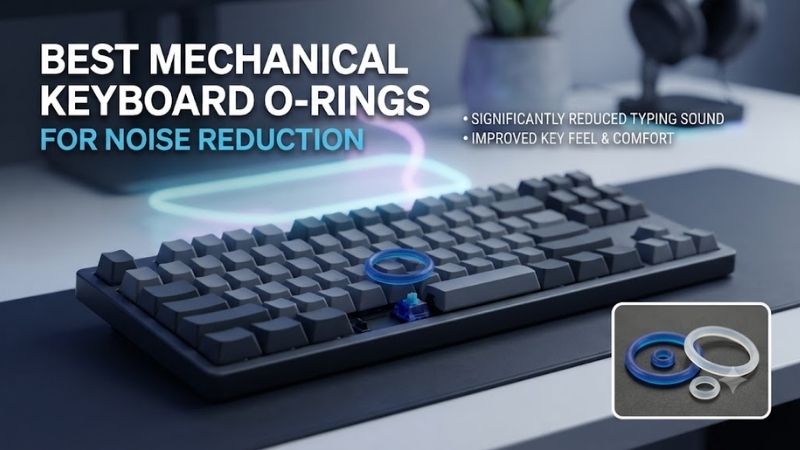
Glorious 40A Thin O-Ring Dampeners – Best Overall
Glorious 40A Thin O-Ring Dampeners are a sensible starting point for users who want to soften typing impacts without making an extreme change to key travel. Their relatively soft silicone construction is intended to cushion bottom-out while maintaining a more familiar feel than thicker damping configurations.
Best for: Everyday mechanical keyboard users seeking moderate noise reduction.
Key features
-
40A hardness designation.
-
Thin silicone configuration.
-
Translucent material.
-
Designed for most compatible MX-style keycaps.
-
Package containing 120 rings.
Acoustic performance
During a conventional keypress, the switch moves downward until its mechanism and surrounding components reach their travel limit. Depending on the keycap geometry, an installed O-ring can contact the switch housing and compress before the normal hard impact occurs.
This changes the contact event from a relatively abrupt collision to a cushioned one.
The result can be a less sharp bottom-out sound. However, the ring will not substantially affect noise created by a click jacket, click bar, or unstable stabilizer mechanism.
Typing experience
A 40A ring offers relatively compliant cushioning, but softness alone does not determine the final feel. The ring’s thickness and the available compression distance also matter.
Users accustomed to hard bottom-out feedback may notice that the keypress feels less definite. Others may appreciate the reduced impact against the fingertip.
Pros
-
Soft bottom-out cushioning.
-
Useful starting configuration.
-
Translucent construction for illuminated keyboards.
-
Simple installation.
Cons
-
Cannot eliminate switch-generated clicks.
-
Changes bottom-out feel.
-
Actual travel reduction depends on keycap geometry.
Buy if: You want a relatively gentle introduction to keyboard dampening.
Skip if: You prefer a crisp, unmodified bottom-out sensation.
MK Pro Rings Sampler Pack – Best for Finding the Right Feel
The MK Pro Rings Sampler Pack is one of the most useful choices for buyers who do not yet know which O-ring hardness or thickness suits their typing style. Instead of requiring a commitment to one configuration, it provides multiple combinations for comparison on the same keyboard.
Best for: First-time O-ring users and keyboard enthusiasts experimenting with sound.
Key specifications
The sampler includes 120 silicone rings divided among 24 configurations. Hardness choices range from 30A to 80A, while the available thicknesses are 1.5, 2.0, 2.5, and 3.0 mm.
Each configuration has a limited number of sample rings, so the package is intended primarily for experimentation rather than installing one identical type across a complete keyboard.
Why testing matters
O-rings behave differently across keyboards because the distance between the keycap underside and switch housing can vary. A ring that noticeably softens one keycap profile may barely affect another.
The sampler allows users to install different combinations on selected keys and compare the resulting sound and typing sensation.
A practical method is to test identical letter keys, apply similar typing pressure, and choose the ring that provides the preferred balance between cushioning and travel.
Pros
-
Wide range of hardness options.
-
Several thickness configurations.
-
Useful for comparing feel.
-
Reduces uncertainty before buying a full set.
Cons
-
Not enough rings of one configuration for most complete keyboards.
-
Requires time to compare results.
-
Acoustic comparisons remain subjective without measurement equipment.
Buy if: You want to determine your preferred damping configuration before committing.
Skip if: You already know the exact hardness and thickness you need.
MK Pro Rings 50A 2.0mm – Best Balanced Dampening Option
The MK Pro Rings 50A 2.0mm set provides a middle-ground configuration for users who want some impact cushioning without choosing either very soft or very firm rings. Its moderate hardness and thickness make it a logical option to evaluate for everyday typing and gaming.
Best for: Users seeking a compromise between noise control and keypress definition.
Key specifications
-
Silicone construction.
-
50A hardness.
-
2.0 mm thickness.
-
120 rings per package.
-
Compatibility with MX keycaps using suitable round internal stems.
Performance characteristics
Compared with a softer 30A or 40A ring of similar geometry, a 50A ring generally provides greater resistance to compression.
This can maintain a more defined bottom-out sensation while still cushioning some of the impact.
Thickness is equally important. A 2.0 mm ring may influence travel differently from a 3.0 mm ring even when both use the same material hardness.
The relationship is not a simple one-to-one reduction because the ring compresses under load and may not contact the housing until partway through the stroke.
Pros
-
Moderate hardness.
-
Practical configuration for general use.
-
Consistent package specification.
-
Suitable for controlled experimentation with MX-style caps.
Cons
-
May not absorb as much impact as softer configurations.
-
Still changes the feel of bottom-out.
-
Results vary by keyboard.
Buy if: You want cushioning without the softest possible response.
Skip if: Your priority is maximum cushioning regardless of typing feel.
MK Pro Rings 40A 2.5mm – Best for Soft Bottom-Out Cushioning
The MK Pro Rings 40A 2.5mm configuration is appealing to users who want a softer bottom-out sensation and are comfortable with a potentially noticeable change in the keypress. Its combination of lower material hardness and relatively substantial thickness makes it a useful choice for prioritizing impact cushioning.
Best for: Users who type firmly and want less abrupt bottom-out contact.
Key specifications
-
40A silicone.
-
2.5 mm thickness.
-
120-ring package.
-
Designed for compatible MX-style keycaps.
Sound and feel
When the O-ring engages correctly, the soft material compresses beneath the keycap. This can reduce the sharpness of a bottom-out impact, particularly for users who press keys firmly.
However, the same cushioning that reduces impact harshness can create a noticeably softer stopping point.
Some typists appreciate this because it reduces the perception of repetitive finger impact. Others dislike the loss of a crisp mechanical endpoint.
The result also depends on whether the ring contacts the switch housing at the intended position.
Pros
-
Soft material response.
-
Suitable for stronger bottom-out impacts.
-
Straightforward installation.
-
Useful for comfort-oriented modifications.
Cons
-
May noticeably affect the typing sensation.
-
Potentially greater travel interference.
-
Not a solution for clicky-switch noise.
Buy if: You prioritize cushioning and are willing to accept a softer feel.
Skip if: You want to preserve the original travel and bottom-out feedback as closely as possible.
Glorious 70A Thin O-Rings – Best for Firmer Bottom-Out Feedback
Glorious 70A Thin O-Rings target users who want some damping without the pronounced softness associated with lower-hardness silicone. Their firmer material provides greater resistance to compression, making them a sensible alternative for typists who dislike a mushy bottom-out sensation.
Best for: Mechanical keyboard owners seeking a firmer dampened keypress.
Material and operation
The 70A hardness rating indicates a firmer material than the Glorious 40A alternative. With comparable geometry, a harder O-ring generally requires greater force to deform by a similar amount.
This can preserve a more defined contact sensation.
However, firmer material does not automatically mean better noise reduction. A hard ring may transmit more of the impact than a softer ring, depending on the keyboard and the force applied.
Gaming considerations
Some gamers prefer a predictable, firm stopping point during repeated movement-key presses. A thin, relatively hard O-ring may be less disruptive to that preference than a thick, very soft design.
Nevertheless, there is no basis for claiming that O-rings improve gaming response times simply by reducing effective travel. Actuation still depends on the switch mechanism.
Pros
-
Firmer cushioning.
-
Thin configuration.
-
Translucent design.
-
Compatible with many MX-style keycaps.
Cons
-
May offer less impact absorption than softer rings.
-
Still modifies bottom-out feel.
-
No automatic performance advantage.
Buy if: You prefer a dampened keyboard that retains relatively firm feedback.
Skip if: You want the softest and most cushioned possible contact.
MK Rubber MX O-Ring Dampeners 80A – Best Firm Dampening Alternative
MK Rubber MX O-Ring Dampeners in 80A hardness are intended for users who prefer a distinctly firmer impact response. Compared with soft silicone options, their higher hardness changes how the ring resists deformation and how the bottom-out force is transmitted.
Best for: Users who want to experiment with firm damping.
Key characteristics
-
80A hardness designation.
-
130-piece package.
-
Intended for compatible MX-style keycap applications.
-
Firm material behavior relative to lower-Shore-A options.
Performance implications
A firmer ring may be attractive to users who feel that soft O-rings make their keyboard less responsive to the touch.
However, hardness is not synonymous with sound reduction. If the ring transmits much of the impact through the keycap and housing, the acoustic improvement may be modest.
It is also important to avoid comparing hardness across different materials without accounting for their mechanical properties. Two products with similar Shore A values may behave differently because of their composition, geometry, and compression characteristics.
Pros
-
Firm bottom-out response.
-
Generous ring count.
-
Useful alternative to soft silicone.
-
Straightforward installation process.
Cons
-
Limited cushioning compared with softer materials.
-
May not satisfy users seeking maximum impact reduction.
-
Exact fit depends on the keycap design.
Buy if: You want damping with minimal perceived softness.
Skip if: You primarily want strong impact cushioning.
Buying Guide: How to Choose Keyboard O-Rings for Noise Reduction
Selecting O-rings requires understanding what produces mechanical keyboard noise. Switches, keycaps, stabilizers, plates, and cases all contribute to the final sound. O-rings influence only part of that acoustic system, so they should be treated as one modification rather than a complete keyboard-silencing solution.
Understand Shore A Hardness
Shore A is a measurement scale used to describe the hardness of relatively flexible materials such as rubber and silicone.
Lower values generally indicate softer materials, while higher values indicate greater resistance to indentation.
For keyboard O-rings, typical options range from relatively soft configurations around 30A–40A to firmer options around 70A–80A.
A softer ring may absorb more of a particular bottom-out impact, but it can also create a less distinct stopping sensation. Harder rings may preserve firmer feedback while offering less cushioning.
The ideal hardness depends on the user’s typing force and preferred feel.
Choose the Correct O-Ring Thickness
Thickness influences when the ring makes contact and how much room is available for compression.
A thicker ring may contact the switch housing earlier in the keypress and can reduce effective bottom-out travel more noticeably. A thinner ring may provide a subtler change.
However, the actual effect depends on the location of the internal keycap stem and the geometry of the switch housing.
A stated 2.0 mm O-ring thickness should not be interpreted as a guaranteed 2.0 mm travel reduction.
The ring’s compression behavior and the available space determine the practical result.
Identify the Source of Keyboard Noise
Before installing O-rings, identify which sound you actually want to reduce.
Bottom-out impact: O-rings can help when correctly positioned.
Clicky switch mechanism: O-rings generally do little to suppress the internal click.
Stabilizer rattle: Lubrication or stabilizer adjustment may be more effective.
Case resonance: Internal damping material or construction changes may help.
Switch spring noise: Appropriate switch maintenance may address the source more directly.
For a keyboard using loud clicky switches, changing to compatible silent mechanical switches may produce a more substantial reduction than adding O-rings to the original caps.
How to Install O-Rings Correctly
Installation is relatively simple, but incorrect positioning can result in uneven typing feel.
-
Disconnect the keyboard from the computer.
-
Remove the keycaps using an appropriate puller.
-
Inspect the inside of each keycap for the MX-style stem.
-
Position an O-ring around the compatible stem section.
-
Seat the ring evenly without stretching it unnecessarily.
-
Reinstall the keycap carefully.
-
Test the key several times for consistent movement and operation.
Start with a few letter keys before modifying the entire keyboard. This allows you to assess the sound and typing feel without committing to a complete installation.
Can O-Rings Make a Mechanical Keyboard Completely Silent?
O-rings cannot eliminate every sound produced by a mechanical keyboard because they do not directly control the movement of all internal switch components.
For example, a clicky switch produces sound through a dedicated mechanism. Its click may occur before the keycap reaches the point where an O-ring could cushion bottom-out.
The switch may also produce noise during its upward return, which an ordinary keycap O-ring does not necessarily affect.
A more comprehensive quiet-keyboard modification could combine compatible silent switches, stabilizer maintenance, appropriate case damping, and careful desk placement.
Do O-Rings Reduce Mechanical Keyboard Travel?
They can reduce effective bottom-out travel when the ring contacts a fixed surface before the switch reaches its normal mechanical limit.
The magnitude depends on ring thickness, compressibility, and keycap geometry.
Shortening the physical distance to a cushioned stopping point does not necessarily make the electrical actuation occur sooner.
A conventional mechanical switch still registers its keystroke according to the position and design of its internal contacts.
This distinction is especially important when evaluating claims about gaming performance.
Frequently Asked Questions
Are O-rings worth installing on mechanical keyboards?
They can be worthwhile if bottom-out impact is the primary source of unwanted noise and you are comfortable changing the feel of the keypress.
What O-ring hardness is best for quiet typing?
A softer ring can provide greater cushioning, but the best result depends on thickness, keycap geometry, and typing force. A sampler is useful when uncertain.
Do O-rings work with Cherry MX switches?
Many are designed for MX-style keycaps, but compatibility depends on the internal keycap stem and available clearance.
Can O-rings damage mechanical switches?
Incorrect installation or unsuitable dimensions can interfere with normal movement. Use compatible rings and verify proper key operation.
Should I use O-rings on linear or tactile switches?
Either can benefit from reduced bottom-out impact. The improvement depends on how much of the original sound comes from that impact.
Are O-rings better than silent switches?
Not necessarily. Silent switches can incorporate internal damping for both downward and return movement, while ordinary keycap O-rings have a more limited role.
Final Verdict
The Glorious 40A Thin O-Ring Dampeners are a practical starting point for softening mechanical keyboard bottom-out noise. The MK Pro Rings Sampler is better for discovering an ideal hardness and thickness, while firmer alternatives preserve more defined feedback. Choose based on the noise source and typing feel, not exaggerated silence claims.