🛒 Best Price Today on Amazon
Prime members get fast, free shipping on everything above, plus member-only deals. New members get a 30-day free trial — cancel anytime.
The best ergonomic wrist support for keyboard and mouse gaming should provide comfortable resting support without forcing the wrists into an unnatural position. Product height, firmness, surface material, keyboard compatibility, and movement freedom all influence whether a wrist rest improves the daily gaming experience.
Quick Verdict: Which Gaming Wrist Support Is Best?
The HyperX Wrist Rest Full Size is our preferred choice for most players using conventional full-size gaming keyboards. Its gel-infused memory foam, stitched construction, and anti-slip underside provide a practical combination of cushioning and stability.
The Razer Ergonomic Wrist Rest Pro is a premium alternative for players who prefer a more substantial cushion and a heat-transfer fabric surface.
For compact keyboards, a shorter wrist rest is generally preferable because unnecessary length can interfere with mouse positioning.
Players using low-sensitivity FPS settings should be cautious about adding a stationary mouse wrist rest. The additional support may interfere with broad arm movements, even when the cushion feels comfortable during ordinary desktop use.
Quick Comparison Table
These seven options cover full-size keyboards, tenkeyless keyboards, separate mouse support, and more comprehensive workstation arrangements. Choosing the correct product requires matching its dimensions to the gaming setup rather than assuming that every ergonomic accessory offers the same benefits.
| Product | Best For | Material | Main Advantage |
|---|---|---|---|
| HyperX Wrist Rest Full Size | Best overall | Gel memory foam | Stable keyboard support |
| Razer Ergonomic Wrist Rest Pro | Premium full-size keyboards | Gel memory foam | Heat-transfer fabric |
| Glorious Cloth Wrist Rest | Fabric cushioning | Padded foam | Multiple size options |
| 3M WR422LE | Combined keyboard and mouse | Gel and leatherette | Adjustable platform |
| HyperX Mouse Wrist Rest | Compact mouse-side support | Gel memory foam | Dedicated mouse pad |
| Kensington ErgoSoft Wrist Rest | Gaming and office use | Gel cushioning | Keyboard-profile options |
| HyperX Wrist Rest TKL | Tenkeyless keyboards | Gel memory foam | Shorter form factor |
How We Selected the Best Ergonomic Wrist Supports
Wrist supports were evaluated according to physical compatibility, contact pressure, materials, surface stability, and their effects on natural hand movement. We prioritized identifiable products with meaningful construction differences rather than treating decorative appearance or gaming branding as evidence of superior ergonomics.
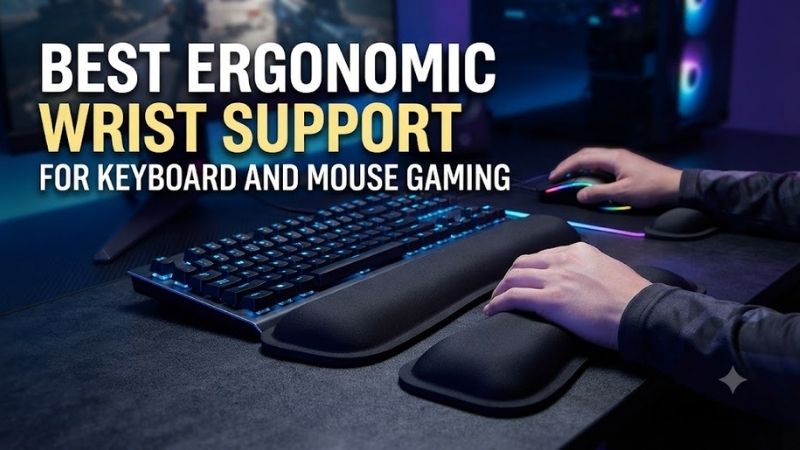
Neutral Wrist Position and Support Geometry
A useful wrist rest should complement the keyboard’s height and allow the hand to remain approximately aligned with the forearm. If the cushion is too tall or positioned incorrectly, it can encourage excessive wrist bending rather than improve comfort.
This issue is particularly important when comparing conventional mechanical keyboards with low-profile designs.
Two wrist rests using the same foam material can produce different results if their heights differ.
The front edge of the keyboard, angle of the keycaps, desk height, and chair position should all be considered.
During active typing or gameplay, the hands should be able to move freely. Resting support is most appropriate when it does not create sustained concentrated pressure against the underside of the wrist.
Cushion Materials and Surface Feel
Gel-infused memory foam, conventional memory foam, and padded gel structures can all provide cushioning, but they behave differently under load. Comfort depends on foam density, thickness, covering material, and contact area rather than the product’s material label alone.
Memory foam tends to deform according to pressure and temperature.
Gel structures can distribute contact force differently depending on their design.
Cloth coverings may feel softer against bare skin, while synthetic leather surfaces may be easier to wipe clean.
No single material guarantees the best result for every user.
A cushion must provide enough support without collapsing excessively or creating a raised barrier between the hands and keyboard.
Stability During Gaming
A wrist rest should remain in position during repeated keyboard activity. If it slides whenever the player reaches for movement keys or changes hand placement, it can become more distracting than useful during gameplay.
Anti-slip rubber surfaces and appropriately weighted construction can help limit unwanted movement.
However, the stability of the keyboard itself is equally important.
A wrist rest cannot compensate for a keyboard that shifts across the desk.
For mouse support, the challenge is different.
Stationary cushions may suit small movements but interfere with broad aiming sweeps.
Best Ergonomic Wrist Supports Reviewed
The following products are intended for different keyboard formats and styles of desktop activity. Their reviews examine dimensions, cushioning, practical gaming applications, maintenance, and situations where a less expensive or differently shaped accessory may be the more appropriate choice.
HyperX Wrist Rest Full Size — Best Overall
The HyperX Wrist Rest Full Size is designed to provide a stable cushioned surface in front of conventional full-size keyboards. Its gel-infused memory foam and anti-slip underside make it a straightforward option for gamers who want support without adding clamps or permanent hardware.
Best For: Full-size mechanical keyboard users seeking everyday resting comfort.
Construction and Dimensions
The full-size model measures approximately 457 × 88 millimeters.
Its cushioning uses gel-infused memory foam covered by a fabric exterior.
HyperX incorporates anti-fray stitching around the edges and a textured natural-rubber underside intended to limit sliding.
The product family has a published thickness of approximately 22 millimeters.
This dimension is particularly relevant because the support must be evaluated against the keyboard’s front height.
For a tall mechanical keyboard, the cushion may provide an appropriate resting position.
For a very thin keyboard, it may sit higher than necessary.
Cushioning and Pressure Distribution
The memory foam is intended to conform under contact.
This can make the support feel less rigid than a solid plastic surface.
However, the foam does not remove the need for correct hand positioning.
Users should avoid placing constant pressure directly against the underside of their wrists during active typing.
A resting cushion is most useful when the hands are relaxed between interactions.
Its comfort depends on the individual, particularly the relationship between desk height and forearm position.
Performance During Gaming
A full-size wrist rest provides continuous coverage across the front of a conventional keyboard.
This is practical for players who regularly move between movement keys, number keys, and other controls.
The anti-slip underside can help keep the cushion aligned with the keyboard during ordinary use.
However, the rest may occupy additional space on a shallow desk.
Users should ensure that it does not push the keyboard too far away from their preferred seated position.
Durability and Cleaning
The stitched exterior is intended to resist fraying.
Fabric can nevertheless accumulate dust and skin oils.
Avoid soaking the foam core unless the manufacturer explicitly permits it.
Repeated moisture exposure may affect the covering and cushioning materials.
Pros
-
Gel-infused memory foam
-
Full-size keyboard coverage
-
Anti-slip rubber underside
-
Anti-fray stitching
-
Published physical dimensions
-
No installation required
Cons
-
May be too tall for low-profile keyboards
-
Fabric requires cleaning
-
Occupies desktop depth
-
Does not provide mouse-hand support
Buy If: You want a conventional cushioned rest for a full-size gaming keyboard.
Skip If: Your keyboard is significantly shorter or very low-profile.
Razer Ergonomic Wrist Rest Pro — Best Premium Support
The Razer Ergonomic Wrist Rest Pro combines gel-infused memory foam with a heat-transfer fabric surface. Its thicker profile makes it particularly relevant to full-size gaming keyboards with substantial front height, although that same thickness may be inappropriate for thinner keyboards.
Best For: Premium full-size mechanical keyboard setups.
Materials and Technical Specifications
Razer specifies a surface made from heat-transfer fabric.
The interior uses cooling gel-infused memory foam.
Its underside incorporates anti-slip rubber feet.
The product measures 444.5 × 90 millimeters, with a thickness of 26.4 millimeters.
The published weight is approximately 248 grams.
These specifications allow buyers to compare the rest directly with their keyboard dimensions.
The thickness deserves particular attention.
A support exceeding 26 millimeters may be comfortable with some keyboard profiles while raising the hands unnecessarily beside others.
Thermal Comfort
Razer markets the gel-infused construction and heat-transfer fabric as features intended to reduce heat buildup.
However, a product using cooling-oriented materials does not guarantee that it will remain noticeably cool throughout every gaming session.
Perceived temperature depends on the ambient room conditions, length of skin contact, and surface material.
The more important consideration is whether the product provides comfortable support without forcing an awkward wrist angle.
Gaming Suitability
The Razer is attractive for players who spend substantial time using a full-size gaming keyboard.
Its broad cushioning surface provides room for different resting hand positions.
However, users should not treat the rest as a fixed anchor.
Competitive gaming often requires quick repositioning, and the hands should remain free to move naturally.
Long-Term Maintenance
The fabric exterior may require regular cleaning.
Skin oils and dust can accumulate over repeated use.
The memory foam should also be protected from excessive moisture.
Users should inspect the non-slip feet periodically to ensure that the cushion remains stable.
Pros
-
Gel-infused memory foam
-
Heat-transfer fabric
-
Published dimensions and weight
-
Anti-slip feet
-
Premium construction
-
Suitable for many full-size keyboards
Cons
-
Relatively thick
-
Not suitable for every low-profile keyboard
-
Premium price category
-
Cooling sensation varies
Buy If: You want a substantial full-size keyboard cushion.
Skip If: You need a very low-profile support.
Glorious Cloth Wrist Rest — Best Fabric-Covered Option
The Glorious Cloth Wrist Rest is intended for users who prefer a broad padded fabric surface rather than a hard or synthetic-leather support. Its range of keyboard-oriented sizes makes it useful for gamers who want a closer fit to their specific keyboard layout.
Best For: Gamers who prefer fabric contact and keyboard-specific sizing.
Design and Material
The Glorious Cloth Wrist Rest uses padded cushioning beneath a soft cloth surface.
Its construction incorporates a non-slip base intended to keep the product positioned in front of the keyboard.
The available size options allow the user to match the rest to different keyboard formats.
This is an important distinction because a wrist rest longer than the keyboard may extend unnecessarily into the adjacent mouse area.
For compact gaming setups, maintaining that separation can improve the overall layout.
Cushioning and Support
The broad cushion provides a resting surface beneath the heel of the palm.
Its comfort depends on thickness, firmness, and compatibility with the keyboard.
A soft cloth surface can feel pleasant during ordinary use, but it does not guarantee that the support is at the correct height.
Buyers should compare the selected version’s actual dimensions against their keyboard.
Gaming Applications
The product is especially suitable for gamers who use the same desk for typing, gaming, and other computer activities.
It provides a straightforward support surface without adding complex adjustment mechanisms.
However, it offers no dedicated mouse support.
Users who need both keyboard and mouse cushioning may require an additional product or an integrated platform.
Pros
-
Cloth-covered cushioning
-
Multiple keyboard-size options
-
Non-slip base
-
Simple design
-
Compatible with gaming and productivity use
Cons
-
Fabric can collect skin oils
-
Exact dimensions depend on variant
-
No dedicated mouse support
-
Incorrect sizing can interfere with layout
Buy If: You want a fabric-covered rest matched to your keyboard size.
Skip If: You prefer a wipe-clean synthetic surface.
3M WR422LE — Best Integrated Keyboard and Mouse Platform
The 3M WR422LE differs from an ordinary wrist cushion by combining wrist support with a larger keyboard-and-mouse platform. It is most appropriate for users who want to adjust their working arrangement rather than simply place padding in front of a keyboard.
Best For: Mixed gaming and productivity workstations.
Integrated Platform
The WR422LE incorporates gel support surfaces within a broader keyboard-and-mouse workstation design.
It uses a leatherette covering and provides an adjustable platform arrangement.
This can be attractive when the user wants to change the operating angle of the keyboard and mouse together.
The design serves a different purpose from a narrow standalone cushion.
It should therefore be considered an integrated ergonomic accessory rather than a direct replacement for every gaming wrist rest.
Adjustment and Positioning
The platform allows users to adjust their working position.
This can be helpful when the desk height and keyboard arrangement otherwise encourage uncomfortable hand angles.
However, additional adjustment introduces complexity.
The user must find a setting that maintains comfortable wrist alignment and does not interfere with natural arm movement.
A highly adjustable product is only beneficial when the adjustment range is used appropriately.
Gaming Limitations
The integrated surface may not provide sufficient mouse travel for every competitive FPS player.
Low-sensitivity aiming can require large horizontal movements.
A dedicated oversized mousepad may be more appropriate in that situation.
The 3M is better suited to users who divide their time between gaming, typing, and general workstation tasks.
Pros
-
Integrated keyboard-and-mouse support
-
Gel cushioning
-
Adjustable working arrangement
-
Leatherette covering
-
Suitable for mixed use
Cons
-
Large desktop footprint
-
More complicated than a standalone rest
-
May restrict broad mouse movement
-
Less portable
Buy If: You want a coordinated keyboard-and-mouse ergonomic platform.
Skip If: You need a minimalist competitive gaming setup.
HyperX Mouse Wrist Rest — Best Dedicated Mouse Support
The HyperX Mouse Wrist Rest provides a smaller cushioned surface designed specifically for the mouse-hand area. It is most useful for users whose mouse movements remain relatively localized and who want a separate resting pad without replacing their existing mousepad.
Best For: High-sensitivity mouse users who prefer a stationary resting cushion.
Dimensions and Construction
The mouse version measures approximately 228 × 88 millimeters.
It uses gel-infused memory foam with a fabric covering.
The underside incorporates anti-slip material.
Its construction is similar to that of the larger HyperX keyboard rest, but the compact dimensions make it more suitable for positioning beside a mouse.
The product should be placed carefully so it does not interfere with the mouse’s normal movement area.
Mouse Movement Compatibility
For ordinary desktop use, a stationary cushion may provide a comfortable resting location.
However, competitive gaming presents different requirements.
Low-sensitivity players frequently move their mouse and forearm through substantial distances.
A stationary rest can interfere with those movements.
The accessory is therefore more appropriate for users who rely on relatively small mouse motions or primarily use it during pauses.
Ergonomic Limitations
The cushion does not eliminate the need for correct mouse placement.
If the mouse is positioned too far from the body, the user may continue to reach awkwardly despite having a wrist rest.
Likewise, sustained pressure against the wrist may remain uncomfortable.
The product should support relaxed positioning rather than force the hand into one location.
Pros
-
Compact mouse-oriented format
-
Gel memory foam
-
Anti-slip underside
-
Stitched construction
-
Separate from keyboard support
Cons
-
Can obstruct large mouse sweeps
-
Requires careful placement
-
Does not solve poor mouse positioning
-
Not suitable for every aiming style
Buy If: You use relatively small mouse movements and want a dedicated resting pad.
Skip If: You rely on broad arm-based FPS aiming.
Kensington ErgoSoft Wrist Rest — Best for Gaming and Office Use
The Kensington ErgoSoft Wrist Rest family provides cushioning intended for keyboard use across different workstation configurations. Its understated design and keyboard-profile options make it relevant to users whose gaming desk also serves as their primary office workstation.
Best For: Hybrid productivity and gaming setups.
Keyboard Compatibility
Kensington offers ErgoSoft variants intended for different keyboard types.
The correct version should be selected according to the keyboard’s physical dimensions and front height.
This matters because a cushion that works with a tall keyboard may not suit a low-profile design.
Rather than choosing a wrist rest solely by appearance, buyers should confirm that its height and width match the equipment.
Cushion Construction
The ErgoSoft family emphasizes padded resting comfort.
Its surface is intended to provide a consistent location for the hands during pauses.
However, comfort depends on how the product is positioned.
The rest should not encourage continuous pressure directly against the wrists.
Users should also ensure that the cushion does not push the keyboard too far away.
Mixed-Use Benefits
A gaming desk frequently supports both keyboard-intensive work and leisure activities.
In this context, a wrist rest that fits the keyboard and provides a stable resting surface can be useful.
The Kensington is less gaming-specific than some alternatives, but that does not make it unsuitable.
Its primary value lies in keyboard compatibility and general workstation comfort.
Pros
-
Multiple keyboard-oriented variants
-
Suitable for mixed use
-
Cushioned resting surface
-
Understated appearance
-
Ergonomic product focus
Cons
-
Exact specifications vary by model
-
Not designed for specialized mouse aiming
-
Requires careful height selection
-
Some configurations may overlap with other accessories
Buy If: You want a keyboard rest for both work and gaming.
Skip If: You need a product specialized for large FPS mouse movements.
HyperX Wrist Rest TKL — Best for Tenkeyless Gaming Keyboards
The HyperX Wrist Rest TKL provides the same general cushioning approach as the full-size model but uses a shorter length intended for tenkeyless keyboards. Its reduced footprint is valuable for compact gaming desks where preserving space beside the keyboard is important.
Best For: Tenkeyless mechanical keyboard users.
Dimensions and Fit
The TKL version measures approximately 362 × 88 millimeters.
It uses gel-infused memory foam, a fabric exterior, and an anti-slip underside.
Its shorter width makes it a more appropriate physical match for many tenkeyless keyboards.
This helps avoid unnecessary cushion overhang beside the keyboard.
For players who keep the mouse close to the movement keys, that extra clearance can be valuable.
Practical Gaming Benefits
A TKL keyboard removes the numeric keypad to preserve desktop space.
Using a full-size wrist rest can partially undermine that advantage.
The shorter HyperX rest better matches the intended compact arrangement.
However, users with 60% or 65% keyboards may want an even shorter accessory.
The physical dimensions should always guide the purchase.
Comfort and Limitations
The cushioning material is not fundamentally different from the full-size version.
Its main advantage is correct sizing.
If the height is appropriate for the keyboard, the rest can provide a comfortable location for the palms during pauses.
However, it should not be used to anchor the wrists continuously during active typing.
Pros
-
Tenkeyless-oriented length
-
Gel-infused memory foam
-
Anti-slip underside
-
Fabric exterior
-
Preserves mouse-side space
Cons
-
Similar materials to other HyperX variants
-
Not suitable for full-size keyboards
-
May be too long for smaller layouts
-
No mouse-side support
Buy If: You use a tenkeyless gaming keyboard.
Skip If: Your keyboard is substantially wider or shorter.
Buying Guide: How to Choose a Gaming Wrist Support
The most useful wrist support is one that matches the entire workstation. Keyboard height, resting pressure, forearm position, and mouse movement should be evaluated together. A cushion may improve comfort in one configuration while creating awkward wrist angles in another.
Match the Rest to Keyboard Height and Layout
Start by measuring the keyboard’s width and front-edge height.
A full-size keyboard generally benefits from a support of comparable width.
Tenkeyless and compact keyboards require shorter options.
Height is equally important.
A cushion that sits too high can encourage awkward wrist positioning.
The goal is to create a comfortable resting location without forcing the hands upward or downward.
Understand How Wrist Supports Should Be Used
A wrist rest is most useful during pauses when the hands are relaxed.
During typing and gaming, the hands should remain free to move.
Avoid placing sustained concentrated pressure directly beneath the wrists.
Support should be positioned beneath the palm area when appropriate.
If a product forces the hands into a fixed position, it may not be suitable for the intended activity.
Evaluate Material and Maintenance
Fabric, leatherette, gel, and memory foam differ in surface feel and cleaning requirements.
Cloth can feel soft but may absorb skin oils.
Synthetic coverings may be easier to wipe clean.
Gel-infused foam does not guarantee a consistently cool surface.
Choose a material based on actual comfort, durability expectations, and maintenance rather than marketing terms alone.
Consider Mouse Aiming Style
A stationary mouse wrist rest may work well for ordinary desktop use or relatively small mouse movements.
However, low-sensitivity FPS players often move the entire forearm.
A fixed cushion can interfere with these movements.
Before purchasing, observe how much of your mouse control comes from the wrist versus the arm.
An unrestricted mousepad may be more valuable than a separate mouse-side cushion.
Adjust the Entire Workstation
A wrist rest should complement appropriate chair and desk positioning.
If the keyboard is too high, the chair is too low, or the mouse is too far away, padding alone may not solve the problem.
Maintain relaxed shoulders and comfortable forearm alignment.
Take appropriate movement breaks during extended sessions.
Persistent symptoms such as numbness or recurring pain require more than purchasing another cushion.
Frequently Asked Questions
Wrist supports are common gaming accessories, but their ergonomic value depends on proper selection and use. These answers explain how cushioning, keyboard height, and movement style affect the practical benefits of a wrist rest without making unsupported medical claims.
Are wrist rests good for gaming?
They can provide comfortable resting support when properly matched to the keyboard and workstation.
Should I rest my wrists while typing?
Avoid sustained pressure directly beneath the wrists during active typing. The hands should remain free to move naturally.
Is gel better than memory foam?
Neither is universally superior. Support geometry, firmness, thickness, and surface covering matter more than the material label alone.
Do FPS players need a mouse wrist rest?
Not necessarily. Stationary rests may interfere with large mouse movements.
What wrist rest size should I use with a TKL keyboard?
Choose a rest whose width closely matches the keyboard, such as a dedicated TKL model.
Can a wrist rest prevent carpal tunnel syndrome?
No wrist rest can guarantee prevention of a medical condition.
Is a thick wrist rest more ergonomic?
Not automatically. Excessive height can create awkward hand positioning.
How should I clean a fabric wrist rest?
Follow the manufacturer’s cleaning instructions and avoid soaking materials that are not designed for full washing.
Final Verdict
The best ergonomic wrist support for keyboard and mouse gaming should provide comfortable resting support without restricting movement. HyperX is a strong all-around option, Razer offers premium cushioning, and compact keyboards benefit from correctly sized rests. Prioritize keyboard alignment and freedom of movement over maximum thickness.