🛒 Best Price Today on Amazon
Prime members get fast, free shipping on everything above, plus member-only deals. New members get a 30-day free trial — cancel anytime.
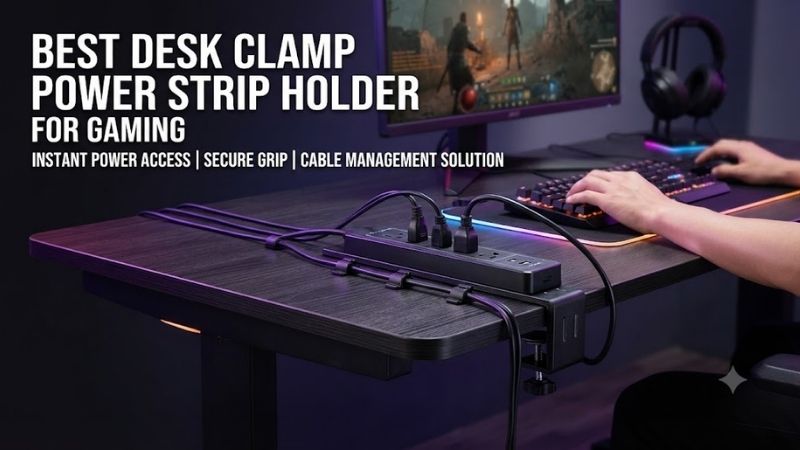
The best desk clamp power strip holder for gaming keeps electrical accessories secure, accessible, and organized without drilling into your desk. Choosing the right holder requires checking clamp compatibility, load capacity, power strip dimensions, ventilation, and cable clearance for your gaming PC.
Quick Verdict: Which Desk Clamp Power Strip Holder Should You Choose?
For most gaming desks, a rigid clamp-on steel tray offers the most practical combination of stability, accessibility, and compatibility with an existing power strip. Mesh organizers suit larger cable collections, while powered desk clamps are better for users who frequently connect accessories.
Best overall: VIVO DESK-CM6L-B Clamp-On Cable Management Tray.
Best long steel tray: Mount-It! MI-7286BLK.
Best for large multi-monitor desks: VIVO DESK-AC36MH.
Best compact fabric organizer: VIVO DESK-AC16F-C.
Best for accessible charging: CRST Desk Clamp Power Strip.
The most important distinction is that a passive power strip holder does not provide electrical outlets or surge protection. It only supports equipment. A powered desk-edge clamp is a separate category and must be evaluated for electrical safety as well as physical fit.
Quick Comparison Table
The seven options below address different cable-management requirements rather than competing on appearance alone. Measurements are especially important because a product may fit the thickness of your desktop but still conflict with an underside frame, drawer, or monitor-arm mounting system.
| Product | Type | Published Capacity | Best For |
|---|---|---|---|
| VIVO DESK-CM6L-B | Steel tray | 11 lb | Overall power strip storage |
| Mount-It! MI-7286BLK | Steel tray | 11 lb | Longer power strips |
| VIVO DESK-AC36MH | Mesh organizer | 11 lb | Wide gaming desks |
| VIVO DESK-AC24MH | Mesh organizer | 11 lb | Compact cable collections |
| VIVO DESK-AC16F-C | Fabric tray | 11 lb | Concealed cable storage |
| CRST Desk Clamp Power Strip | Powered desk clamp | Electrical rating applies | Desktop charging |
| Mount-It! MI-7281B | Powered desk clamp | Electrical rating applies | Accessible AC and USB ports |
How We Selected the Best Desk Clamp Power Strip Holders
A dependable power strip holder must work with the complete gaming desk, not simply accommodate a power strip’s plastic housing. We evaluated installation geometry, load distribution, available space, ventilation, electrical considerations, and whether the organizer remains convenient when changing PC accessories.
Desk Compatibility and Mounting Geometry
A clamp’s published desktop-thickness range is only the starting point for determining compatibility. Steel support frames, curved edges, decorative aprons, and underside drawers can prevent proper installation, even when the tabletop thickness appears suitable.
For example, a clamp rated for a two-inch-thick desktop may still fail to fit a desk with a large steel support bar running beneath its rear edge. The clamp needs enough unobstructed depth to make secure contact with the tabletop.
Before buying, measure the thickness and underside clearance. Identify the exact location where the holder will attach, and verify that its bracket will not interfere with the chair, monitor arms, or existing cable-management hardware.
Standing desks introduce another consideration. When the desk moves, attached accessories move with it. Power cords must therefore have adequate slack throughout the desk’s entire height-adjustment range.
Power Strip Dimensions and Weight Distribution
A holder should support the complete electrical setup, including the power strip, connected adapters, and cables. Large charging bricks can increase both the total weight and the amount of space required around each socket, so measuring the bare strip alone is insufficient.
A steel tray may have enough length for a power strip while lacking sufficient depth for several bulky plugs. Similarly, a flexible mesh organizer may accommodate awkwardly shaped adapters but provide less immediate access when an individual cable needs replacing.
Published load capacities are helpful, but they do not establish that every item can be positioned safely.
Heavy components should remain properly supported rather than hanging from electrical cords. The total load must stay within the manufacturer’s limits, and concentrated weight should not deform the organizer or strain its clamps.
Ventilation, Electrical Safety, and Accessibility
The placement of electrical accessories affects their ventilation and accessibility. A power strip should not be buried beneath loose fabric or surrounded by tightly packed power adapters if its manufacturer requires clearance around the housing or connected equipment.
Passive organizers do not increase a power strip’s electrical capacity. They also do not transform an ordinary outlet strip into a surge protector.
Buyers who need surge protection should select a separate electrical product with appropriate specifications and certification.
Likewise, a powered desk-edge clamp requires examination of its voltage, current rating, USB output, and protection features.
The safest and most practical arrangement is one that keeps equipment securely supported while allowing inspection, cleaning, and disconnection when necessary.
Best Desk Clamp Power Strip Holders Reviewed
These seven recommendations include rigid trays, flexible organizers, and powered desk-edge alternatives. Each review considers the product’s actual construction, documented specifications, ideal use cases, limitations, and the circumstances under which another mounting design would be more appropriate.
VIVO DESK-CM6L-B — Best Overall Power Strip Holder
The VIVO DESK-CM6L-B is our preferred option for gamers who already own a suitable power strip and want to secure it beneath the desk. Its steel construction, raised retaining edge, and padded clamp mechanism provide a practical solution without requiring permanent tabletop modification.
Best For: Gaming desks requiring a rigid, removable power strip organizer.
Design and Technical Specifications
VIVO specifies a steel tray measuring 17 × 6 × 5.8 inches, with an overall height of approximately 8.8 inches including the clamps.
Its raised retaining lip measures two inches, helping keep supported accessories within the tray.
The manufacturer publishes an 11-pound weight capacity and compatibility with desktops measuring 0.2 to 2 inches thick.
These specifications make the product suitable for many conventional power strips, although unusually long models or oversized adapters may require a larger holder.
The steel construction creates a defined support surface. This is an advantage over an adhesive-mounted power strip, where the entire weight depends on the adhesive bond.
Installation and Practical Compatibility
The clamps attach through hand tightening and incorporate protective padding.
No holes are required in a compatible desktop.
However, users should examine the contact area before tightening the brackets. A clamp should not be attached to a hollow, cracked, or unstable desk edge.
The product’s overall height also matters. If the desk has a deep support frame, the clamps and tray may obstruct knee clearance or collide with existing accessories.
For a height-adjustable gaming desk, mount the organizer where its contents will not strike the chair or nearby furniture as the desk moves.
Performance in a Gaming Setup
A rigid tray is especially useful when a gaming PC, two monitors, speakers, and a USB hub all require power.
Instead of leaving the strip on the floor, the user can mount it beneath the desktop and organize cables toward their respective devices.
This reduces loose wiring around chair wheels and makes floor cleaning easier.
The open design also allows access to plugs without dismantling the entire cable system.
It does not provide surge protection, additional outlets, or electrical overload monitoring.
Pros
-
Steel construction with published dimensions
-
11-pound weight capacity
-
Compatible with 0.2–2-inch desktops
-
No-drill installation
-
Protective clamp padding
-
Raised retaining edge
-
Suitable for existing power strips
Cons
-
Requires underside clearance
-
May not fit unusually long power strips
-
Cannot compensate for poor electrical cable routing
-
Does not provide electrical protection
Buy If: You need reliable under-desk storage for an existing power strip.
Skip If: You want outlets mounted directly at the desk edge.
Mount-It! MI-7286BLK — Best Long Steel Cable Tray
The Mount-It! MI-7286BLK offers an extended steel cable-management tray for users whose accessories do not fit comfortably within shorter organizers. Its published dimensions and load capacity make it a credible alternative when mounting length matters more than decorative features.
Best For: Long power strips and gaming desks with several connected adapters.
Construction and Published Dimensions
Mount-It! lists overall dimensions of 23.6 × 3.9 × 7 inches.
The product uses steel and ABS components with a matte-black finish.
Its published weight capacity is 11 pounds.
The longer format may be advantageous for a power strip with several widely spaced outlets.
However, the comparatively narrow depth deserves attention.
A long strip with small plugs may fit conveniently, while one carrying bulky right-angle adapters or oversized charging bricks may require additional space.
The correct choice depends on the complete installed arrangement rather than the strip’s nominal length alone.
Clamp Fit and Installation
The manufacturer specifies compatibility with tabletop thicknesses between 0.2 and 1.97 inches.
This covers many conventional desks but does not guarantee clearance around support frames.
Mount-It! supplies the required assembly hardware and installation instructions.
Users should verify that the tray can be positioned without obstructing chair movement or blocking access to other under-desk accessories.
Because the organizer mounts without drilling, it can be relocated if the desk layout changes.
Gaming Setup Advantages
A long tray is useful when monitor power cables, speaker wiring, and charging adapters approach the same region of the desk.
It can group those cables while keeping their respective connections accessible.
Users should still secure excess cable lengths independently.
A tray can support the strip, but loose wiring may continue to hang beneath the desk unless additional cable clips or reusable ties are installed.
Pros
-
Long 23.6-inch design
-
Steel and ABS construction
-
Published 11-pound capacity
-
No-drill clamp attachment
-
Suitable for longer cable arrangements
-
Manufacturer-documented installation requirements
Cons
-
Narrower than some alternative trays
-
Limited to compatible desk edges
-
Does not include electrical outlets
-
Heavy adapters may need careful positioning
Buy If: Your power strip is too long for a compact organizer.
Skip If: You need a deeper tray for bulky electrical accessories.
VIVO DESK-AC36MH — Best Mesh Organizer for Large Gaming Desks
The VIVO DESK-AC36MH is intended for large workstations where cables and adapters need to be organized across a wider area. Instead of placing everything in a rigid metal channel, its suspended mesh design creates a flexible storage area beneath the desktop.
Best For: Large gaming desks with multiple displays and cable bundles.
Dimensions and Construction
The 36-inch model measures approximately 36.4 × 14.5 inches.
VIVO uses a combination of steel, nylon, polyester, and ABS components.
The flexible mesh is suspended from desk-mounted brackets.
Its hanging depth can be adjusted between approximately 5.5 and 7 inches.
This construction can accommodate irregularly shaped cable bundles more easily than some rigid trays.
However, a flexible organizer should not be treated as a structural shelf for heavy equipment.
Compatibility and Installation
The manufacturer specifies an 11-pound weight capacity.
Supported desktop thickness ranges from approximately 0.6 to 2.8 inches.
A particularly important requirement is the 8.5-inch clearance needed beneath the desk for the mounting brackets.
That requirement can eliminate compatibility with gaming desks that use substantial steel frames.
Users should measure the intended mounting location before ordering, especially if monitor arms or other clamps already occupy the rear edge.
Practical Use and Ventilation
The mesh design leaves much of the stored equipment exposed to surrounding air.
This may be useful for ordinary power adapters, but it does not eliminate the need to follow their ventilation instructions.
A wide basket can reduce cable crossings beneath a multi-monitor gaming desk.
For example, monitor power cords can enter from one side, while keyboard and peripheral cables can be grouped nearer the other.
The main trade-off is access.
Removing a single adapter may require moving other cables that share the suspended basket.
Pros
-
Wide 36.4-inch organizer
-
Adjustable hanging depth
-
11-pound rated capacity
-
Open mesh construction
-
Accommodates multiple cable bundles
-
No drilling required
Cons
-
Requires 8.5 inches of bracket clearance
-
Flexible rather than rigid support
-
Individual plugs may be harder to access
-
Large footprint beneath the desk
Buy If: You need distributed cable storage across a wide gaming desk.
Skip If: You primarily want a rigid shelf for one power strip.
VIVO DESK-AC24MH — Best Compact Mesh Cable Organizer
The VIVO DESK-AC24MH uses the same suspended mesh concept as the larger model but occupies less width beneath the desktop. It is attractive for compact gaming setups where cables need organization without covering the entire underside of the workstation.
Best For: Smaller gaming desks with moderate cable-management needs.
Dimensions and Material
The 24-inch model measures approximately 23.5 × 14.5 inches.
It shares the product family’s flexible mesh construction and supporting clamp arrangement.
For a desk equipped with one monitor, a gaming PC, and basic peripherals, this footprint may provide adequate storage without unnecessary unused width.
However, users should compare the intended cable bundle against the actual organizer dimensions.
A large number of power adapters can occupy more space than the cables themselves.
Installation Requirements
The product supports desktop thicknesses of approximately 0.6 to 2.8 inches and has an 11-pound capacity.
Its mounting brackets require sufficient under-desk clearance.
This is not automatically a better choice for every small desk.
A compact desk with a deep frame may be less compatible than a larger desk with an unobstructed underside.
Before purchasing, inspect the support structure and consider whether the organizer’s hanging depth will affect seated comfort.
Advantages Over the Larger Version
The shorter design preserves more under-desk space for other accessories.
This may be valuable when a gaming PC tower, headset hook, or under-desk drawer occupies part of the available area.
The trade-off is reduced storage width.
The 24-inch model is best when the cable collection is modest enough that the additional width of the 36-inch version would provide little benefit.
Pros
-
Shorter mesh format
-
Published compatibility dimensions
-
11-pound load capacity
-
No-drill installation
-
Open cable storage
-
Adjustable hanging height
Cons
-
Less storage width
-
Still requires substantial bracket clearance
-
Does not support equipment like a rigid shelf
-
Less convenient for frequent plug changes
Buy If: You want flexible cable storage on a compact workstation.
Skip If: You have numerous large power adapters.
VIVO DESK-AC16F-C — Best Fabric Holder for Compact Setups
The VIVO DESK-AC16F-C combines a steel-supported mounting system with a soft Oxford-fabric storage tray. Its relatively narrow format and adjustable hanging position make it suitable for users who want to conceal ordinary cables and smaller power strips without installing a large organizer.
Best For: Compact gaming desks prioritizing cable concealment.
Construction and Storage Dimensions
The 16-inch tray measures approximately 15.7 × 5.5 × 5 inches.
Its construction combines steel, plastic, and Oxford fabric.
The manufacturer lists an 11-pound weight capacity.
The compact dimensions are suitable for selected power strips, small adapters, and loose signal cables.
However, buyers must check the length of their existing strip before choosing this model.
A long surge protector may extend beyond the fabric tray, reducing the benefit of the enclosure.
Mounting and Access
VIVO specifies desktop compatibility between 0.4 and 2 inches thick.
The brackets require approximately 5.5 inches of clearance, while the product offers adjustable hanging positions.
The fabric sides can be unhooked from the clamps to access stored equipment.
This is helpful when the power strip is not frequently changed.
However, users who repeatedly unplug accessories may prefer an open metal tray with more immediate access.
Ventilation Considerations
Fabric organizers can visually conceal cables, but they require careful use with electrical equipment.
Power adapters should not be crowded together or covered in ways that interfere with their intended cooling.
The fabric tray is best suited to an organized set of ordinary cables and compatible accessories.
High-temperature equipment should never be enclosed contrary to its manufacturer’s instructions.
Pros
-
Compact 15.7-inch tray
-
Oxford-fabric construction
-
Adjustable hanging positions
-
11-pound rated capacity
-
Removable fabric access
-
Included cable-management accessories
Cons
-
Not suitable for every long power strip
-
Fabric requires careful adapter placement
-
Less immediate access than an open tray
-
Limited room for bulky plugs
Buy If: You want a discreet organizer for a modest cable collection.
Skip If: Your power strip uses numerous oversized adapters.
CRST Desk Clamp Power Strip — Best for Accessible USB and AC Power
The CRST Desk Clamp Power Strip differs from the passive holders because it brings electrical outlets directly to the workstation edge. It is appropriate for gamers who want convenient power access rather than simply storing an existing strip beneath the desk.
Best For: Frequently connected controllers, chargers, and desktop accessories.
Electrical Features
CRST documents three AC outlets, one USB-C Power Delivery port rated up to 20 watts, and two USB-A ports.
The manufacturer specifies a 15A, 125VAC electrical rating.
Its published features include a resettable overload breaker and a 1,020-joule surge-protection rating.
Those specifications should be understood within the limits of the device.
A 20W USB-C port is useful for certain mobile accessories, but it is insufficient to provide full operating power to many gaming laptops.
Mounting System
The clamp accommodates compatible desktop edges up to approximately two inches thick.
Protective pads help reduce direct contact with the desk finish.
The device uses a six-foot power cord.
This can provide flexibility on ordinary desks, although large standing desks may require additional planning to maintain adequate cord slack.
When It Is Better Than a Hidden Strip
An accessible power strip makes sense when users frequently connect temporary devices.
For example, a gaming controller, wireless headset, or phone can be charged without reaching beneath the desk.
However, positioning electrical outlets near the desktop also increases the importance of keeping drinks and spills away from the device.
Pros
-
Three AC outlets
-
USB-C Power Delivery
-
Two USB-A ports
-
Published surge-protection specification
-
Resettable overload breaker
-
Clamp-on installation
Cons
-
Not a passive power strip holder
-
USB-C output is limited for gaming laptops
-
Occupies visible desk-edge space
-
Electrical load management is essential
Buy If: You need accessible electrical connections.
Skip If: You already have sufficient outlets and only need cable storage.
Mount-It! MI-7281B — Best Alternative Desk-Edge Power Solution
The Mount-It! MI-7281B provides a combination of AC outlets and USB charging connections in a desk-clamp format. Its primary advantage is convenient access to power, although its charging capabilities should be evaluated separately from modern high-wattage USB-C solutions.
Best For: Gamers who frequently connect ordinary USB-powered accessories.
Electrical Configuration
The MI-7281B provides three AC outlets and three USB ports.
Its documented AC rating is 15A at 125V and 60Hz.
The product is designed to bring everyday electrical access closer to the user.
However, buyers seeking modern USB-C charging should verify the precise USB output specifications rather than assuming every USB-equipped strip provides high-wattage Power Delivery.
Clamp and Installation
The holder accommodates suitable desktop thicknesses between approximately 0.4 and 2 inches.
Protective contact surfaces help reduce direct pressure on the desk finish.
Its power cord is approximately five feet long.
For a height-adjustable desk, that cord length must be considered carefully before installation.
Gaming Use Case
The MI-7281B is useful for keyboards, controllers, chargers, and other accessories that need accessible connections.
Its three AC outlets may accommodate selected peripheral power supplies, provided their combined load remains within the electrical rating.
It is less suitable for buyers who want their power equipment entirely hidden beneath the desk.
Pros
-
Three AC outlets
-
Three USB charging ports
-
Clamp-on installation
-
Suitable for compatible desktops
-
Convenient accessory access
Cons
-
Not a passive organizer
-
USB charging capabilities are limited by the exact model
-
Visible power connections
-
Requires careful cord routing
Buy If: You want accessible AC and conventional USB ports.
Skip If: You need a hidden holder for an existing surge protector.
Buying Guide: How to Choose a Power Strip Holder for Gaming
Selecting the correct holder starts with identifying the equipment that needs to be mounted. A rigid tray may be ideal for one heavy power strip, while mesh storage works better for distributed cables. Powered desk-edge accessories serve a different purpose and introduce electrical safety considerations.
Determine Whether You Need Storage or Additional Outlets
A passive organizer is the appropriate purchase when you already have enough electrical outlets.
Its purpose is to improve physical cable organization.
A powered clamp-on strip makes sense when you need additional accessible AC or USB connections.
However, adding a powered strip should not be treated as an excuse to overload an existing outlet or daisy-chain electrical accessories.
The safest choice is based on the intended electrical arrangement rather than convenience alone.
Measure Desktop Thickness and Underside Clearance
Measure the tabletop at the exact location where the clamps will attach.
Then inspect the underside for support rails, drawers, or other obstructions.
A holder that supports the tabletop thickness may still be incompatible with the desk’s frame.
Check the full bracket dimensions, not only the advertised clamp range.
This is especially important on height-adjustable gaming desks and desks with integrated cable trays.
Evaluate Weight Capacity and Adapter Size
The weight of a power strip may seem insignificant, but connected adapters and cable bundles increase the load.
Compare the total weight with the manufacturer’s rating.
Also measure the largest plug and adapter dimensions.
A narrow tray may accommodate a long strip but lack enough space for adapters that extend sideways or downward.
Avoid forcing power cords into tight bends simply to fit the equipment inside an organizer.
Plan for Airflow and Electrical Access
Electrical accessories should remain accessible for inspection and disconnection.
Do not bury warm adapters in tightly packed fabric or cable bundles.
An open steel tray provides straightforward access, while mesh organizers offer flexible storage.
Fabric organizers can conceal cables effectively but require particular attention to adapter placement.
Follow electrical-device instructions and applicable safety requirements.
Build a Cable System That Can Be Maintained
A clean gaming desk should remain easy to troubleshoot.
Group cables logically, leave suitable slack, and use removable ties rather than permanently binding everything together.
Keep power connections clear of moving chair components.
For standing desks, check the entire movement path before securing cable lengths.
The objective is not simply hiding every wire; it is creating an arrangement that remains safe and practical during future PC upgrades.
Frequently Asked Questions
A power strip holder changes how electrical accessories are stored, but it does not change their electrical capabilities. Understanding clamp fit, ventilation, and safe cable routing helps prevent common installation mistakes and supports a more maintainable gaming setup.
Can I mount a surge protector under my gaming desk?
Yes, provided its manufacturer permits that installation and the holder supports it securely without obstructing ventilation or access.
Is a steel tray better than a mesh organizer?
A steel tray provides rigid support and direct access. Mesh organizers offer flexible storage across larger areas. The better option depends on the equipment.
Do clamp-on holders damage desks?
They can if installed on unsuitable materials or tightened excessively. Use compatible surfaces and follow the manufacturer’s installation instructions.
Are clamp-on organizers suitable for standing desks?
Many are, but power cords must accommodate the desk’s full movement range without stretching or becoming trapped.
Can I put power bricks in a fabric cable tray?
Only when the equipment fits securely and its ventilation requirements are maintained.
Does a cable tray provide surge protection?
No. Surge protection must come from an appropriately rated electrical product.
Should I choose a powered desk clamp or a hidden power strip?
Choose a powered clamp when frequent outlet access matters. Choose a passive holder when you already have sufficient electrical connections.
Final Verdict
The best desk clamp power strip holder for gaming should support your equipment securely without compromising cable access or ventilation. VIVO DESK-CM6L-B offers a practical steel-tray solution, while Mount-It! MI-7286BLK suits longer strips. Mesh and fabric organizers serve larger or more concealed cable arrangements.