🛒 Best Price Today on Amazon
Prime members get fast, free shipping on everything above, plus member-only deals. New members get a 30-day free trial — cancel anytime.
- Quick Verdict
- Cooler Master N300 Overview
- Cooler Master N300 Design and Build
- Cooler Master N300 Specifications and Compatibility
- Cooler Master N300 Cooling Performance
- Storage Support
- Cable Management
- Front I/O and Connectivity
- Building in the Cooler Master N300
- Cooler Master N300 for Gaming
- Cooler Master N300 for Office PCs
- Cooler Master N300 for Older PC Rebuilds
- Cooler Master N300 for a NAS or Home Server
- Noise Levels
- Dust Management
- Upgradeability
- Cooler Master N300 vs Modern Mesh Cases
- Cooler Master N300 vs Compact Cases
- Cooler Master N300 Strengths
- Cooler Master N300 Weaknesses
- Who Should Buy the Cooler Master N300?
- Who Should Skip the Cooler Master N300?
- Frequently Asked Questions
- Final Verdict
The Cooler Master N300 is a traditional ATX mid-tower built around straightforward airflow, practical component support, and a largely mesh-front design. It lacks the glass panels and modern cable-hiding features of newer cases, but it remains relevant for low-cost gaming PCs, older hardware rebuilds, office systems, and users who value function over appearance.
Quick answer: Our top pick in 2026 is the Case Type — our #1 rated choice. See the full ranked comparison, alternatives and buying advice below.
Quick Verdict
The Cooler Master N300 makes the most sense as a functional, inexpensive case for builders who want conventional ATX compatibility and airflow without paying for decorative features.
Its strongest characteristic is the airflow-oriented front design. The case was created in an era when optical drives and multiple internal drive bays were still common, so its internal layout looks more traditional than current minimalist cases. That can be useful for older hardware, but it also creates more obstruction around the front of the chassis than modern open-layout cases.
The N300 supports standard desktop components rather than proprietary hardware, making it useful for rebuilding an older gaming PC or moving components from an OEM-style system into a conventional enclosure.
It is not the best choice for a premium modern build. Cable management is basic, the internal structure is dated, and larger modern GPUs or elaborate cooling configurations require careful measurement.
For a simple air-cooled system using a mainstream CPU, conventional ATX power supply, one graphics card, and a few storage drives, however, the N300 remains an easy case to understand.
Cooler Master N300 Overview
| Category | Cooler Master N300 |
|---|---|
| Case Type | ATX mid-tower |
| Motherboard Support | ATX and smaller compatible formats |
| Cooling Focus | Mesh-front airflow |
| Side Panel | Traditional solid or vented design depending on version |
| PSU Location | Bottom-mounted |
| Storage | Multiple internal drive positions |
| Optical Drive Support | Yes on traditional N300 configurations |
| Front Connectivity | USB and audio, with exact layout varying by model |
| Best For | Budget builds, older hardware, practical air-cooled PCs |
| Main Limitation | Older internal layout and basic cable management |
Cooler Master N300 Design and Build
Traditional Mid-Tower Layout
The N300 uses a conventional tower format with the motherboard mounted vertically, a power supply positioned at the bottom, storage cages toward the front, and expansion slots at the rear.
This layout will feel familiar to anyone who built PCs before tempered-glass cases and open internal chambers became standard.
The advantage is simplicity. Components go where experienced PC builders expect them to go, and standard hardware can be installed without unusual brackets or proprietary mounting systems.
The disadvantage is that the interior does not feel as open as newer cases. Drive cages occupy significant space toward the front and can interfere with airflow or long graphics cards depending on the configuration.
Mesh-Focused Front Panel
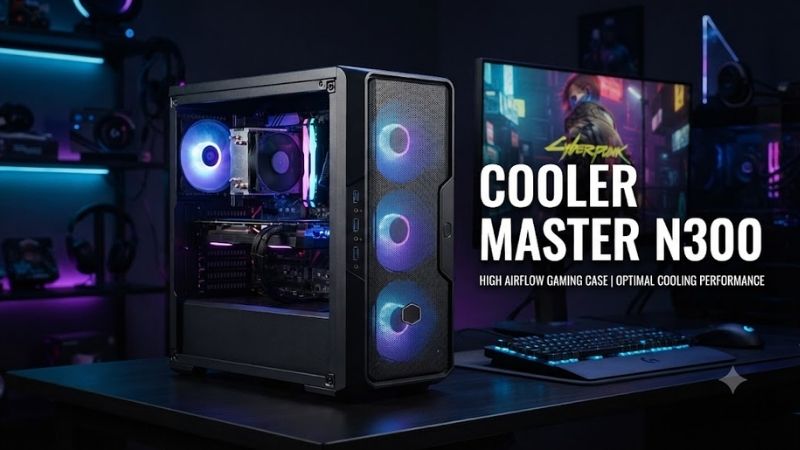
The defining visual feature of the N300 is its perforated front design.
Rather than using a closed plastic front panel with narrow side vents, the case exposes much of the front area to incoming air.
This is useful for traditional air-cooled systems because front intake fans can draw cooler room air directly into the chassis.
The open front also gives the case a functional industrial appearance rather than a decorative gaming look.
That approach still makes sense today. Mesh cannot compensate for poor fan placement, but a relatively unrestricted front intake gives case fans a better starting point than a heavily sealed panel.
Conservative Appearance
The N300 is not designed to be a showcase case.
There is no large panoramic glass surface, vertical GPU presentation, or extensive RGB integration built into the chassis.
That can actually be an advantage in office environments or understated gaming setups.
Users who prefer a black tower that visually disappears under a desk may appreciate the N300 more than builders who want every component visible.
Cooler Master N300 Specifications and Compatibility
Motherboard Support
The N300 is designed around standard ATX desktop hardware and can also accommodate smaller compatible motherboard formats.
This makes it useful for a broad range of systems, including:
- ATX gaming motherboards
- Micro-ATX systems
- Basic office PCs
- Older platform rebuilds
- Budget workstation builds
The case is much less restrictive than proprietary small-form-factor computers.
Builders can select a standard motherboard and power supply rather than being tied to custom dimensions.
Standard ATX Power Supply Support
The case uses a conventional bottom-mounted power-supply position.
This is one of its most useful qualities for users migrating from an older or proprietary desktop.
A standard ATX PSU gives buyers access to a far wider range of replacement units and wattage options than systems using manufacturer-specific power supplies.
The bottom position also separates the PSU intake from much of the CPU and GPU airflow path when the installation and floor clearance are appropriate.
If the case sits on thick carpet, users should ensure the power-supply intake is not obstructed.
Graphics Card Compatibility
The N300 can support discrete graphics cards, but modern GPU dimensions require more attention than they would in a newer open-layout tower.
Large storage cages and the conventional front structure can reduce available space for especially long cards.
This is less important for:
- Compact graphics cards
- Mainstream dual-fan GPUs
- Older graphics cards
- Office display adapters
It becomes more important with modern high-end cards using long triple-fan coolers.
Always measure the exact graphics-card length and compare it with the available internal clearance before purchasing hardware.
CPU Cooler Compatibility
The N300 is suitable for conventional air-cooled CPU builds.
Mainstream tower coolers can work well, provided their height fits within the case.
Because side-panel clearance is limited compared with some modern wide chassis, very large dual-tower coolers should be checked carefully.
Low-profile and moderate tower coolers are easier choices.
Users building around high-power modern processors should also consider whether the overall airflow and cooler capacity are appropriate rather than assuming any ATX case will manage the thermal load equally well.
Cooler Master N300 Cooling Performance
Front Intake Airflow
The mesh front is the N300’s strongest cooling feature.
Cool air can enter through the front and move toward the CPU cooler and graphics card.
A simple airflow arrangement works well:
- Front fans as intake
- Rear fan as exhaust
- Top fans as exhaust where applicable
This creates a straightforward front-to-back and bottom-to-top airflow path.
The case does not need complicated fan arrangements to cool mainstream components effectively.
Multiple Fan Positions
The N300 was designed with several fan-mounting positions rather than relying on one front and one rear fan.
Depending on the exact chassis revision, builders can add fans to multiple areas of the case.
Potential locations within the N300 design family include:
- Front
- Rear
- Top
- Side
- Bottom
Users should verify the exact fan-size support of their specific N300 SKU before buying additional fans because regional and model variations can exist.
More fans do not automatically produce better cooling.
A balanced intake and exhaust arrangement is generally more useful than filling every available position.
Air Cooling Works Best
The N300 is most naturally suited to air-cooled builds.
A conventional tower CPU cooler combined with front intake and rear exhaust creates a simple setup with relatively few failure points.
This approach is appropriate for:
- Mainstream gaming CPUs
- Office processors
- Older enthusiast CPUs
- Budget workstation hardware
Users considering large liquid-cooling radiators should verify exact radiator support carefully.
The N300 predates the modern trend toward cases designed primarily around large 280 mm and 360 mm AIO systems.
GPU Cooling
The open front can provide the graphics card with a steady supply of fresh air.
This is particularly useful when the front intake fans are positioned to move air directly toward the GPU area.
Side ventilation on relevant N300 versions can potentially provide additional airflow, although adding side fans is not always necessary.
Modern graphics cards often use large open-air coolers that exhaust heat back into the case, so effective rear and top exhaust remains important.
Storage Support
Multiple Drive Bays
One area where the N300 reflects its generation is storage support.
The chassis includes room for several traditional internal drives and was designed when users commonly installed:
- 3.5-inch hard drives
- 2.5-inch SSDs
- Optical drives
- Multiple local storage devices
This makes it surprisingly useful for certain modern roles.
For example, someone rebuilding an older media PC may appreciate the ability to keep several SATA drives installed.
Hard Drive Use
Mechanical drives remain useful for bulk storage.
An N300-based system can therefore work well as:
- File server
- Media library
- Backup PC
- Budget workstation
- Archive system
Mechanical drives generate vibration and some heat, so users installing several disks should ensure front airflow remains adequate.
Large storage cages can also partially obstruct airflow toward the graphics card.
SSD Installation
SATA SSDs are easy to use in this type of chassis.
Modern systems may rely mainly on M.2 SSDs installed directly on the motherboard, which means the N300’s extensive drive infrastructure can become unnecessary.
That is one reason newer cases often remove large drive cages entirely.
For an older system with several SATA drives, however, the N300’s traditional layout remains useful.
Optical Drive Support
The N300 belongs to the generation of cases that still accommodates front-accessible optical drives.
That can be valuable for users who still use:
- DVDs
- Blu-ray drives
- Disc-based software archives
- Older media collections
Modern gaming cases frequently eliminate 5.25-inch bays entirely, making the N300 more practical for legacy hardware use.
Cable Management
Basic Rather Than Modern
Cable management is one of the areas where the N300 shows its age.
Modern cases often provide:
- Deep rear cable channels
- Velcro straps
- PSU shrouds
- Dedicated cable bars
- Large routing grommets
The N300 is much more basic.
Builders can still route cables cleanly, but the process requires more planning.
No Modern PSU-Shroud Experience
The traditional open internal layout means the power supply and its cables remain more visible.
That is not a major problem because the N300 is not primarily a showcase case.
However, modular or semi-modular power supplies can make assembly significantly easier by reducing the number of unused cables inside the chassis.
Plan Cable Routes Before Installing Components
It is easier to route:
- CPU power
- Front-panel cables
- SATA cables
- Fan cables
- GPU power
before installing every component.
Older cases typically provide less rear-panel room, so leaving cable management until the end can result in a crowded build.
Front I/O and Connectivity
USB Connectivity
N300 versions include front-access USB connectivity, with specific port combinations depending on exact model and market.
Some configurations include USB 3.0 alongside older USB connections.
That was useful when the case was introduced and remains functional for:
- Flash drives
- Controllers
- Headsets
- External drives
- Wireless receivers
The limitation is that users should not expect current front-panel technologies such as USB-C to be standard.
Front Audio
Front headphone and microphone connections are useful for gaming headsets and office audio.
This remains a practical feature when the case sits under a desk and motherboard rear audio ports are difficult to reach.
Users using USB or wireless gaming headsets may not need the analog connections.
Building in the Cooler Master N300
Motherboard Installation
Installing a standard ATX motherboard is straightforward.
Builders should confirm the correct standoff locations before placing the board.
Only the standoffs corresponding to motherboard mounting holes should be installed because an unused standoff touching the underside of a motherboard can create electrical problems.
Power Supply Installation
Install the PSU before cable routing.
If the power supply has a downward-facing intake and the case provides suitable bottom ventilation, ensure there is adequate clearance underneath.
On carpeted floors, raising the case can reduce the risk of blocking the PSU intake.
Graphics Card Installation
Install storage devices and route major cables before adding a long graphics card.
This gives more room to work near motherboard headers and SATA connections.
For modern GPUs, also check:
- Card length
- Card thickness
- PCIe power connector clearance
- Front drive-cage clearance
- Side-panel clearance
A card may technically fit lengthwise while still creating problems around its power connector.
Fan Configuration
A simple fan layout is usually best.
For a typical gaming system:
Front: Intake
Rear: Exhaust
Top: Exhaust if additional cooling is needed
Additional side or bottom fans should be added only when they solve a measurable cooling problem.
Too many fans can increase noise without delivering a meaningful temperature improvement.
Cooler Master N300 for Gaming
The N300 can still house a capable gaming computer.
Its mesh front gives it a better thermal foundation than many older cases with heavily restricted solid front panels.
A practical N300 gaming build could include:
- Mainstream ATX or micro-ATX motherboard
- Modern midrange processor
- Tower air cooler
- Midrange graphics card
- NVMe SSD
- Standard ATX power supply
- Two or three well-positioned case fans
The primary limitation is physical compatibility with oversized modern components.
Extremely large GPUs, huge CPU coolers, and elaborate liquid-cooling systems are better suited to newer chassis with more internal room.
Cooler Master N300 for Office PCs
The N300 is arguably even easier to recommend for office or general-purpose systems.
Its conservative appearance works well in professional environments.
An office build does not usually need:
- Tempered glass
- RGB controllers
- Vertical GPU mounting
- Large radiators
- Extensive decorative panels
The N300 instead offers standard hardware support, storage flexibility, and airflow.
For organizations maintaining older hardware, this simplicity can be valuable.
Cooler Master N300 for Older PC Rebuilds
This is one of the most interesting uses for the N300.
Older PC hardware can benefit from a case with:
- Optical drive support
- Multiple hard-drive bays
- ATX compatibility
- Standard PSU mounting
- Good airflow
- Legacy-friendly internal layout
Someone rebuilding an older Core i5, Core i7, FX, Ryzen, or similar-era system may find the N300 more convenient than a modern case that has eliminated several traditional features.
Cooler Master N300 for a NAS or Home Server
The available storage positions can also make the N300 useful for a basic home server.
A home-storage build may prioritize:
- Several hard drives
- Low-power CPU
- Ethernet
- Quiet fans
- Good front airflow
The mesh front can help keep multiple disks cooler than a fully enclosed case.
Users planning a serious NAS should still verify drive-bay count, vibration control, and storage-controller requirements.
Noise Levels
Mesh Improves Airflow but Does Not Block Noise
The N300’s open front allows air to move easily.
The same openness also allows fan and hard-drive noise to escape more directly.
This is a normal trade-off with airflow-focused cases.
A closed, sound-dampened case can reduce noise transmission but may restrict airflow more heavily.
Fan Choice Matters
Low-quality fans can make the N300 sound louder than necessary.
A quieter build should prioritize:
- Quality PWM fans
- Appropriate fan curves
- Clean airflow paths
- Large fans running at moderate speeds
- Proper CPU cooler sizing
Better airflow can actually help reduce noise because fans do not need to spin as quickly to maintain acceptable temperatures.
Dust Management
Mesh-front cases naturally collect dust at intake locations.
Regular cleaning is therefore important.
Users should inspect:
- Front mesh
- Bottom PSU intake
- Side vents
- Fan blades
- CPU cooler
- GPU heatsink
A system positioned directly on the floor generally collects dust faster than one placed on a desk or raised stand.
Positive internal pressure, where intake airflow slightly exceeds exhaust, can also reduce uncontrolled dust entry through unfiltered openings.
Upgradeability
Good for Standard Components
The N300 uses conventional PC hardware.
That provides useful flexibility for upgrading:
- Motherboard
- RAM
- CPU
- GPU
- Power supply
- Storage
- Fans
It is substantially more serviceable than proprietary compact desktops.
Limited by Modern Component Size
Upgradeability does not mean unlimited compatibility.
Modern components have grown substantially.
High-end graphics cards can be:
- Longer
- Thicker
- Taller
than hardware available when the N300 was designed.
Large CPU air coolers and high-capacity radiators can also exceed its practical limits.
The case works best when paired with mainstream rather than extreme enthusiast hardware.
Cooler Master N300 vs Modern Mesh Cases
Modern airflow cases generally provide:
- Better cable management
- Wider GPU clearance
- More radiator support
- Tempered-glass panels
- PSU shrouds
- USB-C options
- Improved SSD mounting
- Cleaner internal layouts
The N300 counters with:
- Straightforward construction
- Optical-drive support
- Traditional storage capacity
- Standard ATX hardware support
- Functional mesh airflow
- Potentially low acquisition cost
The choice therefore depends heavily on the build.
A new premium gaming PC deserves a newer chassis.
An inexpensive rebuild may not.
Cooler Master N300 vs Compact Cases
The N300 takes more physical space than micro-ATX and Mini-ITX cases.
That extra size can make building easier and gives users greater hardware flexibility.
Compact cases are preferable when:
- Desk space is limited
- Portability matters
- Minimal appearance is important
The N300 is preferable when:
- Standard ATX support matters
- Multiple drives are required
- Easy component access matters
- Maximum compactness is unnecessary
Cooler Master N300 Strengths
Airflow-Friendly Front
The mesh design provides a relatively unrestricted route for cool air.
That is still one of the most important qualities of any gaming case.
Standard Component Compatibility
The case avoids proprietary motherboard and PSU designs.
This makes repairs and upgrades easier.
Legacy Storage Support
Multiple SATA drives and optical hardware are easier to accommodate than in many modern minimalist cases.
Straightforward Construction
There are relatively few decorative systems or complicated internal mechanisms.
This can simplify troubleshooting and long-term ownership.
Cooler Master N300 Weaknesses
Dated Interior
The internal drive structure occupies space that newer cases leave open for graphics cards and airflow.
Basic Cable Management
Builders accustomed to modern rear-routing channels and PSU shrouds may find the N300 restrictive.
No Modern Showcase Design
Users seeking panoramic tempered glass and extensive RGB integration should look elsewhere.
Limited Support for Extreme Hardware
Very large GPUs, oversized coolers, and large radiators require more compatibility checking than in modern enthusiast towers.
Older Front Connectivity
The N300 predates the widespread adoption of front USB-C.
That may matter for current peripherals and external SSDs.
Who Should Buy the Cooler Master N300?
Choose the Cooler Master N300 if you:
- Want an inexpensive ATX case
- Prefer airflow over decorative panels
- Are rebuilding an older PC
- Need optical-drive support
- Use several SATA drives
- Want standard ATX PSU compatibility
- Need a simple office tower
- Have a moderate-size graphics card
- Prefer an understated black case
The N300 is especially attractive when purchased inexpensively for a secondary computer.
Who Should Skip the Cooler Master N300?
Look at a newer case if you:
- Own a very large graphics card
- Want a 360 mm-class liquid cooler
- Need front USB-C
- Want excellent cable management
- Prefer tempered glass
- Want extensive RGB presentation
- Need a dual-chamber layout
- Are building a flagship gaming system
There is little reason to force expensive modern hardware into an older case if a newer chassis solves the compatibility issues more cleanly.
Frequently Asked Questions
Is the Cooler Master N300 Good for Gaming?
Yes, the Cooler Master N300 can still work well for a budget or midrange gaming PC because its mesh front allows relatively unrestricted intake airflow and it accepts standard desktop hardware. The main limitation is component size, so modern long graphics cards and oversized CPU coolers should be measured carefully before purchase.
Does the Cooler Master N300 Support ATX Motherboards?
Yes. The N300 is an ATX mid-tower designed for standard ATX motherboards and smaller compatible formats. This makes it useful for conventional custom-built PCs and hardware rebuilds. Builders should still install motherboard standoffs correctly and confirm that other components do not interfere with the storage structure.
Can the Cooler Master N300 Fit a Modern Graphics Card?
Many modern graphics cards can fit, but compatibility depends on the exact card dimensions and how the internal drive cages are configured. Compact and mainstream GPUs are easier to accommodate than extremely long triple-fan models. Always check GPU length, thickness, power-connector clearance, and nearby drive hardware.
Is the Cooler Master N300 Good for Air Cooling?
Yes. Air cooling is one of the case’s strongest use cases. The mesh front supports direct intake airflow, while rear and additional fan positions can move heated air out of the chassis. A conventional tower CPU cooler with front intake and rear exhaust is a simple and effective configuration for mainstream hardware.
Does the Cooler Master N300 Have Good Cable Management?
Cable management is functional but basic compared with modern cases. The N300 predates deep rear cable channels, extensive Velcro routing systems, and full PSU shrouds. A modular power supply and careful cable planning can produce a clean build, but users should not expect the same routing space offered by newer enthusiast cases.
Is the Cooler Master N300 Still Worth Buying?
It can be worth buying when the price is low and the intended system uses conventional hardware. It is particularly useful for older PC rebuilds, budget desktops, home servers, and users needing optical or multiple SATA drive support. For an expensive new gaming build, a modern mesh case generally provides better compatibility and cable management.
Final Verdict
The Cooler Master N300 remains a useful case when simplicity, airflow, standard ATX compatibility, and legacy storage support matter more than modern aesthetics. Its mesh front, conventional power-supply support, and flexible drive layout make it particularly suitable for inexpensive gaming builds, office PCs, home servers, and older hardware rebuilds.
Its limitations are equally clear: cable management is basic, the internal layout is dated, front connectivity lacks newer conveniences, and oversized modern GPUs or cooling hardware require careful measurement. For mainstream air-cooled hardware purchased on a sensible budget, however, the N300 can still provide a functional and serviceable foundation without unnecessary complexity.
Ready to decide? Our #1 pick for 2026 is the Case Type.
Live price & availability on Amazon.