🛒 Best Price Today on Amazon
Prime members get fast, free shipping on everything above, plus member-only deals. New members get a 30-day free trial — cancel anytime.
- Quick Verdict: Best Underdesk Keyboard Trays
- Quick Comparison Table
- How We Selected These Keyboard Trays
- The 6 Best Underdesk Keyboard Trays Reviewed
- Underdesk Keyboard Tray Buying Guide
- Common Mistakes When Buying an Underdesk Keyboard Tray
- Which Underdesk Keyboard Tray Should You Choose?
- Frequently Asked Questions
- Conclusion
An underdesk keyboard tray can free up valuable desktop space while helping you position your keyboard and mouse at a more comfortable height. Whether you need a sliding tray for a small desk, a clamp-on model that requires no drilling, or a fully adjustable ergonomic platform, choosing the right design matters. This guide compares six keyboard trays based on mounting, dimensions, adjustability, stability, and everyday usability.
Quick answer: For most people in 2026, the best underdesk keyboard tray is the Keyboard Tray — our #1 rated choice. See the full ranked comparison, alternatives and buying advice below.
Quick Verdict: Best Underdesk Keyboard Trays
The best underdesk keyboard tray should fit your desk securely, provide enough space for your keyboard and mouse, and position your arms comfortably during typing.
Some trays simply slide beneath the desktop, while others allow height and tilt adjustments to accommodate different sitting positions.
Our top recommendations:
-
Best Overall: VIVO MOUNT-KB05E Clamp-On Keyboard Tray — A spacious sliding platform with sturdy C-clamps and no-drill installation.
-
Best for Ergonomic Adjustability: 3M AKT150LE Easy Adjust Keyboard Tray — Height and tilt adjustment with an independently movable mouse platform.
-
Best for Small Desks: VIVO MOUNT-KB05ES Compact Keyboard Tray — A 20-inch platform designed for narrower workstations.
-
Best Height-Adjustable Clamp-On: VIVO MOUNT-KB05HB — Multiple height settings without drilling into the desktop.
-
Best Traditional Keyboard Drawer: Fellowes Office Suites Underdesk Keyboard Drawer — A retractable tray with three height settings and a separate mouse platform.
-
Best Premium Ergonomic System: Humanscale 6G Keyboard System — Adjustable negative tilt and a configurable keyboard support mechanism.
For most home office users, the VIVO MOUNT-KB05E offers a strong balance of simplicity, usable space, and practical installation. Users who need more extensive positioning control should consider the 3M AKT150LE or Humanscale 6G.
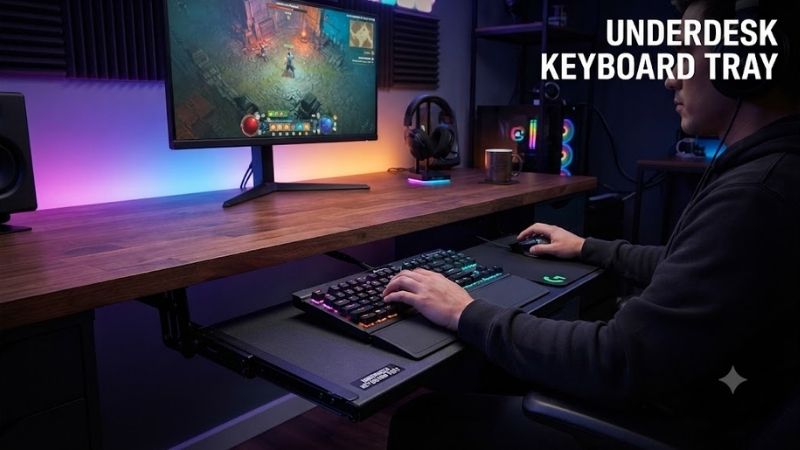
Quick Comparison Table
| Keyboard Tray | Mounting Type | Main Adjustment | Best For | Main Limitation |
|---|---|---|---|---|
| VIVO MOUNT-KB05E | Clamp-on | Sliding | Everyday use | Fixed working height |
| 3M AKT150LE | Under-desk track | Height and tilt | Ergonomic workstations | Requires installation space |
| VIVO MOUNT-KB05ES | Clamp-on | Sliding | Small desks | Narrower platform |
| VIVO MOUNT-KB05HB | Clamp-on | Five height settings | Adjustable home offices | Clamp clearance |
| Fellowes Office Suites | Under-desk mounting | Three height settings | Traditional keyboard storage | Limited positioning flexibility |
| Humanscale 6G | Under-desk track system | Height and negative tilt | Premium ergonomics | Higher installation complexity |
These models accommodate different desk designs and working preferences. Before purchasing, verify the available mounting area, desk thickness, keyboard dimensions, and clearance beneath the desk.
How We Selected These Keyboard Trays
Our selections focus on identifiable products with manufacturer-documented features and installation requirements.
This is a specifications-based editorial comparison rather than a first-hand laboratory test. We evaluated keyboard trays based on mounting compatibility, working surface dimensions, adjustment mechanisms, mouse accommodation, and installation practicality.
Particular attention was given to the difference between basic sliding trays and fully adjustable ergonomic systems.
A sliding tray may create a more comfortable keyboard position when the desktop is too high, but it cannot automatically accommodate every user.
Height-adjustable systems provide more positioning flexibility, while negative-tilt mechanisms can help maintain a neutral wrist posture when configured correctly.
The goal is to identify the right tray for different workstation arrangements rather than assume that one product fits every desk.
The 6 Best Underdesk Keyboard Trays Reviewed
1. VIVO MOUNT-KB05E Clamp-On Keyboard Tray — Best Overall
Best For: Home office users, students, remote workers, and anyone wanting a spacious keyboard tray without drilling into a desk.
Why We Picked It: The VIVO MOUNT-KB05E combines straightforward clamp mounting, a wide work surface, and sliding steel tracks. It offers practical keyboard storage without requiring permanent modifications to the desktop.
Key Specifications
| Specification | VIVO MOUNT-KB05E |
|---|---|
| Mounting Type | C-clamp |
| Tray Width | 26.8 inches |
| Tray Depth | 11 inches |
| Overall Width With Clamps | 32.5 inches |
| Maximum Load | 11 lb |
| Compatible Desk Thickness | 0.5–1.25 inches |
| Slide Extension | 8.5 inches |
| Track Length | 12.3 inches |
| Position Below Desk | 1.5–2.75 inches |
| Materials | Steel and particleboard |
Features and Benefits
The VIVO MOUNT-KB05E uses two C-clamps to attach the keyboard tray to the desktop edge.
This approach eliminates the need to drill mounting holes into the underside of the desk.
The clamps incorporate protective padding intended to reduce direct contact between the mounting hardware and desktop surface.
The 26.8-inch platform accommodates many full-size keyboards alongside a mouse, although available mousing space depends on keyboard width.
A steel sliding mechanism allows users to extend the tray during work and retract it beneath the desk afterward.
The tray also features a relatively simple structure that makes it suitable for people who do not want to install a complex articulating arm.
Performance and Practical Use
The MOUNT-KB05E works best when the user’s ideal keyboard height is reasonably close to the tray’s fixed position beneath the desktop.
For example, a desk that places the keyboard too high may become more comfortable when the keyboard is moved several inches downward.
However, the tray does not provide independent height or tilt adjustments.
This means it may not work equally well for users with different body proportions, chair heights, or seating preferences.
The clamp system also needs enough clear space along the desk edge.
Desks with thick aprons, unusual edge profiles, or obstructions underneath may prevent secure installation.
What Makes It Different
The MOUNT-KB05E emphasizes simple installation and generous working space rather than advanced ergonomic adjustments.
It is a strong general-purpose choice when mounting compatibility has been confirmed.
Pros:
-
No-drill C-clamp installation.
-
Spacious 26.8-inch tray.
-
Smooth sliding design.
-
Protective clamp padding.
-
Suitable for many keyboard-and-mouse combinations.
Cons:
-
No independent tilt adjustment.
-
Limited to specific desktop thicknesses.
-
Requires unobstructed clamp-mounting space.
Buy If: You want a practical sliding keyboard tray with no permanent desk modifications.
Skip If: You need significant height or angle adjustment to achieve a comfortable typing position.
2. 3M AKT150LE Easy Adjust Keyboard Tray — Best for Ergonomic Adjustability
Best For: Professionals who spend long periods typing and need precise keyboard and mouse positioning.
Why We Picked It: The 3M AKT150LE offers independent height and tilt adjustment, an articulating mouse platform, and a substantial range of positioning flexibility.
Key Specifications
| Specification | 3M AKT150LE |
|---|---|
| Mounting Type | Under-desk track |
| Keyboard Platform Width | 19.5 inches |
| Keyboard Platform Depth | 10.625 inches |
| Height Adjustment | 4 inches above to 6 inches below mounting surface |
| Tilt Adjustment | +10° to -15° |
| Required Mounting Width | 24 inches |
| Required Mounting Depth | 23.25 inches |
| Mouse Platform | Adjustable, left or right |
| Wrist Rest | Gel-filled leatherette |
| Storage | Retracts beneath desk |
Features and Benefits
The 3M AKT150LE uses an articulating support arm instead of a fixed-height sliding platform.
Users can adjust the tray’s vertical position and angle to better match their seated posture.
The system provides up to six inches of downward travel relative to the mounting surface and four inches of upward adjustment.
It also supports tilt adjustment from approximately 10 degrees positive to 15 degrees negative.
Negative tilt allows the keyboard surface to slope downward away from the user, which may help maintain a more neutral wrist position in an appropriately configured workstation.
The independent mouse platform can be positioned on either side of the keyboard.
This is especially useful for users who want the mouse closer to their body or prefer a different mouse height and angle.
Performance and Practical Use
The AKT150LE offers substantial adjustment flexibility for a fixed desk.
A user can lower the keyboard toward a more suitable typing height without changing the desk itself.
The included gel wrist rest provides a supporting surface, although users should avoid placing excessive pressure on their wrists while actively typing.
The mouse platform can also be adjusted to reduce unnecessary reaching.
However, the system requires significant installation space beneath the desk.
Its mounting hardware needs approximately 24 inches of width and 23.25 inches of depth.
Users with shallow desks or support braces underneath must verify compatibility carefully.
What Makes It Different
The AKT150LE provides more adjustment control than a basic clamp-on sliding tray.
Its independent mouse platform and height-and-tilt mechanism make it particularly suitable for ergonomically customized workstations.
Pros:
-
Wide height adjustment range.
-
Positive and negative keyboard tilt.
-
Independently adjustable mouse platform.
-
Integrated gel wrist support.
-
Retracts beneath the desk.
Cons:
-
Requires substantial under-desk mounting space.
-
More involved installation than clamp-on trays.
-
Additional mechanisms increase complexity.
Buy If: You need a highly adjustable keyboard platform for a dedicated workstation.
Skip If: Your desk lacks the mounting depth or you prefer tool-free installation.
3. VIVO MOUNT-KB05ES Compact Keyboard Tray — Best for Small Desks
Best For: Apartment workstations, narrow desks, compact home offices, and users with smaller keyboards.
Why We Picked It: The VIVO MOUNT-KB05ES reduces platform width to 20 inches while preserving the convenience of a sliding clamp-on design.
Key Specifications
| Specification | VIVO MOUNT-KB05ES |
|---|---|
| Mounting Type | C-clamp |
| Tray Width | 20 inches |
| Tray Depth | 11 inches |
| Overall Width Between Clamps | 26 inches |
| Maximum Load | 11 lb |
| Compatible Desk Thickness | 0.5–1.25 inches |
| Slide Extension | 8.5 inches |
| Track Length | 12.3 inches |
| Position Below Desk | 1.5–2.75 inches |
| Installation | No drilling required |
Features and Benefits
The MOUNT-KB05ES is designed for smaller workstations that cannot comfortably accommodate a full-width keyboard tray.
Its 20-inch platform provides sufficient space for many compact keyboards, including 60%, 65%, and tenkeyless layouts.
However, the amount of remaining mouse space depends on the exact keyboard dimensions.
Users with a full-size keyboard and a large mouse movement area may find the surface restrictive.
The tray uses C-clamps with protective padding, allowing installation without permanently altering the desk.
A sliding track lets users pull the platform forward when typing and move it underneath the desktop when finished.
Performance and Practical Use
The compact design is attractive for small desks where desktop organization is a priority.
It can create additional space for a monitor, notebook, document holder, or other frequently used items.
The narrower platform may also reduce visual clutter in minimal workspaces.
However, the total mounting width is greater than the usable tray width.
Although the tray itself measures 20 inches, the mounting arrangement requires approximately 26 inches across the clamps.
This distinction matters when installing the product beneath a desk with narrow support structures.
What Makes It Different
The MOUNT-KB05ES offers a smaller footprint than the standard MOUNT-KB05E without changing the basic installation approach.
It is particularly useful for users who already prefer compact keyboards.
Pros:
-
Compact 20-inch tray.
-
No-drill installation.
-
Sliding storage mechanism.
-
Protective clamp padding.
-
Suitable for small workstation layouts.
Cons:
-
Limited mouse space with large keyboards.
-
No independent height or tilt adjustment.
-
Requires approximately 26 inches of mounting width.
Buy If: You have a small desk and use a compact keyboard.
Skip If: You need ample horizontal space for a full-size keyboard and mouse.
4. VIVO MOUNT-KB05HB Height-Adjustable Tray — Best Adjustable Clamp-On Option
Best For: Home office users who want no-drill installation with more keyboard height flexibility than a conventional sliding tray.
Why We Picked It: The VIVO MOUNT-KB05HB combines C-clamp installation with a five-position height adjustment mechanism.
Key Specifications
| Specification | VIVO MOUNT-KB05HB |
|---|---|
| Mounting Type | Adjustable C-clamp |
| Tray Dimensions | 26.8 × 11 inches |
| Width Including Clamps | 33 inches |
| Maximum Load | 11 lb |
| Compatible Desk Thickness | 0.5–3.4 inches |
| Height Settings | 5 |
| Bracket Adjustment Range | 2.4 inches |
| Setting Increments | 0.6 inches |
| Slide Extension | 8.5 inches |
| Track Length | 12.3 inches |
Features and Benefits
The MOUNT-KB05HB builds on VIVO’s basic clamp-on keyboard tray concept by adding height-adjustable side brackets.
Users can choose from five height positions, with approximately 0.6 inches between settings.
The tray’s position beneath the desk depends on both the selected bracket position and the desktop thickness.
The manufacturer specifies a possible placement range of approximately 0.25 to 7 inches below the desktop under different configurations.
This provides considerably more setup flexibility than a fixed-height clamp-on tray.
The wider clamp accommodation also makes the model suitable for a broader range of desk thicknesses.
Performance and Practical Use
The five height settings can help position a keyboard closer to a user’s preferred working level.
However, the system does not provide continuous vertical adjustment like an articulating ergonomic arm.
Users must select from the available preset positions.
The sliding mechanism allows the keyboard to be stored beneath the desk when it is not in use.
Its 26.8-inch platform provides enough space for many keyboards and mice.
The main installation challenge is verifying clearance around the desktop edge, especially when the desk has a thick apron or structural supports.
What Makes It Different
The MOUNT-KB05HB bridges the gap between basic clamp-on trays and more complex ergonomic keyboard systems.
It offers meaningful height adjustment while avoiding the need to drill into the desk.
Pros:
-
Five keyboard height settings.
-
Supports desks up to 3.4 inches thick.
-
Spacious keyboard-and-mouse platform.
-
Sliding under-desk storage.
-
No drilling required.
Cons:
-
Height adjustment is limited to preset positions.
-
No independent tilt adjustment.
-
Clamps require substantial horizontal clearance.
Buy If: You want a clamp-on keyboard tray with more positioning flexibility.
Skip If: You need precise continuous height adjustment or negative tilt.
5. Fellowes Office Suites Underdesk Keyboard Drawer — Best Traditional Keyboard Drawer
Best For: Office desks, conventional workstations, and buyers who want a straightforward retractable keyboard platform.
Why We Picked It: The Fellowes Office Suites Underdesk Keyboard Drawer offers a traditional drawer-style design with three height positions and a separate mouse tray.
Key Specifications
| Specification | Fellowes Office Suites |
|---|---|
| Model | 9140303 |
| Mounting Type | Under-desk installation |
| Keyboard Position | Sliding drawer |
| Height Adjustment | 3 positions |
| Mouse Platform | Separate |
| Mouse Position | Left or right |
| Mouse Tray Storage | Stows underneath |
| Primary Material | Recycled-material construction |
| Intended Use | Office and home workstation |
Features and Benefits
The Fellowes Office Suites keyboard drawer provides a simple way to move the keyboard and mouse away from the primary desktop surface.
Its three height adjustment positions allow users to select a working height from a limited set of options.
The separate mouse tray can be mounted on either side of the keyboard platform.
This accommodates both right-handed and left-handed users.
When the mouse platform is not needed, it can be stored underneath the main tray.
The design is particularly useful for conventional office desks where a sliding keyboard drawer is preferred over an articulating arm.
Performance and Practical Use
The Fellowes system is appropriate for basic productivity work, typing, and computer use.
Its keyboard-and-mouse arrangement can help reduce desktop clutter while keeping commonly used input devices accessible.
However, the three available height positions provide less adjustment flexibility than premium ergonomic systems.
The product also requires installation beneath the desk, which may not be practical for certain glass desktops or desks with obstructions.
Users should check the mounting surface and fastener requirements before installation.
What Makes It Different
The Fellowes Office Suites design emphasizes familiar drawer-style functionality and separate mouse placement.
It is suitable for users who want practical keyboard storage without advanced ergonomic mechanisms.
Pros:
-
Three height settings.
-
Retractable under-desk design.
-
Separate mouse tray.
-
Left- or right-side mouse placement.
-
Practical office-oriented construction.
Cons:
-
Limited ergonomic adjustment range.
-
Requires suitable under-desk mounting.
-
Less flexibility than articulating systems.
Buy If: You want a conventional keyboard drawer with adjustable positioning and a separate mouse surface.
Skip If: You need continuous height control or a large integrated keyboard-and-mouse platform.
6. Humanscale 6G Keyboard System — Best Premium Ergonomic Option
Best For: Dedicated office workstations, professionals who type extensively, and users seeking highly adjustable keyboard positioning.
Why We Picked It: The Humanscale 6G system focuses on ergonomic keyboard positioning through adjustable height, negative tilt, and configurable keyboard-and-mouse platforms.
Key Specifications
| Specification | Humanscale 6G |
|---|---|
| Product Family | Humanscale Keyboard Systems |
| Arm Mechanism | 6G keyboard support arm |
| Height Adjustment | Adjustable |
| Tilt Adjustment | Negative tilt |
| Tilt Range | Up to -15° |
| Platform Options | Multiple configurations |
| Mouse Support | Configurable |
| Palm Support | Optional gel support |
| Mounting | Under-desk track system |
| Intended Use | Ergonomic workstations |
Features and Benefits
The Humanscale 6G is designed around adjustable positioning rather than simple keyboard storage.
Its arm mechanism supports height adjustment and negative keyboard tilt.
Unlike some trays that permit positive tilt, the Humanscale keyboard system emphasizes neutral-to-negative keyboard angles.
This can help users position the keyboard in a way that supports relatively straight wrists during typing.
The system offers different keyboard platform shapes and mouse support configurations.
This customization is useful because users vary in keyboard size, mouse preference, working posture, and desk arrangement.
Performance and Practical Use
The 6G is suitable for professional environments where precise keyboard positioning is important.
A user can adjust the keyboard’s height independently of the desk surface, which is particularly useful when the desk cannot be lowered to the ideal typing height.
Negative tilt adjustment can also help users avoid excessive wrist extension when positioned appropriately.
However, ergonomic benefits depend on the complete workstation setup.
Chair height, desk height, monitor placement, forearm support, and individual posture all influence comfort.
The 6G does not automatically eliminate discomfort or prevent repetitive strain injuries.
Buyers should also verify the exact platform and arm configuration because Humanscale offers multiple combinations.
What Makes It Different
The Humanscale 6G emphasizes a configurable ergonomic system rather than a simple sliding keyboard shelf.
Its value lies in positioning flexibility, negative-tilt control, and workstation customization.
Pros:
-
Adjustable keyboard height.
-
Negative tilt support.
-
Multiple keyboard platform configurations.
-
Configurable mouse positioning.
-
Designed for dedicated ergonomic workstations.
Cons:
-
More complex installation than clamp-on trays.
-
Configuration choices require careful selection.
-
Premium design may exceed the needs of casual users.
Buy If: You spend substantial time typing and want a configurable workstation with precise keyboard positioning.
Skip If: You only need basic keyboard storage or prefer a simple no-drill solution.
Underdesk Keyboard Tray Buying Guide
1. Clamp-On vs Screw-Mounted Keyboard Trays
The mounting system is one of the most important features to consider.
Clamp-on keyboard trays attach to the desktop edge using mechanical clamps.
Their main advantages are easy installation, removability, and the ability to avoid drilling holes.
However, clamps require a compatible desktop thickness and enough unobstructed space around the desk edge.
Screw-mounted trays attach to the underside of a desk using mounting brackets or tracks.
They may provide more flexibility for articulating mechanisms and adjustable keyboard arms.
However, installation usually requires tools and a suitable mounting surface.
| Feature | Clamp-On Tray | Screw-Mounted Tray |
|---|---|---|
| Drilling Required | Usually no | Usually yes |
| Easy Removal | Generally easier | More involved |
| Desk Thickness Requirements | Important | Depends on fastener and desk construction |
| Height Adjustment | Model dependent | Model dependent |
| Tilt Adjustment | Less common | Available on ergonomic models |
| Best For | Simple home setups | Dedicated workstations |
Choose based on your desk construction, installation preferences, and ergonomic requirements.
2. Measure Your Desk Before Purchasing
An underdesk keyboard tray must fit both the desk and the available working space.
Start by measuring the width beneath the desktop.
Next, measure the depth available for the sliding track or support arm.
You should also check desk thickness, mounting clearance, and any structural beams underneath.
For clamp-on trays, measure the desk edge where the clamps will attach.
For screw-mounted systems, verify that the desktop material can safely accommodate the required hardware.
Some desks use hollow-core panels, glass, or unusual construction materials that are unsuitable for certain mounting systems.
3. Choose the Correct Tray Width
Keyboard tray width determines how comfortably you can position the keyboard and mouse.
| Keyboard Type | Typical Keyboard Width | Suggested Tray Consideration |
|---|---|---|
| 60% keyboard | 11–12 inches | Compact tray may work |
| 65% keyboard | 12–13 inches | Compact tray with limited mouse room |
| Tenkeyless keyboard | 14–15 inches | Medium or full-size tray |
| Full-size keyboard | 17–18 inches | Wider tray recommended |
| Ergonomic split keyboard | Varies considerably | Measure complete layout |
A 20-inch tray may fit a compact keyboard and mouse, but it can become restrictive for users who need a broad mousing area.
A 26- or 27-inch tray provides more flexibility for conventional keyboards.
Gamers who use low mouse sensitivity may prefer a larger desktop mouse area instead of a narrow keyboard tray.
4. Understand Keyboard Tray Height
A keyboard tray can be helpful when the desk surface places the keyboard too high.
Ideally, the working height should allow your shoulders to remain relaxed while the elbows stay near the sides of your body.
Forearms should be approximately level or slightly downward toward the keyboard, depending on individual comfort and positioning.
A fixed-height tray may work well for one user but poorly for another.
Height-adjustable designs provide more flexibility.
However, lowering the keyboard too far can create new problems, particularly if the knees or thighs interfere with the tray.
Always consider available legroom alongside typing height.
5. Is Negative Tilt Important?
Keyboard tilt influences wrist position.
Positive tilt raises the back of the keyboard, which may encourage wrist extension in some setups.
Negative tilt lowers the back of the keyboard relative to the front.
This can help support a straighter wrist position when the keyboard height and user posture are configured appropriately.
However, negative tilt is not automatically comfortable for everyone.
Users should avoid forcing an angle that creates discomfort.
The primary goal is a relaxed typing posture with minimal unnecessary bending at the wrists.
6. Keyboard Tray Depth and Mouse Space
Tray depth affects keyboard placement, palm support, and overall usability.
A shallow tray may accommodate the keyboard but leave little room to reposition it.
A deeper tray can provide additional flexibility, but it may extend farther into the user’s seating area.
Mouse space is equally important.
Some keyboard trays provide one large surface for both devices.
Others offer an independent mouse platform.
Independent platforms can help position the mouse closer to the keyboard, but they introduce additional mechanisms and may require more adjustment.
7. Check Weight Capacity and Stability
Keyboard trays should support the combined weight of the keyboard, mouse, wrist rest, and accessories.
Most conventional keyboards are relatively lightweight.
However, large mechanical keyboards can be substantially heavier than compact office models.
Always check the manufacturer’s maximum load rating.
For example, several VIVO clamp-on keyboard trays in this roundup support up to 11 pounds.
Stability also depends on secure installation and the desk’s construction.
A tray mounted to a weak or flexible desktop may feel unstable even when its own load rating is sufficient.
8. Consider Desk Legroom
A keyboard tray occupies space beneath the desktop.
This can reduce available clearance for the knees and thighs.
Before installing one, measure the space between the floor, chair, desktop, and underside of the proposed tray.
If your desk already has limited legroom, a thick tray mechanism may become uncomfortable.
Height-adjustable systems can provide additional flexibility, but the overall mounting assembly still occupies physical space.
For some users, adjusting the chair and desk height may be a better solution than installing a keyboard tray.
Common Mistakes When Buying an Underdesk Keyboard Tray
Buying Without Checking Desk Compatibility
A tray can have excellent features but still be unsuitable for a particular desk.
Always verify mounting width, depth, desk thickness, and any underside obstructions.
Choosing a Tray That Is Too Narrow
A platform that barely accommodates the keyboard may leave insufficient room for comfortable mouse movement.
Measure both devices before purchasing.
Assuming Every Sliding Tray Is Ergonomic
A sliding tray changes keyboard location, but it does not necessarily provide the height or tilt needed for comfortable typing.
Users who require precise positioning should consider adjustable models.
Ignoring Knee and Thigh Clearance
An underdesk tray may lower the keyboard while also reducing legroom.
Evaluate the entire workstation before installation.
Overtightening Clamp Hardware
Clamp-on trays must be installed securely, but excessive tightening can damage certain desktop materials.
Follow the manufacturer’s installation instructions and ensure the mounting surfaces are suitable.
Using the Wrong Mounting Hardware
Screw-mounted systems require appropriate fasteners and suitable desk construction.
Avoid substituting random screws or mounting into unsupported materials.
Assuming Wrist Rests Should Support the Wrists During Typing
A palm rest can provide support during pauses, but pressing the wrists heavily against a rest while actively typing may create unnecessary pressure.
Maintain relaxed hand positioning and avoid using the rest as a rigid support throughout typing.
Which Underdesk Keyboard Tray Should You Choose?
| Your Main Priority | Recommended Tray | Reason |
|---|---|---|
| General home office | VIVO MOUNT-KB05E | Spacious and simple |
| Precise ergonomic adjustment | 3M AKT150LE | Height, tilt, and mouse positioning |
| Small desk | VIVO MOUNT-KB05ES | Compact 20-inch platform |
| Adjustable no-drill installation | VIVO MOUNT-KB05HB | Five height settings |
| Traditional keyboard drawer | Fellowes Office Suites | Retractable design |
| Premium workstation | Humanscale 6G | Configurable ergonomics |
A no-drill clamp-on tray is often the most convenient starting point for a typical home office.
For a workstation used throughout the day, adjustable height and tilt may provide more useful flexibility.
Frequently Asked Questions
Is an Underdesk Keyboard Tray Worth It?
An underdesk keyboard tray can be worthwhile when the desk surface is too high for comfortable typing or when additional desktop space is needed. It is most useful when the tray can be positioned at an appropriate height without restricting legroom. However, it is not necessary for every workstation.
Are Clamp-On Keyboard Trays Stable?
A properly installed clamp-on keyboard tray can provide stable support when used within its specified load capacity. Stability depends on the clamp design, desktop material, desk thickness, and installation quality. Always follow the manufacturer’s requirements and avoid mounting to unsuitable surfaces.
Can I Install a Keyboard Tray on a Standing Desk?
Yes, some keyboard trays can be installed on height-adjustable desks. However, compatibility depends on the desk’s frame, underside clearance, crossbars, and mounting surface. The tray must not interfere with the desk’s lifting mechanism or moving components.
What Size Keyboard Tray Do I Need for a Full-Size Keyboard?
A full-size keyboard commonly measures approximately 17–18 inches wide. A tray around 26 inches wide can provide additional space for a mouse, although the exact amount depends on your equipment. Users requiring extensive mouse movement should consider a larger platform.
Should a Keyboard Tray Have Negative Tilt?
Negative tilt can be useful for maintaining a neutral wrist position when the keyboard is properly positioned. However, the ideal angle varies by user and workstation setup. A comfortable height and relaxed posture are more important than selecting a specific tilt angle.
Can an Underdesk Keyboard Tray Help With Wrist Discomfort?
A properly positioned keyboard tray may help reduce awkward wrist and arm positions associated with an unsuitable desk height. However, a keyboard tray is not a medical treatment, and no design guarantees prevention or relief of repetitive strain injuries. Persistent pain, numbness, or tingling should be evaluated by a qualified healthcare professional.
Conclusion
The VIVO MOUNT-KB05E is our best overall underdesk keyboard tray recommendation for users wanting a spacious, straightforward sliding platform without drilling into their desks. The 3M AKT150LE and Humanscale 6G offer greater ergonomic adjustability, while the VIVO MOUNT-KB05ES is particularly suitable for compact workstations. The VIVO MOUNT-KB05HB provides a useful compromise between simple clamp mounting and adjustable height, and the Fellowes Office Suites delivers familiar drawer-style functionality. Before choosing, measure your desk, keyboard, mouse, and available legroom, then prioritize secure mounting and comfortable positioning over appearance alone.
Ready to decide? Our #1 pick for 2026 is the Keyboard Tray.
Live price & availability on Amazon.