🛒 Best Price Today on Amazon
Prime members get fast, free shipping on everything above, plus member-only deals. New members get a 30-day free trial — cancel anytime.
- LG 48GQ900-B Specifications
- Design and Build Quality
- 48-Inch 4K OLED Display
- Gaming Performance
- 120Hz and 138Hz Overclock Mode
- HDMI 2.1 and Console Gaming
- PS5 Performance
- G-SYNC and FreeSync
- HDR Performance
- Anti-Glare Coating
- Text and Productivity
- Built-In Audio
- Gaming Remote Control
- OLED Burn-In Considerations
- Pros and Cons
- Who Should Buy the LG 48GQ900-B?
- Who Should Skip It?
- FAQ
- Conclusion
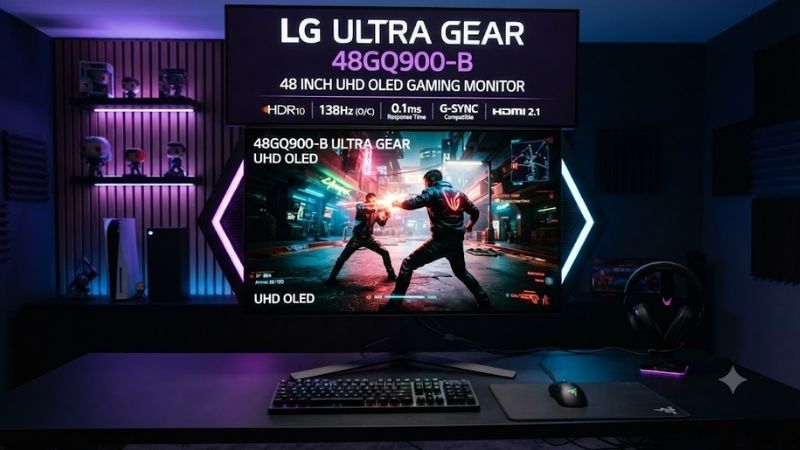
The LG 48GQ900-B 48 UltraGear UHD OLED Gaming Monitor combines a huge 48-inch 4K OLED panel with 120Hz refresh, a 138Hz overclock mode, HDMI 2.1, VRR, and 0.1ms response time. It delivers outstanding contrast and motion clarity, but its enormous size and modest OLED brightness require the right desk and room.
LG 48GQ900-B Specifications
| Feature | Specification |
|---|---|
| Screen Size | 47.5-inch class / 48-inch |
| Resolution | 3840 × 2160 UHD 4K |
| Panel Type | OLED |
| Refresh Rate | 120Hz, overclockable to 138Hz |
| Response Time | 0.1ms GtG |
| HDR | HDR10 |
| Color Coverage | DCI-P3 99% typical |
| Contrast Ratio | 1,500,000:1 |
| Adaptive Sync | G-SYNC Compatible, AMD FreeSync Premium |
| HDMI | HDMI 2.1 |
| DisplayPort | DisplayPort 1.4 |
| Audio | Built-in stereo speakers, headphone output |
| Extras | Anti-glare coating, gaming remote |
LG officially specifies a 3840 × 2160 OLED display, 1.5-million-to-one contrast ratio, 99% DCI-P3 coverage, HDR10, 120Hz native refresh, and 138Hz overclocking. It also supports NVIDIA G-SYNC Compatible and AMD FreeSync technology for variable-refresh gaming.
Design and Build Quality
The first thing that defines the 48GQ900-B is not OLED technology but sheer size. At 48 inches, this is closer to a compact television than a conventional desktop monitor. It can create an immersive gaming experience, but placing it on a shallow 24-inch desk leaves the screen uncomfortably close to your eyes.
The chassis uses a restrained black UltraGear design without the exaggerated stand structure found on some smaller gaming monitors. Thin borders help the display dominate your field of view, while the wide feet provide stable support. The scale still means you need considerable horizontal and vertical clearance around the screen.
The stand offers far less ergonomic flexibility than a normal 27-inch or 32-inch gaming monitor. PCWorld noted that the included stand does not provide normal tilt adjustment, which makes desk height and viewing distance more important. Buyers who need precise positioning should consider a compatible wall-mount solution.
48-Inch 4K OLED Display
OLED is the main reason to consider this monitor. Each pixel can control its own light output, allowing black pixels to switch off rather than relying on a shared backlight. The result is effectively perfect black reproduction, extremely strong perceived contrast, and no bright halo around objects in dark scenes.
LG lists a 1,500,000:1 contrast ratio and 99% DCI-P3 color coverage for the panel. These characteristics work particularly well in cinematic games with dark environments, HDR highlights, and saturated color. Horror games, space titles, RPGs, and racing games can look dramatically more dimensional than on standard IPS panels.
The 3840 × 2160 resolution is also well suited to a screen this large. At normal monitor distances, individual pixels remain more visible than they would on a smaller 32-inch 4K screen, so viewing distance matters. Sitting farther back allows the size to create immersion without making desktop text and UI elements look unnecessarily coarse.
Gaming Performance
LG rates the 48GQ900-B at 0.1ms gray-to-gray response time. OLED pixels transition far faster than typical LCD pixels, reducing trailing and smearing behind moving objects. This gives the display exceptionally clean motion even before considering its 120Hz refresh rate.
RTINGS also measured very low input lag and described the monitor as delivering smooth, clear motion with very little visible blur. That combination works well for shooters, racing games, fighting games, and action titles where the image changes quickly and delayed pixel transitions can make movement look less precise.
The 120Hz refresh rate is not as high as modern 240Hz or 360Hz esports displays, but 4K at 120Hz remains demanding for GPUs. Players focused on cinematic image quality will likely value the resolution and OLED contrast more than another 120 frames per second that require significantly more graphics power.
120Hz and 138Hz Overclock Mode
The monitor runs at 120Hz by default and can reach 138Hz with its overclock function enabled. LG specifies support for variable refresh up to 120Hz and up to 138Hz in overclock mode when compatible hardware and connection settings are used.
The jump from 120Hz to 138Hz is relatively small, so it should not be treated as the monitor’s main selling point. The difference is much less dramatic than moving from 60Hz to 120Hz. Still, PC users with enough GPU performance can enable the higher mode when they want every available frame without moving to a lower-resolution display.
HDMI 2.1 and Console Gaming
HDMI 2.1 is one of the 48GQ900-B’s most important features because it enables 4K gaming at up to 120Hz from compatible devices. LG explicitly advertises 4K at 120Hz through HDMI 2.1, making the monitor a natural fit for modern gaming PCs, PlayStation 5, and Xbox Series X.
RTINGS confirmed that the display supports HDMI 2.1 bandwidth for 4K 120Hz gaming from current Xbox and PlayStation consoles. This gives console players the same high-resolution, high-refresh combination that makes OLED gaming televisions attractive, but within a monitor-oriented design that also includes DisplayPort.
PCWorld reported three HDMI 2.1 inputs alongside DisplayPort 1.4, giving the monitor enough video connectivity for a gaming PC, PS5, and Xbox Series X at the same time. That flexibility is valuable for a mixed gaming room where one display needs to handle several platforms without constant cable changes.
PS5 Performance
For PS5 users, 4K 120Hz compatibility is the major attraction. Games that support 120fps output can take advantage of the higher refresh rate, while VRR can help smooth frame-rate changes in supported titles. The OLED panel also improves dark-scene contrast considerably compared with conventional edge-lit LCD monitors.
A 48-inch screen makes more sense for PS5 gaming when you sit farther away with a controller than when you use a keyboard and mouse directly in front of it. If your gaming room combines a desk with a couch or deeper seating position, the size becomes an advantage rather than a potential ergonomic problem.
G-SYNC and FreeSync
The 48GQ900-B is NVIDIA G-SYNC Compatible and supports AMD FreeSync Premium. Variable refresh allows the monitor to synchronize its refresh behavior with GPU frame output, reducing visible tearing and minimizing judder when frame rate fluctuates inside the supported operating range.
This matters at 4K because even powerful graphics cards cannot maintain exactly the same frame rate in every scene. Instead of forcing the GPU to hold a perfect 120fps, adaptive sync lets games move through a more realistic performance range while preserving smoother visual delivery.
HDR Performance
OLED provides an excellent foundation for HDR because pixels can produce true black directly beside bright highlights. Dark-room HDR therefore has impressive depth, and there is no backlight blooming around subtitles, stars, headlights, or bright interface elements sitting on black backgrounds.
However, brightness is one of the 48GQ900-B’s weaknesses. RTINGS found that the monitor does not become especially bright and noted that brightness can vary depending on the content displayed. OLED’s automatic brightness behavior can become particularly noticeable when large bright areas fill the screen.
That means the monitor looks strongest in controlled or darker rooms rather than brightly lit offices with direct sunlight. If maximum HDR highlight brightness is more important than black level, newer high-brightness OLED or Mini LED displays may be more compelling despite the LG’s excellent contrast.
Anti-Glare Coating
Unlike many glossy OLED televisions, the 48GQ900-B uses an anti-glare and low-reflection surface treatment. LG specifically markets this coating as a core feature, helping the panel manage reflections from room lighting and windows more effectively than a highly reflective glossy screen.
The trade-off is that some users prefer the visual clarity and richer appearance of glossy OLED finishes in dark rooms. The anti-glare surface makes the monitor easier to use in varied lighting conditions, but it slightly changes the presentation compared with an OLED television designed primarily for controlled home-theater environments.
Text and Productivity
A 48-inch 4K OLED can provide enormous desktop space, making it possible to place several windows across the screen without a multi-monitor setup. Coding tools, timelines, browser windows, monitoring software, and communication apps can all remain visible simultaneously when scaling is configured appropriately.
The drawback is text clarity. RTINGS found text quality merely adequate because of the OLED panel’s subpixel structure, noting that scaling can improve the presentation. Users spending most of the day reading documents or working with fine text may prefer a smaller, higher-density LCD or newer OLED architecture.
Static productivity interfaces also deserve consideration on any OLED display. Long sessions with unmoving taskbars, browser controls, timelines, or application elements create a different usage pattern from varied gaming and video. Buyers should follow LG’s OLED care recommendations and avoid unnecessary static high-brightness content.
Built-In Audio
LG includes stereo speakers and a four-pole headphone output with DTS Headphone support. The integrated speakers are useful when you want a clean console-style setup without desktop speakers, while the headphone connection provides a convenient option for gaming headsets.
Dedicated speakers or a quality headset can still provide better audio for competitive gaming, music, and movies. The built-in system is therefore best viewed as useful flexibility rather than a reason to choose this monitor. Optical and analog audio connectivity also make external sound setups easier to integrate.
Gaming Remote Control
Because the screen is so large, LG includes a gaming remote control rather than forcing every setting change through buttons underneath the panel. This makes more sense on a 48-inch display that may be positioned several feet from the user, especially when switching between consoles and PC use.
The remote also reinforces the hybrid nature of the product. The 48GQ900-B behaves like a gaming monitor in terms of DisplayPort, variable refresh, and PC features, but its scale and seating distance can feel much closer to a gaming television during controller-based play.
OLED Burn-In Considerations
OLED panels can experience permanent image retention after prolonged uneven wear, so static desktop content deserves more attention than with LCD monitors. This does not mean burn-in will occur quickly during normal mixed gaming, but users running the same high-contrast interface for thousands of hours should understand the risk.
Varying content, using sensible brightness, allowing panel-care features to operate, hiding unnecessary static elements, and turning the monitor off when unused can help reduce uneven wear. Anyone buying a used 48GQ900-B should also inspect full-screen gray and solid-color images for visible retention.
Pros and Cons
Pros
- 48-inch 4K OLED panel
- Perfect black levels
- Excellent perceived contrast
- 120Hz native refresh rate
- 138Hz overclock mode
- 0.1ms rated response time
- HDMI 2.1 with 4K 120Hz
- G-SYNC Compatible
- AMD FreeSync support
- Excellent PS5 and Xbox compatibility
- DisplayPort for gaming PCs
- Strong reflection handling
Cons
- Extremely large for normal desks
- Lower brightness than strong Mini LED displays
- OLED brightness varies with content
- Only moderate text clarity
- Stand has limited adjustment
- OLED burn-in requires consideration
- 138Hz offers only a small gain over 120Hz
Who Should Buy the LG 48GQ900-B?
The 48GQ900-B is best for gamers who want a single huge OLED screen for both PC and console gaming. It works particularly well for racing games, RPGs, action titles, flight simulators, and cinematic single-player games where deep blacks and screen size create more value than extremely high refresh rates.
It is also suitable for users who connect several gaming platforms. Multiple HDMI 2.1 ports plus DisplayPort allow one display to serve a desktop gaming PC, PS5, and Xbox without turning the desk into a collection of separate monitors. A deeper desk or farther viewing position is strongly recommended.
Who Should Skip It?
Competitive FPS players who sit close to the screen may find 48 inches unnecessarily large. A 27-inch or 32-inch 240Hz OLED gives faster refresh and makes it easier to see the entire image without large eye movements, which is often more practical for Counter-Strike, Valorant, or similar esports titles.
It is also not the best choice for full-time office use. Moderate text clarity, OLED static-content concerns, limited stand adjustment, and variable brightness make high-quality IPS monitors easier to manage for spreadsheets, writing, and productivity work performed for many hours every day.
FAQ
Is the LG 48GQ900-B Good for PS5?
Yes. The monitor supports HDMI 2.1 and 4K at 120Hz, making it well suited to PS5 games that offer high-frame-rate modes. It also supports variable refresh technology, while the OLED panel provides extremely fast pixel response and strong contrast.
Does the LG 48GQ900-B Support 4K 120Hz?
Yes. LG officially lists 3840 × 2160 at 120Hz through HDMI 2.1, with compatible hardware and an appropriate HDMI 2.1 connection. The monitor can also operate at up to 138Hz in its overclocked mode for PC gaming.
Is the LG 48GQ900-B OLED?
Yes. It uses a 48-inch-class OLED panel with independently controlled pixels, allowing extremely deep blacks and strong contrast. LG specifies a 1.5M:1 contrast ratio along with 99% typical DCI-P3 color coverage and HDR10 support.
Is 48 Inches Too Big for a Gaming Monitor?
It can be if your desk is shallow. A 48-inch screen works best with more viewing distance than a conventional 27-inch or 32-inch display. Controller gamers and simulation players may enjoy the immersive size, while close-range keyboard-and-mouse users should measure their desk before buying.
Is the LG 48GQ900-B Still Worth Buying?
It can still be worthwhile at a strong discount, particularly for users wanting a large OLED display with HDMI 2.1 and DisplayPort. However, LG now lists the model as discontinued in the U.S., so pricing should be compared carefully with newer 32-inch and 42-inch OLED monitors offering higher refresh rates or improved desktop practicality.
Conclusion
The LG 48GQ900-B 48 UltraGear UHD OLED Gaming Monitor delivers excellent 4K gaming through deep OLED blacks, 120Hz refresh, fast response, HDMI 2.1, and VRR. Its enormous screen is fantastic for immersive PC and console gaming, but buyers need enough viewing distance and should accept moderate brightness, limited stand adjustment, and OLED ownership considerations.