Deciding between linear vs tactile switches can make or break your typing speed. Read our definitive comparison guide to pick your ideal keyboard switch now!
Linear vs Tactile Switches: Ultimate Guide for Best Clicks
Linear vs tactile switches confuse many mechanical keyboard shoppers who struggle with accidental key triggers, annoying chatter, or finger strain during long gaming rounds. This comprehensive buyer guide compares core actuation mechanics, acoustic dampening, and spring weights so you can confidently pick the right switches for your daily desk setup.
How to Choose Mechanical Keyboard Switches
Navigating the debate between linear vs tactile switches requires evaluating personal finger comfort, everyday use cases, and mechanical tolerances. You need to inspect operational travel distance, spring resistance, acoustic signatures, and stem construction so your typing board matches your exact tactile needs without any strain.
Actuation Force and Pre-Travel Distance
Actuation force defines how much physical finger pressure is needed to register an electrical contact signal on your computer. Lighter stems hovering around forty-five grams allow lightning speed, whereas stiffer springs demanding over sixty grams prevent careless double clicks when resting heavy fingers across the mechanical keycaps.
Pre-travel distance determines how many millimeters a switch slider moves downward before electrical closure takes place inside the housing. Speed switches actuate at one millimeter for instant reactions, while standard travel distances around two millimeters provide traditional depth that keeps accidental keystrokes to an absolute minimum.
Tactile Bump Feedback and Reset Point
Understanding how tactile bump feedback functions helps resolve the classic dispute of linear vs tactile switches for typists. A pronounced physical resistance peak provides instant physical confirmation that your keypress registered cleanly, eliminating the subconscious urge to bottom out completely against the hard bottom plate.
The internal reset point marks where the metal leaf springs reopen as the key rebounds upward to its initial resting position. Switches engineered with tight reset margins allow rapid repeated actuation, ensuring rapid inputs register cleanly without requiring your fingers to release the keycap fully during high-pressure writing sessions.
Acoustic Noise Levels and Sound Profiles
Sound signatures vary tremendously when contrasting linear vs tactile switches across different desk environments. Smooth linear sliders produce quiet bottom-out thuds that blend seamlessly into corporate open offices, while tactile leaf mechanisms create sharp snaps that provide audible verification alongside pleasing structural resonance.
Chassis housing materials also directly govern the pitch and frequency of every bottom-out impact against the switch base. Nylon housings create deep, muted clacks that soothe the ears, whereas polycarbonate blends amplify higher frequencies to produce vibrant keystrokes that might distract nearby coworkers during late-night home typing.
Stem Stability and Key Wobble Prevention
Stem stability directly impacts the premium feel of any mechanical board during frantic typing sessions at your desk. Switches engineered with box-style perimeter shrouds or tight internal tolerances minimize horizontal stem play, keeping your custom keycap surface completely level regardless of where your fingertips happen to strike.
Loose slider tolerances introduce distracting rattling sensations that degrade overall typing consistency across long work shifts. Investing in modern switch housings molded from self-lubricating composites ensures uniform friction coefficients, delivering stable keystroke travel that remains consistent through tens of millions of depressions.
Top Picks for Every Desk Setup
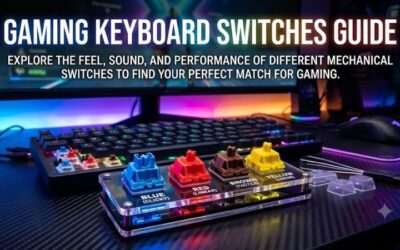
Selecting between linear vs tactile switches becomes far easier once you test leading market candidates under real conditions. Our detailed breakdown highlights four top-tier models built with exceptional factory tolerances, premium plastics, and durable contact leaves to suit both tournament gamers and dedicated creative writers.
| Model | Switch Type | Actuation Force | Total Travel | Best For |
|---|---|---|---|---|
| Gateron Oil King | Linear | 55g | 4.0mm | Competitive Gaming & Fluid Typing |
| Cherry MX Red | Linear | 45g | 4.0mm | Fast-Paced FPS & Office Work |
| Gazzew Boba U4T | Tactile | 62g | 4.0mm | Heavy Typing & Tactile Feedback |
| Drop Holy Panda | Tactile | 67g | 4.0mm | Enthusiast Typists & Programmers |
Gateron Oil King Linear Switch
Gamers who desire an exceptionally fluid gliding stroke straight out of the package will love this premium factory-lubed component. Its nylon bottom housing produces a delightfully deep acoustic profile, while the resilient black stem eliminates scratchiness completely, allowing your fingers to glide across the keyboard with effortless speed.
However, the opaque black housing blocks surface-mounted backlighting, making this model suboptimal for setups requiring bright RGB illumination. The slightly heavier fifty-five gram operating force might also cause subtle fatigue for users accustomed to ultra-light featherweight gaming stems during marathon late-night gaming raids.
Cherry MX Red Linear Switch
Beginners exploring linear vs tactile switches frequently start with this legendary standard found on prebuilt boards worldwide. Its featherweight forty-five gram spring offers low mechanical resistance, creating an agile platform for fast-paced shooters where lightning reflexes and split-second key engagements decide victory.
On the negative side, unlubricated batches often exhibit noticeable spring ping and dry plastic friction right out of the retail packaging. Without tactile confirmation, distracted writers may experience accidental typos by merely resting finger weight over sensitive caps during prolonged office data entry tasks.
Gazzew Boba U4T Tactile Switch
Dedicated programmers and remote typists seeking supreme tactile feedback will adore the prominent mechanical bump of this boutique favorite. The tactile resistance starts immediately at the top of the stroke, providing unmistakable tactile feedback alongside a rich, clean thock that makes all-day coding sessions genuinely satisfying.
Despite its massive popularity among keyboard enthusiasts, the aggressive tactile profile can feel excessively stiff for rapid twitch gaming. Furthermore, irregular stock availability across major retailer storefronts often forces consumers to pay elevated secondary markup prices just to complete a full standard layout.
Drop Holy Panda Tactile Switch
Enthusiasts desiring a snappy tactile rebound will find an iconic solution in this legendary high-end mechanical mechanism. Combining unique polycarbonate housing blends with custom slider geometry, it yields a distinctive popping downstroke paired with an explosive acoustic clack that commands immediate attention in private offices.
Unfortunately, the premium cost per pack makes filling a standard full-size peripheral considerably expensive for casual desktop tinkerers. In addition, the loud mechanical clatter makes this unit ill-suited for quiet communal libraries or shared corporate workstations where ambient acoustic courtesy remains essential.
Frequently Asked Questions About Keyboard Switches
Sorting out common questions surrounding linear vs tactile switches helps clarify technical subtleties before placing your hardware order. The following detailed answers address actuation feel, ergonomic strain, office noise, and custom tuning so you can purchase your next mechanical components with complete operational certainty.
Which Switch Style Is Superior for Competitive Gaming?
Comparing competitive linear vs tactile switches reveals clear functional advantages for fast-moving digital action titles. Smooth linear mechanisms eliminate tactile obstruction, permitting instantaneous double-taps and seamless directional changes that esports professionals rely upon when surviving chaotic first-person shooters.
Tactile switches remain viable for strategy titles or simulation games where preventing unintended keystrokes is paramount to mission success. Nevertheless, the physical bump can create slight mechanical delay during frantic keystroke spams, causing high-tier tournament contenders to gravitate heavily toward friction-free linear paths.
Can Tactile Switches Cause Premature Finger Fatigue?
Finger fatigue depends largely on individual spring weights rather than the tactile mechanism itself during regular daily operations. A heavy tactile switch requiring sixty-seven grams of actuation pressure can definitely tire untrained hands, especially if your typing technique involves forceful strikes against the bottom chassis plate.
Conversely, medium tactile bumps often alleviate strain by conditioning your hands to avoid bottoming out forcefully with each stroke. Once muscle memory learns the exact tactile actuation threshold, you type with lighter, floating keystrokes that preserve joint energy over extended eight-hour documentation marathons at work.
Are Linear Switches Suitable for Shared Workspaces?
Linear switches represent the ideal mechanical option for shared cubicles, open offices, and busy co-working business spaces. Because their internal sliding stems bypass sharp mechanical clicks or snapping tactile leaves, they produce gentle muted sounds that respect ambient workplace etiquette and avoid annoying nearby colleagues.
Adding silicone dampening rings or selecting factory-silenced variants further reduces bottom-out vibrations and upward rebound echoes. These modifications transform standard mechanical hardware into whisper-quiet tools that rival traditional membrane keyboards without sacrificing responsive spring return or crisp typing consistency.
How Does Factory Lubrication Impact Overall Keystroke Feel?
Factory lubrication smooths the internal contact zones between the moving stem rails and the stationary outer housing guides. High-grade synthetic grease eliminates unwanted scratchiness, dampens metallic spring pinging, and delivers a cushioned bottom-out sensation that dramatically elevates the physical typing experience right away.
Applying lubricant manually at home requires tedious disassembly and specialized tools that intimidate many peripheral newcomers. Purchasing pre-lubed hardware saves valuable hours of mechanical maintenance while guaranteeing uniform fluid distribution across every single keycap on your custom computer battlestation setup.
Final Thoughts on Mechanical Keyboard Switches
Ultimately, choosing between linear vs tactile switches depends on whether you prioritize effortless gliding speed or deliberate physical feedback. Gamers wanting lightning responses should choose linear stems, while prolific writers will appreciate tactile confirmation. Test both styles on a switch tester to build your perfect desktop setup today.