
🛒 Best Price Today on Amazon
Prime members get fast, free shipping on everything above, plus member-only deals. New members get a 30-day free trial — cancel anytime.
Mechanical Vs Membrane Keyboard buyers frequently face baffling switch options, mushy key responses, and steep price disparities across modern computer peripherals. Choosing between rapid tactile precision and budget-friendly silent typing often creates immense purchase hesitation among everyday typists and competitive gamers.
How to Choose Between Mechanical and Membrane Keyboards
Selecting an ideal peripheral demands weighing switch responsiveness against daily ergonomic comfort and pricing. When evaluating a mechanical vs membrane keyboard setup, examining essential technical specifications ensures that your purchase aligns with workflow habits and entertainment needs without unnecessary buyer remorse.
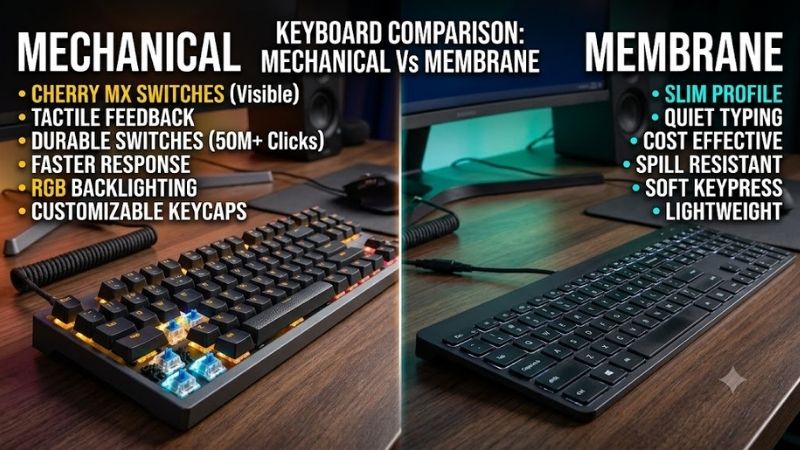
Switch Mechanism and Actuation Feel
The core mechanical structure dictates tactile responsiveness and physical finger fatigue throughout marathon computing sessions. Mechanical models rely on independent physical switches under each keycap, registering keystrokes at consistent midway trigger points to provide distinctive physical feedback with remarkable actuation precision.
Conversely, membrane keyboards utilize continuous silicone sheets positioned over electrical circuit traces. Pressing a key forces the pliable rubber dome downward to complete the contact point, creating a softer bottom-out sensation that feels pleasantly cushioned yet noticeably less responsive during rapid sequential keystrokes.
Durability and Long-Term Lifespan
Lifespan ratings distinguish heavy-duty desktop hardware from standard entry-level accessories. Evaluating a mechanical vs membrane keyboard lifespan reveals significant engineering differences, as mechanical switches boast individual metal springs rated between fifty and one hundred million actuations before experiencing physical failure.
Rubber dome assemblies degrade more rapidly under continuous daily stress because flexible silicone components gradually lose elasticity. Typical membrane boards withstand five to ten million keystrokes before key response becomes inconsistent or stiff, making modular mechanical designs considerably superior for enduring ownership.
Typing Speed and Gaming Latency
Input velocity remains critical for competitive gaming reflexes and professional transcription accuracy. Mechanical switches register signals before bottoming out entirely, permitting rapid reset cycles and advanced n-key rollover protocols that prevent missed inputs during chaotic multiplayer gaming skirmishes or hurried typing.
Membrane keyboards require full downward compression to bridge underlying electrical traces, introducing slight actuation delays. While casual productivity tasks remain completely unaffected by these fractional latency gaps, high-ranking competitive esports players frequently experience subtle input bottlenecks during tense virtual play.
Acoustic Profile and Office Noise
Sound emission plays a major role when working in shared family areas or professional corporate cubicles. When assessing a mechanical vs membrane keyboard for quiet spaces, remember that clicky mechanical switches generate sharp auditory snaps that can easily irritate colleagues or family members during late-night productivity sessions.
Membrane boards inherently dampen physical vibration because flexible rubber domes cushion descending key impacts. If you share work quarters or participate in frequent online meetings, membrane architecture delivers tranquil typing that keeps ambient desktop chatter minimal without requiring custom aftermarket dampening rings.
Top Picks for Everyday Typing and Gaming
Finding top-tier hardware becomes easy once you inspect proven contenders delivering stellar performance. Settling the mechanical vs membrane keyboard debate requires reviewing models across diverse budget tiers, as highlighted in the comparison matrix below outlining premier choices for productivity and high-stakes virtual tournaments.
| Product Name | Switch Type | Actuation Force | Key Rollover | Backlighting | Best For |
|---|---|---|---|---|---|
| Corsair K70 RGB MK.2 | Cherry MX Mechanical | 45g Linear / Tactile | Full N-Key Rollover | Per-Key RGB | Competitive Esports |
| SteelSeries Apex Pro | OmniPoint Adjustable | 45g (Adjustable) | Full N-Key Rollover | Per-Key RGB | Enthusiast Customization |
| Razer Ornata V3 | Mecha-Membrane Hybrid | 50g Clicky | 6-Key Rollover | 10-Zone RGB | Hybrid Office Work |
| Logitech G213 Prodigy | Tuned Mech-Dome | 50g Cushioned | Anti-Ghosting Matrix | 5-Zone RGB | Budget Everyday Use |
Corsair K70 RGB MK.2 Mechanical Keyboard
This iconic mechanical model serves competitive esports players and power typists who demand rapid actuation alongside aircraft-grade aluminum durability. Robust Cherry MX switches provide lightning-fast inputs and flawless rollover accuracy, while the high initial retail cost represents the only notable obstacle for casual desktop users.
Integrated media rollers and dedicated onboard memory profiles allow effortless customization during heated sessions. The detachable soft-touch wrist rest maintains natural ergonomic comfort through exhaustive digital tournaments, establishing this versatile mechanical vs membrane keyboard choice as a top-tier peripheral for serious gamers.
SteelSeries Apex Pro Mechanical Keyboard
This cutting-edge peripheral suits discerning enthusiasts and creative professionals who seek customizable magnetic switch actuation depths. Patented OmniPoint sensors allow per-key sensitivity adjustments for razor-sharp gaming triggers or deliberate typing strokes, though its premium price point requires a substantial financial commitment.
An integrated smart OLED screen displays dynamic system diagnostics, Discord notifications, and audio settings without interrupting fullscreen gaming action. The aircraft-grade alloy frame withstands aggressive tapping, while plush magnetic wrist padding shields wrists against repetitive strain during marathon creative workstations.
Razer Ornata V3 Hybrid Membrane Keyboard
This hybrid design caters to everyday office workers and hybrid gamers who enjoy snappy tactile clicks alongside soft membrane bottoming. The mecha-membrane switch architecture fuses cushioned comfort with distinct auditory clicks, though purist mechanical fans may find the membrane-style key reset speed slightly sluggish for fast titles.
Low-profile keycaps promote natural wrist alignment, reducing physical forearm tension during prolonged coding or spreadsheet tasks. Spill-resistant construction safeguards internal electronics against accidental beverage splashes, making this model an extraordinarily practical option for busy multipurpose home offices.
Logitech G213 Prodigy Membrane Keyboard
This budget-friendly peripheral suits value-minded gamers, remote employees, and students seeking silent typing and durable desktop performance. Specially tuned Mech-Dome keys deliver satisfying tactile feedback that mimics mechanical response, though keycaps cannot be swapped with aftermarket custom designs due to fixed stem shapes.
Dedicated multimedia buttons allow instant volume adjustments without minimizing active games or office apps. The integrated palm rest and two-level angle adjustment promote healthy typing posture, while the rugged spill-resistant casing guarantees outstanding longevity for budget shoppers seeking dependable everyday productivity.
Frequently Asked Questions
Shoppers navigating the mechanical vs membrane keyboard market frequently encounter critical inquiries regarding tactile comfort, longevity, and audio output. Clarifying these pivotal factors helps buyers prevent expensive peripheral mistakes. The answers below address the most prevalent questions regarding contemporary keyboard designs.
Which Keyboard Type Offers Superior Gaming Performance?
Mechanical boards provide superior gaming responsiveness because independent switches register keystrokes halfway through their travel distance. When choosing a mechanical vs membrane keyboard for gaming, competitive players gain an immediate tactical advantage through instantaneous input feedback and full anti-ghosting matrix reliability.
Membrane keyboards remain perfectly viable for casual narrative adventures and slow-paced simulation titles where millisecond response times never dictate victory. However, fast-paced first-person shooters and complex fighting games benefit immensely from the rapid reset cycles and unmatched physical precision of true mechanical switches.
Are Membrane Keyboards More Suitable for Shared Offices?
Membrane hardware excels in shared office spaces because flexible silicone domes absorb descending key impacts, drastically muffling typing noise. Open-concept workstations and home offices benefit from this whisper-quiet profile, preventing loud clatter from distracting coworkers or bleeding into sensitive conference microphones.
Mechanical models can also function in communal corporate settings if configured with specialized silent linear switches and interior dampening foam. Nevertheless, achieving tranquil acoustics on mechanical setups requires careful switch selection and higher expenditures compared to inexpensive, naturally silent membrane alternatives.
How Much Longer Do Mechanical Keyboards Typically Last?
Mechanical boards outlast membrane alternatives by a massive margin thanks to resilient metal spring engineering and robust construction. A quality mechanical switch operates flawlessly through fifty to one hundred million presses without noticeable degradation, ensuring consistent actuation performance across many years of intense usage.
Membrane keyboards rely on synthetic rubber domes that gradually dry out, stiffen, and lose elasticity after five to ten million depressions. Furthermore, broken mechanical switches can be desoldered or hot-swapped individually, whereas damaged membrane circuit traces generally require discarding and replacing the entire keyboard unit.
Is Investing in a Mechanical Keyboard Truly Worth It?
Investing in mechanical hardware proves immensely rewarding for programmers, writers, and serious gamers who spend eight or more hours daily at computer desks. The superior ergonomic comfort, tactile feedback, and modular repairability easily justify the initial financial outlay by preventing repetitive wrist strain and boosting typing speed.
Conversely, casual computer users who only browse social media, check occasional emails, or write short documents may prefer keeping costs low with standard membrane alternatives. Evaluating your daily computing workload helps determine whether the premium tactile benefits warrant the increased upfront price tag for your desk setup.
View more products:
Final Thoughts
Ultimately, deciding on a mechanical vs membrane keyboard comes down to typing intensity, acoustic preference, and budget goals. Mechanical units deliver unmatched tactile responsiveness and long-term durability for enthusiasts, while membrane boards provide silent comfort and superb affordability for casual everyday productivity.
Product links and buying checks
As an Amazon Associate, we earn from qualifying purchases.
- Razer Ornata V3 on Amazon — Check the exact model, selected variant and seller before ordering.
- Logitech G213 Prodigy on Amazon — Check the exact model, selected variant and seller before ordering.
Prices, availability and included accessories can change. Review the current listing and the compatibility guidance above before purchasing.









