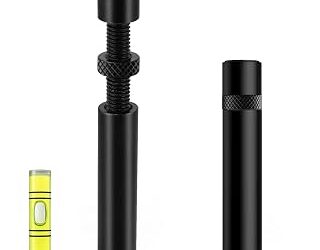
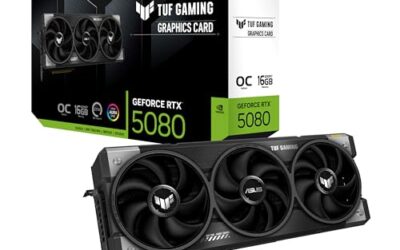
- Top Pick: acer GPU Support Bracket, GPU Stand with Magnet Non-Slip Base,(L, 70-120mm) | Adjustable Graphics Card Holder, Video Card Sag Holder Bracket Fits Most Cases, Tool-Free GPU Brace
- Best Value: California JOS GPU Support Bracket Graphics Card Brace Anti-Sag Holder Height Adjustable Video Card Stand Large(1 PCAK, Black)
- Premium Choice: ASUS NVIDIA GeForce RTX™ 5060 LP BRK 8GB GDDR7 OC Edition Graphics Card (PCIe® 5.0, 8GB GDDR7, HDMI®/DP 2.1, Low-Profile Design, IP5X Dust Resistance), 3 Year Warranty
Undervolting is the single best tweak for most modern GPUs in 2026: you lower voltage while keeping clock speeds nearly the same, which cuts heat, noise, and power draw without giving up FPS. Done correctly, you can reduce a high-end card’s power consumption by 15-25% and drop junction temperatures by 8-15°C, often with less than 2% performance loss.
Unlike overclocking, undervolting doesn’t push your hardware harder — it makes it more efficient. Whether you game on a power-hungry flagship or a compact card like the ASUS RTX 5060 LP BRK OC Edition, this guide shows you how to undervolt safely using free tools from NVIDIA and AMD, test for stability, and keep those gains long-term.
As an Amazon Associate we earn from qualifying purchases at no extra cost to you.


⚡ Save on Your Next PC — Amazon Prime
Prime members get fast free shipping on the systems above, plus early access to Prime Day & Black Friday PC deals. New members get a 30-day free trial.
Watch: How to Undervolt Your GPU — Video Review
Why Undervolt Your GPU in 2026?
Modern GPUs from the last two generations are factory-tuned for maximum performance, not efficiency. They run at higher voltages than necessary to guarantee stability on every chip, which leaves a lot of headroom for you to reclaim.
- Lower temperatures: Most GPUs target 83-84°C before throttling. A good undervolt can bring sustained load temps from 78°C down to 65-70°C, even in compact cases.
- Quieter operation: Lower heat means fans spin 200-400 RPM slower. Expect a 3-6 dBA reduction, which is very noticeable during long sessions.
- Stable performance: By avoiding thermal throttling, your frame time stays more consistent. Many users actually gain 1-3% in average FPS due to more stable boost clocks.
- Power and longevity: Saving 40-80W at the wall is common on cards like an RTX 4070 Super or RX 7800 XT. Less voltage and heat also reduces stress on VRMs and capacitors over years.
What You Need Before You Start
Preparation takes five minutes and prevents 90% of beginner mistakes. You don’t need extra hardware, but a stable physical setup helps.
- Monitoring software: Install HWINFO64 or GPU-Z to log voltage, power draw, hotspot temperature, and clock speed. MSI Afterburner (4.6.6 beta or newer) for NVIDIA or AMD Software: Adrenalin Edition for AMD are your tuning tools.
- A stress test and a real game: Use a synthetic load like 3DMark Time Spy / FurMark for quick tests, plus an actual demanding game such as Cyberpunk 2077 or Alan Wake 2 for 30 minutes to confirm real-world stability.
- Restore point: Save your stock settings. In MSI Afterburner, click Save to Profile 1 before changing anything. In AMD Software, use Save Profile.
- Check card mounting: An undervolt won’t fix crashes caused by a sagging card with a poor PCIe contact. If your GPU is large or mounted vertically, ensure it is properly supported with something like the Acer GPU Support Bracket or the Lian Li VG4 Vertical GPU Kit, and re-seat power cables before you tune.
How to Undervolt an NVIDIA GPU Step by Step
NVIDIA cards are undervolted via the voltage/frequency curve in MSI Afterburner. The principle is to make the card hit your target frequency at a lower voltage.
- 1. Find your stock boost: Run a game for 10 minutes and note the average boost clock. For example, an ASUS RTX 5060 LP BRK OC Edition will typically settle around 2625-2640 MHz at ~1.05V.
- 2. Open the Curve Editor: In Afterburner, press Ctrl+F. You will see a graph of voltage (x-axis, mV) vs frequency (y-axis, MHz).
- 3. Set your target point: A great 2026 starting point for most RTX 40/50-series cards is 2610 MHz at 950-975 mV, or 2700 MHz at 1000 mV for higher-end dies. Hold Shift, drag the entire curve down, then raise only the point at your chosen voltage to your target frequency.
- 4. Lock the curve: Press Shift+L or click Apply. The curve should flatten after your voltage point. Click the checkmark to apply.
- 5. Test and iterate: If it crashes, raise voltage by 15 mV (e.g., 975mV to 990mV) or lower frequency by 15 MHz. If stable, try lowering voltage another 15 mV. Most cards stabilize within 3-4 tries.
How to Undervolt an AMD GPU Step by Step
AMD makes undervolting simpler with a built-in voltage slider. You are reducing the maximum voltage the card will request at its boost frequency.
- 1. Open AMD Software: Go to Performance > Tuning > Custom > Enable GPU Tuning and Advanced Control.
- 2. Lower voltage gradually: Find Voltage (mV). Stock for an RX 7800 XT is around 1150 mV. Reduce it by 30-40 mV at a time — try 1120 mV, then 1080 mV, then 1050 mV.
- 3. Keep max frequency the same: Do not raise Max Frequency yet. Leave it at the default so you isolate voltage changes. Set Power Limit to -5% if you want an extra efficiency gain.
- 4. Apply and test: Click Apply Changes. Run your stress test for 10 minutes, then a game for 30 minutes. Artifacts, driver timeouts, or black screens mean you went too low.
- 5. Find the floor: When you hit instability, add 20-30 mV back. The sweet spot for most RDNA 3/3.5 cards is 1020-1070 mV, saving 30-60W with no loss in FPS.
How to Test Stability and Fine-Tune
An undervolt that passes one test but crashes in another is not stable. You need layered testing.
- Quick stability loop: Run 3DMark Time Spy Stress Test (20 loops) or Unigine Superposition at 4K Optimized. Watch for crashes, driver resets, or visual artifacts. If it passes, you are 80% there.
- Long gaming test: Play a demanding title for at least 45-60 minutes. Games with variable loads like Starfield or Call of Duty are better detectors of instability than constant-load benchmarks.
- Check metrics: In HWINFO64, verify that performance is actually similar. You want clocks within 30 MHz of stock, but with 50-80W lower board power and hotspot temps under 85°C. If average FPS dropped more than 3%, raise frequency slightly.
- Don’t forget the mount: After tuning, vibration from fan speed changes can accentuate GPU sag over time, especially with heavy triple-fan cards. A simple fix like the California JOS GPU Support Bracket or a universal Graphics Card GPU Brace Support keeps the PCIe slot level and prevents intermittent contact issues that mimic an unstable undervolt. The magnetic base on models like the GPU Anti-Sag Bracket with magnet and non-slip sheet makes adjustment without tools easy.
Tips
- Change only one variable at a time. Adjust voltage or frequency, not both, so you know what caused a crash.
- Save two profiles: an efficient undervolt for daily gaming (e.g., 2610 MHz @ 950 mV) and a stock profile for troubleshooting after driver updates. Major drivers can reset curves.
- Update your case airflow first. Even a 2°C drop in ambient case temperature can let you reduce voltage another 10-15 mV at the same frequency.
- Document your numbers. Write down stock voltage, target voltage, frequency, power draw, and temps so you can revert quickly or help others with the same card model.
Frequently Asked Questions
Will undervolting void my warranty?
No. Undervolting uses official software sliders and does not flash the BIOS or exceed stock limits. It actually lowers stress on the card. Resetting to defaults before an RMA is recommended, but manufacturers consider it a normal tuning operation.
Will I lose a lot of performance?
If done correctly, no. Most gamers keep 97-100% of stock performance while cutting 15-25% power. Losing more than 3% means your voltage is too low for your frequency target — raise voltage by 15 mV or drop frequency by 15-30 MHz until the loss disappears.
Is undervolting safe for my GPU?
Yes, it is safer than stock operation. You are reducing voltage and heat, not increasing them. The worst outcome of too aggressive an undervolt is a temporary crash or driver timeout, which is fixed by rebooting and raising voltage slightly. No hardware damage occurs.
Why does my undervolt crash in one game but not another?
Different games stress different parts of the GPU. A synthetic benchmark may be stable at 950 mV while a game with rapid load spikes needs 965 mV. Always validate with at least two different games and add a 15-20 mV safety margin to your lowest stable voltage for daily use.
Conclusion
Undervolting is the most practical upgrade you can do in 2026 for free — quieter fans, cooler temps, and lower power bills with virtually no FPS sacrificed. Start conservative, test methodically, and save your stable curve. Once you see your card holding 2600+ MHz under 70°C at 160W instead of 220W, you will not want to go back to stock.